How to Receive CJ Affiliate Payments : CJ Affiliate Payment Setup Full Guide
By JoshWP Team | Updated: | ~17 min read | Affiliate Marketing · Payment Setup
Quick Answer
CJ Affiliate (formerly Commission Junction) pays publishers via Direct Deposit, Check, or Payoneer on a Net-20 schedule — meaning payment processes within 20 days of the end of the month a commission was earned, subject to a $50 minimum threshold for Direct Deposit and Payoneer, or $100 for Check. For publishers outside the US, Payoneer is generally the most practical option, supporting 150+ currencies without needing a US bank account. This guide is a complete, screenshot-by-screenshot walkthrough of adding a Payoneer account to CJ Affiliate — including exactly how to get your routing number from Payoneer and add it in CJ — plus the full payment schedule, fees, tax requirements, and a documented 2025–2026 issue you should know about before updating your banking details.
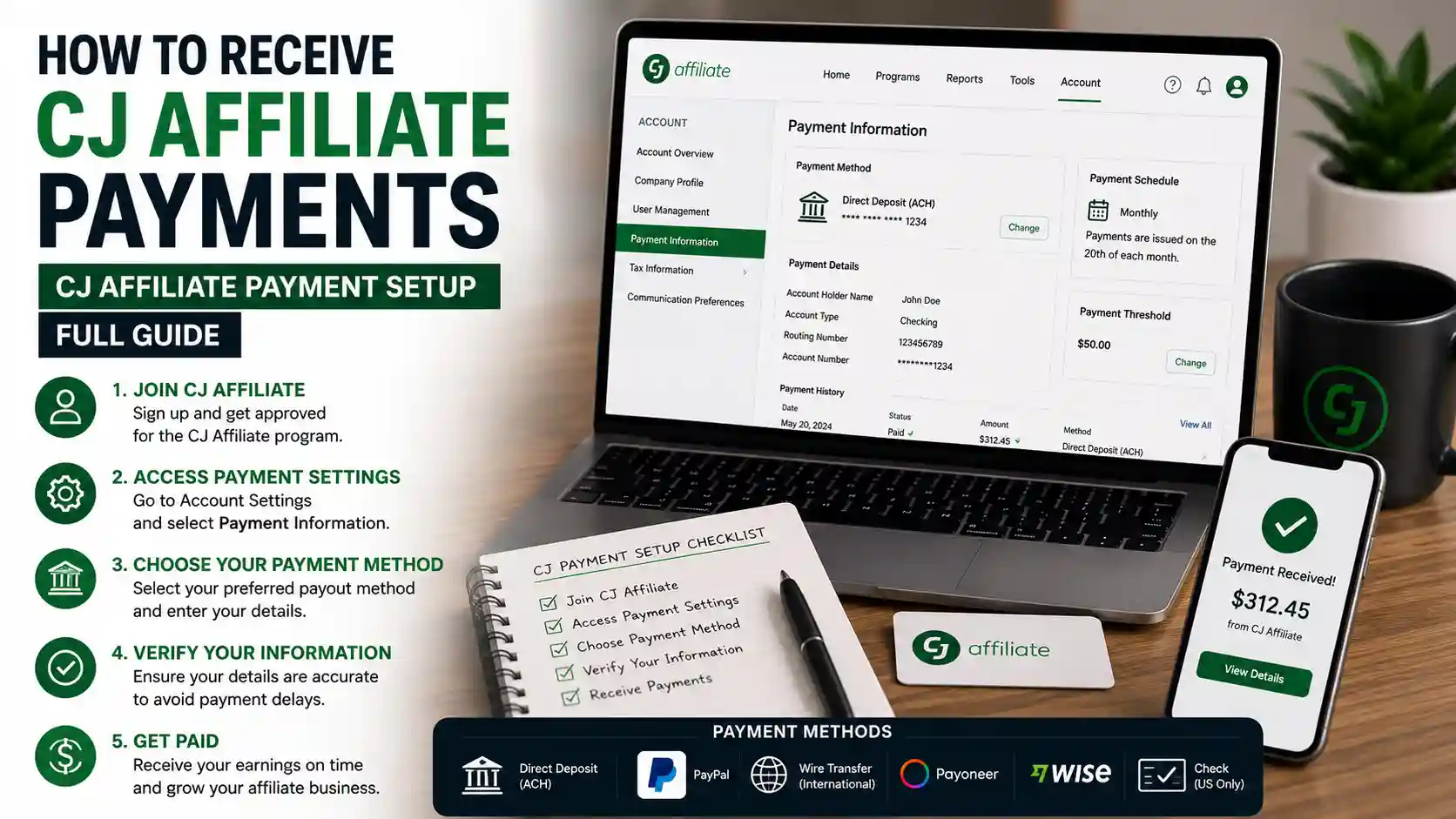
If you’ve been approved for advertiser programs on CJ Affiliate and you’re ready to actually get paid, the payment setup screen can feel more confusing than it should — a currency dropdown, a routing number field, a verification step that isn’t clearly explained anywhere in CJ’s own help center. This CJ Affiliate Payment Setup Full Guide exists to fix that.
We’ll walk through exactly how to add a Payoneer account to CJ Affiliate, screen by screen, including precisely how to get your routing number for CJ from inside your Payoneer dashboard and how to add that routing number in CJ for verification. Beyond the walkthrough, this guide covers the entire payment picture: CJ’s full payment schedule, every fee involved, tax form requirements, and — because this article is meant to leave nothing out — a real, documented pattern of payment freezes tied to banking updates that you should know about before you touch your payment settings.
If you don’t have a Payoneer account yet, start with our companion guide, How to Open a Payoneer Account, then come back here to connect it to CJ.
Table of Contents
- 1. What Is CJ Affiliate?
- 2. Payment Methods CJ Affiliate Offers
- 3. What You’ll Need Before You Start
- 4. Step-By-Step: How to Add Payoneer to CJ Affiliate
- 5. How to Get Your Routing Number for CJ
- 6. How to Add the Routing Number in CJ
- 7. CJ Affiliate Payment Schedule Explained
- 8. Read This Before You Update Banking Info
- 9. Tax Forms & Verification Requirements
- 10. CJ Affiliate By The Numbers
- 11. Common Payment Setup Problems & Fixes
- 12. Pros and Cons of Payoneer for CJ Payments
- 13. Frequently Asked Questions
What Is CJ Affiliate?
CJ Affiliate — founded in 1998 as Commission Junction — is one of the largest and longest-running affiliate marketing networks in the world, connecting publishers (affiliates) with over 20,500 advertisers across nearly every industry, from retail and finance to software and travel. The company was renamed CJ Affiliate in 2014 after its parent company rebranded from ValueClick to Conversant, and in 2019 both CJ Affiliate and Conversant were acquired by Publicis Groupe, a global advertising and media holding company.
As a publisher on CJ, your job is to promote advertiser products and earn a commission — typically 3% to 50% depending on the program, with physical product commissions commonly landing around 8–12% — whenever your referred traffic results in a sale, lead, or other tracked action. Getting that commission actually paid out to you is where this guide comes in.
Payment Methods CJ Affiliate Offers
CJ Affiliate supports exactly three ways to get paid — notably, PayPal and credit card payouts are not supported, which surprises a lot of newer publishers.
| Method | Minimum Threshold | Best For |
|---|---|---|
| Direct Deposit | $50 | US-based publishers with a US bank account |
| Check | $100 | Publishers who prefer paper checks or lack electronic banking |
| Payoneer | $50 | International publishers outside the US, or anyone wanting multi-currency flexibility |
Why Most International Publishers Choose Payoneer
Direct Deposit generally requires a US bank account, which most publishers outside the United States simply don’t have. Payoneer solves this by giving you local receiving account details — including a US routing and account number — so CJ can pay you as if you had a US bank account, while you actually receive funds in your own local currency through Payoneer, across 150+ currencies worldwide.
What You’ll Need Before You Start
✅ An approved CJ Affiliate publisher account in good standing.
✅ A verified Payoneer account. If you don’t have one yet, see our step-by-step Payoneer sign-up guide first.
✅ Your completed tax form on file with CJ (W-9 for US persons, W-8BEN for non-US persons).
✅ About 10 minutes of uninterrupted time — rushing through the routing number field is the most common source of setup errors.
Step-By-Step: How to Add Payoneer to CJ Affiliate
Here is the complete process, screen by screen, alternating between CJ Affiliate and Payoneer exactly as you’ll need to.
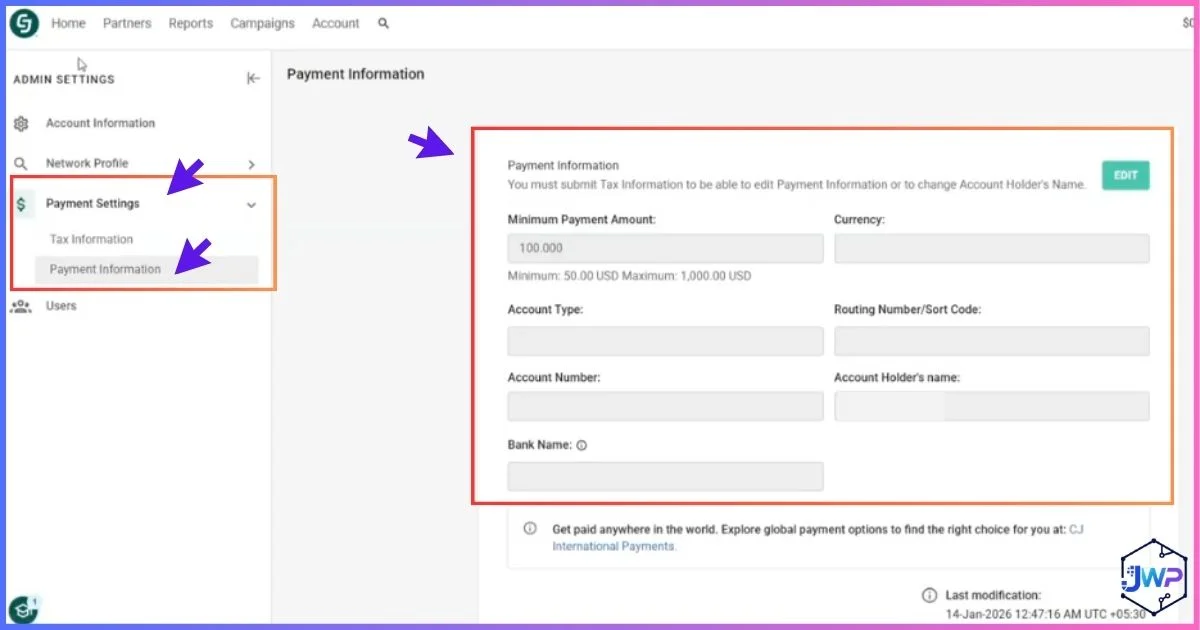
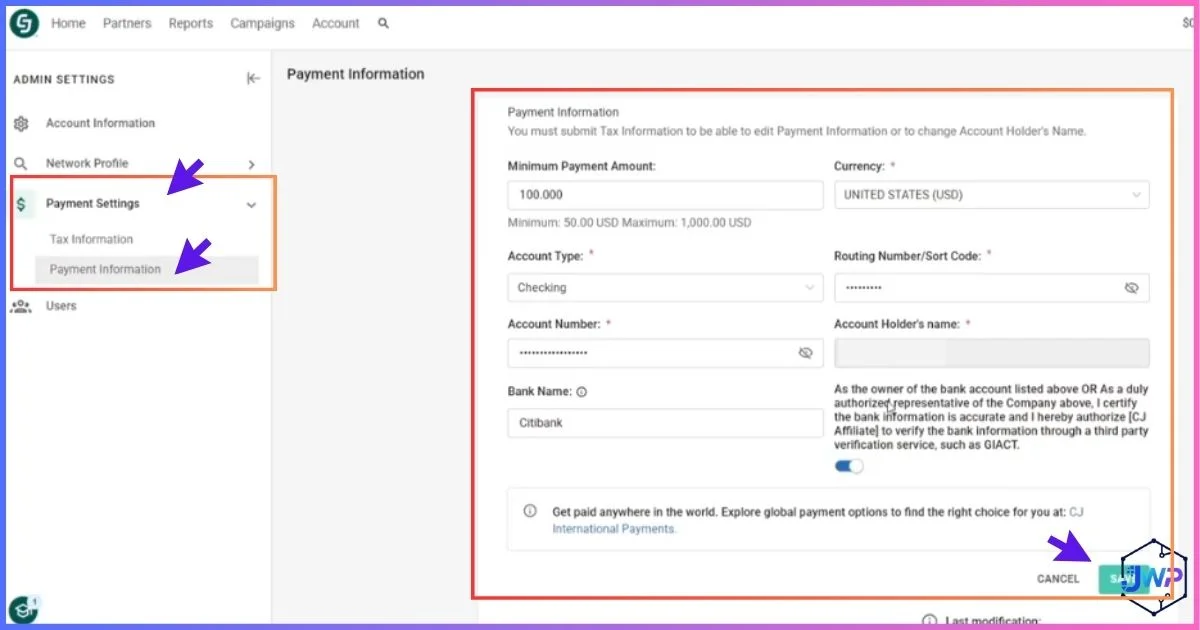
CJ Go to Payment, Then Payment Information
Log in to your CJ Affiliate account, open the Account menu, and select Payment, then Payment Information. This is the central screen for all CJ Affiliate payment setup.
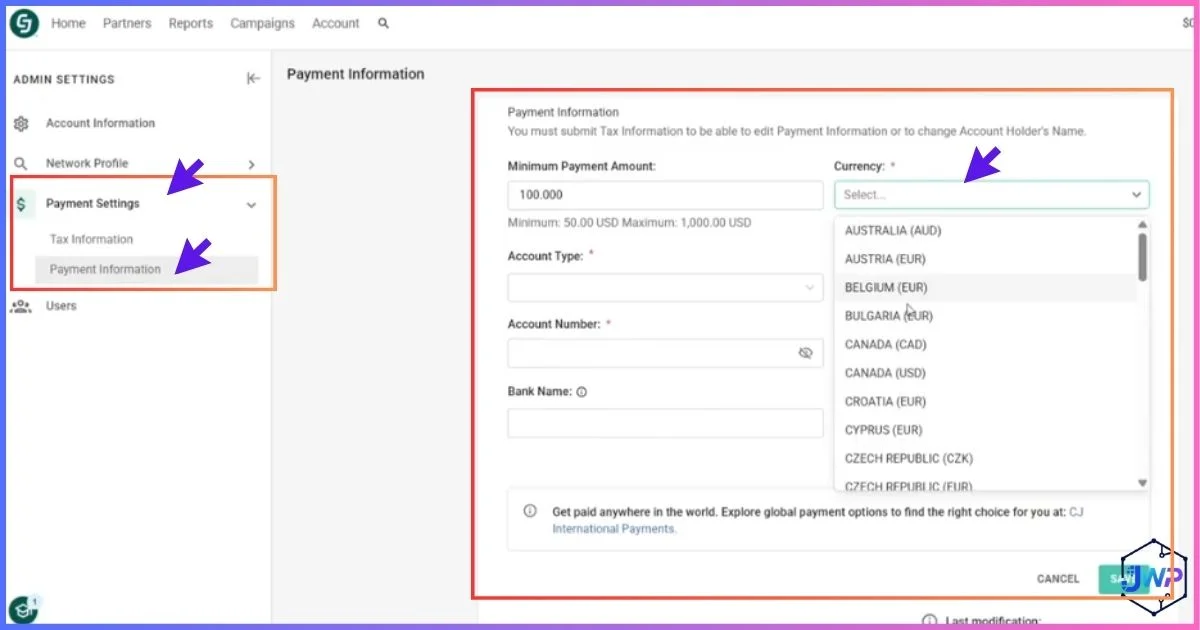
CJ Choose Currency as USD
In the payment settings, set your payment currency to USD. This is required because Payoneer’s CJ-compatible receiving account uses US routing details — Payoneer converts to your local currency automatically on the other end.
Payoneer Open Your Payoneer Dashboard
Log in to Payoneer in a separate tab — you’ll need to copy your account details over to CJ in the next couple of steps.
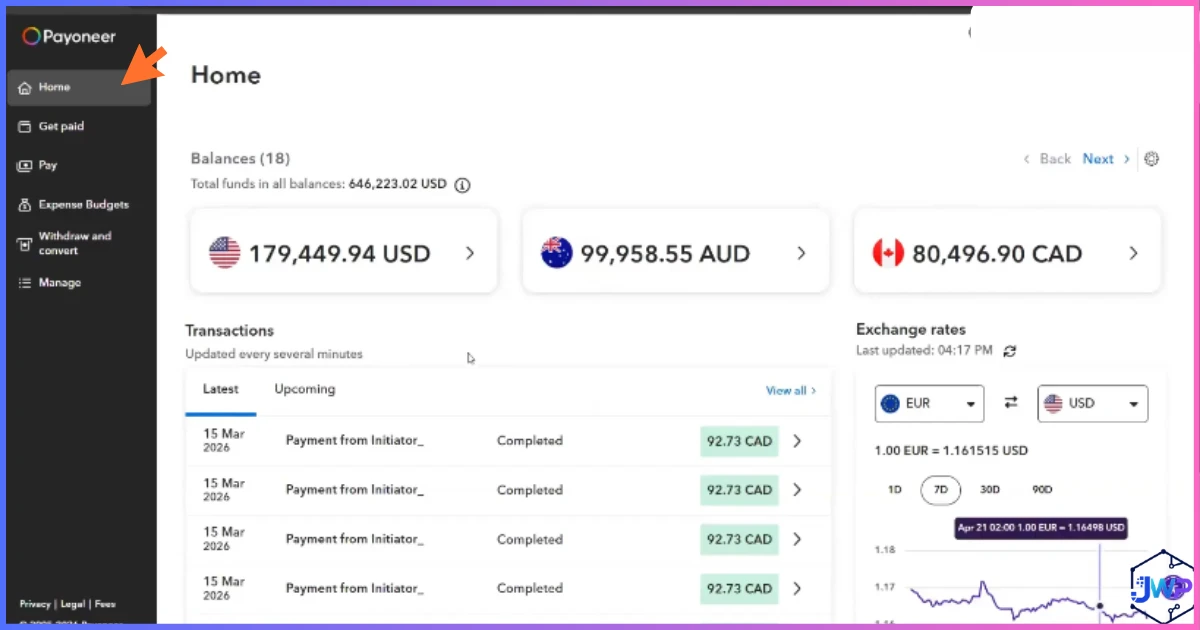
Payoneer Go to “Get Paid” to Find Your Bank Account Details
From your Payoneer dashboard, click Get Paid, then select your USD receiving account — this is where your bank-style account and routing number live.
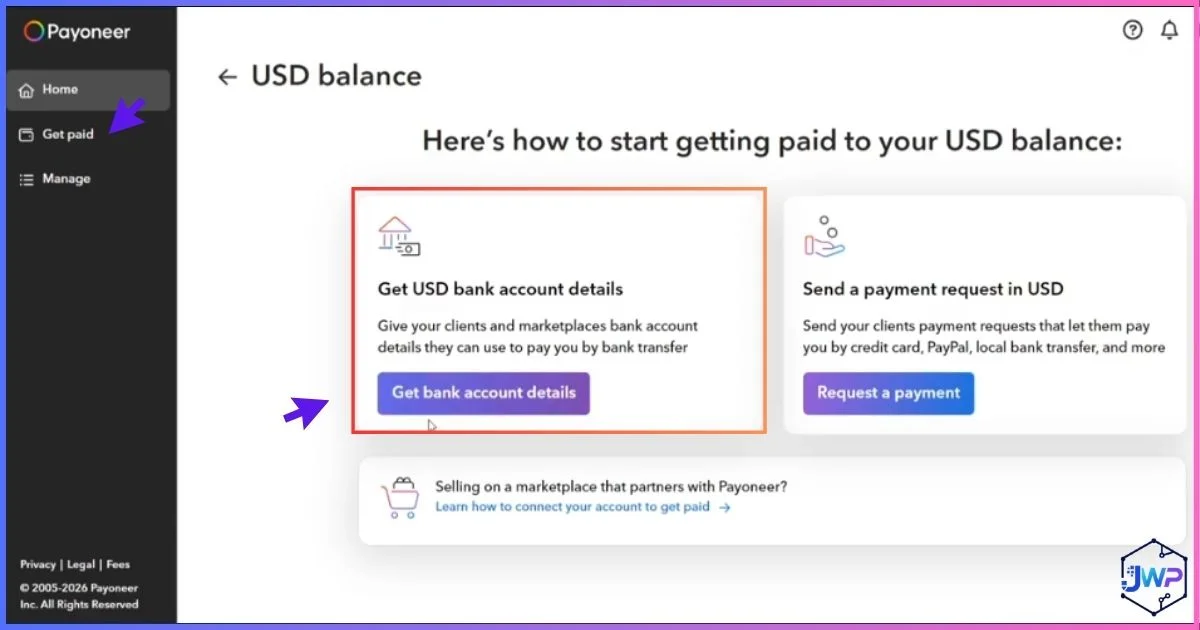
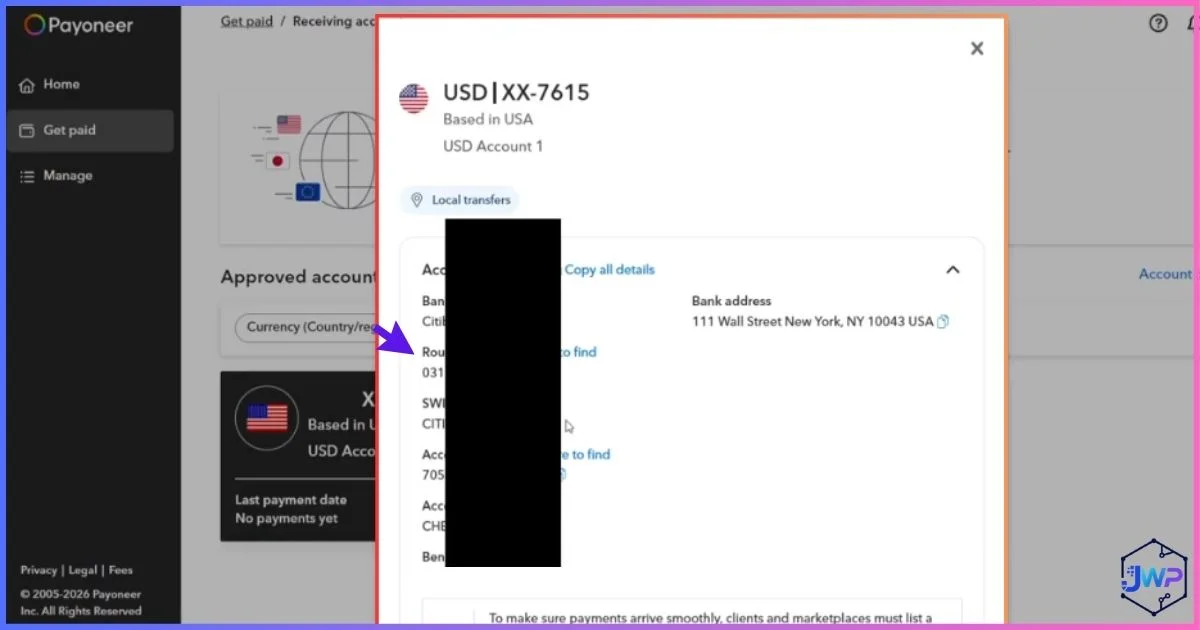
Payoneer Copy Your Bank Details, Including the Routing Number
Copy the account number and routing number shown on this screen exactly — this is the routing number you’ll enter into CJ in the next step. This is precisely how to get your routing number for CJ from Payoneer.
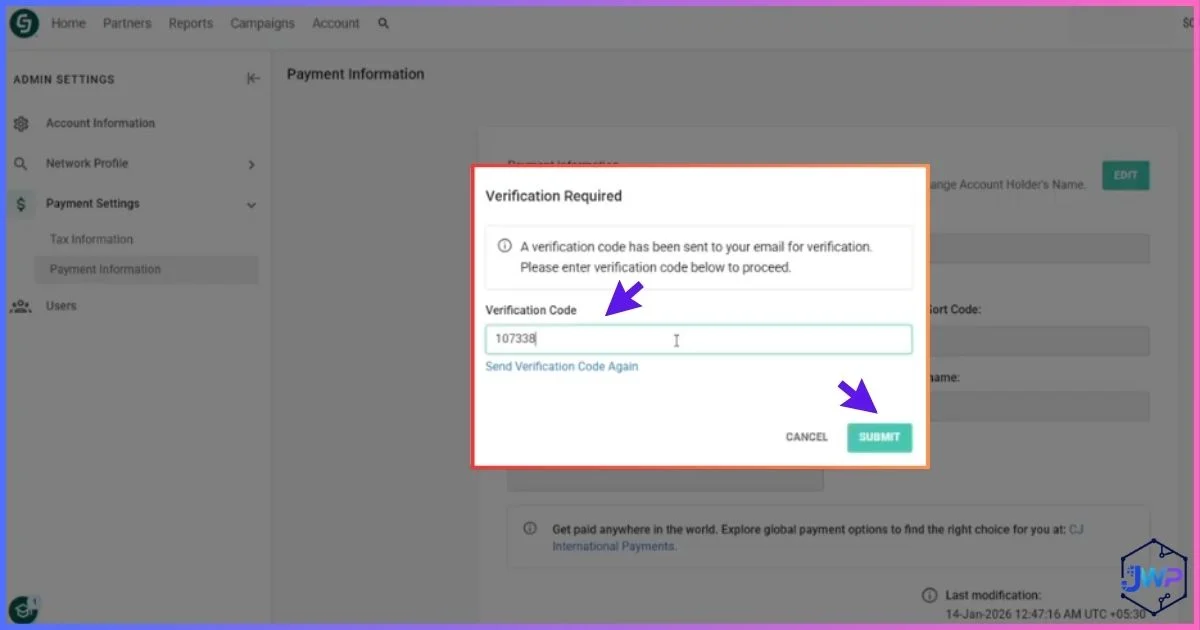
CJ Enter the Routing Number for Verification
Back in CJ’s Payment Information screen, paste in your Payoneer account number and routing number exactly as copied. CJ uses this to verify the account before saving it as your payment destination.
CJ Save Your Changes
Double-check every digit against your Payoneer screen, then save your payment information. A single mistyped digit is the single most common reason a payment update gets rejected or delayed.
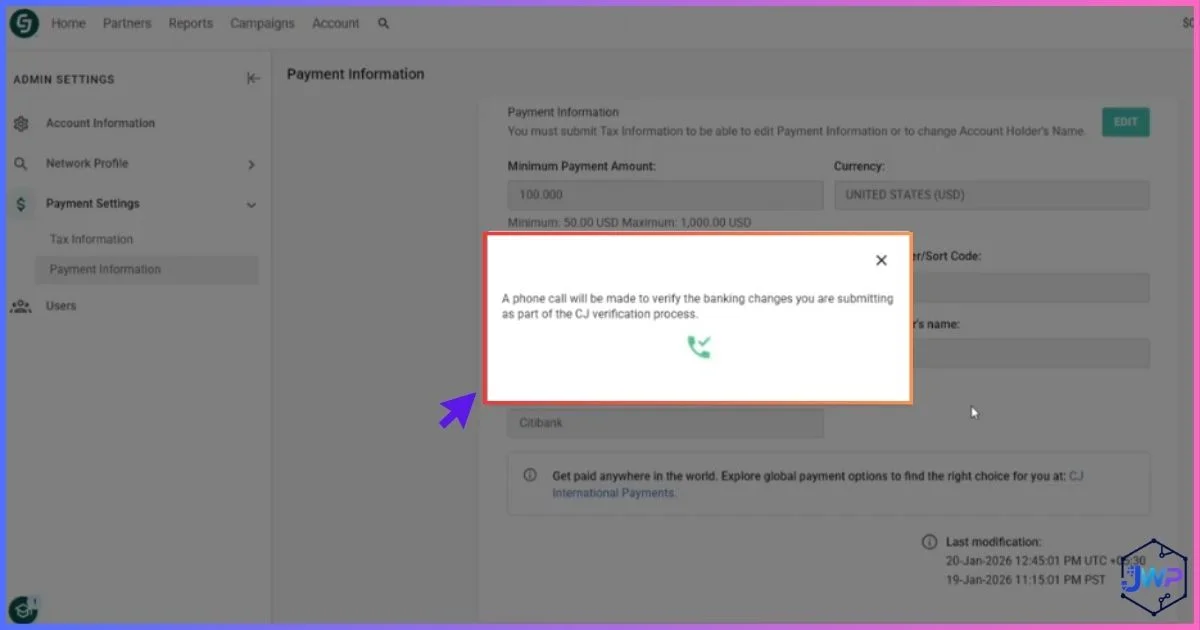
CJ Complete the Verification Call or Message
As part of CJ’s standard verification process for banking changes, expect a call or message to confirm you authorized the update. Respond promptly — this step exists specifically to prevent unauthorized account takeovers.
How to Get Your Routing Number for CJ
To recap the exact process from steps 3–5 above: your CJ-compatible routing number comes directly from your Payoneer USD receiving account, not from a separate bank. Here’s the short version:
1. Log in to Payoneer and go to Get Paid.
2. Select your USD receiving account (create one first if you haven’t already — it’s free and takes a minute).
3. Your account number and routing number are displayed directly on this screen — copy both exactly.
This same routing number can be reused for any other platform that pays via US ACH/Direct Deposit, not just CJ — a genuinely useful side benefit of setting up a USD receiving account once.
How to Add the Routing Number in CJ
Once you have your routing number copied from Payoneer, adding it in CJ (covered in steps 6–7 above) comes down to three things worth getting exactly right:
Match the currency setting. Your CJ account currency must be set to USD before the routing number field will accept Payoneer’s US account details.
Enter digits exactly, with no spaces. Copy-paste directly from Payoneer rather than retyping by hand to avoid transposed digits.
Confirm the account name matches. The name on your CJ account should match the name on your verified Payoneer account — mismatches are a common cause of manual review delays.
Save, then complete verification. After saving, CJ will contact you by phone or message to confirm the change before it takes effect on your next payment cycle.
CJ Affiliate Payment Schedule Explained
CJ operates on Net-20 payment terms: commissions are processed within 20 days of the end of the calendar month in which they were earned, provided your balance has crossed the minimum threshold for your chosen payment method. Funds typically land in your account within roughly 30 days total from the original transaction date, once bank processing time is factored in.
Minimum Payout Threshold by Method
Payment Timeline
Days from month-end close to funds typically landing in your account.
A Detail Worth Knowing
CJ’s payment cycle runs automatically and cannot be expedited — even by CJ support. If commissions owed to you exceed what a specific advertiser has currently deposited with CJ, your payment for that portion can be held until the advertiser funds their account, independent of your own account standing.
Read This Before You Update Banking Info
A Documented Pattern Worth Knowing About
Starting in mid-2025 and continuing into 2026, multiple long-term CJ publishers with clean payment histories have reported the same sequence: after updating their direct deposit or banking information, their payment cycle froze immediately, with CJ citing incorrect bank or tax information as the cause — even after publishers resubmitted verified, accurate details. Some publishers reported thousands of dollars in unpaid commissions with slow or unclear support follow-up. This is a documented, published pattern visible in independent review records, not a rumor.
To be fair to CJ: this doesn’t appear to affect the majority of routine banking updates, and CJ’s verification call/message step (the final step in the walkthrough above) exists specifically to catch fraudulent changes — a legitimate security measure, not a stalling tactic. But given the documented pattern, a few precautions are genuinely worth taking:
1. Triple-check every digit of your routing and account number before saving — mismatches are the single most common trigger for extended manual review.
2. Keep a screenshot or record of your submission and the exact date you made the change, in case you need to reference it in a support ticket later.
3. Respond immediately to CJ’s verification call or message — delays on your end can extend the review window further.
4. If your account does freeze after an update, follow up in writing (email, not just phone) so there’s a documented record of your attempts to resolve it.
This isn’t a reason to avoid updating your payment information when you need to — it’s a reason to do it carefully, keep records, and follow up promptly if something seems stuck.
Tax Forms & Verification Requirements
CJ Affiliate requires every publisher to submit a completed tax form before payments can be released, regardless of which payment method you choose:
W-9 (US persons/entities). Standard US taxpayer identification and certification form.
W-8BEN (non-US persons). Certifies foreign status for US tax withholding purposes — required for the vast majority of Payoneer-paid international publishers.
Power Tip
If you change your country of residence or business structure after initially submitting your tax form, you must submit a new certification — an outdated tax form is a common, easily avoidable reason for payment holds.
CJ Affiliate By The Numbers
Typical Commission Rate Range
Commission rates vary widely by advertiser and product category.
Payment Method Fit: Domestic vs International Publishers
Editorial assessment of practical fit (0–10), not an official CJ benchmark.
Common Payment Setup Problems & Fixes
Routing number rejected? Confirm your CJ account currency is set to USD first — the field often won’t validate Payoneer’s US routing number under any other currency setting.
Account frozen after an update? Respond immediately to any verification call or message, and follow up in writing if you don’t hear back within a few business days.
Balance not reaching the threshold? Remember commissions across all your CJ advertiser programs are pooled into one account balance — check your total, not just one program’s earnings.
Account going dormant? CJ applies a $10/month dormant account fee if an established account goes six consecutive months without a valid commission — keep at least minimal activity if you’re stepping away temporarily.
Pros and Cons of Using Payoneer for CJ Payments
✓ Pros
- No US bank account required to receive CJ payments
- Supports 150+ currencies for international publishers
- Same $50 minimum threshold as Direct Deposit
- Routing number setup takes only a few minutes once your Payoneer account is verified
- Reusable across other affiliate networks and platforms beyond CJ
✗ Cons
- Requires opening and verifying a separate Payoneer account first
- Currency conversion costs apply once funds convert out of USD in Payoneer
- Banking info updates on CJ can trigger extended manual review (documented pattern)
- No PayPal or credit card payout alternative if Payoneer doesn’t suit you
Frequently Asked Questions
How do I add a Payoneer account to CJ Affiliate?
Go to Account > Payment > Payment Information in CJ, set your currency to USD, then copy your account and routing number from your Payoneer “Get Paid” screen and paste them into CJ’s payment fields. Save your changes and complete CJ’s verification call or message to finish.
How do I get my routing number for CJ?
Log in to Payoneer, go to Get Paid, and select your USD receiving account. Your routing number and account number are displayed directly on that screen — copy them exactly to use in CJ.
How do I add a routing number in CJ?
Set your CJ account currency to USD, then enter your routing and account number in the Payment Information screen exactly as shown in Payoneer, with no extra spaces. Save your changes and complete the follow-up verification call or message from CJ.
What is CJ Affiliate’s minimum payout threshold?
$50 for Direct Deposit and Payoneer, $100 for Check. Earnings across all your CJ advertiser programs are pooled into one account balance toward this threshold.
When does CJ Affiliate pay?
CJ operates on Net-20 terms — payments process within 20 days of the end of the month a commission was earned, provided your balance meets the minimum threshold. Total time from the original transaction to funds landing is typically around 30 days.
Does CJ Affiliate support PayPal?
No. CJ Affiliate only supports Direct Deposit, Check, and Payoneer — PayPal and credit card payouts are not available.
Why did my CJ account freeze after I updated my banking info?
CJ runs a verification step on banking changes to prevent fraud, and a documented pattern from 2025-2026 shows some publishers experiencing extended holds after updates, even with accurate information. Triple-check every digit before saving, respond promptly to any verification request, and follow up in writing if a hold extends beyond a few business days.
Do I need a tax form to get paid on CJ?
Yes. US publishers submit a W-9, and non-US publishers submit a W-8BEN. Payments are held until a valid, current tax form is on file with CJ.
What happens if my CJ account is inactive for a long time?
If an established account goes six consecutive months without a valid, non-chargebacked commission, CJ applies a $10/month dormant account fee against any existing balance until the balance reaches zero or new commissions are generated.
Can I use the same Payoneer account for other affiliate networks?
Yes. The same Payoneer routing and account number can be reused for any platform that supports US ACH/Direct Deposit-style payments, not just CJ Affiliate — a genuinely useful side benefit of setting it up once.
Disclosure: This article contains an affiliate link. If you sign up through our link we may earn a commission at no extra cost to you. Figures on CJ Affiliate’s payment terms, fees, and policies reflect publicly available information at the time of writing and may change — always confirm current details directly with CJ Affiliate and Payoneer before making financial decisions. This article is for informational purposes only and is not financial or tax advice. Screenshots shown reflect the actual sign-up and payment-setup flow at the time of writing and may change as CJ Affiliate and Payoneer update their interfaces.