MagicFit Review : Turn Any Product Photo Into Viral Ads, Videos & Social Posts — No Designer Needed
Creating scroll-stopping product ads used to mean hiring designers, videographers, and copywriters. MagicFit collapses all of that into a single AI platform. Drop a product URL or image, choose a format, and you’re launching in minutes. Here’s our full hands-on review.
Quick Verdict
MagicFit is a purpose-built AI creative studio for e-commerce brands and marketers who need to produce high-volume, high-quality ad creatives, product videos, viral hooks, and social posts without a production team. It’s backed by enterprise AI models (Kling 2.6 Turbo Pro and Google Veo) and delivers results in under two minutes per asset.
Trusted by 40,000+ brands, reporting 4.2x ROAS, 510% engagement lift, and 85% time saved over traditional content workflows. The AppSumo lifetime deal starts at $89 (regular $120/year), carries the AppSumo Select badge, and includes 60-day money-back protection.
- What Is MagicFit?
- Who Is MagicFit For?
- How MagicFit Works: The 3-Step Process
- The 8 AI Agents: Full Feature Breakdown
- AI Ad Creative Market Stats & Why It Matters
- MagicFit Pricing: AppSumo Lifetime Deal
- MagicFit vs. Canva vs. AdCreative.ai vs. Creatify
- Pros & Cons
- Real Results & User Feedback
- Final Verdict
- FAQ
Introduction
What Is MagicFit?
MagicFit is an AI-powered content creation platform built by PushOwl, specifically designed for e-commerce brands and marketers who need to produce scroll-stopping product ads, videos, and social content at scale — without a design team, a video editor, or a freelancer budget.
The core premise is simple: give MagicFit a product image or a product URL, and its eight specialized AI agents handle the rest. Within two minutes on average, you can have a fully produced vertical video for TikTok Reels, a static ad with correct aspect ratios and CTA zones for Meta, a UGC-style creator video, or a dramatic cinematic product placement scene ready for download and deployment.
The platform runs on enterprise-grade AI models including Kling 2.6 Turbo Pro and Google Veo for video generation, which puts the output quality in a different league from basic template tools. According to MagicFit’s published data, its users are seeing 4.2x higher engagement, 85% reduction in content production time, and a 4.2x ROAS improvement compared to their previous content workflows.
On AppSumo, MagicFit carries the AppSumo Select badge, a quality designation reserved for tools that pass a more rigorous performance and support review. It currently holds a 4.73 out of 5 rating across 67 verified reviews, with over 40,000 brands actively using the platform.
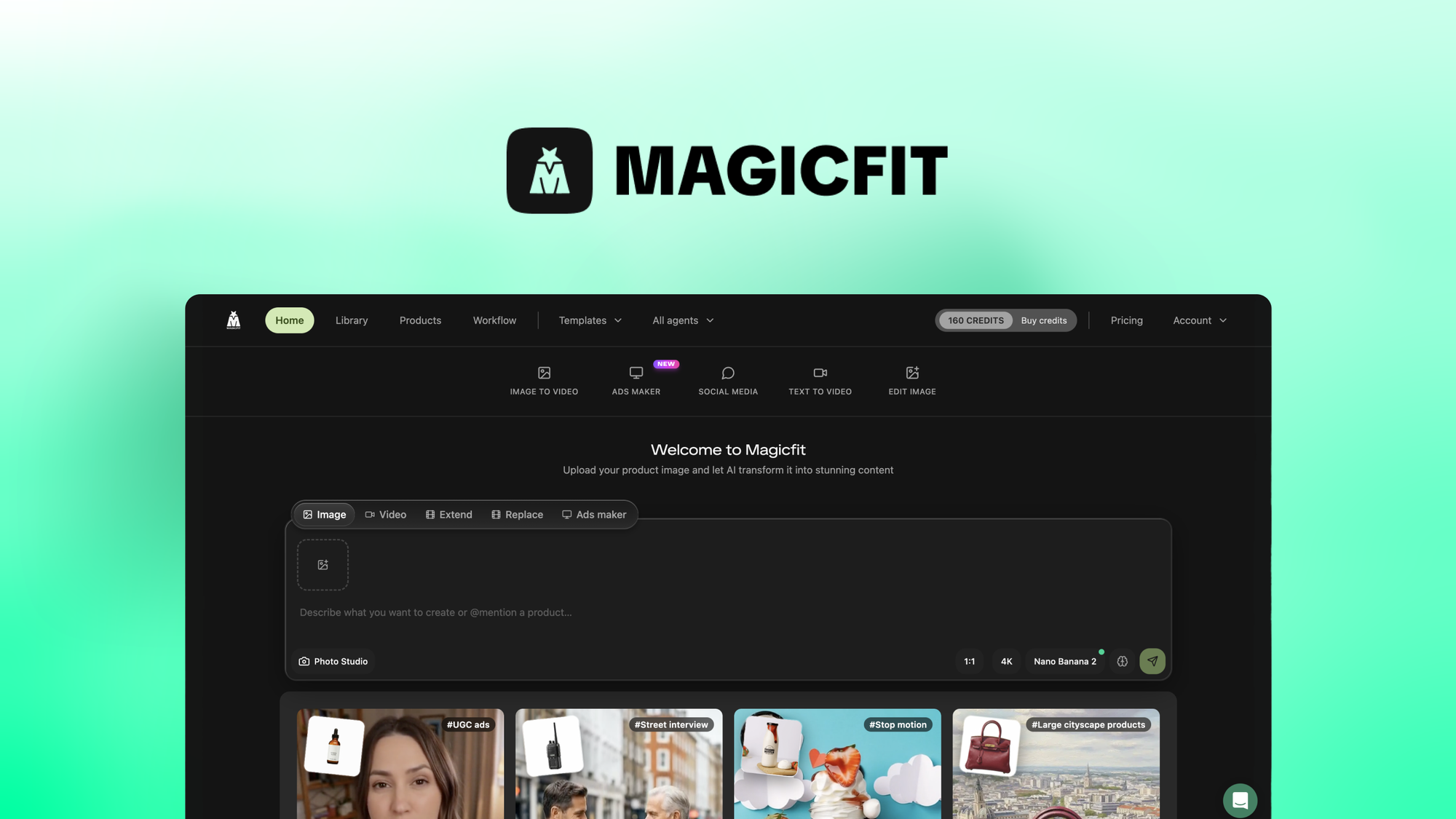
MagicFit transforms any product image or URL into viral-ready ads, videos, and social content.
Target Users
Who Is MagicFit Built For?
MagicFit is positioned by AppSumo as best for e-commerce brands, marketers, and small businesses. In practice, it’s particularly well-suited for anyone running paid ads on Meta or TikTok, anyone managing a product-focused social media presence, and agencies that need to produce high volumes of ad creatives across multiple clients without exploding their production costs.
E-commerce Brands
Shopify store owners and DTC brands who run constant ad creative tests on Meta and TikTok will save thousands on production costs while shipping more creative variants per month.
Performance Marketers
Media buyers and growth marketers who need to rapidly test creative angles, generate UGC-style video hooks, and produce scroll-stopping hooks at the volume that modern ad algorithms demand.
Creative Agencies
Agencies managing multiple product-focused clients who need to deliver ad creative at scale without growing their design team proportionally to their client roster.
Go from product photo to published ad in under 2 minutes.
40,000+ brands are using MagicFit’s 8 AI agents to produce viral ads, UGC-style videos, cinematic product placements, and social posts — without designers or video editors.
Claim Your Lifetime Access →60-day money-back guarantee • AppSumo Select • 40,000+ brands
The Workflow
How MagicFit Works: 3 Steps from Product to Published
One of the things that genuinely stands out about MagicFit is how streamlined the production workflow is. There’s no design canvas to wrestle with, no timeline editor, and no export queue to manage. The entire process from input to downloadable asset runs in three steps.
Paste Your Product Link or Upload an Image
Drop any product URL from any e-commerce platform (Shopify, Amazon, WooCommerce, etc.) or upload a product image directly. MagicFit automatically extracts the product details, images, and key attributes. No manual data entry required.
Choose Your Content Type & Agent
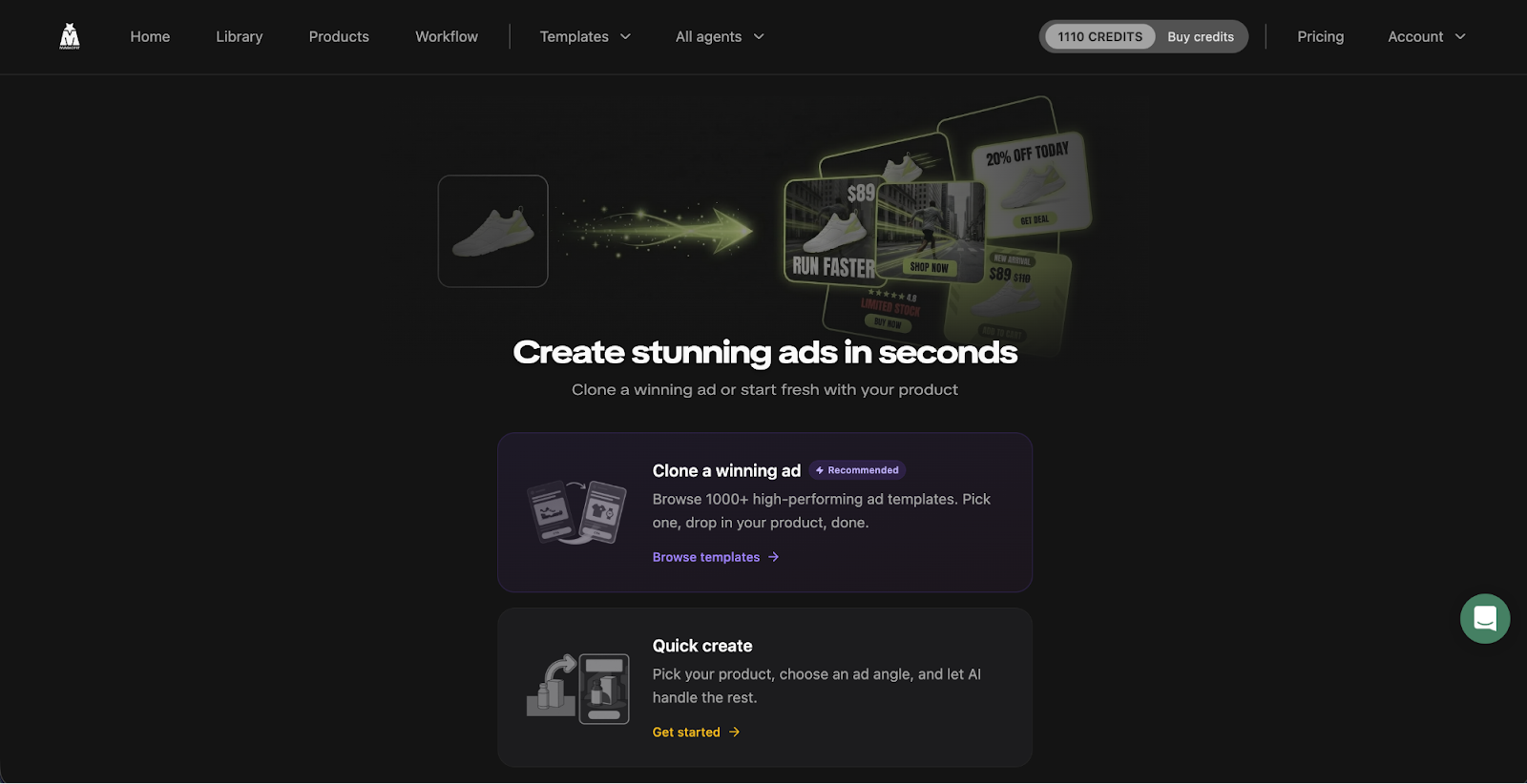
Pick which of the 8 AI agents you want to use: image-to-video, product placement, static ad creation, social post, viral hook, viral copy, background replacement, or image editing. Select a template style (sliding reveal, product drop, cinematic, creator-style, UGC) and the AI generates four unique variations simultaneously.
Download HD Content and Launch
Your content is rendered in full HD with audio included, in the correct aspect ratio for your target platform (1080p vertical for TikTok/Reels, square and landscape for Meta, etc.). Download and upload directly to your ad manager or social scheduler — no post-production needed.
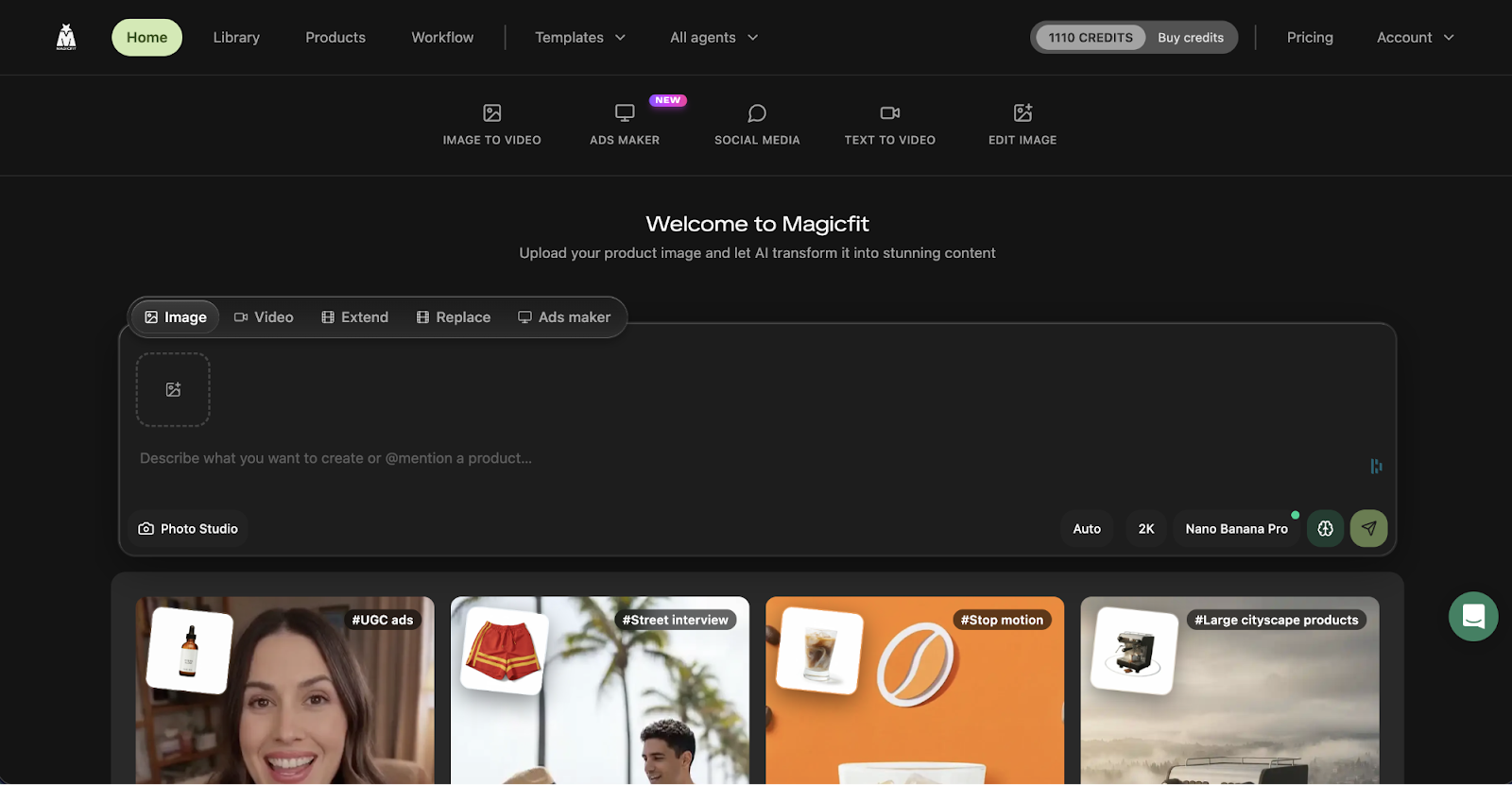
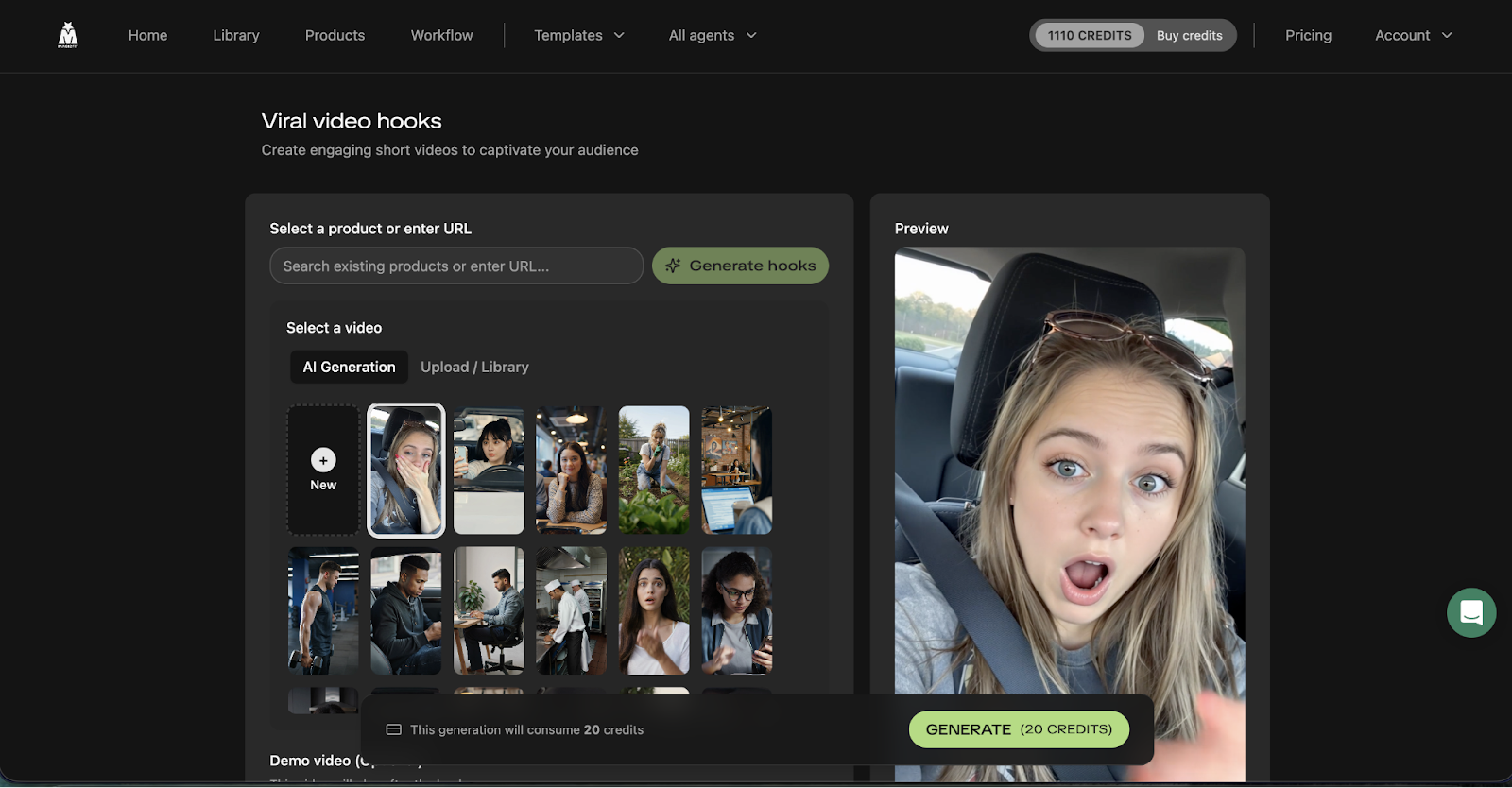
Step 1: Drop your product URL or image
Step 2: Choose agent and content style
Step 3: Download and launch immediately
Feature Breakdown
The 8 MagicFit AI Agents: What Each One Does
MagicFit organizes its capabilities into eight specialized AI agents, each optimized for a different type of creative output. This modular structure means you’re not using a general-purpose tool that does everything averagely — each agent is purpose-built for its specific content format. Here’s a full breakdown of every agent.
Agent 1: Image to Video
Takes any static product photo and transforms it into a high-engagement vertical video optimized for TikTok, Reels, and Stories. Outputs include sliding product reveals, cinematic product drops, bold cuts, and creator-style UGC content — powered by Kling 2.6 Turbo Pro for cinema-quality motion.
Agent 2: Product Placement
Places your product into dramatic lifestyle environments: stunning cityscapes, car interiors, billboard scenes, luxury settings, and surreal giant-product compositions that stop the scroll. Perfect for luxury, tech, fashion, and lifestyle brands that need aspirational context around their products without a photoshoot budget.
Agent 3: Content Creation (Static Ads)
Generates polished static ad creatives with correct platform aspect ratios (1:1, 4:5, 9:16, 1.91:1) and built-in CTA zones. Templates are optimized for Meta Ads Manager specs. Produces four variations per generation so you have immediate A/B test material without additional prompting.
Agent 4: Social Media Posts
Auto-generates branded social posts for Instagram, TikTok, and Facebook — complete with AI-written captions, hashtag suggestions, and visual compositions optimized for each platform’s feed algorithm. Multiple caption variants are generated per post for easy testing.
Agent 5: Viral Hooks Generator
The first three seconds of a video determine whether someone scrolls past or stops to watch. The Viral Hooks agent generates TikTok and Reel openers with AI-written scripts, multiple opening shot angles, and pre-edited hook sequences. You pick your product, paste the URL, and the agent delivers ready-to-use hook videos.
Agent 6: Viral Copy Generator
Produces high-converting ad copy and social captions optimized for social media and paid campaigns. Generates swipeable copy variants — different hooks, CTAs, and angles — so you’re testing messaging as well as creative. Works in conjunction with static and video ad outputs for complete campaign packages.
Agent 7: Background Replacement
Instantly removes existing product backgrounds and replaces them with clean studio whites, aesthetic lifestyle sets, gradient backgrounds, or custom scenes — producing catalog-ready shots without a photo studio. Ideal for creating consistent product imagery across a SKU range or refreshing existing product photos without a reshoot.
Agent 8: Image Editor
Fixes lighting issues, removes distracting background clutter, adjusts color balance, and polishes before-and-after shots. Functions as a lightweight AI photo editor so your source assets are ready for any generation before you even hit an agent — reducing the quality gap between a phone photo and a studio shot.
Bonus: Text-to-Video with Kling 2.6 & Google Veo
Write any product script and MagicFit automatically turns it into a fully produced vertical 1080p video using Kling 2.6 Turbo Pro or Google Veo — the same enterprise AI models used by production studios. No voiceover recording, no editing. Write the script, get the video.
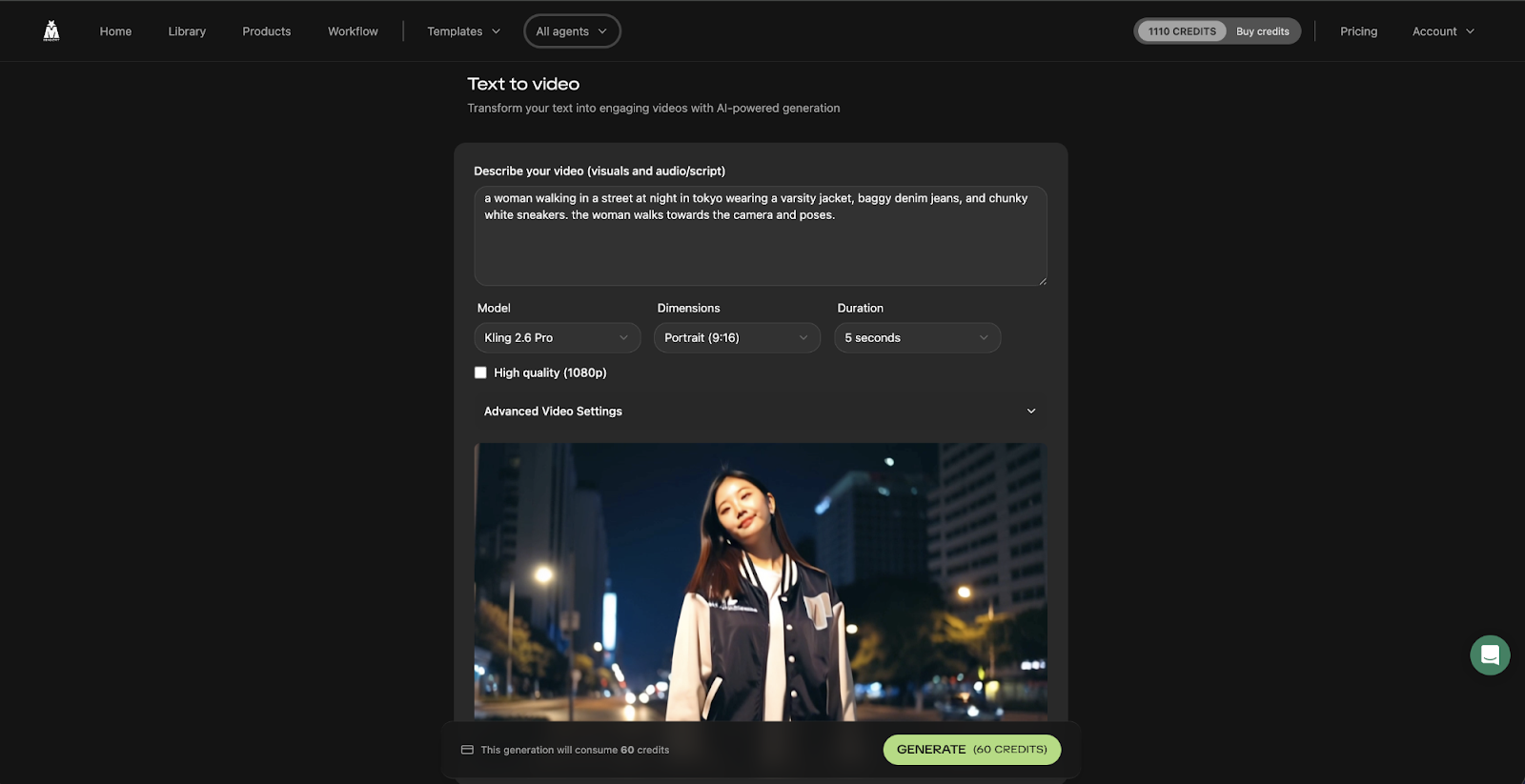
MagicFit’s text-to-video feature: write a script, receive a finished 1080p vertical video.
Market Context
The AI Ad Creative Revolution: Why Is the Inflection Point
The advertising creative landscape has changed fundamentally over the past three years. TikTok’s rise forced every major ad platform to prioritize video. Meta’s algorithm shifted to favor fresh creative variations over single long-running ads. And the cost of producing quality ad creative — even basic video content — has remained stubbornly high when using traditional production methods. Tools like MagicFit exist because the math simply broke: you need more creative, faster, at lower cost per asset, than any agency or in-house team can sustainably deliver manually.
4.2x
Higher ROAS reported by MagicFit users
510%
Engagement lift vs. traditional content workflows
85%
Time saved on content production per asset
2 min
Average creation time from product input to finished asset
Cost Per Ad Creative: MagicFit vs. Traditional Methods
Estimated average cost to produce a single ad creative asset (static or video) across different production methods
MagicFit Feature Strength Radar vs. Canva & AdCreative.ai
Comparative scores across key AI ad creative capabilities (out of 10)
MagicFit Content Output Types
Breakdown of content formats producible through MagicFit’s 8 agents
AppSumo Lifetime Deal
MagicFit Pricing: AppSumo Lifetime Deal Breakdown
MagicFit’s regular pricing runs at $120/year for Tier 1 and up to $1,200/year for Tier 4. Through AppSumo, you get lifetime access with a single one-time payment — no monthly or annual renewal ever. The deal is structured in four tiers based on generation credits and usage volume.
| Plan | AppSumo Price | Regular Price | Savings | Best For |
|---|---|---|---|---|
| License Tier 1 | $89 (once) | $120/yr | 26% off + lifetime | Solo e-commerce brands, individual marketers |
| License Tier 2 | $159 (once) | $240/yr | 34% off + lifetime | Active DTC brands, growing ad accounts |
| License Tier 3 | $299 (once) | $600/yr | 50% off + lifetime | High-volume advertisers, small agencies |
| License Tier 4 | $569 (once) | $1,200/yr | 53% off + lifetime | Large agencies, enterprise creative teams |
60-Day Money-Back Guarantee + “We Got Your Back” Coverage
Every MagicFit AppSumo purchase is covered by a 60-day full refund window and AppSumo’s extended “We Got Your Back” protection. You have two full months to test every agent and every content type before committing — with zero risk.
Shopify Integration Included
MagicFit integrates directly with Shopify, allowing you to pull products from your store and generate ad creatives without manually uploading images or copy-pasting URLs. This is a significant workflow accelerator for Shopify merchants running multiple ad campaigns simultaneously.
Stop paying designers $50–$200 per ad creative.
MagicFit produces studio-quality ads, viral videos, and social posts from a product image in under 2 minutes — for a one-time lifetime payment starting at $89.
60-day money-back guarantee • AppSumo Select • Lifetime access
How It Compares
MagicFit vs. Canva vs. AdCreative.ai vs. Creatify vs. InVideo
MagicFit positions itself on AppSumo as a direct alternative to Canva for product-focused ad creative. But the more accurate comparison set is against specialized AI ad tools like AdCreative.ai, Creatify, and InVideo. Here’s how they stack up on the features that matter for e-commerce and performance marketing.
| Feature | MagicFit (LTD) | Canva Pro | AdCreative.ai | Creatify | InVideo |
|---|---|---|---|---|---|
| Lifetime Deal | Yes (AppSumo) | No | No | No | No |
| Monthly Cost (entry) | ~$2.5/mo amortized | $15/mo | $21/mo | $39/mo | $20/mo |
| Image to Video | Yes (Kling 2.6 / Veo) | Limited | No | Yes | Yes |
| Product Placement (Cityscapes, Scenes) | Yes (built-in) | No | No | No | No |
| Static Ad Creatives with CTA Zones | Yes | Yes | Yes | Limited | Limited |
| Viral Hook Video Generator | Yes (dedicated agent) | No | No | Yes | Basic |
| Text-to-Video | Yes (Kling / Veo) | No | No | Yes | Yes |
| AI Viral Copywriting | Yes (dedicated agent) | Basic AI | Yes | Limited | Limited |
| Background Replacement | Yes (dedicated agent) | Yes | No | No | No |
| Shopify Integration | Yes (native) | Limited | Yes | No | No |
| Enterprise AI Models | Kling 2.6 + Google Veo | Basic AI | Proprietary | Proprietary | Proprietary |
MagicFit’s most unique differentiator is the Product Placement agent — no other tool in this comparison set places your product into AI-generated lifestyle scenes, cityscapes, and dramatic environments at the quality level that Kling 2.6 enables. Combined with the dedicated Viral Hooks agent and text-to-video capability using Google Veo, MagicFit covers more of the creative production stack than any single competitor at any price point.
Honest Assessment
MagicFit Pros & Cons
What Works Well
- ✓Enterprise AI models (Kling 2.6 + Google Veo) deliver genuinely cinematic output quality
- ✓Product Placement agent is genuinely unique — no direct competitor offers this
- ✓2-minute average creation time from product URL to finished asset
- ✓Generates 4 variations per run — immediate A/B test creative without extra prompting
- ✓8 specialized agents cover every major creative format in one platform
- ✓Shopify integration for seamless product import
- ✓Trusted by 40,000+ brands with proven ROAS and engagement data
- ✓AppSumo Select badge — rigorous quality vetting applied
- ✓No design skills, video editing, or copywriting needed to use effectively
- ✓60-day money-back + “We Got Your Back” extended guarantee
Limitations to Know
- ✗Credit-based system means heavy users need a higher tier to avoid running out
- ✗AI-generated video still occasionally produces minor visual artifacts on complex products
- ✗No native scheduling or publishing — assets download for manual posting
- ✗Best for product-focused content — service businesses may find less direct application
- ✗Newer platform (relatively few reviews vs. more established tools)
- ✗Advanced creative control (fine-tuning motion, timing) is limited vs. dedicated video editors
Real Results
Real Results & User Feedback
“We’ve cut our creative production time by 85% and our ROAS went up significantly within the first month. The product placement scenes are unlike anything we could produce in-house — and we’re running 4 variants per ad set now instead of 1.”
DTC Brand Founder, Apparel Category
“The viral hooks feature alone is worth the price. We’ve been struggling to crack TikTok for a year. MagicFit generated hooks that got our first 100k view video in the second week of using the tool.”
Performance Marketer, Beauty Brand
“As a Shopify agency managing 12 clients, MagicFit has fundamentally changed what we can offer. We’re delivering 80+ ad creatives per client per month now, which was impossible before without hiring a dedicated content team.”
Agency Owner, Shopify Partner
Platform Performance Data
Bottom Line
Final Verdict: Is MagicFit Worth It in ?
Yes — MagicFit is one of the more genuinely impressive AI creative tools to hit AppSumo. What sets it apart from the growing field of AI ad generators is the quality of its underlying models and the completeness of its agent lineup. Running Kling 2.6 Turbo Pro and Google Veo for video generation puts the output in a different category from tools running generic open-source models — the motion quality and scene coherence are noticeably better.
The Product Placement agent is the feature that will likely surprise you most the first time you use it. Dropping a product image into a dramatic cityscape or a car interior scene that looks like it was produced by a $5,000/day studio is genuinely remarkable, and there is nothing comparable available in Canva, AdCreative.ai, or any of the standard alternatives at this price point.
For e-commerce brands and performance marketers specifically, the ROI case is almost trivially easy to make. A single avoided designer invoice — typically $100-$300 for a high-quality video ad — covers the cost of the lifetime deal. Running 80 creatives per month at traditional production costs would cost thousands. MagicFit delivers that volume in a few hours for a one-time $89-$569 payment depending on your tier.
The main honest caution is the credit system: heavy users who are generating hundreds of assets per month should look at Tier 3 or Tier 4 to avoid bumping against limits. But for most brands just getting started with AI creative production, Tier 1 or 2 will be more than sufficient, and the 60-day refund window gives you plenty of time to test your actual usage volume before committing.
Our MagicFit Rating Breakdown
Related: GoBrunch Review
Related: Noptin Review
Common Questions
Frequently Asked Questions About MagicFit
What exactly does MagicFit do?
MagicFit is an AI creative studio for product brands. You input a product image or URL and its eight specialized AI agents generate video ads, static ad creatives, UGC-style videos, viral hook videos, social media posts, ad copywriting, product placement scenes, and polished catalog photos — all in minutes, without any design or video editing skills required.
What AI models does MagicFit use for video generation?
MagicFit uses Kling 2.6 Turbo Pro and Google Veo for video generation — enterprise-grade models that produce significantly higher motion quality and scene coherence than the open-source alternatives used by many competing tools. These are the same model families used by professional production studios, which is a meaningful differentiator for output quality.
Is MagicFit a good fit for non-Shopify stores?
Yes. While MagicFit has a native Shopify integration for easy product import, you can use the platform with any product by uploading an image or pasting any product URL from any website. Amazon sellers, WooCommerce store owners, Etsy sellers, and brands on any other platform can all use MagicFit effectively.
What’s the difference between the four license tiers?
The tiers are differentiated primarily by the number of generation credits included per month. Tier 1 ($89) is designed for solo brands generating moderate volumes. Tier 2 ($159) suits active ad accounts needing consistent creative output. Tier 3 ($299) is built for high-volume advertisers and small agencies. Tier 4 ($569) provides the highest credit volume for large agencies and enterprise teams generating 80+ assets per month.
Does MagicFit work for service businesses, not just product brands?
MagicFit is primarily optimized for product-based businesses where a physical item can be photographed and placed into scenes. Service businesses can still benefit from the viral copy generator, social post agent, and text-to-video capabilities, but the product placement and image-to-video agents are designed around physical products. It’s most powerful for e-commerce, DTC, and product brands.
What format and resolution are the output videos?
MagicFit outputs videos in 1080p HD with audio included. For vertical formats (TikTok, Instagram Reels, YouTube Shorts), content is produced in 9:16 aspect ratio. Static ads are generated in the correct ratios for Meta Ads Manager (1:1, 4:5, 1.91:1) with CTA zones properly positioned. All content is ready to download and upload directly without additional editing.
Can I get a refund if MagicFit doesn’t meet my expectations?
Yes. AppSumo provides a 60-day full money-back guarantee on all MagicFit purchases. Additionally, the deal is covered by AppSumo’s “We Got Your Back” extended protection. You have two full months to test every agent, run real campaigns, and measure actual ROAS and engagement impact before deciding to keep the tool permanently.
How does MagicFit compare to hiring a freelance video editor?
A freelance video editor or creative studio typically charges $150-$500 per video ad, has a 2-7 day turnaround, and requires briefing, revision rounds, and back-and-forth communication. MagicFit produces four video variants in under 2 minutes for a fraction of the cost. For testing multiple creative angles at ad launch, the speed and volume advantage over freelancers is substantial. Freelancers still have an edge for highly custom branded content requiring precise creative direction, but for the testing and iteration phase of advertising, MagicFit wins on speed and cost.
Your product deserves ads that stop the scroll. MagicFit builds them in 2 minutes.
40,000+ brands. 4.2x ROAS. 85% time saved. Enterprise AI models at lifetime deal pricing — starting at just $89 one time.
One-time payment • Lifetime access • 60-day money-back guarantee • AppSumo Select