RecRam Review — See What Customers Actually Experience, Not Just What They Type
By JoshWP Team | Updated: | ★★★★½ 4.53 / 5 (15 verified AppSumo reviews) | AppSumo Select Pick
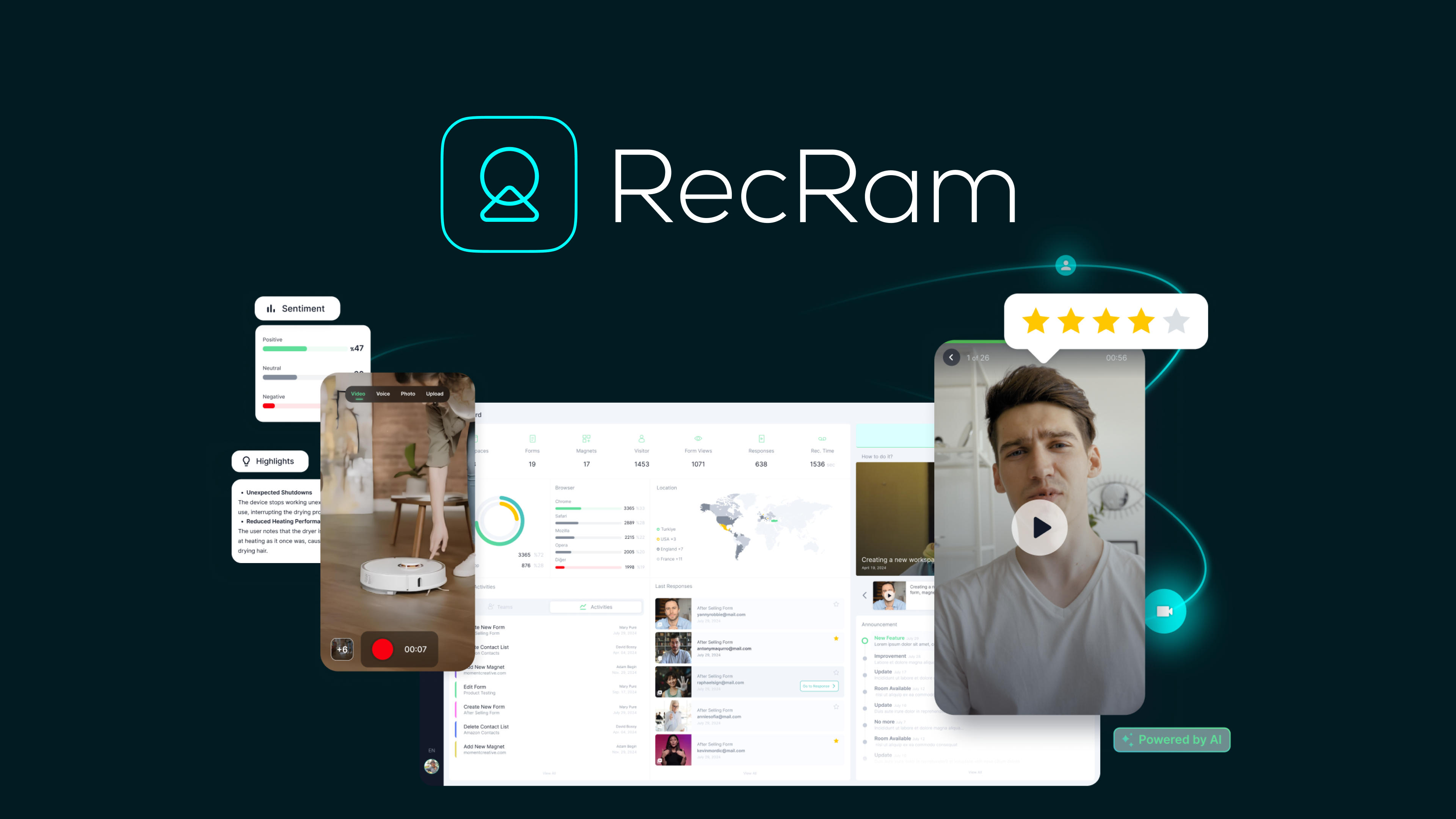
If you have been searching for an honest, detailed RecRam review, you are in exactly the right place. RecRam is an AI-powered video feedback platform that replaces static forms, generic surveys, and disconnected support tickets with something far more valuable: actual video from your customers showing you exactly what they are experiencing, thinking, and feeling. Positioned as an alternative to VideoAsk and Typeform, RecRam adds a layer of AI analysis that turns raw video responses into transcripts, sentiment scores, lead qualification data, and thematic insights — without you having to watch every recording.
In , businesses that understand their customers at a deeper level than their competitors have a measurable advantage. The problem with traditional feedback tools is not that companies do not ask for feedback — it is that the feedback they collect is shallow, dishonest, and difficult to act on. A five-star rating tells you nothing. A 300-word typed response tells you something. A video of a frustrated customer showing you exactly where they got confused on your checkout page tells you everything. RecRam makes collecting and analyzing that kind of feedback effortless.
This review covers every feature in depth, all four AppSumo lifetime deal pricing tiers with a full comparison table, a head-to-head against VideoAsk, Typeform, and Loom, who RecRam is genuinely built for, honest pros and cons, real user feedback, and the most common questions buyers have before purchasing. Let’s get into it.
- 1. What Is RecRam?
- 2. Key Features — Full Breakdown
- 3. How RecRam Works — Step by Step
- 4. The AI Analysis Layer — What It Actually Does
- 5. RecRam By The Numbers
- 6. RecRam Pricing — All 4 AppSumo Tiers
- 7. RecRam vs VideoAsk vs Typeform vs Loom
- 8. Who Is RecRam Best For?
- 9. Pros and Cons
- 10. What Real Users Are Saying
- 11. Final Verdict
- 12. Frequently Asked Questions
What Is RecRam?
RecRam is a multi-mode video feedback and communication platform built around a single insight: the richest customer data comes from seeing and hearing people, not from reading what they typed into a form. The platform combines three distinct capabilities into one product — interactive video forms, asynchronous 1:1 video messaging, and AI-powered response analysis — creating a feedback loop that is simultaneously more human and more analytically powerful than anything a static survey or live chat can provide.
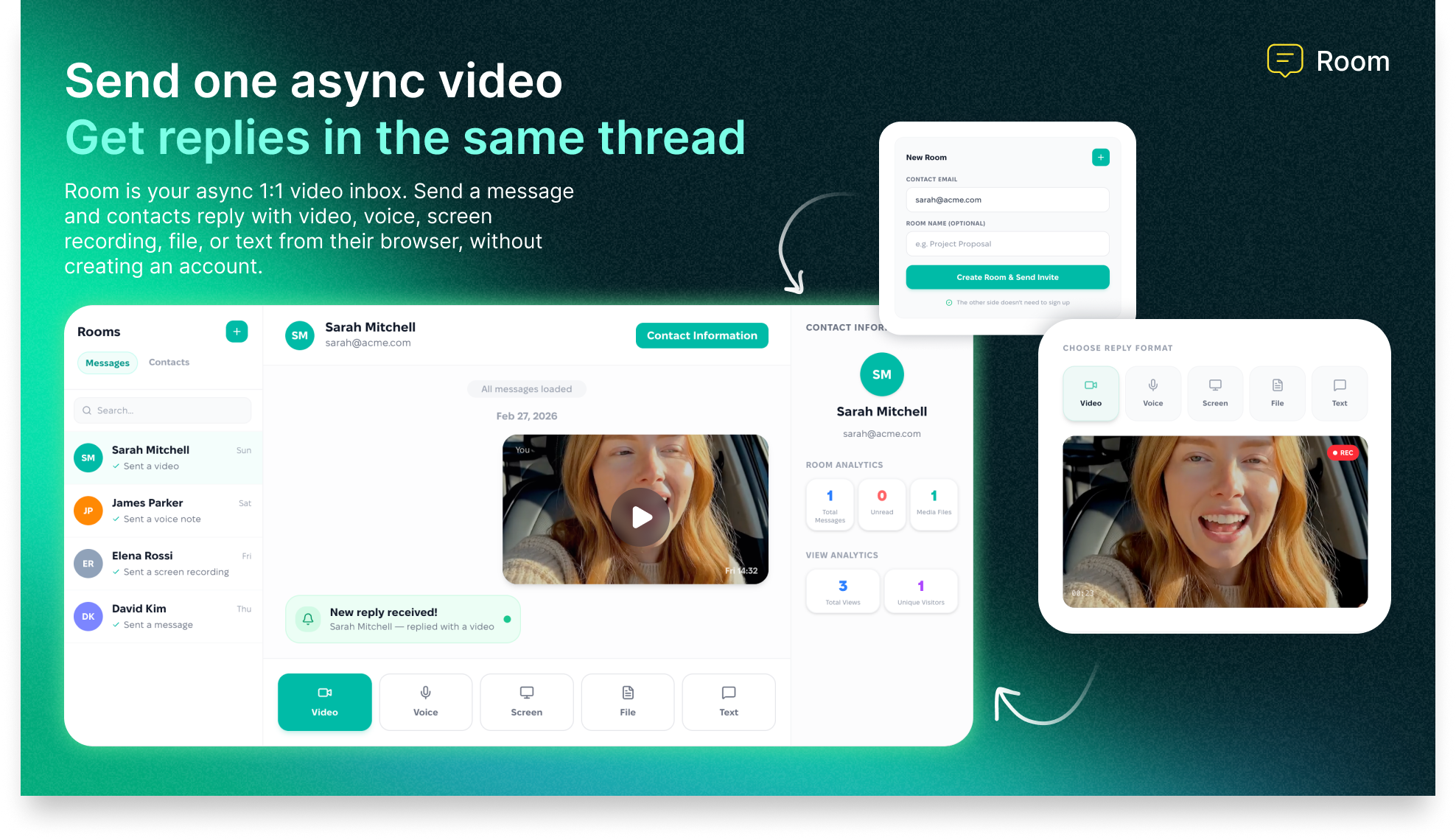
The interactive video forms work much like a more engaging, multimedia version of Typeform. You build a form using a drag-and-drop builder, embed it anywhere on your site with a single line of code, and respondents can reply via video, audio, or text — whichever they prefer. The async video inbox works like a more structured, professionally organized version of Loom — you send a personalized video to a prospect or client, they reply via their browser without creating an account, and every exchange is threaded in a single organized conversation.
The AI layer is what elevates RecRam above both of these comparisons. Every video response is automatically transcribed, analyzed for sentiment, scored for lead qualification, and synthesized into key takeaways and thematic summaries. You get actionable intelligence from your video responses without watching a single clip — though the recordings are always available if you want the full context.
Why Video Feedback Changes Everything in
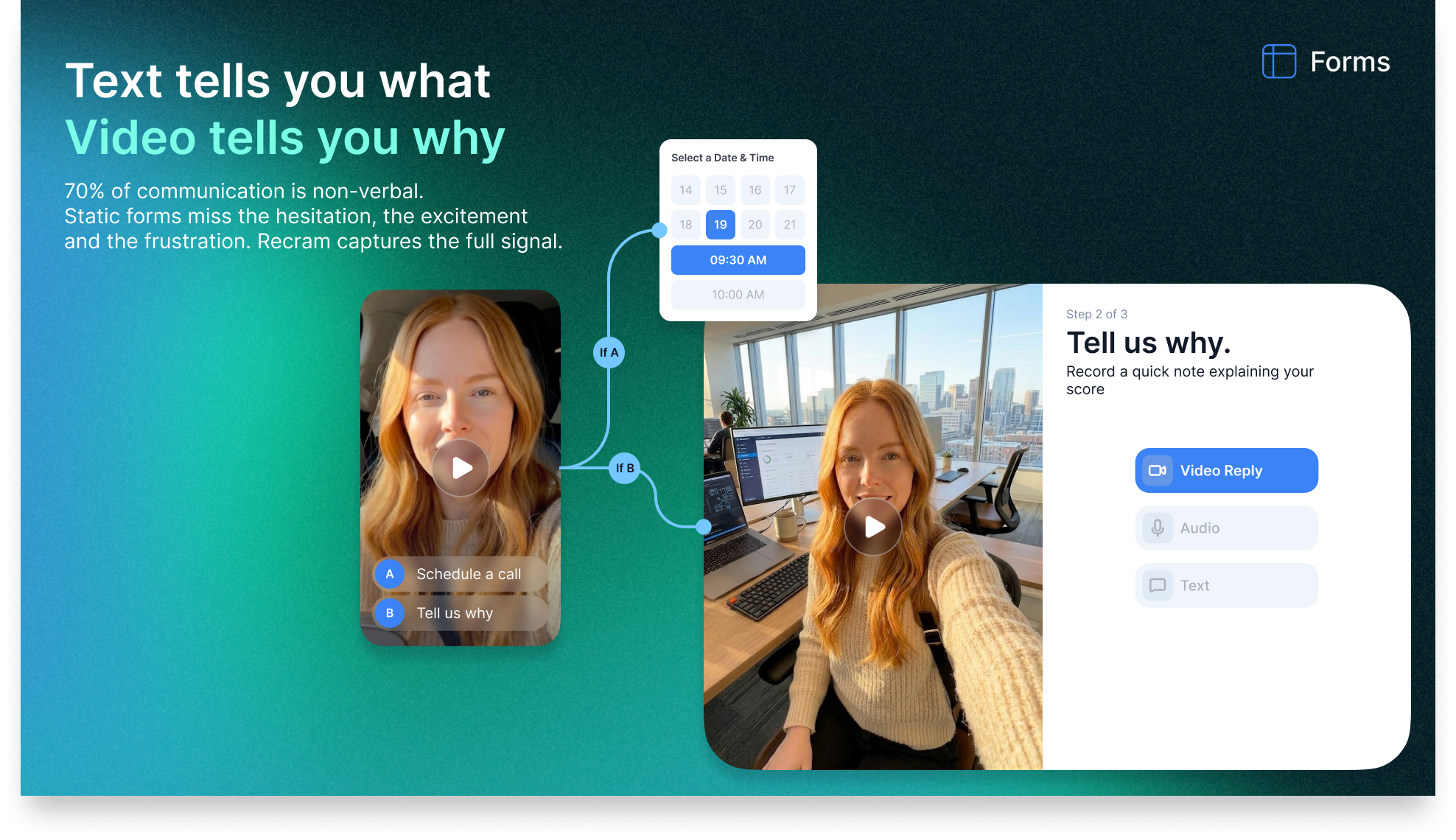
According to Forrester Research, video feedback captures 7–10x more information per response than text surveys. A Stanford study found that face-to-face communication (including video) conveys emotional context that text loses entirely — with up to 93% of communication meaning coming from non-verbal cues. For businesses making decisions about product direction, customer experience, and sales processes, this difference in data quality is not marginal — it is fundamental.
Key Features — Full Breakdown
RecRam is built around four distinct pillars: video form collection, site widget embedding, async video messaging, and AI analysis. Here is how each pillar works in practice.
01 Interactive Video Forms
Drag-and-Drop Form Builder
Build multi-step video forms using a visual drag-and-drop interface. Add question types, branch logic, scheduling steps, and custom design elements without touching code. Forms can include video questions from you (pre-recorded), text prompts, rating scales, and custom fields — creating a rich, contextual feedback experience rather than a generic survey.
Video, Audio, or Text Replies
Respondents choose their preferred reply format — video, audio recording, or plain text. This flexibility dramatically increases completion rates because not everyone is comfortable on camera, and not every response requires it. The platform captures whichever format the respondent chooses and processes it through the same AI pipeline regardless of format.
Scheduling Steps Built In
A genuinely unique feature: you can embed a calendar scheduling step directly inside your video form. A customer submits their feedback, then books a follow-up call in the same flow without switching tools. This transforms feedback collection from a dead-end into a conversion funnel — ideal for sales qualification, customer success check-ins, or UX research sessions.
Full Brand Customization
Every form is fully customizable with your brand colors, logo, fonts, and domain. Conditional logic lets you branch the form based on responses — showing different follow-up questions to dissatisfied customers versus happy ones. The output looks and feels like a purpose-built experience rather than a generic feedback tool.
02 Site Widget & Embedding
One-Line Embed Code
Embed the RecRam video widget on any page — landing pages, support documentation, checkout flows, pricing pages, product pages — with a single line of JavaScript. The widget works across all devices and browsers. Once live, visitors can initiate a video conversation or submit video feedback without leaving the page they are on.
Inline, Pop-up, or Chat Widget Modes
Choose how the widget appears on your site: embedded inline within page content, as a pop-up triggered by scroll depth or exit intent, or as a persistent chat-style widget in the corner of the screen. Each mode suits different use cases — inline works for product pages, pop-ups for exit intent capture, and chat widgets for ongoing support access.
Share via Link, Email, Slack, or QR Code
Beyond site embedding, every RecRam form and video conversation is shareable via a direct link, email, Slack message, or QR code. This flexibility means you can deploy video feedback collection anywhere — post-purchase email sequences, conference presentations, printed materials, or Slack threads with specific team members or clients.
Works on Every Device
The RecRam widget and video forms are fully mobile-responsive. Respondents can submit video feedback from a smartphone camera, a laptop webcam, or a tablet — whatever device they happen to be using when they encounter the form. No app installation is required for respondents on any device.
03 Async 1:1 Video Messaging
Personalized Video Outreach
Send personalized video messages directly to prospects, clients, or teammates. Record yourself explaining a proposal, walking through a product demo, answering a support question, or providing feedback on a deliverable. The recipient gets a link they can open in any browser — no app, no account, no friction. This is the Loom-style async communication use case, but with the added dimension of two-way threaded replies.
Threaded Replies — No Account Needed
Recipients reply via their browser — using video, voice, screen recording, file attachment, or text — without creating any account. All replies are organized in threaded conversations that stay together permanently in your RecRam inbox. You get instant notifications when someone replies, eliminating the need to follow up manually to check for responses.
Screen Recording Support
Both you and your respondents can share screen recordings as part of async conversations. A customer can show you exactly where they got confused in your app. A sales prospect can walk you through their current workflow. A teammate can demonstrate a bug. This screen-sharing capability within async threads makes RecRam a genuine support and collaboration tool, not just a feedback collector.
Go from Feedback to Meeting in One Flow
The scheduling integration means you can move from an async video conversation into a live meeting without context-switching tools. A customer submits a video complaint, you respond with a personalized video explanation, and if more detail is needed, they can book a call directly through the same thread — turning a potentially negative support experience into a high-touch human interaction.
The AI Analysis Layer — What It Actually Does
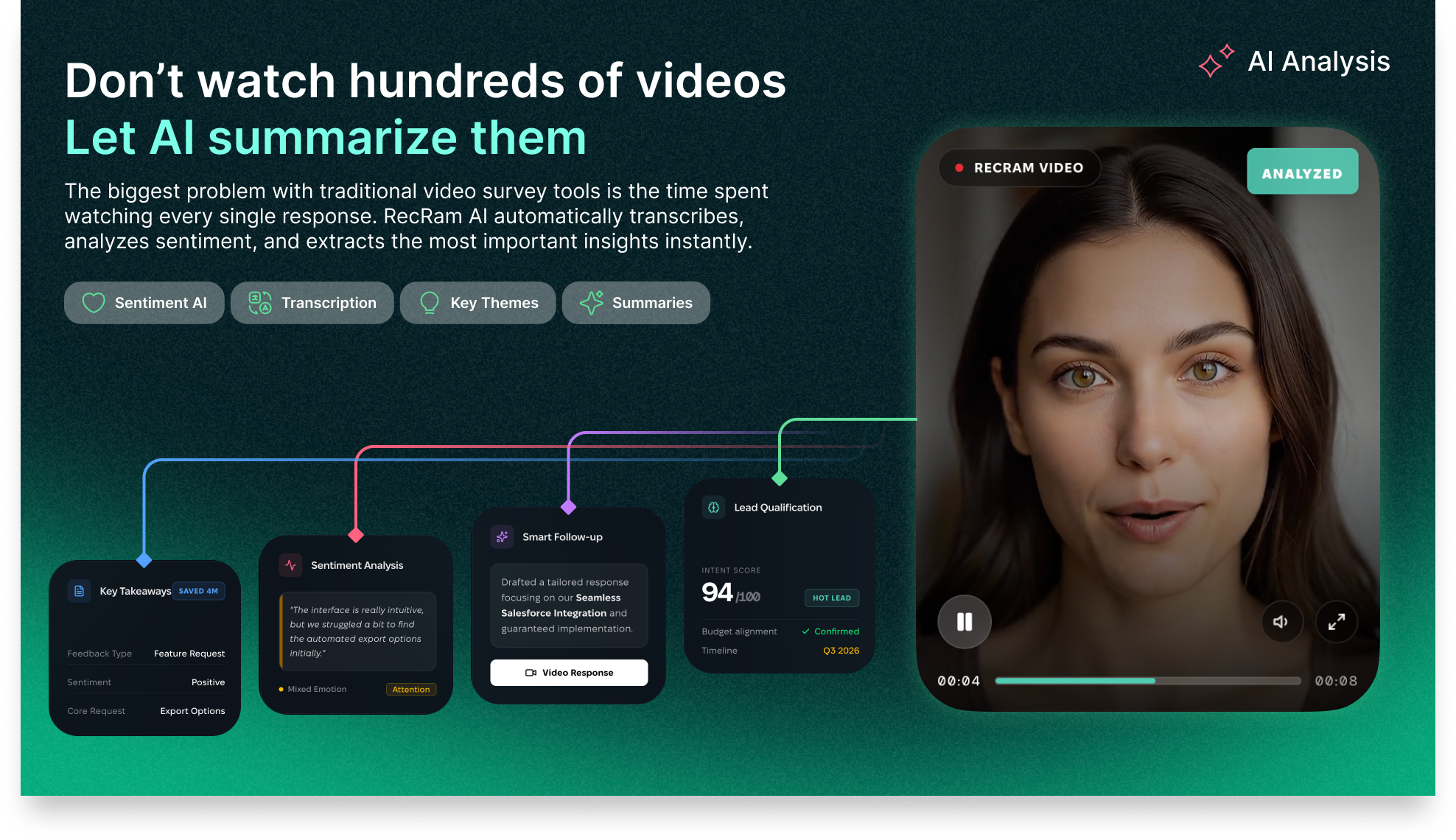
The AI capabilities in RecRam are not a marketing checkbox — they are the feature that separates the platform from every other video feedback tool and makes it genuinely scalable for teams that collect significant response volumes. Here is exactly what the AI does with every video response.
Automatic Transcription
Every video and audio response is automatically transcribed into searchable text. This means you can search across all your responses for specific keywords, topics, or phrases — even when the content was spoken, not typed. A support team can find every customer who mentioned “checkout” or “error page” without watching any footage.
Sentiment Analysis
The AI analyzes not just what was said, but how it was said — detecting emotional sentiment (positive, neutral, negative) from both the verbal content and vocal tone. This gives you the honest customer sentiment that typed text surveys never capture, because people moderate their written responses but are far more candid in video.
Lead Qualification Scoring
For sales and marketing use cases, RecRam’s AI scores each video response for lead qualification — analyzing expressed intent, pain points, urgency signals, and buying indicators. Sales teams can prioritize follow-up based on AI scores rather than manually reviewing every response, focusing human attention on the highest-potential prospects first.
Key Takeaways & Thematic Analysis
Across multiple responses, the AI identifies recurring themes, common pain points, and frequently mentioned topics — distilling dozens or hundreds of individual video responses into actionable summaries. Product managers can see “17% of responses mention checkout confusion” without reviewing a single video manually.
Smart Follow-Up Suggestions
After analyzing a response, the AI suggests appropriate follow-up actions — whether that is scheduling a call, escalating to a senior support rep, sending a specific resource, or marking a lead as high-priority. These suggestions reduce the cognitive load on your team and ensure no response falls through the cracks.
Zero-Watch Insights
The entire AI analysis is designed so that you never need to watch a video response to extract value from it. Every response comes pre-packaged with its transcript, sentiment score, key takeaways, and follow-up suggestions. You choose when to watch the actual footage — the AI has already done the initial triage and categorization.
How RecRam Works — Step by Step
Here is the complete workflow from setup to actionable customer insights, covering both the video form and async messaging use cases.
Build Your Video Form or Start an Async Conversation
Use the drag-and-drop builder to create an interactive video form — adding your questions (text, video, or audio format), branching logic, scheduling steps, and brand customization. Alternatively, record a personalized video message to send to a specific person via the async inbox.
Deploy via Widget, Link, QR Code, or Direct Message
Embed the video form on your site using one line of code, share it via a direct link in an email or Slack message, or generate a QR code for offline use. For async conversations, paste the video link directly into your outreach message. Respondents access everything through their browser with zero installation.
Respondents Reply in Their Preferred Format
Customers or prospects open the link on any device and record a video, audio, or text response directly in their browser — no app download, no account creation, no barriers. The recording uploads automatically when they submit. For screen-sharing responses, the browser-based recorder handles capture without any plugin.
AI Processes Every Response Automatically
The moment a response is submitted, RecRam’s AI transcribes the content, analyzes sentiment, generates key takeaways, scores lead qualification (where applicable), and produces follow-up suggestions. You receive an instant notification with the AI summary — before you have even clicked to view the response.
Review Insights and Take Action
In the RecRam dashboard, review AI-generated summaries, sentiment trends, thematic analysis across all responses, and individual response details. Watch specific videos where more context is needed. Use the integrated scheduling and follow-up tools to act on insights immediately. Export data or trigger workflows via Zapier, Slack, or webhooks.
Close the Loop with Async Replies
Reply to individual respondents via the same async thread — sending a personalized video response, a resource, or a scheduling link. The threaded conversation stays organized and accessible without the response getting lost in a general support queue or email inbox.
RecRam By The Numbers
The business case for video feedback over text surveys is well-supported by data. Here is the context that frames RecRam’s value and how it performs against alternatives.
Video vs Text Feedback — Information Richness
RecRam Feature Ratings (Out of 10)
Survey Completion Rate by Format
RecRam vs Competitors — Value Radar
7–10×
More information captured per video response vs text survey (Forrester)
93%
of communication meaning comes from non-verbal cues — lost in text (Stanford)
34%
higher conversion rate when using personalized video in sales outreach (Vidyard)
RecRam Pricing — All 4 AppSumo Lifetime Tiers
RecRam offers four lifetime deal tiers on AppSumo, scaling up team size, response volume, and organization capacity. Here is the complete breakdown so you can identify exactly which tier fits your needs.
Tier 1 — Solo / Freelancer
$69
$342/yr
80% OFFLifetime access · All Basic Plan features
- ✓ 1 team member
- ✓ 1 organization
- ✓ 400 monthly form responses
- ✓ Video, audio & text replies
- ✓ AI transcription & sentiment
- ✓ Site widget embed
- ✓ Async 1:1 video inbox
- ✓ Scheduling integration
Tier 2 — Small Team
$169
$780/yr
78% OFFLifetime access · All Basic Plan features
- ✓ 3 team members
- ✓ 1 organization
- ✓ 900 monthly form responses
- ✓ Everything in Tier 1
- ✓ Team collaboration
- ✓ Full AI analysis suite
- ✓ Thematic analysis
- ✓ Lead qualification scoring
Tier 3 — Recommended
BEST VALUE$389
$1,464/yr
73% OFFLifetime access · All Pro Plan features
- ✓ 7 team members
- ✓ 1 organization
- ✓ 2,000 monthly form responses
- ✓ All Pro Plan features
- ✓ Advanced AI insights
- ✓ Priority support
- ✓ API access
- ✓ Advanced integrations
Tier 4 — Agency / Enterprise
$669
$2,940/yr
77% OFFLifetime access · All Pro Plan features
- ✓ 15 team members
- ✓ 2 organizations
- ✓ 5,000+ monthly form responses
- ✓ Everything in Tier 3
- ✓ 2 separate organizations
- ✓ White-label options
- ✓ Advanced API
- ✓ Dedicated support
| Feature | Tier 1 — $69 | Tier 2 — $169 | Tier 3 — $389 | Tier 4 — $669 |
|---|---|---|---|---|
| Regular Annual Value | ||||
| Team Members | 1 | 3 | 7 | 15 |
| Organizations | 1 | 1 | 1 | 2 |
| Monthly Form Responses | 400 | 900 | 2,000 | 5,000+ |
| Video / Audio / Text Replies | ✅ | ✅ | ✅ | ✅ |
| AI Transcription | ✅ | ✅ | ✅ | ✅ |
| Sentiment Analysis | ✅ | ✅ | ✅ | ✅ |
| Lead Qualification Scoring | ✅ | ✅ | ✅ | ✅ |
| Thematic Analysis | Basic | ✅ | ✅ Advanced | ✅ Advanced |
| Async 1:1 Video Inbox | ✅ | ✅ | ✅ | ✅ |
| Scheduling Integration | ✅ | ✅ | ✅ | ✅ |
| Site Widget Embed | ✅ | ✅ | ✅ | ✅ |
| Zapier / Webhook / Slack | ✅ | ✅ | ✅ | ✅ |
| API Access | ❌ | ❌ | ✅ | ✅ |
| Multiple Organizations | ❌ | ❌ | ❌ | ✅ (2) |
| Plan Level | Basic | Basic | Pro | Pro |
| Lifetime Access | ✅ | ✅ | ✅ | ✅ |
60-Day Money-Back Guarantee on All Tiers
Every AppSumo purchase is backed by a 60-day refund policy and the “We Got Your Back” guarantee. You have two full months to deploy RecRam in your real workflow — embedding the widget on your site, running actual feedback campaigns, testing the AI analysis — before making a final decision.
Choosing the Right Tier
Tier 1 ($69) suits solo consultants, freelancers, and small businesses with modest feedback volumes who primarily need the video form and async messaging features. Tier 2 ($169) is right for small marketing or product teams wanting to collaborate on insights. Tier 3 ($389) — the AppSumo-recommended tier — unlocks Pro features, API access, and 2,000 responses/month for growing businesses. Tier 4 ($669) is built for agencies managing multiple client brands or larger organizations with 15+ team members needing 5,000+ responses monthly.
RecRam vs VideoAsk vs Typeform vs Loom
RecRam is positioned as an alternative to VideoAsk, Typeform, and Loom — three tools that each cover part of what RecRam does in a single platform. Here is an honest comparison.
| Feature | RecRam | VideoAsk | Typeform | Loom |
|---|---|---|---|---|
| Interactive Video Forms | ✅ Core feature | ✅ Core feature | ❌ Text only | ❌ No |
| Video / Audio / Text Reply Choice | ✅ All three | ✅ All three | ❌ Text only | ❌ No forms |
| Async 1:1 Video Messaging | ✅ With threads | ⚠️ Limited | ❌ No | ✅ Core feature |
| No Account Needed for Respondents | ✅ Yes | ✅ Yes | ✅ Yes | ⚠️ Account helps |
| AI Transcription | ✅ Automatic | ✅ Available | ❌ No | ✅ Available |
| Sentiment Analysis | ✅ Built-in | ❌ No | ❌ No | ❌ No |
| Lead Qualification Scoring | ✅ Built-in | ❌ No | ❌ No | ❌ No |
| Thematic Analysis Across Responses | ✅ Built-in | ❌ No | ❌ No | ❌ No |
| Scheduling Integration in Form | ✅ Built-in | ✅ Available | ⚠️ Via integration | ❌ No |
| Site Widget (Inline/Pop-up/Chat) | ✅ All modes | ✅ Available | ✅ Available | ❌ No |
| Screen Recording in Replies | ✅ Yes | ❌ No | ❌ No | ✅ Core feature |
| Lifetime Deal Available | ✅ AppSumo from $69 | ❌ Sub only | ❌ Sub only | ❌ Sub only |
| Starting Monthly Price | ~$29/mo (or one-time) | ~$30/mo | ~$25/mo | ~$15/mo |
RecRam’s competitive advantage is the combination of capabilities in a single platform. VideoAsk is the closest alternative — both offer interactive video forms with multi-format replies — but RecRam adds AI sentiment analysis, lead qualification scoring, thematic analysis, screen recording in replies, and threaded async messaging that VideoAsk lacks. Typeform is superior for complex, multi-step text surveys but has no video capability. Loom is excellent for async video communication but is not a feedback collection or form tool in any meaningful sense.
The honest case for RecRam vs VideoAsk: If you are currently using VideoAsk and the AI analysis, lead scoring, and thematic insights are not on your plan, or you are on VideoAsk’s subscription and want to eliminate recurring costs, RecRam’s lifetime deal delivers comparable core functionality plus a meaningfully richer AI layer at a one-time cost that pays back within a few months of subscription savings.
Who Is RecRam Best For?
RecRam’s three-pillar approach — video forms, async messaging, and AI analysis — makes it genuinely valuable across several distinct business functions.
Product Managers & UX Researchers
ProductCollect unmoderated user research sessions via video, see exactly where users struggle in your product, and use thematic AI analysis to identify patterns across dozens of responses without watching every recording. Video feedback reveals usability problems that written surveys simply miss.
Sales Teams & Account Managers
SalesSend personalized async video outreach to prospects and receive video replies that reveal intent, objections, and buying signals. The AI lead qualification scoring helps prioritize follow-up so reps focus on the highest-value conversations first. The scheduling integration converts warm prospects directly into booked calls.
Customer Support & Success Teams
SupportReplace the back-and-forth of text-based support tickets with async video — customers show exactly what they are experiencing, support reps reply with personalized video explanations. Screen recording in replies means you can walk customers through solutions visually, reducing resolution time and increasing satisfaction.
Marketers & Growth Teams
MarketingCollect authentic video testimonials and case study content from customers, run video NPS surveys that capture genuine emotion, and embed video exit-intent widgets on pricing pages to understand why visitors are leaving. AI sentiment analysis across all responses reveals the true customer perception of your brand.
Course Creators & Coaches
EducationUse video forms for student check-ins, progress assessments, and feedback collection. The async video inbox enables personalized video coaching without scheduling live sessions. Send a video response to a student’s question, they reply in their own time — creating a high-touch learning experience that scales without your calendar.
Agencies & Consultants
AgencyUse async video for client briefings, approval workflows, and feedback rounds — replacing long email threads with video conversations that preserve context and reduce misunderstandings. The Tier 4 multi-organization support allows running separate branded experiences for different clients.
Who Should Look Elsewhere
RecRam is not the right tool if your primary need is a comprehensive NPS or CES survey platform with deep analytics dashboards — dedicated tools like Delighted or Medallia serve that use case better. It is also not a replacement for a full customer service platform with ticketing, SLA management, and routing if you handle enterprise-scale support volume. And if your audience is entirely video-averse and prefers text-only interactions, the video-first approach may not fit the context.
Pros and Cons
Based on the platform’s full feature set, pricing structure, and verified AppSumo user feedback from 15 reviews, here is an honest assessment.
Pros
- ✓ Three tools in one: video forms, async messaging, and AI analysis
- ✓ AI sentiment analysis, lead scoring, and thematic insights — not just transcription
- ✓ Respondents require no account or app installation
- ✓ Video, audio, or text reply choice increases completion rates
- ✓ Scheduling integration built directly into the form flow
- ✓ Screen recording in replies for support and collaboration use cases
- ✓ Inline, pop-up, and chat widget embed modes
- ✓ Share via link, email, Slack, or QR code — deploy anywhere
- ✓ Zapier, Slack, Webhooks, and WordPress integrations
- ✓ AppSumo Select Pick — vetted for quality and support
- ✓ Lifetime deal from $69 — substantial saving vs monthly subscriptions
- ✓ 60-day money-back guarantee
Cons
- ✗ 4.53 rating (not perfect) — some users report feature gaps vs. more mature competitors
- ✗ Tier 1 capped at 400 monthly responses — may limit early growth campaigns
- ✗ API access only available from Tier 3+ ($389)
- ✗ Multiple organizations only available at Tier 4 ($669)
- ✗ Relatively newer product — fewer third-party integrations than VideoAsk’s ecosystem
- ✗ Not a replacement for full enterprise CX or ticketing platforms
- ✗ Video-averse customer bases may have lower completion rates
- ✗ AI analysis quality depends on clear audio from respondents
What Real Users Are Saying
RecRam holds a 4.53-star rating across 15 verified AppSumo reviews. Here is a representative sample of what buyers are reporting from real-world use in .
Natalie P.
Product Manager — SaaS Company
“We embedded the RecRam widget on our onboarding flow and started getting video feedback from new users within 48 hours. The AI thematic analysis across 60+ responses surfaced a recurring confusion point in step 3 that our text surveys had completely missed. We fixed it and saw a measurable improvement in activation rates within two weeks.”
Marcus B.
Sales Director — B2B Services
“The async video inbox has genuinely changed how I handle sales follow-ups. I send a personalized 90-second video explaining a proposal, the prospect replies with their questions or concerns via video, and I respond to their specific objections in another video. The whole exchange happens in a few hours without a scheduled call. Conversion rate on warm leads went up noticeably.”
Julia W.
Customer Success Manager
“We replaced our standard post-onboarding survey with a RecRam video form. Response rate went from around 12% to just over 40%. The sentiment scoring caught three customers who were politely giving 4-star text responses but whose video revealed they were genuinely frustrated. We were able to do early intervention before they churned.”
Thomas H.
Verified AppSumo Buyer
“Very solid product — 4 stars because the API is gated to Tier 3, which pushed me to spend more than I planned. Once I understood the tier structure and upgraded, everything worked well. The scheduling inside the form flow is genuinely clever — we went from collecting feedback to booking calls in the same session. The team behind this is actively responding to feedback in the AppSumo comments which gives me confidence it will keep improving.”
AppSumo Rating Distribution (15 Reviews — 4.53 Average)
Final Verdict
Bottom Line: RecRam is a genuinely differentiated product that solves a real and significant problem — the shallow, dishonest data that traditional feedback forms produce — and does so with an AI layer that makes video feedback scalable at any response volume.
For product teams, sales organizations, customer success teams, and marketers who need to understand what customers actually think and experience rather than what they are willing to type into a five-point scale, RecRam delivers something meaningfully different from any tool in its category. The combination of interactive video forms, async 1:1 messaging, and zero-watch AI analysis — all deployable without asking respondents to create accounts — is a compelling package. The AppSumo lifetime deal makes the financial case easy: the cost of a year’s VideoAsk subscription covers two or three RecRam lifetime tiers.
9.4/10
AI Capabilities
9.6/10
Value for Money
9.0/10
Ease of Use
9.2/10
Data Quality
Related: SBL SO Review
Related: TidyCal Review
Frequently Asked Questions
Answers to the most common questions from people evaluating RecRam before purchasing.
Do respondents need to create an account to reply to a RecRam video form?
No. Respondents access RecRam video forms and async video conversations entirely through their browser — no account, no app download, no login required. They click the link you share, their browser accesses the camera and microphone (with permission), they record and submit their response. This zero-friction experience is one of the primary reasons video completion rates are significantly higher than traditional survey tools.
What does “monthly form responses” mean — and what happens if I exceed the limit?
Monthly form responses refers to the total number of completed form submissions RecRam processes through its AI analysis pipeline each month. Tier 1 allows 400 responses, Tier 2 allows 900, Tier 3 allows 2,000, and Tier 4 allows 5,000+. The reset is monthly. If you approach your limit, RecRam will notify you. Exceeding the limit may pause new submissions until the next month or require an upgrade, depending on RecRam’s specific overage policy — worth confirming with their support team for your specific use case.
How does the AI analysis work — does it watch the videos automatically?
Yes. The moment a video or audio response is submitted, RecRam’s AI pipeline automatically processes it — transcribing the spoken content, analyzing the sentiment from both language and vocal tone, generating key takeaways, and (for sales contexts) producing a lead qualification score. You receive a notification with the AI-generated summary. You can review the summary and insights without watching the video, and the actual recording is stored and accessible whenever you want the full context.
How is RecRam different from VideoAsk?
Both tools offer interactive video forms where respondents can reply via video, audio, or text. The key differences are in the AI analysis layer and the async messaging capabilities. RecRam adds AI sentiment analysis, lead qualification scoring, and thematic analysis across multiple responses — features VideoAsk does not include. RecRam’s async 1:1 video inbox with screen recording and threaded replies also provides a more structured async messaging workflow than VideoAsk offers. RecRam also offers a lifetime deal via AppSumo, whereas VideoAsk is subscription-only.
Can I embed the RecRam widget on my WordPress site?
Yes. RecRam has a WordPress integration and also supports embed via a single line of code that works on any website platform — WordPress, Webflow, Squarespace, Shopify, custom HTML sites, or any other CMS. The widget can be configured as inline content, a pop-up, or a persistent chat-style widget depending on your placement preference.
What integrations does RecRam support?
RecRam integrates natively with Slack for notifications and team alerts, Zapier for connecting to thousands of other tools, webhooks for custom integrations, WordPress for site embedding, and API access (from Tier 3). The Zapier integration means you can route video form responses into your CRM, email platform, project management tool, or any other system that accepts incoming data.
Does RecRam support multiple languages for transcription?
RecRam’s AI transcription supports multiple languages. Accuracy is highest for clearly spoken content with good audio quality. For non-English responses, transcription and sentiment analysis quality may vary depending on language and accent — worth testing with your specific audience before deploying at scale to non-English speaking customer bases.
What is the AppSumo refund policy for RecRam?
All AppSumo purchases are covered by a 60-day money-back guarantee, backed by the “We Got Your Back” program. You have two full months to embed RecRam on your site, run actual feedback campaigns, test the AI analysis on real responses, and evaluate the async video inbox in your real workflow before committing to keep it.
Stop Reading What Customers Type — See What They Actually Experience in
RecRam replaces shallow text surveys with video feedback that reveals what customers truly think and feel — then uses AI to turn every response into actionable insights without you watching a single clip.
60-Day Money-Back Guarantee | Lifetime Access | No Recurring Fees | AppSumo Select Pick