How to Build Microfrontends on Cloudflare: One Domain, Multiple Frameworks
Combine separately deployed Astro, Next.js, React, SvelteKit, or static applications under paths such as /, /blog, /docs, and /dashboard while visitors experience one cohesive domain.
Quick Answer
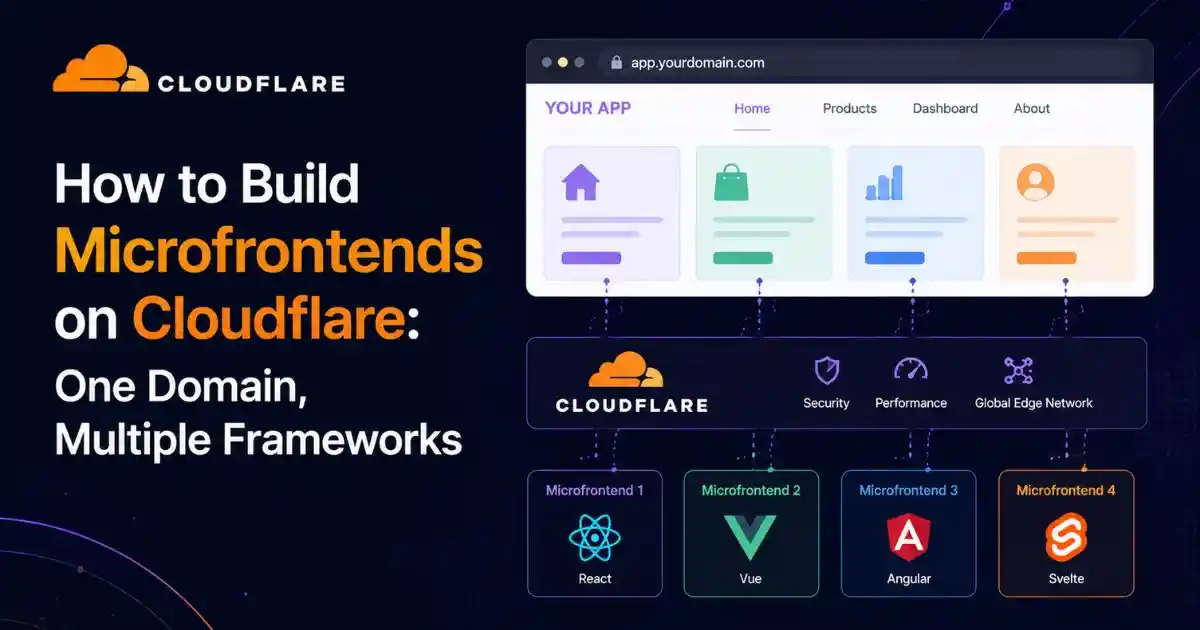
Cloudflare microfrontends use a router Worker in front of several independently deployed frontend Workers. You assign each application a distinct path, such as /, /blog, or /docs, and connect it to the router with a service binding. The router matches requests by path, forwards each request internally, removes the mount prefix, and rewrites relevant HTML and CSS paths so assets load from the correct public URL.
The simplest setup is available through Cloudflare’s dashboard template. Deploy each frontend first, choose the Microfrontends template, select a domain, map paths to Workers, optionally enable preloading and smooth transitions, then deploy the router Worker.
Architecture Basics
What Are Microfrontends on Cloudflare?
Microfrontends apply the organizational ideas of microservices to the browser-facing layer. Instead of one large frontend repository, build pipeline, framework, and release schedule, the user interface is divided into smaller applications. Each application can have its own source repository, team, framework, tests, and deployment lifecycle.
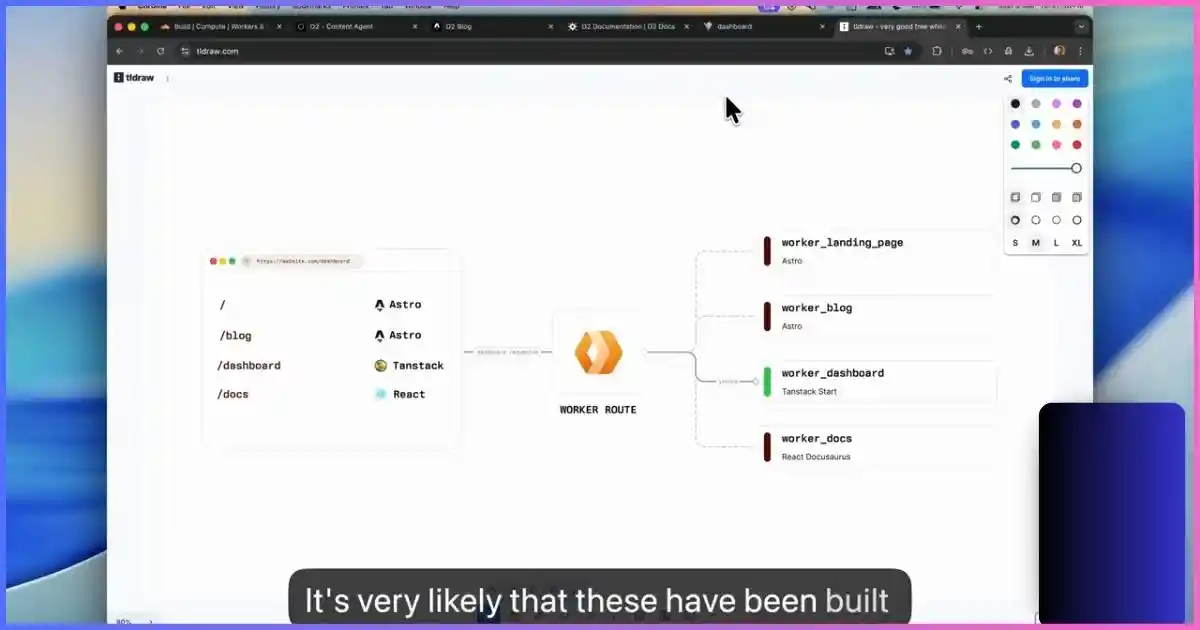
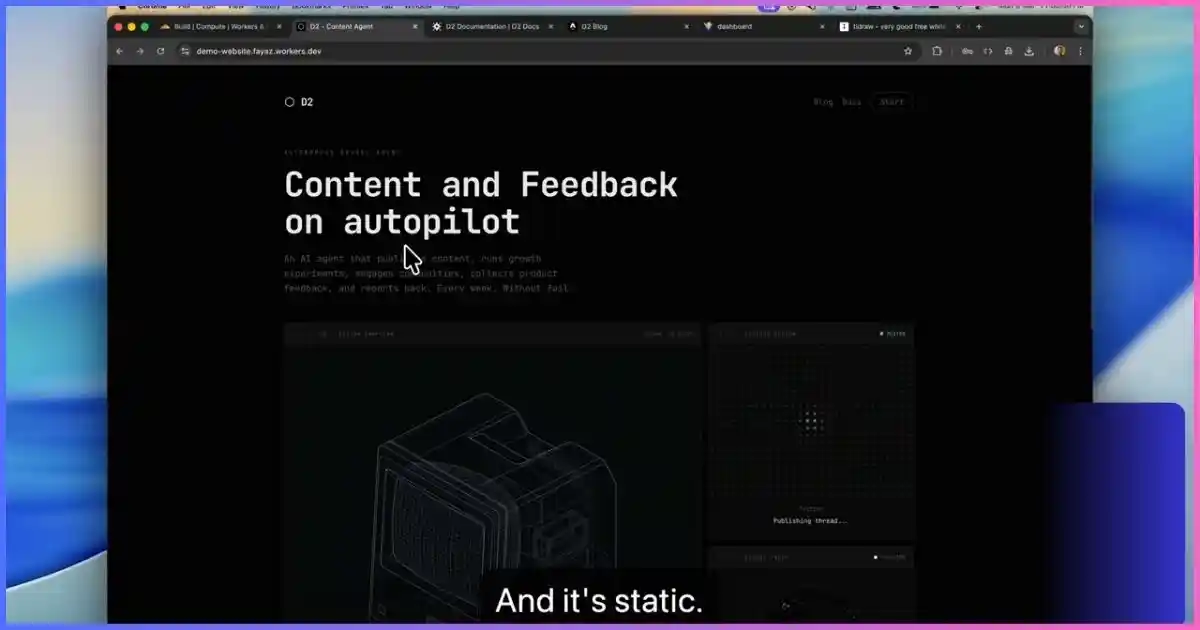
Cloudflare’s implementation uses full applications mounted at URL paths. A marketing team might own the homepage at /, a content team might own an Astro blog at /blog, a documentation team might run a Docusaurus or Astro site at /docs, and a product team might operate a React dashboard at /dashboard. Although those applications are separately deployed, users access them through the same public domain.
This is not the same as loading four framework bundles into one page or using an iframe for every section. The Cloudflare router makes a server-side routing decision at the edge. A request for example.com/docs/getting-started is sent to the docs Worker, while example.com/dashboard is sent to the dashboard Worker.
A Practical Example
| Public path | Possible framework | Owning team | Deployment |
|---|---|---|---|
/ | Astro or static assets | Marketing | marketing-site Worker |
/blog | Next.js, Astro, or Remix | Content | company-blog Worker |
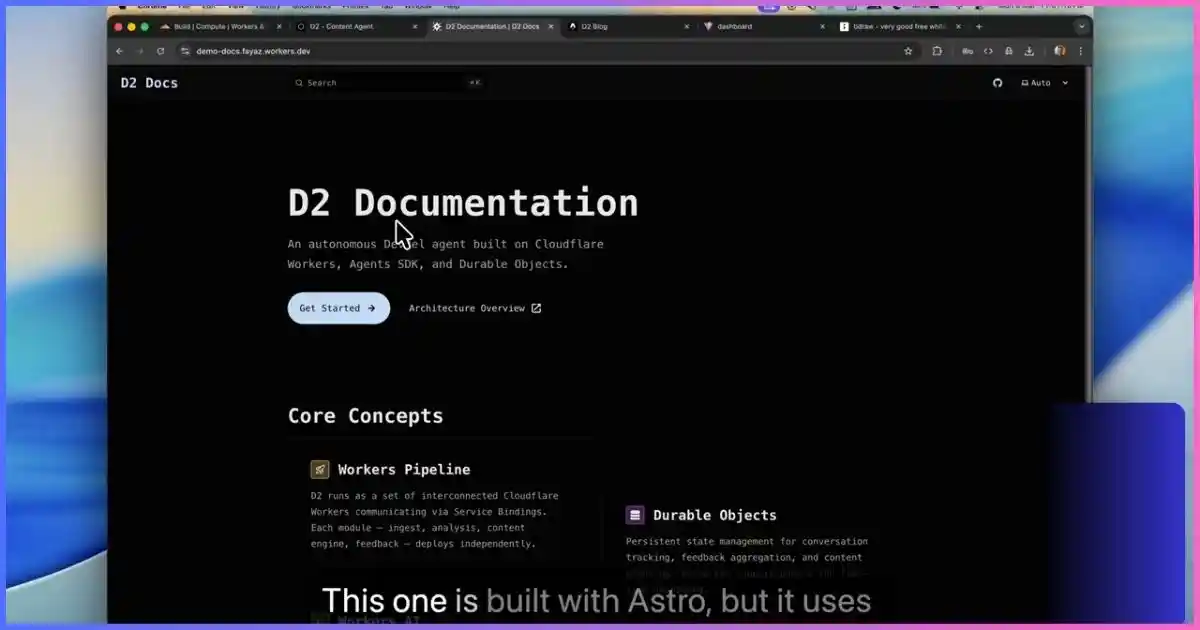
/docs | Docusaurus or Astro | Developer experience | product-docs Worker |
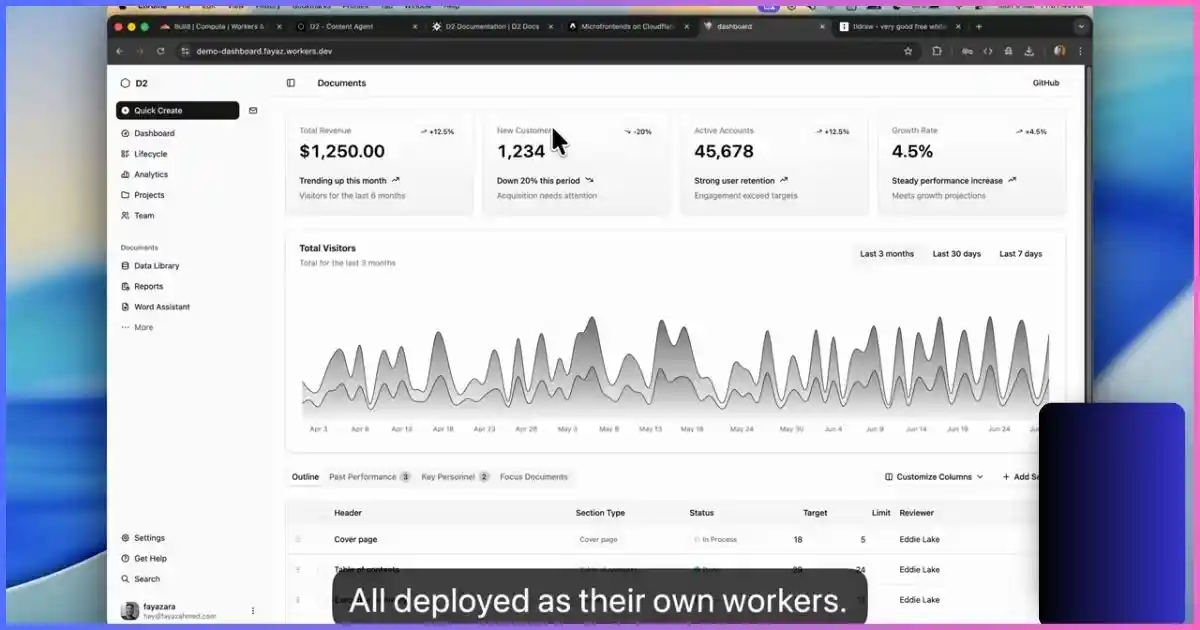
/dashboard | React, Vue, or SvelteKit | Product | customer-dashboard Worker |
Behind the Scenes
How Cloudflare’s Microfrontend Router Works
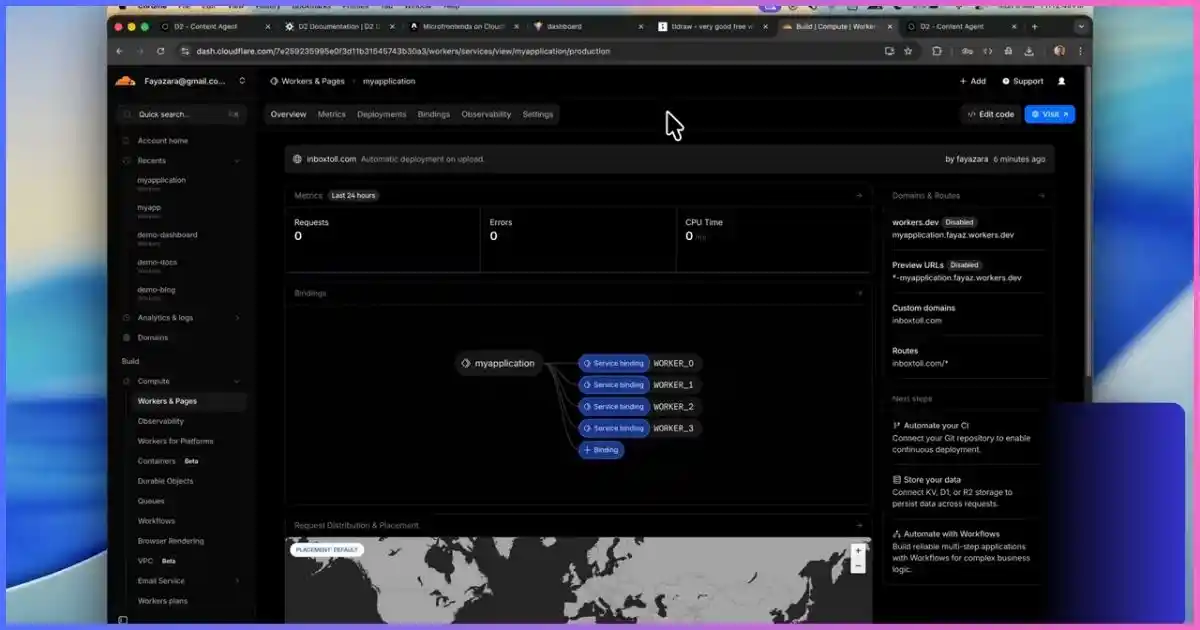
The Cloudflare template creates an additional Worker that acts as the entry point for the domain. This router Worker does not need to contain every application. It connects to the child Workers through Cloudflare service bindings, which allow one Worker to call another without exposing a separate public API hop.
For each browser request, the router performs five important jobs:
- It reads the incoming URL path.
- It compares that path with the configured routes.
- It chooses the most specific matching microfrontend.
- It forwards the request to the selected Worker through a service binding.
- It adjusts response content and headers when necessary so the mounted application works at its public path.
Suppose the docs application is mounted at /docs. A visitor requests /docs/guides/install. The router matches /docs, sends the request to the docs binding, and strips the mount prefix. The docs application receives /guides/install, which lets it behave much like it does at its own root.
Cloudflare matches routes by specificity, with longer paths taking precedence. This means /docs/api can be routed separately from the more general /docs route. The root path / normally acts as the final fallback.
Why Teams Use It
Benefits and Tradeoffs of Microfrontends
Independent Deployments
A team can ship a new docs version without rebuilding the dashboard or marketing site. Cloudflare says an existing microfrontend Worker can be deployed or rolled back independently; the router automatically reaches its current deployed version through the binding. The router only needs to change when you add a route, change a binding, or modify router behavior.
Framework Freedom
Each team can select a framework appropriate for its product area. A mostly static marketing site does not need the same architecture as an authenticated application. The router is the shared delivery layer, not a mandate to use one frontend stack everywhere.
Gradual Migration
Microfrontends support a strangler-style migration. Keep the existing application on /, build one new area separately, route a path to it, and continue moving sections over time. This is often less risky than rewriting a large frontend in one release.
Clearer Ownership
Paths can mirror team boundaries. The docs team owns the docs Worker and its deployment pipeline; the product team owns the application Worker. Incidents and rollbacks can be isolated more easily when ownership is explicit.
The Cost: More Architecture
Microfrontends introduce route configuration, shared design decisions, cross-application navigation, separate logs, multiple release pipelines, analytics coordination, authentication boundaries, and more end-to-end tests. If one small team owns a simple website, a single frontend is usually cheaper to build and operate.
Need Simpler Hosting for a Conventional Website?
Not every project needs edge Workers and multiple frontend teams. Hostinger is a practical option for WordPress sites, traditional web hosting, staging environments, and VPS-hosted APIs that may support a larger frontend platform.
Prepare the Projects
What You Need Before Building Cloudflare Microfrontends
- A Cloudflare account with access to Workers.
- A domain active in the Cloudflare account for the production router.
- Two or more frontend projects already deployed as separate Workers.
- A unique mount path for every application.
- Working standalone deployments before composition.
- A plan for shared navigation, authentication, analytics, SEO, and design tokens.
- Access to each project or cooperation from the teams that own them.
Test every child Worker on its own preview or workers.dev URL first. The router cannot repair a failed build, missing environment variable, server-side exception, or broken application route. Composition should be the final layer added after each frontend is healthy independently.
Plan the Route Table First
Write down the public paths and owning Workers before opening the deployment form. Avoid overlapping ownership unless you intentionally rely on specificity. Always include a root application so unmatched pages have a predictable destination.
Official Demonstration
Watch: One Domain, Multiple Frameworks on Cloudflare
The video below shows the dashboard workflow from separate Worker deployments to one path-routed domain. The written tutorial adds implementation details and production checks that are easier to miss in a short demonstration.
Hosting a Companion API or Staging Site?
A Hostinger VPS can host supporting services, databases, internal tools, or non-Worker projects alongside your Cloudflare-delivered frontend architecture.
Dashboard Walkthrough
How to Build Microfrontends on Cloudflare: Step by Step
Step 1: Deploy Every Frontend as Its Own Worker
Build and deploy the marketing site, blog, documentation, dashboard, or other applications separately. Each can use a different framework, repository, and build command. Cloudflare Workers supports full-stack frameworks and static assets, so the child application can be server-rendered, client-rendered, statically generated, or a mixture supported by its framework adapter.
Open every standalone deployment and test its internal routes, JavaScript, CSS, images, redirects, forms, and APIs. Record the Worker names because the microfrontend form will ask you to select them.
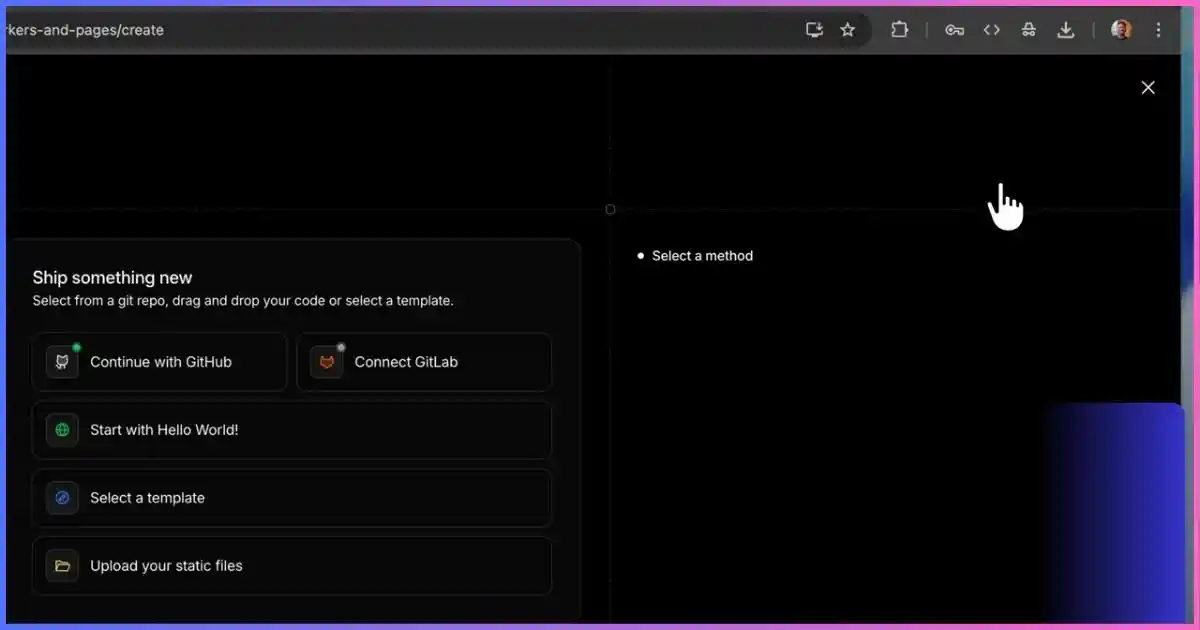
Step 2: Open the Worker Creation Flow
In the Cloudflare dashboard, open Workers & Pages and start creating a new application or Worker. Select the template method rather than uploading another frontend directly. Dashboard wording can evolve, but the current flow exposes a Deploy Microfrontend template.
Step 3: Name the Router Worker and Select the Domain
Give the router a descriptive Worker name such as company-web-router or production-microfrontends. This Worker becomes the composition layer, so distinguish it clearly from the child applications.
Select the domain that visitors will use. The domain must be available in the Cloudflare account. The router will receive requests for the configured host and then dispatch them internally.
Step 4: Decide Whether to Enable Smooth Transitions
The setup form offers smooth transitions between applications. When enabled, the generated router uses the browser View Transitions API where supported. Cloudflare’s documented configuration sets smoothTransitions to true and injects transition CSS into HTML responses.
This is progressive enhancement. Browsers without View Transitions support continue with normal navigation. Enable it when the effect suits the site, but do not treat animation as a substitute for consistent headers, spacing, typography, and navigation.
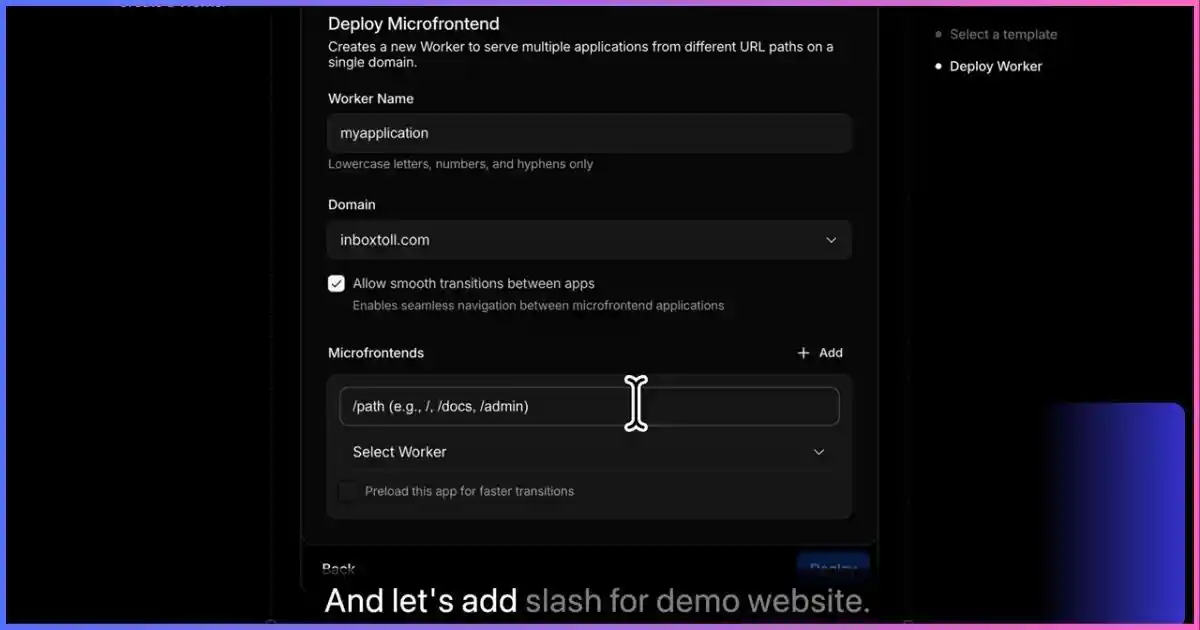
Step 5: Add the Root Microfrontend
Enter / for the main application and select its deployed Worker. The root route should normally be added after planning more specific paths, although Cloudflare’s router handles specificity when evaluating requests.
The root application becomes the fallback for paths that do not match a longer configured mount. Ensure that its own 404 handling does not accidentally imitate pages owned by another Worker.
Step 6: Add the Blog, Docs, and Dashboard Paths
Use the Add control to create another mapping for each application. Enter a distinct public mount and choose the corresponding Worker:
Do not include a trailing wildcard in the basic dashboard form unless the current interface explicitly calls for it. The mount path represents the application and its descendants. Advanced route syntax is available in the generated configuration for dynamic parameters and wildcard segments.
Step 7: Enable Preloading Selectively
The form can preload an application for faster transitions. Preloading tells the router to add browser hints for selected routes so navigation can begin with fewer delays. It is useful for likely next destinations, such as a dashboard frequently opened from the homepage.
Do not preload every heavy application automatically. Unnecessary prefetching consumes bandwidth and may load assets the visitor never uses. Prioritize routes with strong navigation probability and measure the result using real performance data.
Step 8: Deploy the Router Worker
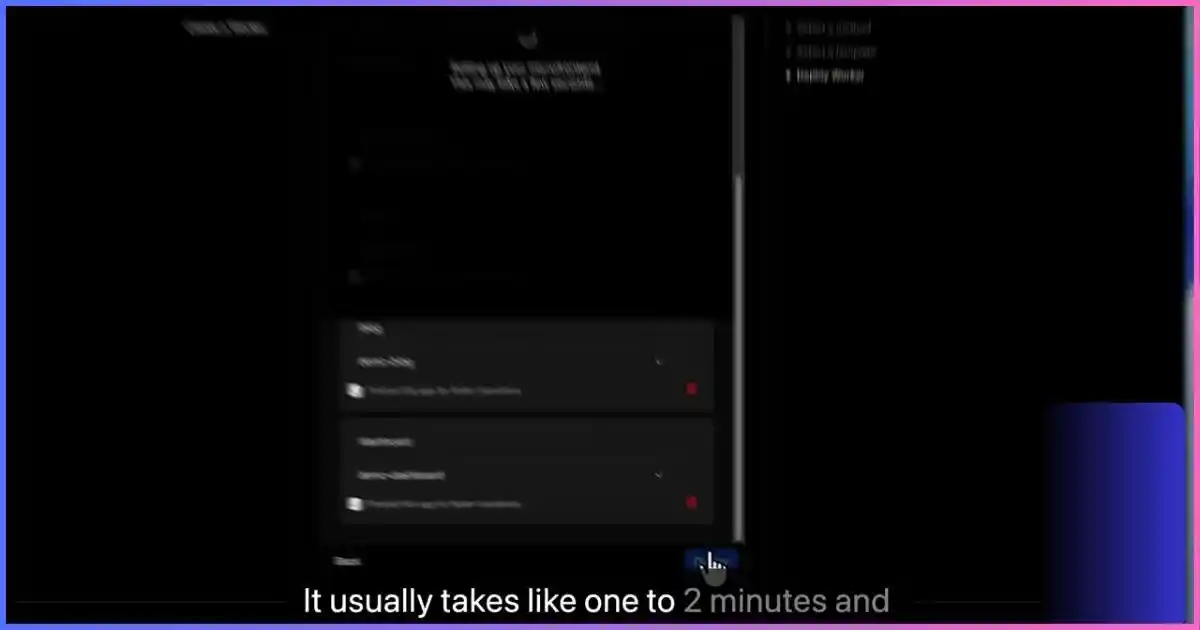
Review the route-to-Worker mappings and deploy. Cloudflare creates the router Worker, service bindings, route configuration, and selected custom-domain association. Deployment may take a short time while the Worker and domain configuration propagate.
Step 9: Test Every Public Route
Open the shared domain and visit every mapped path. Test deep links directly instead of navigating only from the homepage. Refresh a nested page such as /docs/reference/configuration; a microfrontend architecture is not complete if it works through client navigation but fails on a direct request.
Verify page titles, canonical links, JavaScript chunks, stylesheets, images, fonts, forms, redirects, authentication, cookies, API requests, analytics, and 404 behavior.
Configuration Reference
How Routes and Service Bindings Are Configured
The dashboard generates a router Worker with a ROUTES environment variable and service bindings. Understanding the configuration makes future updates easier and helps teams move from a one-time dashboard setup to source-controlled infrastructure.
Example ROUTES Value
Each route needs a unique path and a binding name that exists in the router’s Wrangler configuration. The optional preload flag controls route prefetching. Put the root route last for readability even though the router uses specificity.
Example Service Bindings
The binding name is what the router references; the service name is the deployed Worker. When adding a new application manually, add the service binding, update ROUTES, and redeploy the router with npx wrangler deploy.
Advanced Route Patterns
Cloudflare’s documented router supports static paths, dynamic parameters, wildcard matches, and required segments. Examples include:
Use advanced patterns carefully. A broad wildcard can unexpectedly take traffic from another application. Add automated route tests whenever ownership overlaps.
Mounted Application Details
How Cloudflare Handles Asset Paths, CSS, and Redirects
Mounting a root-built application at /docs creates a common problem. Its HTML may reference /assets/site.css, but the public file now belongs under /docs/assets/site.css. Without intervention, the browser requests the root application’s assets instead of the docs assets.
The router uses Cloudflare’s HTMLRewriter to add the mount prefix to supported root-relative paths. It can rewrite attributes such as href, src, poster, action, srcset, selected data-* attributes, and framework-specific attributes such as Astro component URLs.
The router also rewrites supported CSS url() references. Default asset prefixes include common directories such as /assets/, /static/, /build/, /_astro/, and /fonts/. A framework with a different output directory may need the ASSET_PREFIXES variable. Next.js commonly uses /_next/, for example.
Test More Than the Homepage
- Directly request nested pages and refresh them.
- Open image and font URLs from browser developer tools.
- Verify source maps and lazy-loaded JavaScript chunks.
- Test form actions and redirects that begin with
/. - Check framework data endpoints and server actions.
- Confirm cookies use the intended domain and path.
Team Workflow
Local Development, Testing, and CI/CD
Run the Router and Frontends Locally
Cloudflare documents local development through Wrangler’s service-binding support. Run the router with wrangler dev, then run each child Worker in a separate terminal. This lets the local router call local services with production-like boundaries.
Use Remote Bindings When You Only Own One App
A frontend developer should not need every repository just to work on one route. Cloudflare supports remote service bindings during local development. Set "remote": true for a child service that should use its deployed Worker while the router and current application run locally.
Give Each Worker Its Own Pipeline
Connect each repository to its own Workers Build or external CI/CD pipeline. A docs commit should build and deploy only the docs Worker. The router repository should deploy only when route mappings, bindings, transition behavior, or shared routing logic change.
Test at Three Levels
- Application tests: Unit, component, and integration tests inside each frontend.
- Router tests: Verify every path resolves to the intended binding and prefix stripping is correct.
- End-to-end tests: Navigate across application boundaries on the production-style domain and test direct deep links.
Plan Rollbacks
Independent deployment makes rollback easier, but contracts still matter. If the dashboard assumes a new API or shared navigation package, rolling back only one layer may create incompatibility. Version shared contracts and keep compatible API windows during releases.
Need a Separate VPS for APIs or Build Services?
Hostinger VPS hosting can complement a Cloudflare frontend when your architecture also needs a conventional server, long-running process, private build service, or application that is not designed for Workers.
Production Quality
SEO, Analytics, Authentication, and Design Consistency
SEO Across Multiple Applications
One domain can consolidate brand authority and give users logical paths, but SEO does not become automatic. Every microfrontend still controls its own title tags, descriptions, canonical URLs, structured data, headings, internal links, status codes, and indexability.
- Generate canonical URLs using the public mount path, not the standalone Worker URL.
- Include all indexable routes in a coordinated sitemap strategy.
- Prevent preview and
workers.devURLs from competing with production canonicals. - Return real 404 status codes from unknown routes.
- Keep breadcrumb and internal-link conventions consistent.
- Ensure robots rules do not conflict between applications.
Analytics
Use a shared measurement plan. Separate teams can maintain their own events, but page views, user IDs, consent state, attribution, and cross-route navigation need consistent definitions. Otherwise, one domain produces several incompatible datasets.
Authentication and Cookies
Decide whether authentication is global or route-specific. Use secure, HTTP-only cookies where appropriate and explicitly test cookie domain, path, SameSite, and expiration behavior through the router. A dashboard may need a domain-wide session while a marketing preference cookie should remain scoped. Do not assume that working authentication on a standalone Worker proves it works after mounting.
Headers and Security Policy
Coordinate Content Security Policy, HSTS, framing rules, referrer policy, permissions policy, and caching headers. Conflicting application headers can create subtle failures. Define which headers belong to the router and which remain the responsibility of the child Worker.
Shared Navigation
A user should not have to learn a new header on every path. Standardize the global navigation API and release it through a shared component package or a documented HTML contract. Ensure active states understand mount paths and that links use the public domain rather than standalone Worker URLs.
Common Problems
Troubleshooting Cloudflare Microfrontends
A Route Opens the Wrong Application
Review route specificity and spelling. Confirm that each binding in ROUTES exactly matches a service binding in Wrangler configuration. Add tests for overlapping patterns such as /docs and /docs/api.
CSS, Images, or JavaScript Return 404
Inspect the requested asset URL in browser developer tools. Add missing framework output paths to ASSET_PREFIXES, verify the child Worker actually serves the file, and consider configuring the framework’s public base path.
Nested Pages Work Through Navigation but Fail on Refresh
The child application may not handle direct server requests for that route, or the pattern may not include the nested path. Test the Worker independently and confirm the router strips the mount prefix as expected.
Redirects Lose the Mount Prefix
Inspect the response Location header and confirm the target is appropriate for the public route. Avoid hard-coded standalone Worker hostnames. Test login redirects, trailing-slash redirects, language redirects, and form submissions.
Transitions Do Not Animate
Confirm smoothTransitions is enabled and test in a browser that supports the View Transitions API. Unsupported browsers are expected to navigate normally.
Preloading Makes Performance Worse
Disable preloading for low-probability or heavy routes. Measure transferred bytes, Largest Contentful Paint, Interaction to Next Paint, and mobile behavior rather than assuming more prefetching is always faster.
Authentication Works on the Standalone Worker but Not the Shared Domain
Check callback URLs, allowed origins, cookie domain and path, secure transport requirements, and environment-specific secrets. Authentication providers must recognize the public domain and mounted callback path.
Analytics Double-Counts Page Views
Multiple applications may each initialize a global tracker while transition code also sends a navigation event. Establish one page-view ownership rule and distinguish full document navigation from client-side navigation.
A New Deployment Does Not Require a Router Change
This is normal when updating an existing child Worker. The service binding points to the deployed service, so the router uses its latest deployment. Redeploy the router only when changing routes, bindings, or router configuration.
Questions Answered
Frequently Asked Questions
Can Cloudflare host multiple frameworks on one domain?
Yes. Deploy the applications as separate Workers and connect them to a microfrontend router. Each public path can use a different framework while sharing the same domain.
Do the applications need to be in one repository?
No. Independent repositories and pipelines are a central benefit. The router only needs the deployed Worker names, service bindings, and route configuration.
Does the router add another public network request?
The router calls child Workers through Cloudflare service bindings rather than requiring a normal public HTTP API hop between separate origins.
Can I add a new microfrontend later?
Yes. Deploy the new Worker, add its service binding, add a route to ROUTES, and redeploy the router.
Can I use a custom domain?
Yes. Cloudflare’s documentation recommends a custom domain for the production router Worker. The child Workers remain connected through bindings.
Will root-relative assets work under a subpath?
The generated router rewrites supported HTML and CSS paths for known asset prefixes. Test framework-specific resources and add custom prefixes when necessary.
Are microfrontends good for SEO?
They can support strong SEO because content lives on one domain, but each application must produce correct public canonicals, metadata, links, status codes, and sitemap entries.
Should a small website use microfrontends?
Usually not. A single frontend is simpler unless you have independent teams, separate release needs, a gradual migration, or clearly different application boundaries.
Final Recommendation
When Cloudflare Microfrontends Are the Right Choice
Cloudflare’s router template makes path-based frontend composition unusually approachable. The architecture is a strong fit when several teams already own separate applications, when releases need to happen independently, or when a large frontend is being replaced one section at a time.
The important word is independently. The applications can use different frameworks and pipelines, but they still need shared agreements for URLs, navigation, design, identity, security headers, analytics, and user experience. The router removes much of the delivery plumbing; it does not remove the need for platform governance.
Start with two applications and a small route table. Prove deep linking, asset rewriting, authentication, analytics, rollback, and performance before expanding. A disciplined two-app architecture is more valuable than a fashionable collection of loosely coordinated frameworks.
Need Hosting Beyond Cloudflare Workers?
Hostinger can support conventional websites, WordPress properties, staging environments, databases, and VPS-hosted services that sit alongside or behind your frontend platform.
Related Guides
Connect this architecture guide with analytics, self-hosted AI agents, portable workflows, and business planning:
- Add Google Analytics to an Astro site and avoid missing or duplicated page views.
- Deploy Hermes Agent on a Hostinger VPS for an always-on AI service behind your web tools.
- Set up OpenClaw on a Hostinger VPS for another self-hosted agent option.
- Create a portable AI agent on a USB drive for local, transportable Hermes workflows.
- Explore how to become your own bank and learn the financial foundations behind funding a business responsibly.