Twin.so Review : Is This “AI Employee” Actually Worth Hiring?
By JoshWP Team | Updated: | ~14 min read | No-Code AI Agents · Automation
Quick Answer
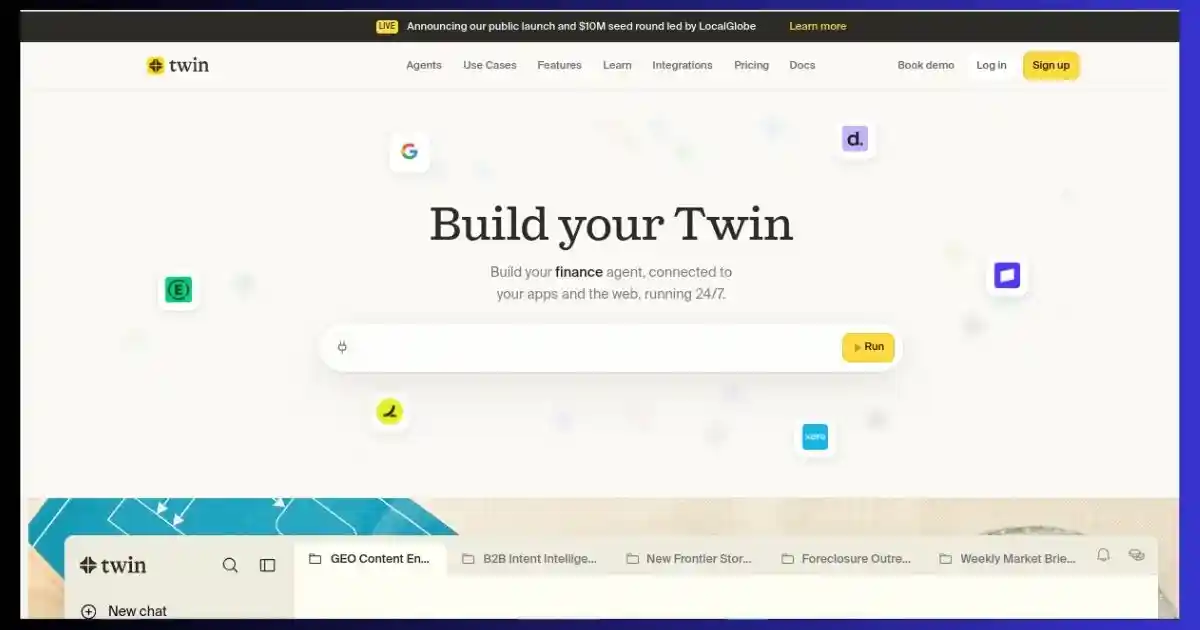
Twin.so is a no-code AI agent platform — now positioned as an “AI employee” — that builds and runs autonomous agents from a plain-English chat. It connects to 5,000+ tools via self-written API integrations and falls back to a real browser automation agent for any site without an API, covering roughly 90% of the web that traditional automation tools like Zapier and Make can’t reach. It lives inside Slack, Teams, and your inbox, runs on a schedule or trigger, and is backed by $10M in seed funding led by LocalGlobe. Pricing starts from €20/month on a credit-based Pro plan, with a 14-day free trial. It’s best for solopreneurs, SMBs, and startup ops teams who want automation without hiring a developer — less ideal if you need deep self-hosted control (n8n) or the widest possible integration catalog out of the box (Zapier).
Every automation tool you’ve tried so far has made the same assumption: that you already know how automation works. Zapier wants you to understand triggers and actions. Make wants you dragging modules around a canvas. n8n wants you comfortable with JSON and self-hosted infrastructure. That assumption is exactly where most non-technical founders, solopreneurs, and small business owners get stuck — not because the work is hard, but because the tooling was never built for them.
Twin.so takes a different starting point. You describe the outcome you want in plain language — “every morning, find the ten most active SaaS founders on LinkedIn, connect with them, and send a personalized intro” — and Twin writes the automation itself: the API integration, the logic, the schedule, all of it. When no API exists for a tool, Twin’s browser agent steps in and operates the site like a human would, clicking, typing, and navigating exactly the way you would if you had the time.
This Twin.so review covers everything: what it actually does, how the credit-based pricing works down to the last detail, the company and funding behind it, real user feedback (including the less flattering kind), and a full head-to-head against Zapier, Make, n8n, and Claude Cowork — so you can decide if it deserves a spot in your stack.
Table of Contents
- 1. What Is Twin.so?
- 2. The Company Behind Twin — Founders & Funding
- 3. How Twin Actually Works (Build Mode vs Run Mode)
- 4. Watch Twin In Action
- 5. Core Features — Full Breakdown
- 6. Meet the Agents — Twin’s Employee Roster
- 7. Twin.so By The Numbers
- 8. Pricing — Credits, Plans & Real Costs
- 9. Security & Compliance
- 10. Twin vs Zapier vs Make vs n8n vs Claude Cowork
- 11. Real Customer Feedback
- 12. Who Is Twin Built For?
- 13. Pros and Cons
- 14. Final Verdict
- 15. Frequently Asked Questions
What Is Twin.so?
Twin.so started life in 2024 as a no-code AI agent builder — a tool that let anyone create autonomous agents through plain English conversation instead of a visual flowchart. That core idea hasn’t changed, but the framing has evolved: Twin now describes itself as “the AI company builder,” positioning each agent less like a workflow and more like a digital employee that lives inside Slack or Microsoft Teams, watches your inbox, and proactively does work before you think to ask for it.
The mechanics underneath are what make this more than a repositioning exercise. When you describe an automation to Twin, the system doesn’t search a pre-built connector library and give up if one doesn’t exist — it writes the API integration itself, in the backend, with no library, no custom MCP server, and no engineering ticket required. If a tool genuinely has no API at all, Twin’s browser automation agent takes over: a real, cloud-hosted browser session that logs in, clicks, types, and extracts data exactly the way a human assistant would. Independent analysis of Twin Labs’ own usage data suggests browser automation is involved in a large majority of real-world workflows on the platform — a strong signal that most of the internet still isn’t reachable through APIs alone, no matter how many integrations a competitor advertises.
On top of that, Twin routes every step of every task to whichever model is currently best suited for it — Anthropic, OpenAI, or open-source — so you’re never locked into a single vendor’s strengths or blind spots, and each agent keeps its own persistent memory and filesystem rather than starting fresh with every run.
The Short Version
Twin.so = plain-English agent builder + API auto-integration + browser automation fallback + persistent memory + native Slack/Teams presence. It’s built so that “I don’t know how to code this” is never the reason an automation doesn’t get built.
The Company Behind Twin — Founders & Funding
Twin.so is built by Twin Labs, a company co-founded in Paris in 2024 by Hugo Mercier (CEO) and Joao Justi (CTO). Neither founder is new to building and scaling technical companies. Mercier previously founded and ran Dreem, a neurotech company that raised roughly $60 million, grew to around 150 employees, and eventually exited — its sleep-monitoring headband technology was even used to track astronauts’ sleep on the International Space Station. Justi’s background runs through algorithmic trading and cryptography: he founded a trading fund at 22, later worked at homomorphic-encryption company Zama, and founded Videosupport, which was acquired in 2023.
The founding insight behind Twin was almost literal: the two asked whether they could “duplicate” themselves by training an AI agent to perform tasks the way they personally would — watching screens, clicking through interfaces, and learning workflows the way a new hire shadows a mentor, rather than being hand-fed rigid, pre-mapped instructions.
Twin Labs raised its seed round on January 31, 2024, and later announced a public launch alongside a $10 million seed round led by LocalGlobe, with participation from operators connected to Hugging Face, Datadog, and Alan. The company has scaled to a small, focused team and now counts real estate brands including Compass, RE/MAX, and Keller Williams among the organizations using Twin.
How Twin Actually Works
Twin’s own onboarding promise is “plug-and-play, live in 15 seconds,” and the setup really is just three steps.
Add Twin to Slack or Teams
Install it from the Slack or Microsoft Teams directory and Twin joins your workspace like a new teammate — no separate app to check, no second inbox to babysit.
Connect Your Tools
Link your CRM, your drive, your inbox, your data sources. If Twin doesn’t already have a pre-built integration for something you use, it writes one on the fly — no library, no engineering ticket.
Assign Its First Job
Give Twin the task that eats your week — lead research, inbox triage, a weekly report — and it runs on your schedule from there, checking in only when it needs a decision from you.
Under the hood, every task falls into one of two cost modes, and understanding the difference is the single most useful thing you can know before you start using Twin seriously:
🛠️ Build Mode
The first time you ask for something new, Twin has to reason through the problem — figure out which tools to use, write the integration, test it, and confirm the plan with you before running. This uses high-reasoning models and costs more credits, but it only happens once per automation.
⚙️ Run Mode
Every repeat execution reuses the agent’s memory from the original build and switches to a lighter, cheaper model. Repeat runs are typically 3–10x cheaper than the initial build — build once, run forever.
Why this matters for your budget: the sticker price of “Twin costs €20/month” is misleading in isolation — what actually matters is how many builds vs. runs your use case needs. A single well-built lead-research agent that runs daily will cost far less per month than five different one-off tasks you rebuild from scratch each time.
Watch Twin In Action
Reading about an AI agent only gets you so far — here’s a real walkthrough of Twin being built and run end-to-end.
Video not loading? Watch it directly on YouTube →
Core Features — Full Breakdown
Twin packs a lot into what looks, on the surface, like a chat window. Here’s every major capability worth knowing about before you commit credits to it.
Conversational Agent Builder
No flowcharts, no drag-and-drop canvas. You describe the outcome in plain English and Twin plans the steps, asks clarifying questions where it needs to, and builds the agent — genuinely usable by someone who has never heard the word “webhook.”
Browser Automation Agent (No API Needed)
Twin’s biggest differentiator. When no integration exists, a real cloud browser logs in and operates the site like a person — clicking, filling forms, scrolling, extracting data. It reasons in real time, so it can often self-correct when a page layout changes, unlike brittle scripted automations.
Scheduled & Trigger-Based Runs
Cron-style schedules, incoming-email triggers, webhook events, and manual one-off runs are all supported. Build a report agent once and it can post to a Slack channel at 8am every Monday without you touching it again.
Every Model, Routed Automatically
Twin benchmarks frontier models from Anthropic, OpenAI, and the open-source world, and routes each step of each task to whichever is best and cheapest for that specific job — planning tends to use high-reasoning models like Opus, while repeat execution drops to lighter, cheaper models.
Infinite Context Memory
Rather than compacting or summarizing context as conversations grow (the approach most chat-style tools use), each Twin agent stores everything — every conversation, every document — in its own filesystem, and can even search other agents’ context when relevant. The more it’s used, the smarter and more efficient it gets.
Proactive, Not Just Responsive
Twin is explicitly designed to build the thing you’d want before you ask for it — the recurring report, the weekly digest, the dashboard you mentioned once in passing. It proposes; you approve or decline.
Auto-Generated Dashboards & UI
Twin can build a branded interface, CRM view, or client-facing dashboard directly from an agent’s underlying data — no separate no-code app builder required.
Agent Deployment & Monetization
Built agents can be shared publicly via a link or monetized directly — useful for agencies that want to package a repeatable workflow (a LinkedIn outreach agent, say) and sell access to it rather than rebuilding it for every client.
Worth flagging: Twin was reportedly one of a small group of companies (roughly 15) selected globally to alpha-test OpenAI’s Computer-Using Agent model — the technology underpinning ChatGPT’s own browser agent. That early access is credited with shaping the maturity of Twin’s browser automation well ahead of most competing no-code tools.
Meet the Agents — Twin’s “Employee Roster”
A nice touch in how Twin frames its product: pre-built agent templates are presented as named roles rather than abstract workflows, which makes it much easier to picture what you’re actually deploying.
Sophie
Inbox operations agent
Aiko
Product operations agent
Thomas
Research agent
Priya
Customer success agent
Alex
Browser automation agent
Marc
Sales follow-up agent
Elena
Marketing execution agent
Carlos
Finance admin agent
James
Executive assistant agent
These are starting templates, not fixed roles — every one of them can be renamed, retrained, and reconfigured around your actual workflow.
Twin.so By The Numbers
Some of these figures are Twin’s own published stats; others are industry benchmarks used for context. Each chart is labeled accordingly.
Free Trial Credit Ramp (First 14 Days)
Source: Twin’s official documentation. New accounts start with 1,000 credits and gain 200/day, capped at 3,600 total trial credits.
How Twin Actually Completes Tasks
Based on independent analysis of Twin Labs’ public usage data — most real workflows rely on browser automation for at least one step.
Integration Breadth: Twin vs the Category
Approximate, publicly stated figures as of mid-2026. Counting methods differ by vendor — confirm current numbers on each site.
Build Once, Run Many: Relative Credit Cost
Illustrative relative cost per execution. Twin states repeat runs are typically 3–10x cheaper than the original build.
Feature Comparison: Twin vs Zapier vs Make vs n8n
Editorial scoring (0–10) based on researched features, not an official benchmark from any vendor.
Monthly Cost: Twin vs a Human Hire
General market estimates for a part-time virtual assistant and a full-time ops hire, for illustrative comparison only — actual Twin cost depends heavily on your credit usage and task mix.
Pricing — Credits, Plans & Real Costs
Twin runs on a credit-based pricing model, which is more flexible than a flat seat price but does take a minute to actually understand. Here’s the full breakdown.
Pro Plan
From €20/month
2,000 credits · scales up to 100k+ credits
- ✓ ~4 agent builds / month at the base tier
- ✓ ~41 agent runs / month at the base tier
- ✓ 100 outbound emails/day, scales with credits
- ✓ Unlimited chat, web scrapers, browser agent
- ✓ Image, video & slide generation, web search
- ✓ Time triggers, webhooks, agent monetization
- ✓ Priority support
Enterprise Plan
Custom Pricing
Custom credit volume & commercial terms
- ✓ Shared/pooled credits across your whole team
- ✓ Private Slack channel with the Twin team
- ✓ Dedicated agent optimization & deployment support
- ✓ Custom contracts, SLAs & private-events access
How the Free Trial Actually Works
Every new account starts with 1,000 credits immediately. Over a 14-day trial window, Twin adds another 200 credits per day, for up to 3,600 total trial credits. If you run out mid-trial, work already in progress isn’t interrupted — you simply get more credits the next trial day, or you can upgrade to Pro immediately if you want to keep moving.
Practical Tip for Controlling Cost
Because Build Mode is the expensive part, get your agent’s instructions as specific as possible on the first attempt, and reserve browser automation for tasks that genuinely have no API alternative. Once an agent is built and validated, repeat runs cost a fraction of the original — so the real economics of Twin favor a smaller number of well-built, frequently-run agents over constantly building new one-off tasks.
Where users push back: credit-based pricing means your monthly cost is harder to forecast than a flat seat fee. A handful of independent reviews and at least one public complaint describe a browser-automation task looping and consuming an unexpectedly large number of credits before it could be stopped — a real risk worth knowing about, and a good reason to start conservatively and watch the in-app credit usage dashboard closely while you learn the platform.
Security & Compliance
For a tool that logs into your accounts and takes real actions on your behalf, security posture matters more than it does for most SaaS products. Twin publishes certifications for ISO 27001, SOC 2 Type I, and SOC 2 Type II, audited and verifiable through a public trust center. Twin also builds in guardrails around irreversible actions — anything that can’t easily be undone requires explicit approval before it executes, rather than running fully autonomously by default.
That said, no automation platform can promise zero risk once it has your credentials and is clicking through live systems on your behalf. Treat Twin (and any browser-automation tool) the way you’d treat a new hire: start it on lower-stakes, reversible tasks, review its output closely at first, and expand its permissions as you build trust in how it performs.
Twin vs Zapier vs Make vs n8n vs Claude Cowork
No automation tool wins on every axis, and Twin is no exception. Here’s an honest side-by-side across the platforms people most often compare it to.
| Feature | Twin.so | Zapier | Make | n8n |
|---|---|---|---|---|
| Build method | Plain-English chat | Visual drag-and-drop | Visual canvas | Visual + code |
| Browser automation (no-API fallback) | ✅ Built-in, core feature | ❌ Not available | ❌ Not available | ⚠️ Via community plugin only |
| No-code required | ✅ Fully | ✅ Mostly | ✅ Mostly | ⚠️ Partial — JSON/API comfort helps |
| Published integration count | 5,000+ | 9,000+ | ~1,500–3,000 | ~1,000+ native |
| Self-hostable | ❌ No | ❌ No | ❌ No | ✅ Yes (Community edition) |
| Native Slack/Teams “employee” presence | ✅ Yes, core to the product | ⚠️ Via integration only | ⚠️ Via integration only | ⚠️ Via integration only |
| Persistent, uncompacted agent memory | ✅ Yes | ❌ No | ❌ No | ⚠️ Depends on setup |
| Agent marketplace / monetization | ✅ Yes | ❌ No | ❌ No | ❌ No |
| Pricing model | Credit-based | Task-based | Operation-based | Execution-based (self-host: free) |
| Published starting price | From €20/mo | From ~$19.99/mo | From ~$9/mo | From ~$20/mo cloud, free self-hosted |
| Security certifications | ISO 27001, SOC 2 Type I & II | SOC 2, GDPR tools | SOC 2, GDPR tools | Varies by hosting |
| Company maturity | Founded 2024, $10M seed | Founded 2011, market leader | Founded 2012, acquired by Celonis | Founded 2019, $55M Series B |
Twin vs Zapier
Zapier still wins on raw integration count and is the safer default if every tool you use already has a polished, native Zapier integration and you never need to touch a site without an API. Twin wins the moment you need to automate something Zapier simply can’t reach — no-API internal tools, legacy systems, niche local-business software — or when you’d rather describe a task in a sentence than build a multi-step Zap by hand.
Twin vs n8n
n8n is the better choice for engineering-led teams that want self-hosted infrastructure, full code-level control, and data residency guarantees. Twin is the better choice if you want to go from idea to deployed agent in minutes without owning any infrastructure or writing a line of code.
Twin vs Make
Make’s visual canvas gives more granular control over complex branching logic once you’ve learned it, and its per-operation pricing can be very economical for high-volume, multi-step scenarios. Twin trades some of that visual precision for a much lower barrier to entry and the ability to reach sites Make’s connector library doesn’t cover.
Twin vs Claude Cowork
Twin’s own positioning here is direct: Cowork compacts context as a conversation grows, while Twin keeps infinite, uncompacted memory per agent and runs proactively on a schedule inside Slack and Teams for an entire team — not just a single chat session for a single user.
Real Customer Feedback
Rather than cherry-pick only glowing quotes, here’s a representative mix of what real users — sourced from Twin’s own published customer logos and independent review sites — actually say.
“n8n is completely dead in our company. Twin worked from the start with natural language — I built things even our engineers hadn’t been able to do.”
Alejandro Villanueva, Nivelics
“We use Zapier, we use Make — shutting them all down. They’re useless for us now because this is such a better platform.”
Nearshore custom software & AI consultancy, via Twin.so
“Twin is great for people who don’t know what an API is, don’t know what a webhook is. It democratizes automation.”
B2B sales & automation agency, via Twin.so
A Trustpilot reviewer described a browser-automation session that looped and burned through more than 1,800 credits before support could resolve it, calling early support response underwhelming.
Paraphrased from a public Trustpilot review, 2026
Take both ends of that spectrum seriously: Twin clearly delivers a step-change for technical teams frustrated with n8n and non-technical teams who’ve outgrown simple Zaps — but as an early-stage platform, it can also produce the kind of runaway-cost edge case described above. Set credit alerts and start small.
Who Is Twin Built For?
🚀 Solopreneurs & Freelancers
LinkedIn outreach, cold email sequences, social replies, and lead qualification — all without hiring a VA or a developer. The browser fallback reaches platforms that have never had a Zapier integration.
🏠 SMB Owners
Real estate agents, pool cleaning services, food trucks, rental operators — businesses that were historically priced or skilled out of automation entirely. Twin is reportedly its fastest-growing segment, and simple enough to configure from a phone.
📊 Startup Ops Teams
Employee onboarding, invoice retrieval, CRM data entry, and recurring reporting — replacing a stack of scattered Zaps and Make scenarios with one conversational interface that lives in Slack.
🏢 Agencies
Build once, deploy for every client, and optionally monetize the agent through Twin’s marketplace. Workspace features let agents share context across a team managing multiple client accounts.
Where Twin is a weaker fit: teams that need self-hosted infrastructure for compliance reasons (n8n is the better call), teams that need the single widest possible pre-built integration catalog with zero custom-build risk (Zapier), or budget-conscious teams that want the most predictable flat-rate pricing at high volume (Make’s operation-based model can be cheaper at scale for pure API-to-API workflows).
Pros and Cons
✓ Pros
- Genuinely no-code — describe the task, Twin builds and writes the integration itself
- Browser automation fallback reaches sites with no API, unlike Zapier or Make
- Persistent, uncompacted memory per agent — no re-explaining context every session
- Native presence in Slack and Teams, feels like a real teammate rather than a dashboard
- Backed by $10M in institutional seed funding and a founding team with real prior exits
- ISO 27001 and SOC 2 Type I/II certified — solid baseline for a young company
- Build-once, run-many pricing rewards well-designed agents over time
- Agent marketplace opens a genuine monetization path for agencies and power users
✗ Cons
- Credit-based pricing is genuinely harder to forecast than a flat monthly seat fee
- Browser automation tasks can consume credits quickly if a task loops or misfires
- Fewer raw integrations than Zapier’s much larger, decade-old catalog
- Not self-hostable — a blocker for regulated industries with strict data residency needs
- Early-stage company (founded 2024) — smaller long-term track record than incumbents
- At least one public complaint describes underwhelming support response on a cost-runaway issue
Final Verdict
Twin.so earns its “AI employee” framing more than most tools that borrow the phrase. The combination of plain-English building, genuine API auto-integration, and a real browser-automation fallback solves a problem that Zapier, Make, and even n8n structurally can’t — automating the huge share of the internet that simply has no API. For solopreneurs, SMBs, and startup ops teams drowning in manual work but priced out of a developer hire, that’s a meaningful, not marginal, advantage. The trade-offs are real too: credit-based pricing takes discipline to manage, the company is young, and browser automation can occasionally misbehave in ways that cost real money before you catch it. Start on the free trial, build one well-scoped agent, watch what it actually costs to run, and scale from there rather than betting your whole ops stack on it day one.
9.1/10
Ease of Use
9.4/10
Automation Depth
7.2/10
Pricing Predictability
8.0/10
Track Record / Maturity
Frequently Asked Questions
What is Twin.so and how does it work?
Twin.so is a no-code AI agent platform. You describe an automation goal in plain English, and Twin plans the steps, writes the necessary API integration itself, or falls back to a browser automation agent for sites with no API. Agents then run autonomously on a schedule or trigger, live inside Slack or Teams, and keep persistent memory across runs.
Is Twin.so free to use?
New accounts get 1,000 credits immediately, plus 200 more per day for 14 days (up to 3,600 total) during the free trial. After the trial, the self-serve Pro plan starts from €20/month for 2,000 credits, scaling up as your usage grows. Enterprise plans are custom-priced.
How is Twin.so different from Zapier?
Zapier uses a visual, drag-and-drop builder and only automates apps with a supported integration — it has the larger catalog (9,000+ apps). Twin builds agents from plain-English chat and can automate essentially any website through browser automation, even without an API, which is the core capability Zapier lacks entirely.
What can you actually automate with Twin?
Common use cases include LinkedIn and Google Maps prospecting, inbox triage and outbound follow-up, content research and multi-platform publishing, invoice and CRM data retrieval, employee onboarding checklists, and recurring reporting pulled directly from production databases into Slack.
Do I need to know how to code?
No. Twin is explicitly built for non-technical users — there’s no visual flowchart to learn and no code to write. You describe what you want, Twin asks clarifying questions if needed, and it handles the technical implementation itself.
What’s the difference between Build Mode and Run Mode?
Build Mode is the first-time creation of an agent, using high-reasoning models to plan and test the workflow — it costs more credits but only happens once. Run Mode is every repeat execution afterward, using a lighter model and the agent’s saved memory; Twin states repeat runs are typically 3–10x cheaper than the original build.
Is Twin.so secure and compliant?
Twin publishes ISO 27001 and SOC 2 Type I and Type II certifications, audited and viewable through a public trust center, and requires approval on irreversible actions before an agent executes them. It is not self-hostable, which may be disqualifying for organizations with strict data residency requirements.
Who is behind Twin.so, and is it well funded?
Twin.so is built by Twin Labs, founded in Paris in 2024 by Hugo Mercier (CEO, previously founder/CEO of neurotech company Dreem) and Joao Justi (CTO, background in algorithmic trading and cryptography). The company announced a $10 million seed round led by LocalGlobe at public launch, with participation from operators connected to Hugging Face, Datadog, and Alan.
What are the best alternatives to Twin.so?
The most common alternatives are Zapier (largest integration catalog, best for standard SaaS-to-SaaS automation), Make (strong visual logic and cost-efficient at scale), n8n (self-hosted, developer-grade control), and Claude Cowork or Lindy (closer competitors in the “AI agent” category, though without Twin’s browser automation depth).
Can Twin.so’s costs get out of control?
It’s possible, and it’s the most consistent complaint in independent reviews — a malfunctioning or looping browser-automation task can burn through credits quickly. Mitigate this by monitoring the in-app credit usage dashboard, starting with lower-stakes tasks, and confirming high vs. low reasoning mode before launching a build, since Twin lets you choose this upfront.
Disclosure: This article contains affiliate links. If you sign up through my link I may earn a commission at no extra cost to you. Figures on funding, pricing, and integration counts reflect publicly available information at the time of writing and may change — always confirm current details on twin.so before purchasing.