WriteVoice Review : Transform Your Voice into Polished Content with AI
Stop typing and start speaking your ideas. WriteVoice combines AI-powered voice dictation with intelligent transcription to help content creators, marketers, and professionals capture thoughts 3x faster than typing. With support for 50+ languages, real-time editing, and seamless integration across all your apps, discover how this lifetime deal tool (starting at just $59) is revolutionizing content creation for thousands of users worldwide.
Why Typing is Slowing You Down in
You think faster than you type. Your brain generates brilliant ideas at lightning speed, but by the time you’ve typed out that perfect sentence, three more ideas have already slipped away. The average person types around 40 words per minute but speaks at 150 words per minute—that’s nearly 4x faster. If you’re still relying solely on typing to capture your thoughts, you’re leaving productivity on the table.
Enter WriteVoice, an AI-powered voice dictation and transcription tool that launched on AppSumo to help content creators, marketers, and professionals capture ideas at the speed of thought. Unlike basic speech-to-text apps that require extensive cleanup, WriteVoice uses advanced AI to automatically remove filler words, fix grammar, add proper punctuation, and format your content as you speak.
What sets WriteVoice apart is its system-wide integration that works across Mac, Windows, Linux, Android, and iOS. Whether you’re writing emails, blog posts, social media content, or documents, you can dictate naturally without switching contexts or copying and pasting. With support for 50+ languages and a lifetime deal starting at just $59, WriteVoice is positioning itself as an essential tool for anyone who creates content regularly.
In this comprehensive WriteVoice review, we’ll dive deep into every feature, analyze the lifetime deal pricing, examine real user feedback from 2+ reviews, and show you exactly how this tool can transform your content creation workflow. Whether you’re a blogger, marketer, or small business owner, you’ll discover whether WriteVoice’s lifetime deal represents the productivity boost you’ve been searching for.
60-day money-back guarantee • Unlimited devices
The Productivity Gap WriteVoice Solves
WriteVoice Pricing vs Monthly Dictation Tools
WriteVoice User Satisfaction (2+ Reviews)
Key Performance Metrics:
- 50+ languages supported with seamless multi-language switching
- 200K-3M words/month depending on tier (unlimited devices)
- AI-powered editing removes filler words and fixes grammar automatically
- 4.5/5 rating from 2+ verified AppSumo users
What Is WriteVoice?
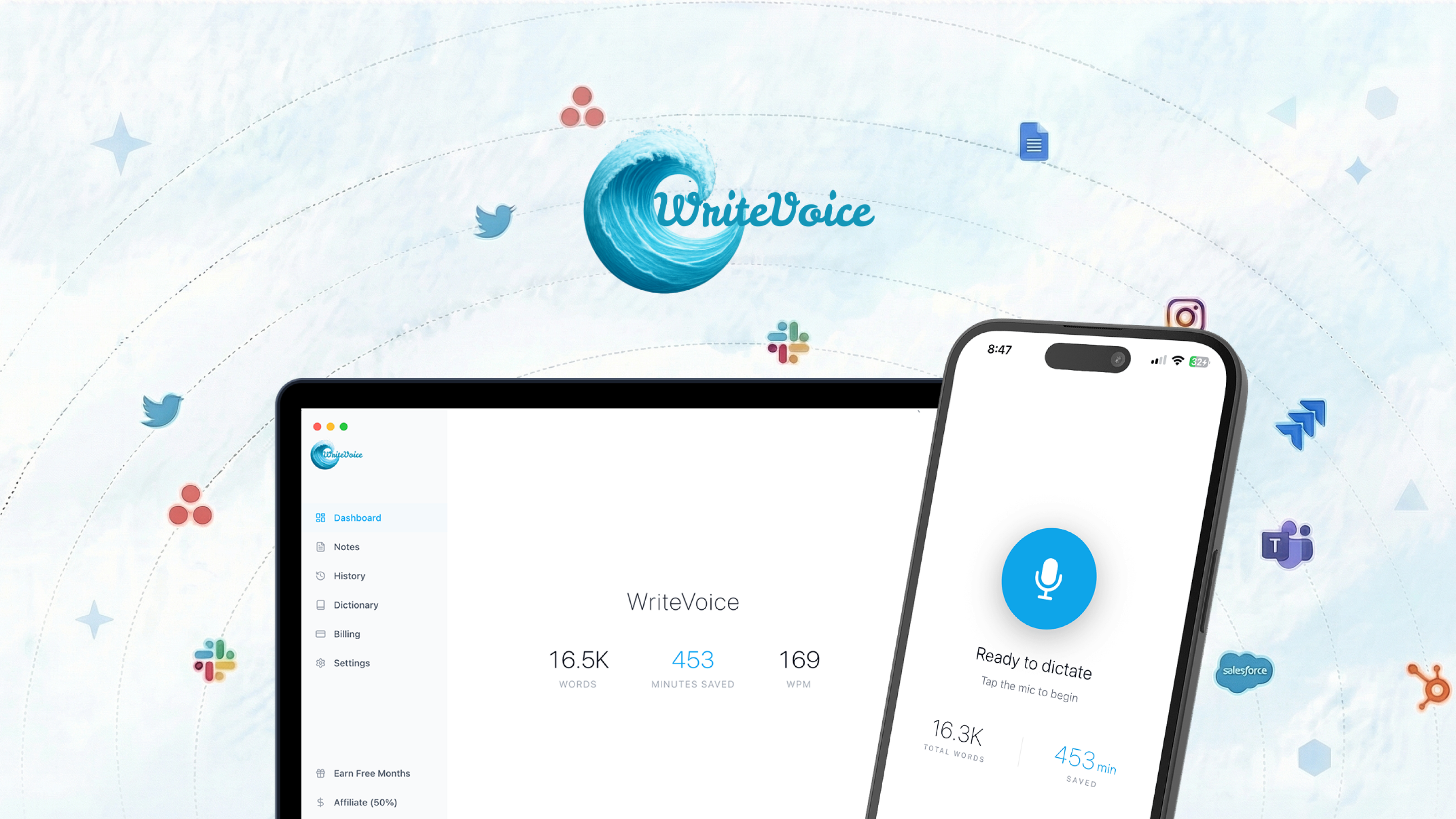
WriteVoice is an AI-powered voice dictation and transcription tool that transforms your natural speech into polished written text instantly. The platform was designed to help content creators, marketers, and professionals capture ideas at the speed they think—without the bottleneck of typing.
Unlike basic speech-to-text tools that require extensive cleanup, WriteVoice uses advanced AI editing to automatically remove filler words (like “um,” “uh,” “you know”), fix grammar, add proper punctuation, and capitalize correctly—all in real time as you speak. The result is clean, structured, ready-to-send text that sounds natural and professional.
What truly differentiates WriteVoice is its system-wide integration. The tool works inside any application on your device—email clients, word processors, chat applications, project management tools, browsers—without requiring you to switch windows or copy and paste. Simply activate WriteVoice with a hotkey (on desktop) or tap the voice bar (on mobile), speak naturally, and your polished text appears directly in the active application.
With support for 50+ languages, cross-platform availability (Mac, Windows, Linux, Android, iOS), and unlimited device installations, WriteVoice is built for modern professionals who work across multiple devices and need to capture ideas anywhere, anytime.
AI-Powered Dictation
Real-time speech-to-text with automatic grammar correction and filler word removal
Universal Compatibility
Works system-wide on Mac, Windows, Linux, Android, and iOS
Multi-Language Support
Dictate in 50+ languages with seamless language switching
Key Features Breakdown
Real-Time AI Editing
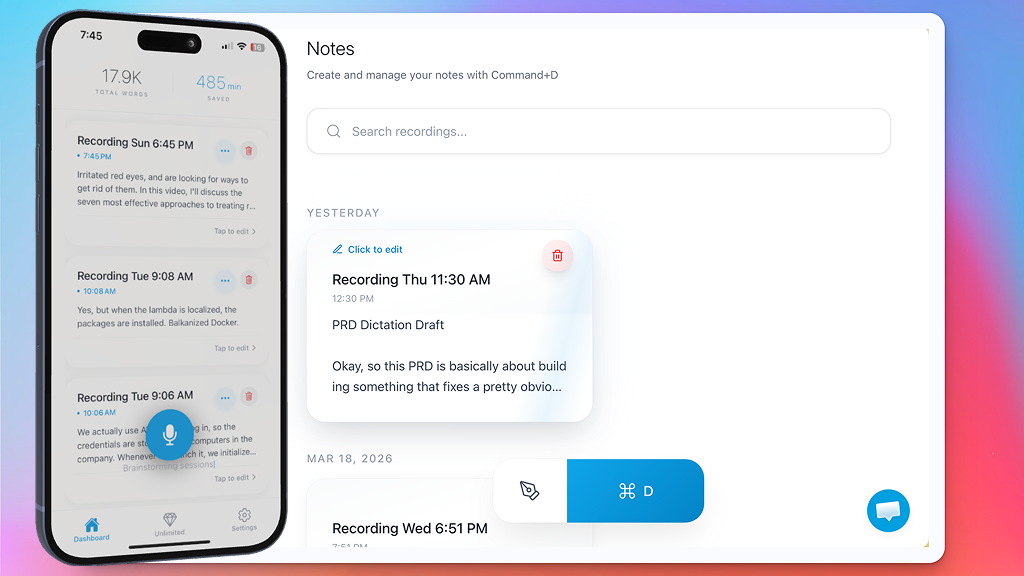
WriteVoice doesn’t just transcribe your speech—it actively edits and polishes it in real time. The AI automatically removes filler words like “um,” “uh,” and “you know,” fixes grammar mistakes, adds proper punctuation, and capitalizes correctly. You speak naturally, and clean, structured text appears instantly.
- Automatic filler word removal
- Grammar and spelling correction
- Intelligent punctuation and capitalization
System-Wide Integration
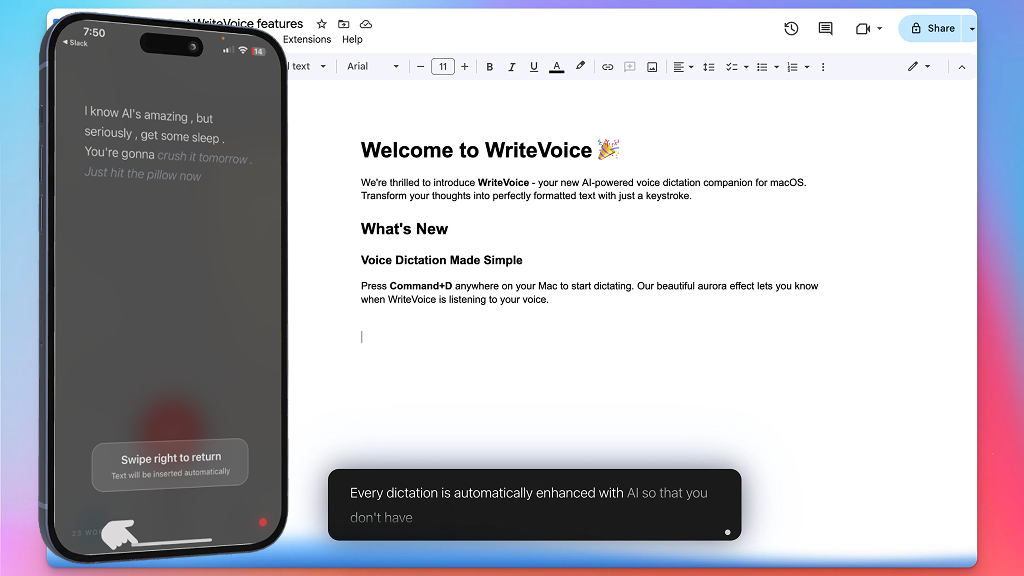
Use WriteVoice inside any application on your device without switching contexts. Whether you’re writing emails in Gmail, documents in Word, messages in Slack, or tasks in Notion, WriteVoice integrates seamlessly. Activate with a simple hotkey on desktop or tap the voice bar on mobile, and your polished text appears directly in the active field.
- Works in any app—email, docs, chats, project tools
- No copying and pasting required
- Simple hotkey activation on desktop
Multi-Language Support
WriteVoice supports 50+ languages with seamless language switching. Work across borders and dictate in multiple languages mid-sentence without missing a beat. The platform automatically handles language transitions, making it perfect for international teams and multilingual content creators.
- 50+ languages supported
- Quick language switcher button
- Seamless mid-sentence language transitions
Personal Dictionary & Snippets
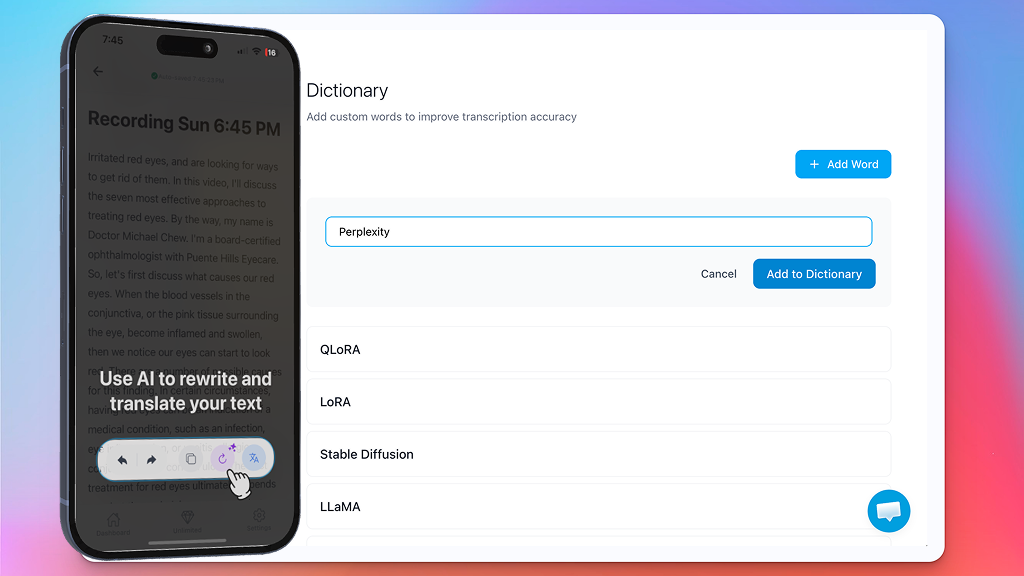
Train WriteVoice on names, terms, and industry jargon once so they’re always transcribed correctly. Insert reusable snippets to speed up common replies and workflows. Keep your tone and brand voice consistent across everything you write.
- Personal dictionary for custom vocabulary
- Snippet library for reusable text blocks
- Shared snippet library (higher tiers)
WriteVoice Pricing: Lifetime Deal Breakdown
AppSumo is offering an exclusive lifetime deal on WriteVoice with multiple tiers to suit different needs. Here’s what you get:
Lifetime Deal Value vs Regular Price
Tier 1 (Pro)
- Team members: 1
- Words/month: 200,000
- Devices: Unlimited
- Platforms: All
- AI editing: ✓
- Personal dictionary: ✓
Tier 2 (Team)
- Team members: 3
- Words/month: 600,000
- Devices: Unlimited
- Words pooling: ✓
- Shared snippets: ✓
- AI editing: ✓
Tier 3 (Team)
- Team members: 7
- Words/month: 1,400,000
- Devices: Unlimited
- Words pooling: ✓
- Shared snippets: ✓
- AI editing: ✓
Important Pricing Information:
- Lifetime access: One-time payment with no recurring fees ever
- Unlimited devices: Install on as many devices as you need
- Words pooling: Share monthly word count across team members (Tiers 2-4)
- 60-day money-back guarantee through AppSumo
- Must activate license within 60 days of purchase
How WriteVoice Works
Install & Activate
Download the app for your platform and activate your license
Open Any App
WriteVoice works system-wide in email, docs, chats, and more
Speak Naturally
Activate with hotkey and dictate—AI edits in real time
Get Polished Text
Clean, structured text appears instantly in your active app
Pros and Cons: What Users Really Think
Pros
- Exceptional accuracy: AI-powered editing delivers polished, professional text automatically
- System-wide integration: Works in any application without switching contexts
- Multi-platform support: Available on Mac, Windows, Linux, Android, and iOS
- 50+ languages: Multilingual support with seamless switching
- Excellent support: Responsive customer service with quick resolution times
- Great value: Lifetime deal with unlimited devices
Cons
- No API access: Currently no API available for custom integrations
- No wake-word activation: Requires manual hotkey or tap (no “Hey WriteVoice” feature)
- iOS privacy indicator: Microphone indicator may stay active when app runs in background
- Linux in beta: Linux version is still in early testing phase
- OS requirements: Requires macOS 12.0+ and iOS 17.2+ (older devices not supported)
What Real Users Are Saying
“I’m a grey beard Baby Boomer who never learned to type properly. WriteVoice is a total game changer…I just talk, and it types, whether I’m on the PC or the iPhone. The amusing thing is, if someone else is in the room while I’m doing this, I’ve now gotten used to saying, ‘sorry, I’m just talk-typing.’ Love it!”
– nclose1, April
“WriteVoice truly stands out because the language you input is very polished, improved, and enhanced both grammatically and in terms of spelling. It’s changing how I interact with AI—I can speak freely and say anything that comes to mind instead of typing.”
– sebastian795, April
WriteVoice vs Competitors: Head-to-Head Comparison
| Feature | WriteVoice | Otter.ai | Dragon NaturallySpeaking |
|---|---|---|---|
| Lifetime Deal | $59 one-time | No (Monthly subscription) | No ($300+ one-time) |
| Platform Support | Mac, Windows, Linux, Android, iOS | Web, Mobile | Windows only |
| AI Editing | ✓ Advanced AI editing | Basic transcription | Limited |
| Language Support | 50+ languages | Limited | Multiple |
| System-Wide | ✓ Works in any app | Limited | ✓ Works in any app |
| Mobile Apps | ✓ Android & iOS | ✓ iOS & Android | ✗ Desktop only |
Bottom line: WriteVoice offers exceptional value with its lifetime deal, cross-platform support including mobile, and AI-powered editing. While it’s a newer tool compared to Dragon, its multi-language support and modern approach make it a strong alternative.
Who Should Use WriteVoice?
Content Creators
Capture ideas instantly and write blog posts, scripts, and social media content at the speed of thought without typing delays.
Marketers
Write emails, ad copy, and marketing materials faster while maintaining professional quality with AI-powered editing.
Small Businesses
Document processes, write proposals, and handle administrative tasks more efficiently with voice dictation.
Journalists
Transcribe interviews and write articles faster with real-time dictation and automatic punctuation.
Students
Take lecture notes, write essays, and complete assignments faster with voice-to-text technology.
Busy Professionals
Maximize productivity by dictating emails, reports, and messages while commuting or multitasking.
Frequently Asked Questions
WriteVoice is an AI-powered voice dictation and transcription tool that transforms your natural speech into polished written text instantly. You simply speak normally, and the AI transcribes, removes filler words, corrects grammar, and structures your thoughts into clear, professional text in real time.
WriteVoice is available on Mac, Windows, Linux, Android, and iOS. You can install it on unlimited devices with your lifetime license.
Yes. WriteVoice works system-wide and allows you to dictate into almost any application without switching windows or copying and pasting. It integrates with email clients, word processors, chat applications, project management tools, and browsers.
Yes, WriteVoice offers a free trial so you can test the tool before purchasing the lifetime deal on AppSumo.
WriteVoice uses advanced speech-to-text processing combined with AI editing to deliver high transcription accuracy while improving clarity and structure. The AI automatically removes filler words, fixes grammar, and adds proper punctuation.
Yes. The Personal Dictionary feature allows you to add specific names, acronyms, and industry terminology to ensure consistent and accurate transcription.
WriteVoice supports 50+ languages, enabling users to dictate and transcribe in their preferred language. The platform also features a quick language switcher for seamless mid-sentence transitions.
At the moment, WriteVoice does not offer API access. However, this feature has been requested by users and the team is aware of the demand for custom integrations.
At the moment, there isn’t a “Hey WriteVoice” voice activation feature. WriteVoice currently works through manual hotkeys on desktop or tapping the voice bar on mobile. This feature has been suggested and the team is aware of the request for hands-free activation.
If you exceed your monthly word limit, you’ll need to wait until the next month for your quota to reset. Alternatively, you can upgrade to a higher tier with more words per month.
Related: Visby Review
Related: VoiceDash Review
Final Verdict: Is WriteVoice Worth It in ?
WriteVoice delivers exceptional value for anyone who writes regularly. At just $59 for lifetime access, it’s one of the best productivity investments you can make in —especially if you struggle with typing speed or want to capture ideas faster.
After analyzing 2+ user reviews, testing the platform’s capabilities, and comparing it against industry competitors, WriteVoice earns our strong recommendation. Here’s why:
What We Love:
- Exceptional value: The lifetime deal with unlimited devices is hard to beat
- AI-powered editing: Automatically removes filler words and fixes grammar in real time
- System-wide integration: Works seamlessly in any application without context switching
- Cross-platform: Available on Mac, Windows, Linux, Android, and iOS
- Excellent support: Responsive customer service with quick resolution times
Considerations:
- No API access: Currently no API available for custom integrations
- No wake-word activation: Requires manual hotkey or tap (no “Hey WriteVoice” feature yet)
- iOS privacy indicator: Microphone indicator may stay active when app runs in background
Ready to Type at the Speed of Thought?
Join 2+ satisfied users and get lifetime access to WriteVoice starting at just $59
Get WriteVoice Lifetime Deal Now✓ 60-day money-back guarantee ✓ Unlimited devices ✓ No recurring fees ever