VPN vs Proxy vs Anti-Detect Browser: Which One Do You Need?
A VPN Changes Your Exit IP. A Proxy Routes Traffic. An Anti-Detect Browser Changes the Identity Websites See.
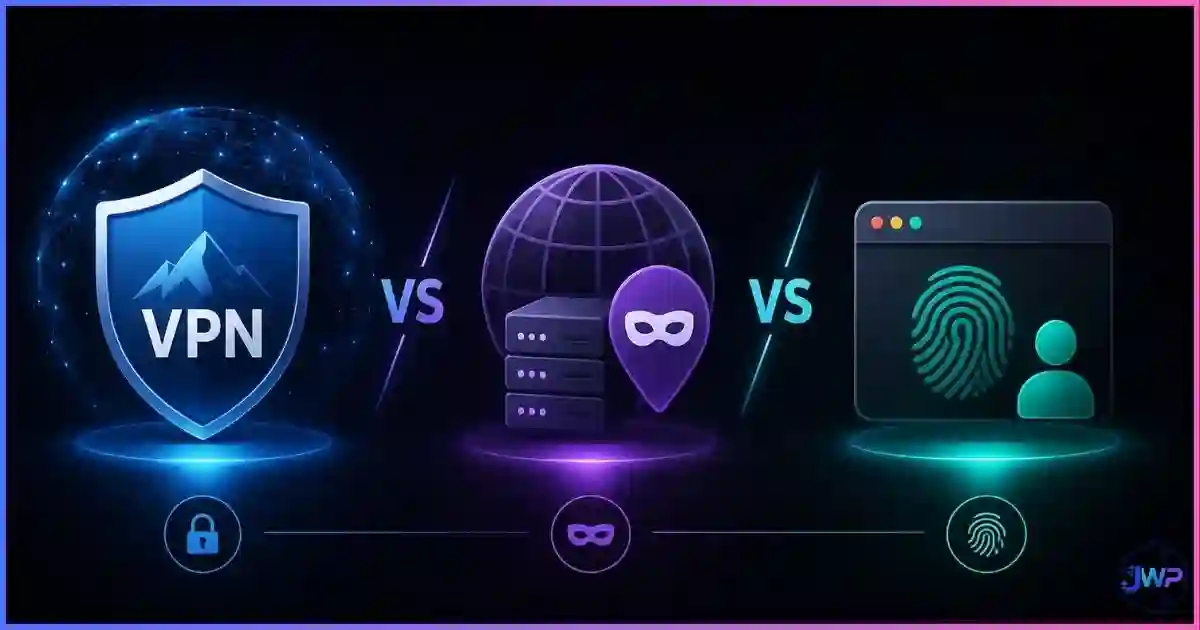
If you are trying to hide your IP, bypass a regional block, scrape data, manage multiple accounts, or stop platforms from linking your browser sessions, you will quickly run into three tools: VPNs, proxies, and anti-detect browsers. They sound similar, but they solve different layers of tracking. A VPN protects your network connection. A proxy routes traffic through another server, often per app or per browser profile. An anti-detect browser changes and isolates the browser identity itself: cookies, storage, Canvas, WebGL, fonts, timezone, WebRTC, and other fingerprint signals.
The big mistake is assuming one tool replaces the others. It does not. A VPN can hide your IP, but it does not change your browser fingerprint. A proxy can give each account a different IP, but it does not isolate cookies. An anti-detect browser can create separate browser identities, but it still needs a high-quality proxy if the network layer matters. This guide explains exactly when to use each tool, when to combine them, and what setup is safest for privacy, scraping, affiliate marketing, ad buying, e-commerce, and multi-account management.
Quick answer
VPN vs proxy vs anti-detect browser: what is the difference?
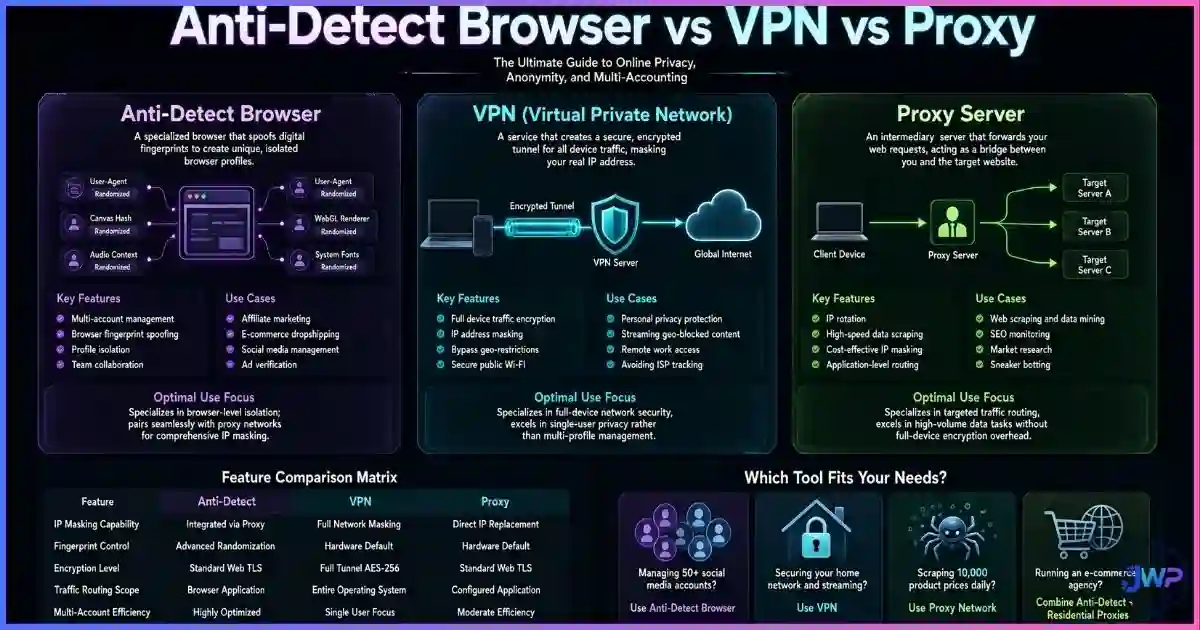
A VPN routes and encrypts all device traffic through a VPN server. It is best for public Wi-Fi safety, hiding browsing activity from your ISP, and simple geo-unblocking. A proxy routes specific traffic through another IP address and is best for scraping, automation, localized testing, and assigning one IP per account. An anti-detect browser creates isolated browser profiles with spoofed fingerprints and is best for multi-accounting, ad accounts, affiliate work, marketplace accounts, and any workflow where platforms must not link sessions together.
Simple rule: use a VPN for general privacy, a proxy for IP rotation and per-account routing, and an anti-detect browser + dedicated proxy when you need browser identity isolation.
Definitions
VPN, Proxy, and Anti-Detect Browser: What Each One Actually Does
The easiest way to understand the difference is to think in layers. Websites identify you through the network layer (IP address), the protocol layer (TLS and headers), the browser layer (fingerprint), and the state layer (cookies and storage). Most tools only cover one or two of those layers.
VPN
A VPN creates an encrypted tunnel between your device and a VPN server. Websites see the VPN server’s IP instead of your real IP. Your ISP sees you connected to the VPN, but not the specific websites you visit.
Proxy
A proxy routes traffic through another IP address, usually per app, browser, request, or profile. Proxies are common in web scraping, geo-testing, and multi-account setups where each account needs a separate IP.
Anti-Detect Browser
An anti-detect browser creates isolated browser profiles with separate cookies, storage, fingerprints, timezones, WebRTC settings, and proxy assignments. It changes the identity websites see.
A VPN or proxy changes where traffic appears to come from. An anti-detect browser changes who the website thinks is using the browser. That distinction matters because modern tracking is not based on IP alone. As explained in why changing your IP doesn’t change your browser fingerprint, a site can still recognize the same device after an IP change by reading Canvas, WebGL, fonts, screen size, timezone, and other fingerprint signals.
Data
Privacy and Tracking Statistics: Why Tool Choice Matters
The numbers show why VPN-only setups are often overestimated. VPNs are widely used, but browser fingerprinting remains highly effective because a VPN does not change the browser layer.
Tracking-layer coverage by tool type
Editorial scoring based on coverage of IP, DNS/WebRTC, cookies/storage, and browser fingerprinting. Higher is better for identity isolation.
What each tool primarily protects
Coverage model: network layer, browser layer, and state layer. The biggest gap in VPN-only setups is browser fingerprinting.
EFF’s Panopticlick research found that most standard browsers are uniquely identifiable. That means:
- A VPN can change your IP while leaving your fingerprint untouched.
- A proxy can rotate addresses while the same browser identity persists.
- An anti-detect browser targets the fingerprint and state layers directly.
Best-fit score by use case
Editorial scoring from 0–100 based on suitability, speed, cost, and detection risk.
Comparison
VPN vs Proxy vs Anti-Detect Browser: Feature-by-Feature
| Feature | VPN | Proxy | Anti-Detect Browser |
|---|---|---|---|
| Hides your real IP? | ✓ Yes, device-wide | ✓ Yes, per app/request/profile | ✕ Not alone; needs proxy |
| Encrypts traffic? | ✓ Yes, tunnel encryption | ~ Depends on proxy type and HTTPS | ✕ Browser itself does not encrypt beyond HTTPS |
| Changes browser fingerprint? | ✕ No | ✕ No | ✓ Yes: Canvas, WebGL, fonts, timezone, WebRTC |
| Isolates cookies and storage? | ✕ No | ✕ No | ✓ Yes, per browser profile |
| Best for multi-accounting? | ✕ Poor | ~ Useful IP layer only | ✓ Best when paired with proxies |
| Best for scraping? | ✕ Usually too limited | ✓ Best for scalable IP rotation | ~ Useful for browser-based scraping |
| Best for public Wi-Fi? | ✓ Best choice | ~ Partial | ✕ Not the main purpose |
| Main weakness | Does not change fingerprint | Usually no encryption or cookie isolation | Requires correct setup and quality proxies |
If your goal is simple privacy, start with a VPN. If your goal is IP rotation, use proxies. If your goal is account separation, fingerprint control, and session isolation, you need an anti-detect browser. For a deeper anti-detect-specific explanation, see what an anti-detect browser is.
VPNs hide IPs. Incogniton isolates browser identities.
If your accounts are getting linked, the problem is usually not just your IP. Incogniton gives each profile isolated cookies, persistent fingerprints, proxy assignment, timezone matching, WebRTC controls, and team workflows.
Create Isolated Profiles in Incogniton → Affiliate link — we may earn a commission at no extra cost to you.VPN Use Cases
When a VPN Is the Right Choice
A VPN is the right tool when your main concern is network privacy. It hides your real IP from the websites you visit, encrypts traffic between your device and the VPN server, and prevents your ISP or public Wi-Fi operator from seeing the exact domains or content of your encrypted sessions.
Use a VPN when you want to:
- Protect traffic on hotel, airport, school, or coffee-shop Wi-Fi.
- Hide your browsing activity from your ISP.
- Access content from another country, when allowed by the service’s terms.
- Protect general personal browsing without managing multiple identities.
- Keep a simple always-on privacy layer for all device traffic.
But a VPN does not change your browser fingerprint, cookies, extensions, screen resolution, fonts, or logged-in accounts. This is why we say a VPN does not change your browser fingerprint. If a site knows your browser identity, a new VPN IP does not magically make you a new person.
For consumer privacy, compare providers in our guide to the best VPN providers. For multi-account work, a VPN alone is usually the wrong tool.
Proxy Use Cases
When a Proxy Is the Right Choice
A proxy is better than a VPN when you need precision: one IP for one account, one region for one test, or thousands of IPs for many requests. Proxies are used heavily in scraping, SEO monitoring, sneaker tools, automation, localized QA, ad verification, and multi-account environments.
Common proxy types include:
| Proxy type | Best for | Risk level | Notes |
|---|---|---|---|
| Datacenter proxy | Speed, bulk scraping, low-cost automation | High | Cheap and fast, but heavily fingerprinted and often blocked by major platforms. |
| Residential proxy | Account management, ad verification, geo-targeting | Low | Routes through real ISP connections; more trusted than datacenter IPs. |
| Mobile proxy | Social platforms, app testing, high-trust sessions | Low | Uses mobile carrier IPs; expensive but hard to block at scale. |
| Rotating proxy | Scraping, crawling, SERP collection | Med | Changes IP automatically; great for requests, risky for logged-in accounts. |
| Static / sticky proxy | Long-lived accounts and sessions | Low | Keeps one IP for days or weeks; best for account trust. |
The biggest proxy mistake is using rotating proxies for logged-in accounts. Real people do not log in from a new city every three minutes. For accounts, use sticky residential or mobile proxies. For scraping, use rotating pools. If you are choosing providers, start with our roundup of the best proxy providers or, for scraping-specific workflows, the best web scraping providers.
Anti-Detect Use Cases
When an Anti-Detect Browser Is the Right Choice
An anti-detect browser is the right tool when you need websites to see separate browser identities, not just separate IP addresses. It solves the browser and state layers: fingerprint, cookies, localStorage, IndexedDB, cache, timezone, WebRTC, screen size, fonts, and profile-level settings.
Use an anti-detect browser when you need to:
- Manage multiple ad accounts without cross-linking.
- Run separate marketplace or e-commerce accounts.
- Separate client social media accounts inside an agency.
- Test websites from different user environments.
- Keep affiliate, media buying, or lead-gen identities isolated.
- Prevent cookie and storage contamination between accounts.
The core concept is browser profile isolation: one profile, one set of cookies, one fingerprint, one proxy, one identity. Anti-detect tools are not just “privacy browsers.” They are identity managers. For a full technical explanation of how profiles become identities, see anti-detect browser profiles and digital identities.
Best Setup
Best Setup for Multi-Accounting: Anti-Detect Browser + Dedicated Proxy
For serious account management, the winning setup is not VPN vs proxy vs anti-detect browser. It is anti-detect browser + one dedicated proxy per profile. The anti-detect browser handles the browser and state layers. The proxy handles the network layer. Together, they create a consistent identity that platforms cannot easily link to your other accounts.
Create one profile per account
Do not reuse profiles between accounts. Each profile should have its own cookies, cache, localStorage, WebRTC policy, timezone, and fingerprint.
Assign one sticky proxy per profile
Use a residential or mobile proxy that stays consistent. Avoid rotating proxies for logged-in accounts unless the platform expects movement.
Match the profile to the proxy
If the proxy is in Madrid, the profile timezone and language should not scream Los Angeles. Inconsistency is one of the easiest spoofing signals to detect.
Keep the fingerprint stable
Do not randomize Canvas, WebGL, fonts, or screen size every session. Real devices are stable. Stable spoofing looks human; random spoofing looks automated.
Never cross-login
Do not log into Account A inside Profile B. One mistake can permanently link the identities in a platform’s risk system.
Anti-detect browsers work best when they provide believable, consistent data. Randomness is not safety. Consistency is safety. If you want the detailed detection side, read can websites detect anti-detect browsers?
Build the correct stack from day one.
Incogniton gives each profile a stable fingerprint, isolated cookies, WebRTC controls, and per-profile proxy assignment. That is the stack agencies, affiliate teams, and marketplace operators need when a VPN is not enough.
Build Isolated Profiles in Incogniton → Affiliate link — we may earn a commission at no extra cost to you.Myth Busting
7 Myths About VPNs, Proxies, and Anti-Detect Browsers
Myth 1
“A VPN makes me anonymous.”
Reality
A VPN hides your IP from websites and your browsing from your ISP, but it does not change cookies, logged-in accounts, or fingerprinting signals.
Myth 2
“A proxy and VPN are the same thing.”
Reality
A VPN usually protects device-wide traffic with encryption. A proxy is more granular and often used per app, request, profile, or automation workflow.
Myth 3
“Changing IPs resets account trust.”
Reality
Changing IPs can help, but fingerprint and storage signals remain. If the browser identity is the same, platforms can still link accounts.
Myth 4
“Rotating proxies are best for everything.”
Reality
They are good for scraping but bad for logged-in accounts. Real users do not jump IPs constantly during normal sessions.
Myth 5
“Anti-detect browsers hide my IP automatically.”
Reality
They spoof the browser layer. You still need a proxy to change the network layer.
Myth 6
“Incognito mode is good enough.”
Reality
Incognito only creates a temporary local session. It does not change IP, fingerprint, timezone, GPU, or fonts.
Myth 7
“More tools always means more privacy.”
Reality
Stacking tools badly creates contradictions: VPN IP in Germany, browser timezone in California, language in Russian, and a Mac profile with Windows fonts.
Action Plan
Decision Checklist: Which Tool Should You Use?
| Your goal | Best tool | Why |
|---|---|---|
| Protect public Wi-Fi browsing | VPN | Encrypts traffic between your device and the VPN server. |
| Hide activity from your ISP | VPN | Your ISP sees the VPN connection, not individual sites. |
| Scrape websites at scale | Proxy pool | Rotating IPs distribute requests and reduce rate-limit risk. |
| Check local search results in different countries | Proxy | Gives precise geo-targeted IP locations. |
| Manage multiple social/ad/e-commerce accounts | Anti-detect browser + proxy | Separates IP, fingerprint, cookies, and storage per account. |
| Prevent account cross-linking | Anti-detect browser + proxy | Identity isolation requires both network and browser separation. |
| Maximum anonymity for sensitive research | Tor Browser | Uniform fingerprints and onion routing, but slow and often blocked. |
Skip these mistakes
- Using one VPN IP for ten accounts.
- Using rotating proxies for trusted logins.
- Assuming IP changes affect fingerprinting.
- Logging multiple identities into one browser profile.
- Randomizing fingerprints every session.
Do this instead
- Use VPNs for general privacy and public Wi-Fi.
- Use proxies for IP routing and scraping.
- Use anti-detect profiles for account isolation.
- Assign one sticky proxy per account profile.
- Keep fingerprint, timezone, and IP consistent.
Multi-account setup checklist
- Each account has its own anti-detect browser profile.
- Each profile has a dedicated residential or mobile proxy.
- Timezone and language match the proxy location.
- WebRTC leaks are blocked or matched to the proxy.
- Cookies, localStorage, and cache are isolated per profile.
- The fingerprint is stable across sessions, not randomized every load.
- No personal accounts are logged into business/client profiles.
Need more than IP masking?
If your goal is multi-accounting, a VPN is not enough. Incogniton helps you isolate each account with its own cookies, fingerprint, timezone, WebRTC settings, and proxy assignment. Start free and scale as your workflow grows.
Try Incogniton Free → Affiliate link — we may earn a commission at no extra cost to you.FAQs
Frequently Asked Questions
Is a proxy better than a VPN?
Is an anti-detect browser better than a VPN?
Do I still need a proxy if I use an anti-detect browser?
Can I use a VPN with an anti-detect browser?
Will a VPN stop browser fingerprinting?
What is the safest setup for multiple accounts?
Are VPNs, proxies, and anti-detect browsers legal?
📚 Sources & Research Notes (click to expand)
This guide combines browser-fingerprinting research, VPN adoption reporting, web privacy documentation, and practical multi-accounting architecture. Exact detection thresholds vary by platform and change frequently; treat the charts as directional comparisons, not guarantees.
- Eckersley, P. (2010). “How Unique Is Your Web Browser?” EFF Panopticlick — foundational research showing 83.6% of tested browsers had unique fingerprints. panopticlick.org
- EFF. Cover Your Tracks — ongoing public browser fingerprint and tracker measurement project. coveryourtracks.eff.org
- GlobalWebIndex / DataReportal privacy-tool reporting — monthly VPN usage estimates among internet users.
- Laperdrix, P., et al. (2020). “Fingerprinting the Fingerprinters.” INRIA / AmIUnique — measurement of browser fingerprint diversity and tracking vectors. amiunique.org
- Englehardt, S., & Narayanan, A. (2016). “Online Tracking: A 1-million-site Measurement and Analysis.” Princeton CITP — large-scale study of web tracking and fingerprinting prevalence.
- Mozilla Developer Network (MDN). WebRTC, Permissions API, Fetch, Proxy, and browser storage documentation.
- Tor Project documentation — Tor Browser design principles, uniformity, and network anonymity model. torproject.org
- JoshWP internal testing and editorial scoring models for tool-fit charts: network layer, browser layer, state layer, and profile isolation coverage.
VPN, proxy, and anti-detect technologies evolve quickly. Always verify your provider’s current privacy policy, logging rules, proxy sourcing standards, WebRTC handling, and browser fingerprint controls before using any tool for sensitive workflows.