WordPress SEO Spam Injection Cleanup: From Japanese Search Results to a Clean Wordfence Scan
This is the full cleanup story of a WordPress SEO spam injection on FreeExams.co.ke: what showed up in Google, what had already been tried, how the infected index.php kept coming back, how the hidden persistence process was found, and how the site was finally verified clean.

Quick Answer
The site had suffered a WordPress SEO spam compromise. Google had indexed Japanese e-commerce spam pages under the domain, and Wordfence later showed the main index.php file contained a large obfuscated PHP payload. The first workaround was to lock index.php with chattr +i and chmod 444, but that only protected one file and made WordPress updates awkward.
The issue had been noticed since 2025, around the period when CloudPanel was installed and a clean site migration file was uploaded. At the time, it was reasonable to hope that replacing the WordPress site with a clean migration would make the infection disappear. It did not, because the real persistence was not only inside the uploaded WordPress files.
The real persistence was not a normal plugin file, theme file, or database snippet. It was three long-running PHP processes owned by the freeexams account, all running php -f /tmp/httpd.conf from the website directory. The script file itself had already disappeared from /tmp, but the processes remained alive and rewrote index.php seconds after it was repaired. Killing those processes stopped the reinfection. After that, the clean WordPress 7.0 index.php held, WordPress core checksums passed, all plugins verified, and the final Wordfence scan returned no results found.
The Site
Background: WordPress SEO Spam Injection Cleanup on CloudPanel
FreeExams.co.ke is a WordPress site hosted on a CloudPanel server that also hosts other websites. The important boundary was clear from the start: the work had to target only the FreeExams site, not every site on the server.
This was not a brand-new problem that appeared and disappeared in a single afternoon. The issue had been noticed since 2025, after CloudPanel was installed and a clean site migration file was uploaded. The clean migration made sense as a recovery attempt: if the compromised files were inside the old WordPress copy, replacing them should have removed the problem. But the spam behavior persisted through multiple attempts, which was the clue that something outside the normal WordPress file set was still alive.
That history also changed how the cleanup had to be approached. CloudPanel was the hosting control panel, not automatically the cause. The key question was whether something in the server account, process table, scheduler, or webroot was continuing to rewrite the site after clean files were restored.
The WordPress document root was:
The server was accessed over SSH as root, but the WordPress files themselves were owned by the CloudPanel site user and group:
This matters because malware persistence can live at several levels: in WordPress files, in plugin files, in database snippets, in scheduled WordPress cron jobs, in system cron jobs, or as a long-running process under the site account. The cleanup had to be careful enough to distinguish those layers.
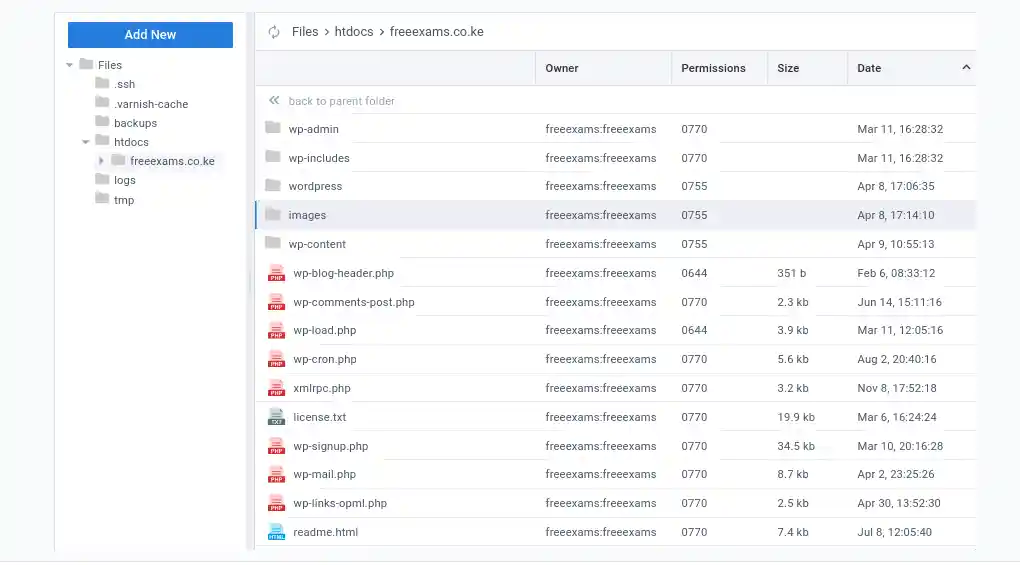
wp-admin, wp-includes, wp-content, index.php, wp-config.php, and the usual root files.What Google Showed
Visible Symptoms: Japanese E-commerce Spam in Search
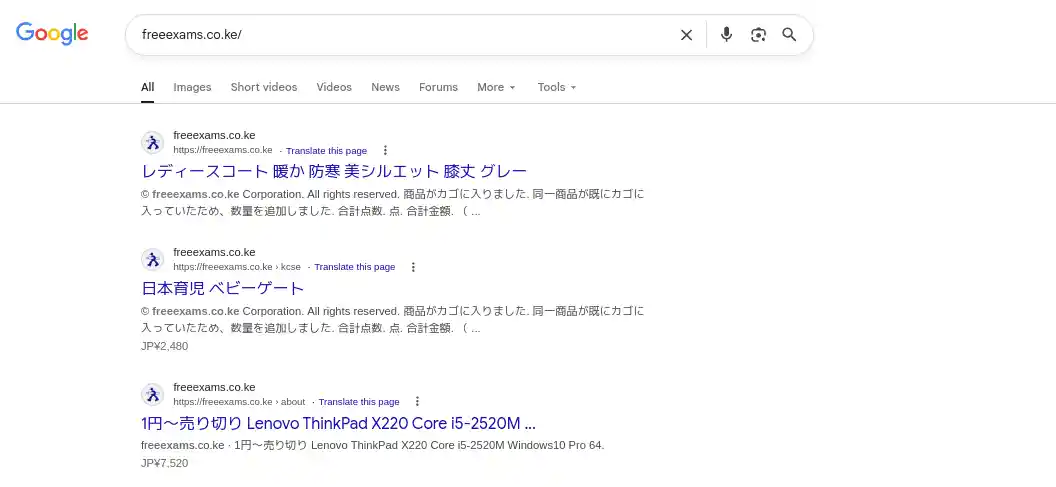
The first obvious symptom was not a broken homepage. It was Google search results. The domain had started showing Japanese e-commerce titles and snippets, including product-style pages that had nothing to do with Kenyan exam materials. This is a classic SEO spam pattern: attackers inject doorway pages or cloaked responses so search engines index commercial spam under a legitimate domain.
The spam pages were not merely ugly. They were dangerous for the domain’s reputation. If Google continues to see spam content, the site can lose trust, search visibility, and user confidence. Search Console cleanup helps remove bad indexed URLs, but it does not fix the compromised server by itself.
The First Defense
What Had Already Been Tried Before the Final Cleanup
Before the final repair, several meaningful steps had already been taken. These were not foolish steps. They reduced damage and bought time. The problem was that they guarded the symptom rather than the source of reinfection.
1. Search Console Cleanup
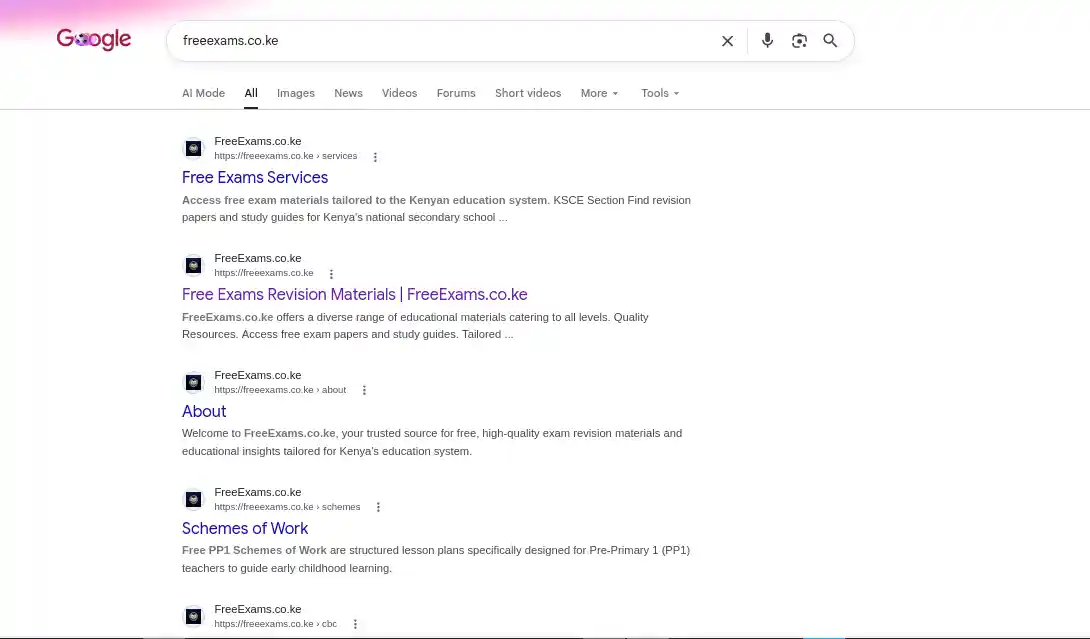
The spam URLs had been removed from Google Search Console. This was visible in the newer search screenshot, where the domain showed legitimate FreeExams pages again instead of the earlier Japanese e-commerce entries.
2. Manual Removal of E-commerce Spam Footprints
The obvious e-commerce additions that had affected search results were cleaned up. This helped repair the search-facing side of the incident.
3. Clean Migration Attempt
After noticing the issue in 2025, a clean site migration file was uploaded after CloudPanel had been installed. This was a sensible step because many WordPress infections live inside plugin, theme, upload, or core files. A clean migration can wipe those away if the malware is only stored in the site files being replaced.
In this case, the infection persisted after the clean migration. That did not mean the migration was useless. It meant the remaining persistence was probably outside the migrated WordPress package. The final investigation proved that point: the writer was a long-running PHP process under the site user, not just a bad file inside the migration archive.
4. Repeated Manual Attempts
There had been many attempts to make the issue go away. Some improved the search results. Some hardened the visible file. But because the hidden PHP process was still running, the infection had a way to come back. This is the exhausting part of malware cleanup: when the persistence layer is missed, every visible fix feels temporary. After enough cycles of trying, waiting, and seeing the problem persist, it was understandable to feel like giving up.
5. Hardened index.php Workflow
Because Wordfence kept flagging index.php, the file had been protected with immutable filesystem attributes and read-only permissions. The workflow looked like this:
That workflow stopped a file from being changed while it was locked. But it also created a maintenance burden: every WordPress update required manual unlock, update, and relock steps. More importantly, the malicious writer still existed. It was simply blocked from modifying that one file while the immutable flag was active.
chattr +i is a barricade, not a cure. It can keep one file from being overwritten, but it does not remove malware, close the original entry point, clean database payloads, kill malicious processes, or prove that the rest of the site is clean.Scope Control
Hosting Context: Only One Site Needed Work
The CloudPanel server hosted several websites, but the target was only:
That meant the cleanup had to stay inside the FreeExams site unless system-level persistence was discovered. This is why the early commands focused on the site root, its owner, its logs, its WordPress files, and its PHP processes.
Initial Server Inspection
The first live inspection confirmed:
- The WordPress site root existed at
/home/freeexams/htdocs/freeexams.co.ke. index.phpwas 22,534 bytes, far larger than the normal WordPress front controller.index.phpwas read-only and immutable.- WP-CLI was installed at
/usr/bin/wp. - The site was running WordPress
7.0.
The Infected File
The Wordfence Finding: index.php Contained an Obfuscated Backdoor
Wordfence’s file viewer showed that index.php began with a massive obfuscated PHP block before the normal WordPress bootstrap. A clean WordPress index.php is tiny. It should define WP_USE_THEMES and require wp-blog-header.php. It should not contain goto mazes, dynamic variables, remote fetch logic, encoded strings, or @eval.
| Indicator | Why it mattered |
|---|---|
goto labels throughout the file | Obfuscation pattern intended to make static analysis difficult. |
@eval(...) | Can execute dynamically supplied PHP code. This is a severe backdoor indicator. |
base64_decode(...) and hex-escaped strings | Used to hide URLs, function names, and payload behavior. |
| Remote fetch behavior | The payload could fetch content from outside the site and serve it conditionally. |
Special path behavior around /index.php/jk | The infected file had custom behavior that normal WordPress does not provide. |
| Normal WordPress bootstrap appended at the end | The malware tried to preserve normal site behavior while adding malicious behavior first. |
The first official checksum check confirmed the suspicion:
That was actually encouraging: WordPress core verification reported index.php as the failing file, not hundreds of modified core files. The visible core compromise was concentrated in the front controller.
The Wrong PHP Code Wordfence Showed
The bad file was not a normal WordPress front controller. Wordfence showed /home/freeexams/htdocs/freeexams.co.ke/index.php as a 22,534 byte file modified on Tuesday, June 16, 2026. A clean WordPress index.php for this install was only 405 bytes.
For the report, the dangerous PHP is shown below as a non-executable forensic excerpt. The original infected copy was preserved separately on the server as evidence, but this article does not need to publish the full working backdoor.
The final line is what made the infection easy to miss during casual browsing: after the malicious code ran, the file still loaded WordPress. That allowed the homepage to keep working while the payload handled special requests, search-engine traffic, referrer logic, and remote content behavior before handing normal visitors back to WordPress.
The Trap
The First Repair Attempt: Clean File, Immediate Reinfection
The first repair was careful and reversible. The infected file was copied into a root-only cleanup folder for evidence, then index.php was unlocked and replaced with a clean WordPress front controller.
To avoid relying on memory, a fresh WordPress 7.0 core package was downloaded into /tmp, and the official index.php from that package was used as the replacement.
At first, the hashes matched:
Then came the important discovery: the file reverted almost immediately. Within seconds, index.php was back to 22,534 bytes, read-only, and infected.
index.php. Re-locking the file would hide the symptom again, but it would not remove the active writer.The Breakthrough
Root Cause Discovery: Three Hidden PHP Processes in Memory
The next step was to look outside the WordPress files. If a clean file was being rewritten without a browser request or WP-CLI command, the likely culprits were a background process, cron job, systemd service, or another persistent script.
The process list revealed the real issue:
Those processes were suspicious for several reasons:
- They were owned by the site user
freeexams. - They had been running since March 14, 2026.
- They were executing PHP from
/tmp/httpd.conf, which is not a normal WordPress, CloudPanel, or php-fpm path. - The process parent was PID 1, meaning the original launcher was gone and the processes had been adopted by init.
- The current working directory was the FreeExams webroot.
The command line and working directory confirmed it:
The source file itself no longer existed:
That explained why simple file scans did not find the writer. The original script had been deleted, but PHP was still running it in memory. As long as those processes lived, they could rewrite index.php again and again.
freeexams account, launched from a deleted /tmp/httpd.conf script and running from the WordPress document root.The Actual Fix
Final Remediation: Stop the Writer, Then Restore the File
The three malicious PHP processes were stopped:
After a short wait, they did not return:
The only later processes under freeexams were normal php-fpm workers:
With the active writer gone, index.php was repaired again using the official WordPress 7.0 file:
This time, the file stayed clean after a waiting period. The clean checksum remained:
index.php lasted about one second. After killing them, the same replacement held and passed WordPress checksum verification.Proof, Not Hope
Technical Verification After Cleanup
Cleanup is not finished when the malicious file is removed. It is finished when the site remains clean under repeated checks. Several verification layers were used.
1. WordPress Core Checksums
2. Plugin Checksums
Every installed public plugin was verified against the WordPress.org plugin repository:
3. Upload Directory PHP Check
Uploads are a common hiding place for web shells. A targeted search looked for PHP-like files under wp-content/uploads:
The only PHP file found there was a small index.php placeholder in a logs directory, a common “silence is golden” style file rather than a payload.
4. Database Snippet Review
Because the site used a code-snippet plugin, the database was checked for suspicious stored PHP. This mattered because database-stored snippets can execute during WordPress requests even when the file system looks clean.
The review found seven wpcode snippets. Two were published. They were ordinary snippets: one added noindex behavior for spam-like paths, and one disabled generated image sizes. No snippet contained the reinfection payload or an index.php writer.
| Snippet | Status | Assessment |
|---|---|---|
| Header for Spam Patterns | Published | Legitimate defensive snippet that sends noindex headers for suspicious spam-style URL patterns. |
| Disable default WordPress generated image sizes | Published | Legitimate performance/storage snippet related to image size generation. |
| Restrictive File Permissions | Draft | Simple draft defining DISALLOW_FILE_EDIT. Not active persistence. |
| Disable Automatic Updates Emails | Draft | Benign draft snippet. |
| Comment-related snippets | Draft | Benign draft snippets for comments and form fields. |
5. WordPress Cron Review
The serialized cron option was checked for obvious payload strings, file-writing functions, and malware indicators. It contained normal scheduled hooks for WordPress, LiteSpeed Cache, Wordfence, WooCommerce, Rank Math, and other plugins. It did not contain the reinfection payload.
6. System Persistence Review
The usual respawn locations were checked:
- Root crontab
freeexamsuser crontab/etc/cron.d/etc/cron.hourly/etc/cron.daily- Systemd timers
- Systemd service files
- Shell histories for references to
/tmp/httpd.conf
No obvious respawner was found. The active persistence had been the three already-running PHP processes.
7. HTTP Smoke Tests
The live site was checked after the cleanup:
8. Homepage Source Check
The homepage source was fetched with a Googlebot user agent and checked for the payload indicators and visible Japanese spam terms. Nothing matched.
Updateable Security
Permissions Cleanup Without Breaking WordPress Updates
The goal was not to freeze WordPress forever. The goal was to remove the active infection so WordPress could operate normally again. After the fix, index.php was intentionally left as a normal writable-by-owner WordPress file:
A permissions review found one world-writable directory:
That directory was changed to 755. A group of top-level WordPress PHP files also had executable permissions. PHP files do not need executable bits to run through php-fpm, so they were normalized to 644:
After that, there were no world-writable paths in the site tree:
chattr +i for routine safety. WordPress can be updated without the manual unlock/update/relock dance that had become necessary before the active writer was removed.The Clean Bill
Final Wordfence Verification
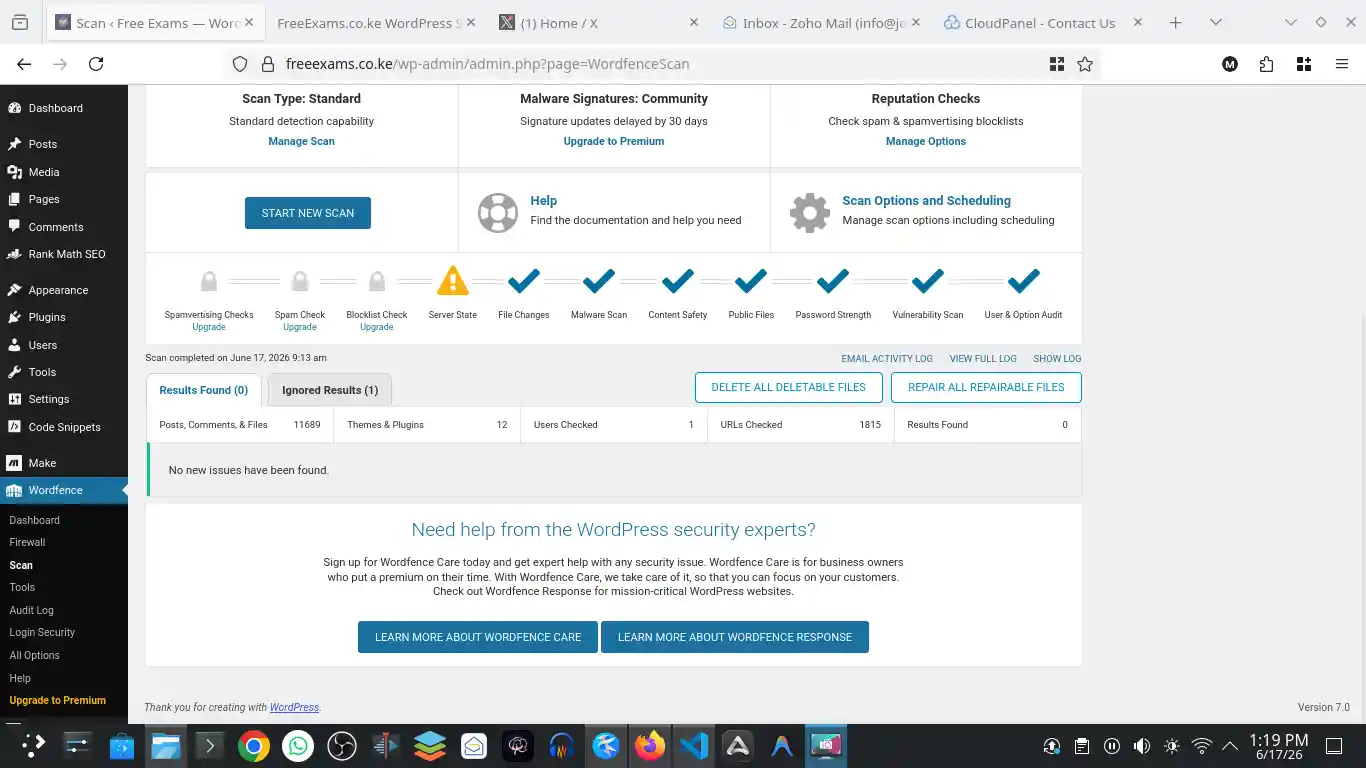
After the server-side cleanup and command-line verification, a Wordfence Security scan was run from inside WordPress. It came back clean.
| Check | Result |
|---|---|
| WordPress core checksum | Passed |
| Plugin checksum verification | 11 of 11 verified |
index.php hash | Matched official WordPress 7.0 file |
index.php immutable flag | Not set |
Hidden php -f /tmp/httpd.conf processes | Gone |
| Homepage HTTP status | 200 |
| Old spam URL behavior | 404 |
| Wordfence scan | 0 results found |
Incident Timeline
Incident Timeline
The issue is first noticed in 2025
The spam problem had already been noticed around the time CloudPanel was installed. A clean site migration file was uploaded afterwards, but the issue persisted instead of disappearing.
Japanese SEO spam appears in Google
Search results for freeexams.co.ke showed Japanese e-commerce product pages and snippets unrelated to the site’s education content.
Search-facing cleanup begins
The e-commerce spam footprints were removed from Search Console and the current search results returned to legitimate FreeExams pages.
index.php is hardened manually
The file was protected with chmod 444 and chattr +i, forcing an unlock/update/relock workflow for WordPress maintenance.
Wordfence flags index.php
The file viewer showed a 22 KB obfuscated PHP payload before the normal WordPress bootstrap.
First checksum verification fails
WP-CLI confirmed that the WordPress installation did not verify because index.php failed checksum validation.
Clean index.php is restored and immediately reinfected
The official WordPress 7.0 index.php was copied into place, but the infected 22 KB file returned almost instantly.
Hidden PHP writer processes are discovered
Three long-running freeexams processes were found executing php -f /tmp/httpd.conf from the webroot.
Processes are killed and the clean file holds
After the malicious processes were stopped, the clean index.php remained intact and passed checksum verification.
Final verification passes
Core checksums passed, all plugins verified, HTTP smoke tests behaved correctly, unsafe permissions were normalized, and Wordfence returned zero findings.
What This Teaches
Lessons Learned
1. A Clean Search Result Does Not Prove a Clean Server
The updated Google screenshot looked much better, but the server still had an active malware process. Search Console cleanup repairs the public index. It does not prove that the backend is clean.
2. A Clean Migration Does Not Remove a Live Server Process
Uploading a clean migration file can fix an infection when the infection lives only inside the WordPress files or database being migrated. It cannot stop a separate process that is already running under the hosting account. That is why the problem persisted after the clean migration attempt in 2025.
3. Immutable Files Are Emergency Brakes, Not Root-Cause Fixes
chattr +i can be useful during an emergency, but it should not become the permanent security model. If a file must be immutable forever to stay clean, something else is still wrong.
4. WP-CLI Checksums Are Excellent for Core and Public Plugins
The core checksum check quickly confirmed that the main WordPress core issue was index.php. Plugin checksums later confirmed that all 11 public plugins matched their expected source files.
5. Reinfection Speed Is Evidence
The clean file was replaced and then reverted almost instantly. That timing ruled out a passive stale file and pointed toward an active writer.
6. Deleted Files Can Still Be Running
The suspicious /tmp/httpd.conf file no longer existed on disk, but PHP was still running it. This is why process inspection mattered as much as file scanning.
7. Database Snippets Must Be Reviewed
Any site with a code-snippet plugin deserves database inspection during a malware cleanup. In this case, the snippets were not the root cause, but checking them closed an important gap.
8. Permission Cleanup Should Be Conservative
The final cleanup did not blindly chmod the entire site. It fixed clearly unsafe items: a world-writable directory and executable bits on top-level PHP files. The site remained compatible with CloudPanel and normal WordPress updates.
- Rotate the root SSH password because it was used during incident response.
- Move SSH toward key-only login and disable password login where practical.
- Rotate WordPress administrator passwords.
- Regenerate WordPress salts to invalidate old sessions.
- Review all WordPress administrator users for unknown accounts.
- Keep Wordfence active and schedule recurring scans.
- Monitor process lists for unexpected long-running commands under site users.
- Monitor Google Search Console for any new indexed spam URLs.
- Keep CloudPanel, WordPress core, themes, and plugins updated.
- Maintain off-server backups so future cleanup can compare known-good states.
Questions
Frequently Asked Questions
Was WordPress itself the root cause?
The visible compromised file was a WordPress core file, but the reinfection came from a separate PHP process running under the site user. WordPress was the target and delivery surface, but the active writer was outside the normal WordPress request lifecycle.
Why did the first clean index.php not stay clean?
Because three long-running PHP processes were still alive. They rewrote index.php almost immediately after it was restored. Once those processes were killed, the clean file stayed in place.
Why was the malicious /tmp/httpd.conf file not found?
It had already been deleted from disk. Linux processes can continue running code after the original file is gone. The process list still showed the command line, and /proc confirmed the processes were running from the FreeExams webroot.
Does the site still need chattr +i on index.php?
No. After the active writer was removed and verification passed, index.php was left as a normal 644 WordPress file with no immutable flag. This allows normal WordPress updates without the previous manual lock/unlock workflow.
Were the plugins infected?
WP-CLI verified all 11 public plugins successfully. The investigation also reviewed suspicious function usage and database snippets. No plugin file was identified as the reinfection source.
What proved the cleanup worked?
The clean index.php held after waiting and after HTTP requests, WordPress core checksums passed, all plugin checksums passed, old spam routes no longer returned injected behavior, the process list no longer showed php -f /tmp/httpd.conf, and the final Wordfence scan returned zero results found.
Evidence Notes
Evidence Kept and Evidence Removed
The infected index.php was preserved on the server as evidence at:
The temporary clean WordPress core download used during repair was removed from /tmp after verification:
No passwords, database credentials, SSH secrets, or WordPress salts are included in this article.