
Anti-Detect Browser vs VPN vs Proxy
They all claim to protect your identity, but they operate on completely different layers of the web. Here is exactly what each tool hides, what it leaks, and the professional stack for managing multiple accounts.
Which Tool Actually Hides Your Identity?
A proxy changes your IP address for specific apps or requests (ideal for web scraping). A VPN encrypts all device traffic and hides your IP from your ISP (ideal for personal privacy on public Wi-Fi). An anti-detect browser spoofs your hardware fingerprint, isolates cookies per profile, and manages WebRTC (ideal for multi-accounting, ad buying, and e-commerce). If your goal is to manage multiple ad accounts or storefronts without getting banned, a VPN alone will fail because it does not hide your browser fingerprint. The professional standard is to use an anti-detect browser paired with a residential proxy.
of standard browsers have a completely unique fingerprint — meaning a VPN alone cannot stop platforms from linking your accounts (EFF Panopticlick).
of standard VPNs fail to mask your canvas hash, WebGL renderer, and installed fonts, leaving your device identity fully exposed.
projected global VPN market size by 2030, driven largely by consumer privacy concerns and remote work (Grand View Research).
distinct layers of tracking (Network, Browser, State) that platforms use to identify you. Most users only protect the Network layer.
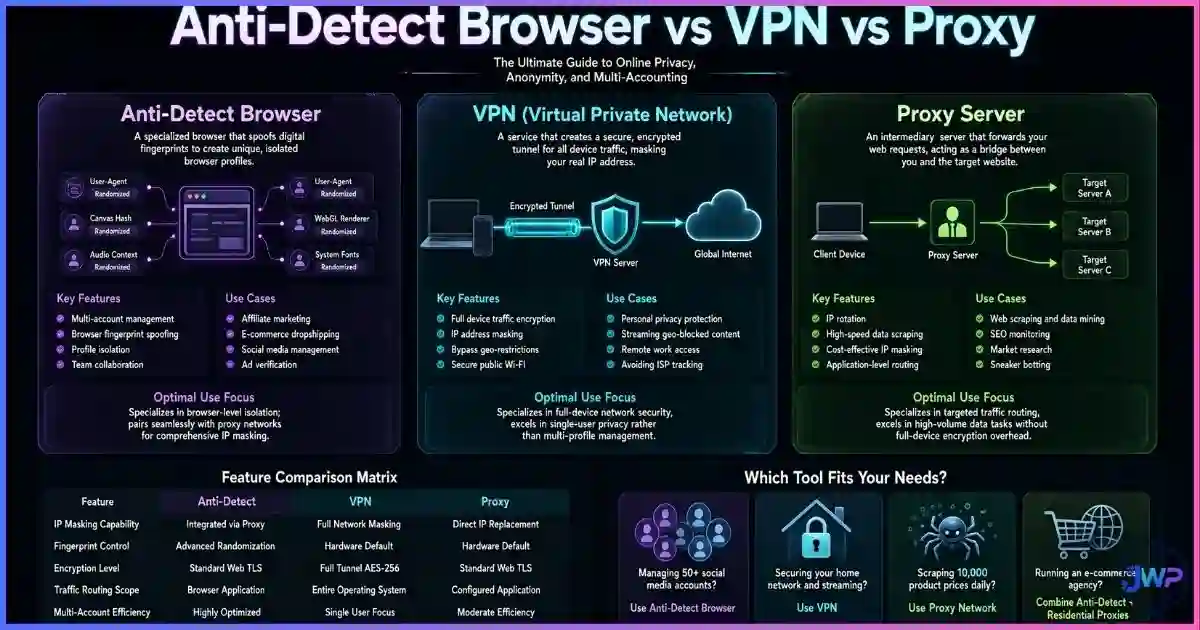
Table of Contents
What Each Tool Actually Does
The biggest mistake people make is treating these three tools as interchangeable. They are not. They operate on different layers of the network and browser stack, and understanding how websites track you requires knowing which layer each tool protects.
1. Proxy (The Network Mask)
A proxy acts as an intermediary server. When you connect through a proxy, the destination website sees the proxy’s IP address instead of yours. Proxies are typically configured per-app or per-request (e.g., in a Python scraping script or a specific browser profile). They do not encrypt your traffic by default, and they do nothing to change your browser’s fingerprint.
2. VPN (The Device Tunnel)
A Virtual Private Network creates an encrypted tunnel between your device and a remote server. All traffic leaving your device (browser, email client, background apps) is routed through this tunnel. A VPN hides your IP from the websites you visit and hides your browsing activity from your ISP. However, it does not alter your browser’s User-Agent, screen resolution, or hardware identifiers.
3. Anti-Detect Browser (The Identity Spoofer)
An anti-detect browser is a specialized web browser designed to create isolated, spoofed digital identities. Each profile gets its own cookies, LocalStorage, cache, and a completely spoofed hardware fingerprint (canvas, WebGL, audio context, fonts, timezone). It is designed specifically to defeat browser fingerprinting and cross-account linkage.
Tracking Protection Charts
The charts below visualize exactly which tracking vectors each tool neutralizes. This explains why professionals managing multiple accounts almost never rely on a VPN alone.
Tracking Vector Protection by Tool (0-10 Score)
IP Address Masking
Browser Fingerprint Spoofing
Cookie & Storage Isolation
Editorial scoring based on tracking vector coverage. Proxies and VPNs excel at the Network Layer (IP masking) but fail completely at the Browser Layer (fingerprinting) and State Layer (cookies), which is where modern ad platforms and e-commerce sites do their cross-account linking.
Primary Use Case Fit by Industry
(Proxy wins)
(VPN wins)
(Anti-Detect wins)
Task-specific suitability. Using a VPN for large-scale web scraping will get your IP banned instantly; using a proxy for personal privacy on a coffee shop Wi-Fi leaves your traffic unencrypted; using a standard browser + VPN for multi-accounting leads to immediate account bans due to fingerprint matching.
The Head-to-Head Comparison Table
| Feature | Proxy | VPN | Anti-Detect Browser |
|---|---|---|---|
| Primary Function | Route traffic through intermediary IP | Encrypt all device traffic & hide IP | Spoof hardware fingerprint & isolate profiles |
| Hides IP Address? | Yes (per app/request) | Yes (device-wide) | No (requires proxy/VPN integration) |
| Encrypts Traffic? | No (unless HTTPS/SOCKS5) | Yes (AES-256 standard) | No (relies on browser HTTPS) |
| Spoofs Fingerprint? | No | No | Yes (Canvas, WebGL, Fonts, Audio) |
| Isolates Cookies? | No | No | Yes (per profile) |
| Prevents WebRTC Leaks? | No | Rarely (requires UDP routing) | Yes (per-profile policy) |
| Cost | Pay per GB or IP | $5–$15/month flat rate | Freemium or $30–$100+/month |
| Best For | Scraping, geo-unblocking APIs | Personal privacy, ISP hiding | Ad buying, affiliate marketing, e-commerce |
When to Use a Proxy
Proxies are the backbone of the data collection and web scraping industry. Because they can be rotated rapidly and assigned to specific scripts or browser profiles, they are ideal for:
- Web Scraping: Extracting pricing data, search results, or public records without getting your main IP banned. (See our roundup of the best proxy providers and best web scraping providers).
- Ad Verification: Checking how your ads appear in different geographies or to different demographics.
- Sneaker/Ticket Botting: Making hundreds of concurrent checkout requests from different IP addresses.
When to Use a VPN
A VPN is a consumer privacy tool. It is designed to protect you from your ISP, your government, and hackers on public Wi-Fi. It is not designed to help you manage 50 Facebook ad accounts. Use a VPN when:
- You are working from a coffee shop, airport, or hotel and need to encrypt your traffic.
- You want to hide your browsing habits from your Internet Service Provider.
- You need to bypass simple geo-restrictions on streaming platforms (Netflix, BBC iPlayer).
- You are a journalist or activist needing basic network-level anonymity.
If you are looking for a personal privacy tool, our guide to the best VPN providers covers the most trustworthy options. However, remember the golden rule: a VPN does not change your browser fingerprint. If you log into your business ad account using a VPN, the platform still sees your exact hardware ID.
When to Use an Anti-Detect Browser
Anti-detect browsers are built for professionals who need to operate multiple digital identities on platforms that actively ban multi-accounting. They are the standard tool for:
- Affiliate Marketers: Running dozens of ad accounts across Meta, TikTok, and Google without triggering “suspicious activity” bans.
- E-commerce Sellers: Managing multiple Amazon, eBay, or Etsy storefronts from a single physical office.
- Social Media Agencies: Managing hundreds of client profiles without cross-contaminating cookies or getting flagged for “unusual login locations.”
- Sports Bettors & Arbitrageurs: Maintaining multiple accounts on betting exchanges to avoid being limited or banned.
Modern platforms use advanced fingerprinting techniques to link accounts. If Account A and Account B share the same canvas hash, WebGL renderer, and timezone, the platform knows they are run by the same person — regardless of the IP address. Anti-detect browsers solve this by giving each profile a unique, consistent, and believable digital identity. For a deeper dive, read what anti-detect browsers can actually hide and whether websites can detect them.
Stop getting banned for sharing a fingerprint.
Incogniton gives every profile its own isolated cookies, spoofed hardware fingerprint, and WebRTC policy. Pair it with a residential proxy, and your accounts look like they are running on completely different physical machines.
Try Incogniton Free →Affiliate link — we may earn a commission at no extra cost to you.
The Professional Stack: Using Them Together
In professional multi-accounting, these tools are not competitors; they are complementary layers of a single identity. The industry standard “stack” for running a high-risk ad account or storefront looks like this:
- Layer 1 (Network): A high-quality Residential Proxy assigned specifically to Profile A. This provides a clean, location-matching IP address that has not been flagged for abuse.
- Layer 2 (Browser): An Anti-Detect Browser Profile configured to spoof a Windows 11 machine with a specific GPU, screen resolution, and timezone that matches the proxy’s geolocation.
- Layer 3 (State): The anti-detect browser isolates all cookies, LocalStorage, and cache for Profile A, ensuring no data bleeds over from Profile B.
This combination provides true browser profile isolation. To the tracking platform, Profile A looks like a real user in Chicago using a Dell laptop, and Profile B looks like a real user in London using a Mac. They share no network, no hardware, and no state data.
Decision Checklist: Which Do You Need?
- I just want to watch Netflix from another country: Use a premium VPN.
- I am scraping 10,000 product pages from Amazon: Use a rotating residential proxy network.
- I am working from a cafe and want to hide my traffic from the cafe owner: Use a VPN.
- I need to manage 15 Facebook Ad accounts for different clients: Use an Anti-Detect Browser + Residential Proxies.
- I am running an Amazon Arbitrage business with 5 seller accounts: Use an Anti-Detect Browser + Static Residential Proxies.
- I want to hide my IP and my fingerprint: Use an Anti-Detect Browser paired with a Proxy or VPN.
Ready to build your professional stack?
Start with up to 10 isolated profiles for free. Incogniton handles the fingerprinting and cookies; you just bring the proxies and the accounts.
Get Incogniton →Affiliate link — we may earn a commission at no extra cost to you.
Frequently Asked Questions
Can I use a VPN and an anti-detect browser together?
Does a VPN hide my browser fingerprint?
Is a proxy safer than a VPN?
Why do affiliate marketers use anti-detect browsers instead of VPNs?
Can websites detect if I am using a proxy?
Sources and Research Notes
Sources & Research Notes (click to expand)
The comparisons and data points in this guide are based on network protocol documentation, browser privacy research, and industry market reports. Tracking methodologies evolve rapidly, so specific platform detection rates may vary.
- Eckersley, P. (2010). “How Unique Is Your Web Browser?” EFF Panopticlick — foundational research showing 83.6% of browsers have unique fingerprints, proving IP masking alone is insufficient for anonymity. panopticlick.org
- Grand View Research (2023). “Virtual Private Network (VPN) Market Size, Share & Trends Analysis Report.” — Market projections showing the $67B+ growth of the consumer and enterprise VPN sector. grandviewresearch.com
- Laperdrix, P., et al. (2020). “Fingerprinting the Fingerprinters: Understanding the Web Tracking Ecosystem.” INRIA — analysis of how platforms use canvas, WebGL, and audio contexts to track users across IP changes. amiunique.org
- Englehardt, S., & Narayanan, A. (2016). “Online Tracking: A 1-million-site Measurement and Analysis.” Princeton CITP — large-scale measurement of cookie syncing and cross-site tracking vectors that bypass standard VPNs. citp.princeton.edu
- Ikram, M., et al. (2016). “An Analysis of the Privacy and Security Risks of Android VPN Permission-enabled Apps.” CSIRO / ACM IMC — research showing widespread DNS and IPv6 leaks in consumer VPN applications. research.csiro.au
- Bright Data / Oxylabs (2024). “The State of Web Scraping and Proxy Infrastructure.” — Industry reports on the necessity of residential vs. datacenter proxies for avoiding bot detection. brightdata.com