Browser Profile Isolation: The Complete Guide
Why separating cookies, cache, fingerprints, and network paths per identity is the only way to run multiple ad accounts, seller storefronts, or affiliate campaigns without getting linked and banned.
What Is Browser Profile Isolation, in One Paragraph?
Browser profile isolation is the practice of giving every digital identity its own completely separate browser environment — its own cookie jar, cache, LocalStorage, IndexedDB, service workers, fingerprint, timezone, language, proxy, and even spoofed hardware attributes. Platforms like Meta, Google, Amazon, and TikTok run sophisticated detection systems that look for shared signals between accounts; when two accounts share any browser state, the platform links them and often suspends all related accounts. True isolation is what separates multi-account operators who scale for years from those who get wiped out in a single overnight ban wave. If you need a primer on the identity container itself, start with what a browser profile actually is.
of users identifiable via cross-browser fingerprinting in the NDSS 2017 study — showing why single-profile isolation is not enough.
breakage observed when Firefox rolled out Total Cookie Protection per-site isolation to 10,000 top sites (Mozilla 2023).
of Amazon sellers reported account suspension in 2024 — linked accounts are a leading trigger.
advertiser accounts Meta suspended in the same period, a 90% increase from 2022 (The APMA).
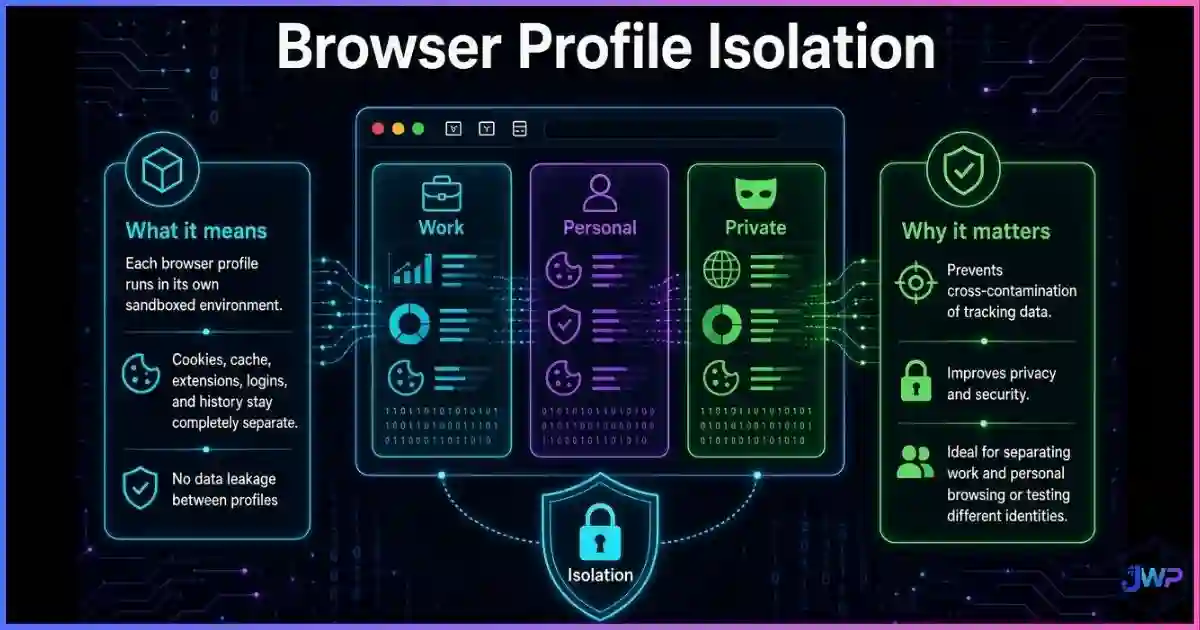
Table of Contents
What Profile Isolation Actually Means
A browser profile is the container that holds every piece of state your browser accumulates while you use the web: cookies, cache, LocalStorage, IndexedDB, service workers, browsing history, form autofill, site permissions, extensions, and the fingerprint your device presents to every page. Browser profile isolation means each identity you operate runs inside its own sealed container, so that no state ever crosses between identities.
This is different from what most people mean when they say “I use different Chrome profiles.” Native browser profiles share the same underlying engine, user agent, hardware fingerprint, canvas rendering, WebGL signature, installed extensions, font list, and device-level attributes — and they typically inherit the same IP and DNS. That is why the professional stack for multi-accounting is either separate browsers vs. virtual machines vs. anti-detect browsers, not Chrome Profile A vs. Chrome Profile B.
Why Platforms Link Your Accounts (and What Happens When They Do)
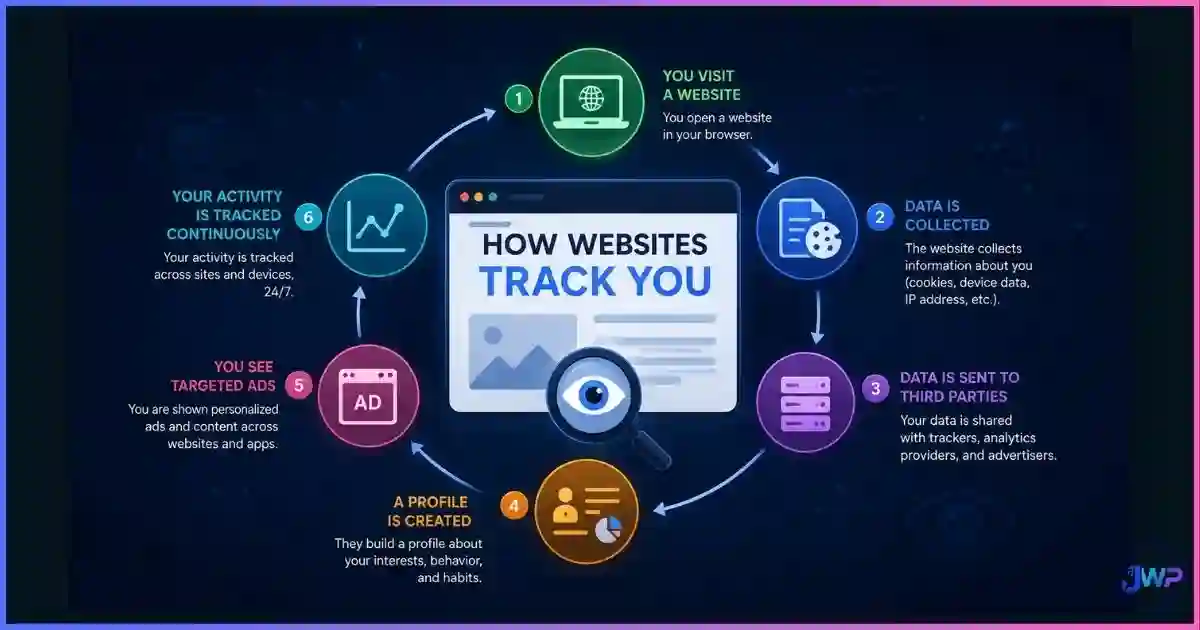
Platform detection is not magic — it is a correlation engine. Fraud and abuse teams at Meta, Google, Amazon, TikTok, and every major marketplace build graphs of identities from the signals your browser exposes. Every time you log in, the platform adds edges between your current session and everything it already knows about you. If two accounts land on the same node, they become “related accounts,” and the platform’s policy response is typically nuclear.
- Meta / Facebook Ads: related-account suspensions cascade. A problem in one ad account can deactivate your entire Business Manager, pixel, and payment method.
- Google Ads: “circumventing systems” and “related accounts” suspensions are among the hardest to appeal because the platform treats them as structural fraud signals.
- Amazon Seller Central: if any linked account is not in good standing, Amazon may deactivate all of your selling accounts until every one is resolved.
- Affiliate networks: one flagged account can claw back commissions across every account tied to the same fingerprint.
The detection graph is fed by far more than IP address. Read how websites track you end-to-end to see how cookies, fingerprinting, CNAME cloaking, server-side tagging, and behavioral signals all feed the same correlation system.
One contaminated profile can burn every account you run.
Incogniton builds fully isolated browser profiles — separate cookies, cache, storage, fingerprint, proxy, and timezone — so a mistake in one identity never reaches the others.
Get Incogniton →Affiliate link — we may earn a commission at no extra cost to you.
Profile Isolation Statistics & Charts
The cost of broken isolation shows up in platform enforcement numbers, browser partitioning research, and fingerprinting studies. The figures below come from platform transparency reports, academic work, and vendor measurements.
Why isolation must go beyond the network layer
fingerprinting
single-browser
Source: Cao, Li & Wijmans, “(Cross-)Browser Fingerprinting via OS and Hardware Level Features” (NDSS 2017). Even changing browsers does not protect you — hardware-level signals survive the swap, which is why profile isolation must include fingerprint spoofing, not just cookie separation.
Platform enforcement scale (publicly reported)
removed in 2025 (VAB)
suspended in the period
the same window
Sources: VAB analysis of Meta transparency reporting (3.5B fake accounts removed in 2025); The APMA (12.7M advertiser accounts suspended — a 90% increase from 2022 — and 2.1B ads removed). These numbers show how aggressively platforms hunt for identity graphs.
Browser-level partitioning: how clean is modern isolation?
Sources: Mozilla 2023 compatibility study — only 0.7% of top 10,000 sites broke with Total Cookie Protection, and 89% of those were resolved; Chrome CHIPS estimate that 10 cookies per-partition satisfy ~99% of existing cross-site cookie use cases. The modern web can run partitioned by default — which is exactly the model professional profile isolation copies.
Isolation method coverage (editorial scoring)
Editorial scoring based on how many detection signals each method isolates. Chrome profiles only separate cookies and storage. VPNs only separate IP. VMs separate state but share hardware fingerprints. Anti-detect browsers separate state, spoof hardware signals, and route each profile through its own proxy.
The stakes are not theoretical. Reported 2024 data suggests roughly 35% of Amazon sellers experienced account suspension — with linked accounts being a leading trigger — and affiliate marketers commonly report 30%+ platform-ban rates from fingerprinting systems. When a single detection event takes down every account, the difference between isolated and non-isolated setups is the difference between a bad Tuesday and a dead business.
The 6 Layers Every Profile Must Isolate
Thinking of isolation as a checklist of layers — not a single setting — is what separates setups that last from setups that leak. Each layer below is a signal that platforms correlate to link accounts. See what anti-detect browsers can hide for the full technical inventory.
| Layer | What it is | How platforms use it to link accounts |
|---|---|---|
| State layer | Cookies, LocalStorage, IndexedDB, cache, service workers, ETags | Shared IDs and cached assets are the easiest cross-account signals; Firefox TCP and Chrome CHIPS now partition these per-site by default. |
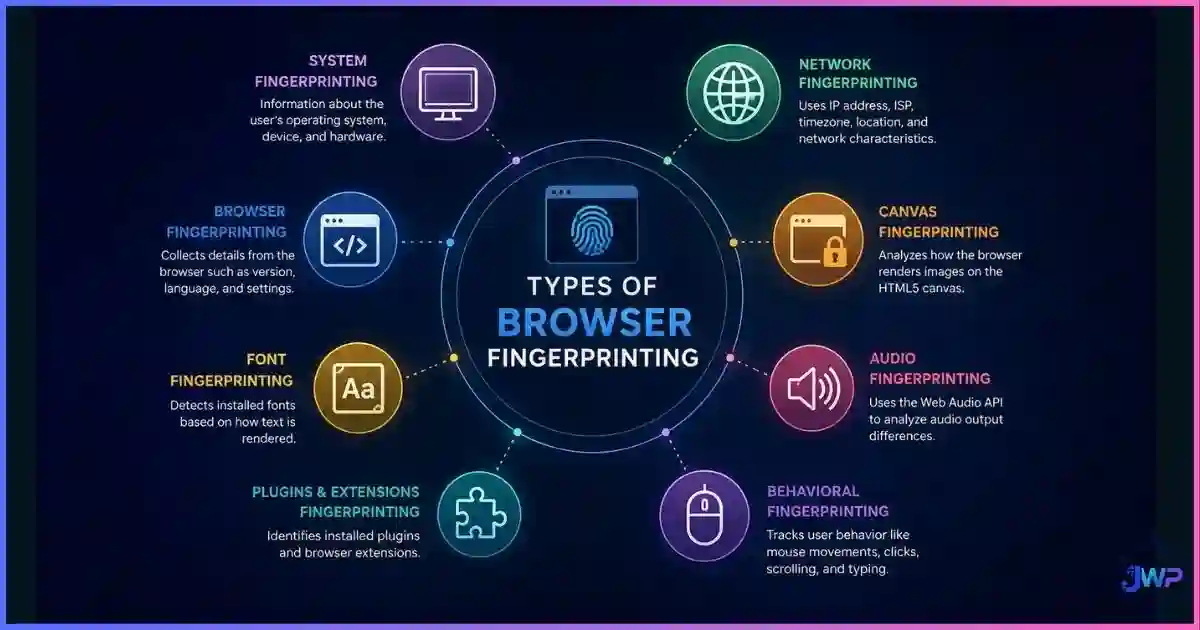
| Fingerprint layer | Canvas, WebGL, AudioContext, fonts, screen, hardware concurrency, user agent | Browser fingerprinting can reach ~99% identification across browsers when hardware-level attributes are included. |
| Network layer | Public IP, IP type (residential / mobile / datacenter), ASN, DNS, WebRTC | Datacenter IPs, shared ASNs, and WebRTC leaks are obvious tells. See what a WebRTC leak is and how to prevent it. |
| Locale layer | Timezone, language, locale, keyboard layout, date/number formats | A Berlin fingerprint claiming to be in Los Angeles timezone is instantly flagged as spoofed. |
| Behavior layer | Mouse movement, typing cadence, scroll patterns, session timing | Bot detection and fraud scoring use behavioral signals to confirm or reject a claimed identity. |
| Consistency layer | Whether the profile tells the same story across sessions | A fingerprint that changes on every visit is flagged as a bot; a stable one looks like a real user. |
The practical rule: isolation without consistency is worse than no isolation. A profile whose fingerprint re-randomizes every session looks like a bot farm. A profile whose fingerprint, timezone, proxy, and language all agree across sessions looks like a real user — which is exactly what anti-detect browser profiles and digital identities are designed to produce.
Approaches Compared: Native Profiles, VMs, and Anti-Detect Browsers
There are several ways to run multiple identities, and they cover very different parts of the stack. The full comparison lives in browser profiles vs. separate browsers vs. virtual machines, but here is the practical summary:
| Approach | What it isolates | What it misses | Best for |
|---|---|---|---|
| Native Chrome / Edge / Firefox profiles | Cookies and site storage between profiles | Same hardware fingerprint, canvas/WebGL, extensions, IP, DNS, timezone | Separating personal vs. work accounts |
| Separate browsers (Brave + Firefox + Tor) | State, engines, and some fingerprints | Still your machine’s hardware, still your IP | Low-account-count privacy work |
| VPN alone | IP address and traffic encryption | All browser state, fingerprint, timezone | Privacy, not multi-accounting — see anti-detect browser vs. VPN vs. proxy |
| Virtual machine per identity | Full OS state, storage, extensions, cookies | Often still the same hardware fingerprint; heavy to run | Teams who can absorb the resource cost |
| Anti-detect browser | State + fingerprint + locale + proxy per profile | Nothing, when configured correctly | Affiliate marketers, ad buyers, e-commerce sellers, QA teams |
Common Mistakes That Break Isolation
- One login, many profiles. Logging into the same Gmail, Facebook, or Amazon account from two profiles instantly links them — no fingerprint required.
- Shared extensions. Installing the same extension in two profiles can share a fingerprint vector (extensions are detectable) and sometimes share sync state.
- Mixed proxy quality. Running one profile on a datacenter IP and another on a residential IP is a visible pattern; platforms correlate IP-type consistency.
- Timezone/geo mismatch. A profile claiming Germany with a timezone of America/Los_Angeles is a fingerprinting tell.
- Randomized fingerprints. Re-rolling fingerprints every session is the opposite of stable digital identity — platforms read that as automation.
- Shared payment methods. The same card, PayPal, or billing address across accounts is one of the strongest linking signals of all.
- Shared device hardware. Two profiles running on the same WebGL renderer string with no spoofing can be correlated at the hardware layer.
Most of these failure modes can be detected with a single pre-launch check. Use a leak test for each profile to confirm no WebRTC, DNS, or timezone tells remain — we cover the testing flow in what a WebRTC leak is and how to test for it, and the broader detection landscape in can websites detect anti-detect browsers.
Scale without the overnight wipeout.
Incogniton isolates every layer — cookies, cache, storage, fingerprint, proxy, timezone, and language — per profile, with stable identities that look like real users to every platform.
Try Incogniton Free →Affiliate link — we may earn a commission at no extra cost to you.
How Anti-Detect Browsers Implement Profile Isolation
An anti-detect browser is a Chromium- or Gecko-based browser where each profile is a sealed, persistent identity container. Under the hood it replaces or spoofs every layer in the table above:
- State: each profile gets a fully isolated user data directory — its own cookies, LocalStorage, IndexedDB, cache, service workers, and browsing history.
- Fingerprint: canvas, WebGL, AudioContext, fonts, screen size, device pixel ratio, hardware concurrency, and device memory are either replaced with values from a real device pool or spoofed in a way that stays consistent across sessions.
- Network: each profile binds to its own proxy, with WebRTC, DNS, and timezone automatically aligned to the proxy’s geolocation.
- Automation: serious tools hide the automation hooks (
navigator.webdriver, Selenium flags, CDP artifacts) so profiles do not get flagged as bots.
The practical difference between products is in how well they execute each layer — consistency, realism, and team features. We compare the market in our roundup of the best anti-detect browsers and the budget tier in the cheapest anti-detect browsers, and we cover single-product deep dives in our Incogniton review, Multilogin review, GoLogin review, AdsPower review, and Geelark review.
If you want to know whether the investment actually pays off, do anti-detect browsers really work breaks down what the data says and where they fall short.
Profile Isolation Launch Checklist
- Decide your identity story per profile: geo, language, timezone, device type, and browser engine.
- Assign one dedicated proxy per profile (residential or mobile for high-value platforms).
- Create each profile in your anti-detect browser with a consistent fingerprint that matches its geo.
- Run a leak test per profile: WebRTC, DNS, IP type, timezone, and fingerprint all match the proxy.
- Warm the profile: light browsing, cookie accumulation, and natural session timing before logging into any sensitive account.
- Never log into a shared identity (personal Gmail, main Facebook) from a working profile.
- Never share payment methods, phone numbers, or recovery emails across profiles.
- Re-test quarterly: browser updates, proxy changes, and platform detection updates all drift isolation over time.
Frequently Asked Questions
What is browser profile isolation?
Why do platforms link multiple accounts?
Is profile isolation the same as using multiple browser profiles in Chrome?
Does a VPN provide profile isolation?
Can platforms still detect isolated profiles?
Is browser profile isolation legal?
Sources and Research Notes
Sources & Research Notes (click to expand)
Methodologies differ across academic studies, platform transparency reports, and browser-vendor measurements, so figures above are presented as published and should be read as directional. Open sources used:
- Cao, Li & Wijmans (2017). “(Cross-)Browser Fingerprinting via OS and Hardware Level Features.” NDSS 2017 — 99.24% cross-browser identification vs. 90.84% single-browser state of the art. ndss-symposium.org
- Mozilla (2023). Firefox Total Cookie Protection compatibility study — 0.7% breakage across the top 10,000 sites, with 89% of that breakage resolved. alibaba.com/lifetips
- Mozilla (2022). “Firefox Rolls Out Total Cookie Protection By Default.” — per-site cookie jar isolation shipped to all users worldwide. blog.mozilla.org
- Chrome Privacy Sandbox. “Cookies Having Independent Partitioned State (CHIPS).” — 10 cookies per-partition satisfies ~99% of existing cross-site cookie use cases. privacysandbox.google.com
- VAB Analysis (2025). “Facebook banned 3.5 billion fake accounts in 2025.” ppc.land
- The APMA (2023). “Affiliate Marketing: Common Pitfalls to Avoid.” — 12.7M advertiser accounts suspended, a 90% increase from 2022, with 2.1B ads removed. theapma.co.uk
- Yosef Kassabry (2026). “Best Anti-Detect Browsers for Affiliate Marketing 2026.” — reports 30%+ platform-ban rates among affiliate marketers from fingerprinting systems. yosefk.me
- Eckersley, P. (2010). “How Unique Is Your Web Browser?” EFF Panopticlick — 83.6% of browsers had a unique fingerprint. panopticlick.org