Why Changing Your IP Address Doesn’t Change Your Browser Fingerprint
You switched to a VPN, your IP address changed, but the platform still banned your account. Here is the difference between network identity and device identity, the entropy data that proves why IP masking fails, and the professional stack for true isolation.
Why Doesn’t Changing Your IP Address Hide Your Fingerprint?
Your IP address and your browser fingerprint operate on completely different layers of the web. Your IP address is a network-level identifier — it tells a website where your traffic is coming from. Your browser fingerprint is a device-level identifier — it tells a website exactly what hardware and software you are using. When you use a VPN or proxy, you only change the network layer. Your screen resolution, installed fonts, canvas rendering hash, WebGL GPU, and timezone remain exactly the same. Because these device attributes are far more unique and stable than an IP address, tracking platforms easily recognize you even when your IP changes.
of standard browsers have a completely unique fingerprint, making them trackable regardless of IP changes (EFF Panopticlick).
of identifying entropy provided by your installed fonts list — far more than the ~4 bits provided by an IP address behind NAT.
of browser fingerprints remain uniquely identifiable after 90 days, even when the user completely changes their IP network (AmIUnique).
of standard VPNs fail to mask your canvas hash, WebGL renderer, and timezone, leaving your device identity fully exposed.
Table of Contents
The Core Misconception: Network vs. Device Identity
Most people assume that “hiding my IP” is the same as “hiding my identity.” This was true in the early 2000s, but it has not been true for over a decade. To understand how websites track you today, you have to separate your network identity from your device identity.
- Network Identity (IP Address): This is the address your ISP assigns to your router. It changes when you restart your router, switch from Wi-Fi to mobile data, or connect to a VPN. It tells the server where the request came from.
- Device Identity (Browser Fingerprint): This is the collection of hardware and software attributes your browser exposes to render web pages correctly. It includes your screen resolution, GPU, installed fonts, timezone, and canvas rendering hash. It tells the server what is making the request.
When you connect to a VPN, you are essentially putting a fake license plate on your car. But the tracking platform isn’t just looking at the license plate — they are looking at the make, model, color, dents, and custom paint job of the car itself. If you drive the exact same car to a new location, they still know it’s you. This is the fundamental reason a VPN does not change your browser fingerprint.
Entropy Data & Tracking Charts
In information theory, “entropy” measures how much identifying power a specific attribute has. The higher the bits of entropy, the more unique that attribute makes you. The charts below show why IP addresses are actually one of the weakest tracking signals available to modern platforms.
Identifying Power (Entropy) by Tracking Attribute
Sources: EFF Panopticlick and INRIA AmIUnique datasets. An IP address behind a home router or mobile carrier (CGNAT) is shared by hundreds or thousands of users, providing very low entropy. In contrast, the combination of your specific GPU, fonts, and canvas rendering is almost entirely unique to your physical machine.
What Actually Changes When You Switch Networks?
Address
WebGL Hash
Fonts
Resolution
Language
Editorial summary of network transition behavior. Only the network layer (IP) changes. The browser layer (hardware and software attributes) remains completely static, allowing tracking platforms to instantly re-link your new IP to your old identity.
Fingerprint Stability Over Time (AmIUnique Longitudinal Study)
Source: AmIUnique longitudinal study (INRIA, 2016). Even when users change their IP address, install new extensions, or update their OS, tracking algorithms use “evolution tracking” to match the old fingerprint to the new one with over 90% accuracy.
The Two Layers of Digital Identity
Tracking platforms like Meta, TikTok, Amazon, and betting exchanges do not rely on a single signal. They build a composite profile using multiple layers. Understanding what browser fingerprinting is requires looking at the full stack:
| Layer | Signals Used | Changed by VPN? | Changed by Anti-Detect? |
|---|---|---|---|
| Network Layer | IP Address, DNS, ISP, Geolocation | Yes | Yes (via Proxy) |
| State Layer | Cookies, LocalStorage, Cache, ETags | No | Yes (Profile Isolation) |
| Browser Layer | Canvas, WebGL, Fonts, Audio, Screen | No | Yes (Spoofing) |
| Protocol Layer | TLS Handshake (JA3), WebRTC Leaks | Rarely | Yes (Policy Control) |
A VPN only covers the Network Layer. If your Browser Layer and State Layer remain exposed, the platform simply ignores your new IP and reads your canvas hash or LocalStorage supercookie to identify you. For a deeper dive into the state layer, see our comparison of cookies vs LocalStorage vs browser fingerprinting.
Why VPNs and Proxies Fall Short on Their Own
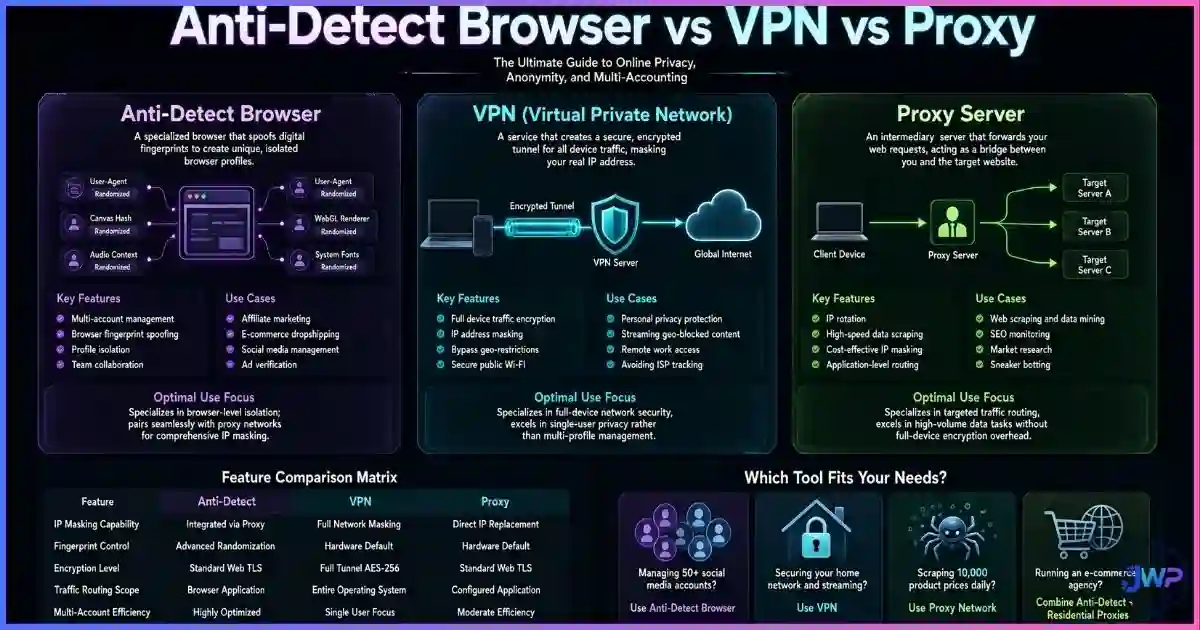
VPNs and proxies are excellent privacy tools, but they are not identity isolation tools. They solve a specific problem: hiding your traffic from your ISP and masking your location from the destination server. They do not solve the problem of multi-accounting or anti-fraud detection.
- The Shared IP Problem: Commercial VPNs route thousands of users through the same IP addresses. Ad platforms maintain blocklists of known VPN IPs. If you use a VPN, you are often flagged as “high risk” simply because your IP belongs to a datacenter.
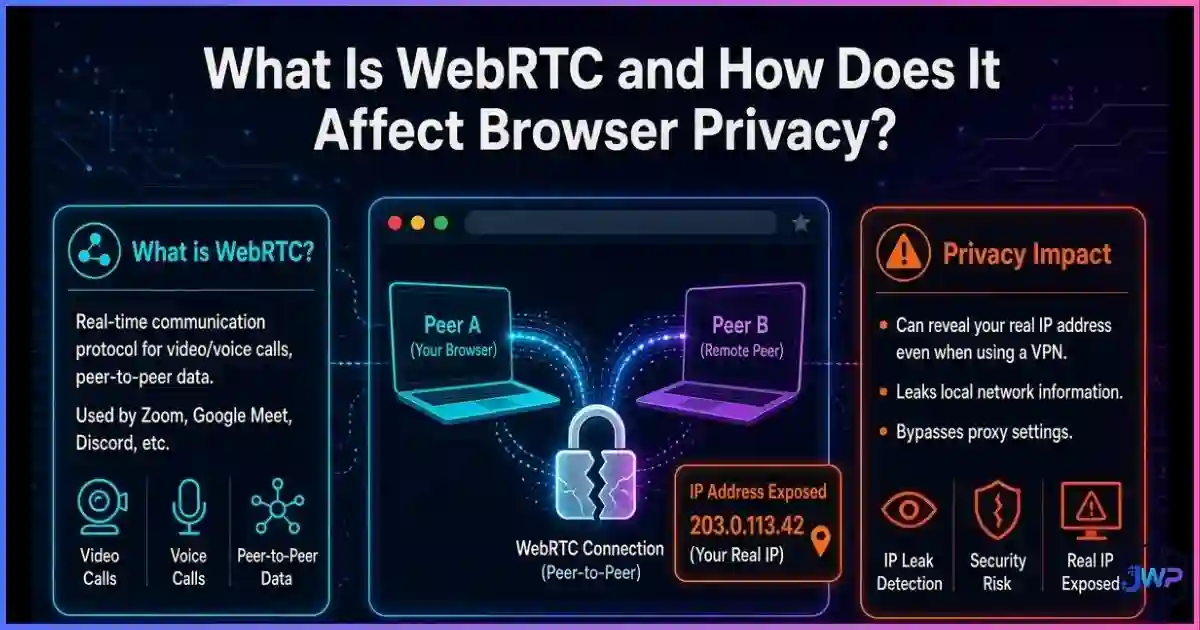
- The WebRTC Leak: Many VPNs fail to route UDP traffic correctly, leading to WebRTC leaks where your real local IP address is exposed to the website via JavaScript, completely bypassing the VPN tunnel.
- The Fingerprint Mismatch: If you claim to be a user in Germany (via a German VPN IP) but your browser timezone is set to Los Angeles and your language is en-US, fraud systems instantly flag the inconsistency.
How Tracking Platforms Link You Anyway
When you create a new account using a new IP address but the same standard browser, the platform’s anti-fraud algorithm runs a matching process:
- Read the Fingerprint: The script collects your User-Agent, screen resolution, installed fonts, canvas hash, and WebGL renderer.
- Generate a Hash: These attributes are combined into a unique string (e.g.,
fp_8f7d9a2b). - Database Lookup: The platform checks if
fp_8f7d9a2bis associated with any existing accounts. - Link and Flag: If the hash matches a previously banned account, the new account is immediately shadow-banned or suspended, regardless of the fresh IP address.
This is why the types of browser fingerprinting used by platforms are so effective. They do not need your IP to know who you are; they just need to recognize your machine. To verify your own exposure, you can use public tools to check your browser fingerprint and see exactly how unique your device looks to these algorithms.
The Professional Solution: Anti-Detect Browsers
For professionals managing multiple ad accounts, e-commerce storefronts, or social media profiles, the goal is not just “hiding” — it is identity isolation. You need every account to look like it is running on a completely different physical machine, in a different location, with a different history.
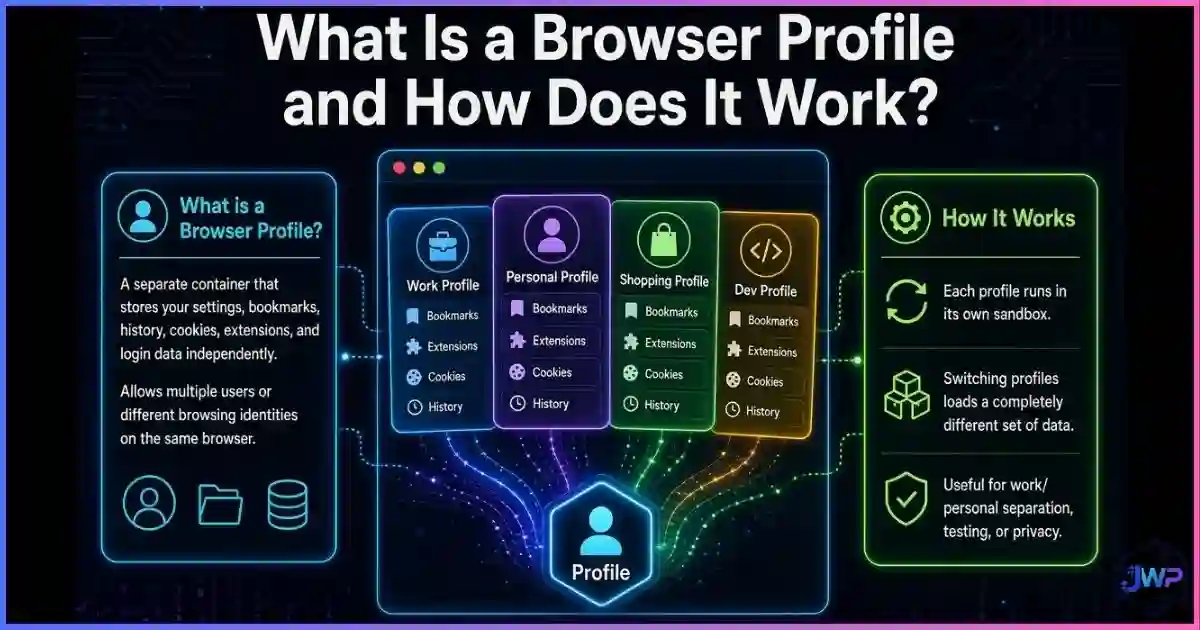
This is exactly what an anti-detect browser is designed to do. Instead of just changing the IP, it creates isolated browser profiles where every layer of the tracking stack is controlled:
- Network Layer: Each profile is paired with a dedicated residential or mobile proxy, ensuring a clean, location-matching IP.
- Browser Layer: The tool spoofs the canvas hash, WebGL vendor, installed fonts, and screen resolution so each profile has a unique, consistent hardware fingerprint.
- State Layer: Cookies, LocalStorage, and cache are completely siloed per profile, preventing cross-contamination.
- Protocol Layer: WebRTC policies are set to “proxy-only” or disabled, preventing IP leaks.
By aligning the network identity (proxy) with the device identity (spoofed fingerprint) and the state identity (isolated cookies), the profile becomes indistinguishable from a real, unique user. This is why understanding browser profile isolation is critical for anyone running multi-account operations at scale.
Stop getting banned for sharing a fingerprint.
Incogniton gives every profile its own isolated cookies, spoofed hardware fingerprint, and WebRTC policy. Pair it with a residential proxy, and your accounts look like they are running on completely different physical machines.
Try Incogniton Free →Affiliate link — we may earn a commission at no extra cost to you.
Identity Isolation Checklist
- Stop relying on standard Chrome/Firefox profiles for multi-accounting; they share the same hardware fingerprint.
- Do not assume a VPN makes you anonymous to ad platforms; it only changes your IP, not your device ID.
- Use an anti-detect browser to create isolated profiles with unique, consistent fingerprints for each account.
- Pair each anti-detect profile with a high-quality residential or mobile proxy that matches the profile’s spoofed geolocation.
- Ensure your profile’s timezone, language, and screen resolution match the location of your proxy IP.
- Disable or proxy-route WebRTC in your anti-detect settings to prevent local IP leaks.
- Never log into personal accounts (Gmail, personal Facebook) inside a profile meant for business multi-accounting.
Build a professional, multi-account infrastructure.
Incogniton handles the fingerprint spoofing, cookie isolation, and WebRTC policies. You just bring the proxies and the accounts. Start with up to 10 profiles for free.
Get Incogniton →Affiliate link — we may earn a commission at no extra cost to you.
Frequently Asked Questions
Does a VPN hide my browser fingerprint?
Can websites track me if I change my IP address?
How many bits of entropy does an IP address provide compared to a fingerprint?
How do anti-detect browsers solve this problem?
Sources and Research Notes
Sources & Research Notes (click to expand)
The entropy data, stability metrics, and tracking mechanisms described in this guide are drawn from foundational browser privacy research and large-scale academic measurements.
- Eckersley, P. (2010). “How Unique Is Your Web Browser?” EFF Panopticlick — Foundational research showing 83.6% of browsers have unique fingerprints and introducing the “bits of entropy” methodology for measuring tracking attributes. panopticlick.org
- Laperdrix, P., Rudametkin, W., & Baudry, B. (2016). “Beauty and the Beast: Diverting modern web browsers to build unique browser fingerprints.” IEEE S&P — The AmIUnique longitudinal study showing 89% fingerprint stability over 90 days, even across network changes. amiunique.org
- Gómez-Boix, A., Laperdrix, P., & Baudry, B. (2018). “Hiding in the Crowd: an Analysis of the Effectiveness of Browser Fingerprinting at Large Scale.” WWW 2018 — Detailed per-attribute entropy tables showing fonts (~13 bits) and canvas (~11 bits) vastly outperforming IP addresses in identifying power. inria.hal.science
- Englehardt, S., & Narayanan, A. (2016). “Online Tracking: A 1-million-site Measurement and Analysis.” Princeton CITP — Large-scale measurement of how platforms combine cookies, LocalStorage, and fingerprinting to re-identify users across IP changes. citp.princeton.edu
- Mowery, K., & Shacham, H. (2012). “Pixel Perfect: Fingerprinting Canvas in HTML5.” W2SP — The original academic documentation of how GPU and font rendering differences produce measurably distinct canvas hashes. ucsd.edu