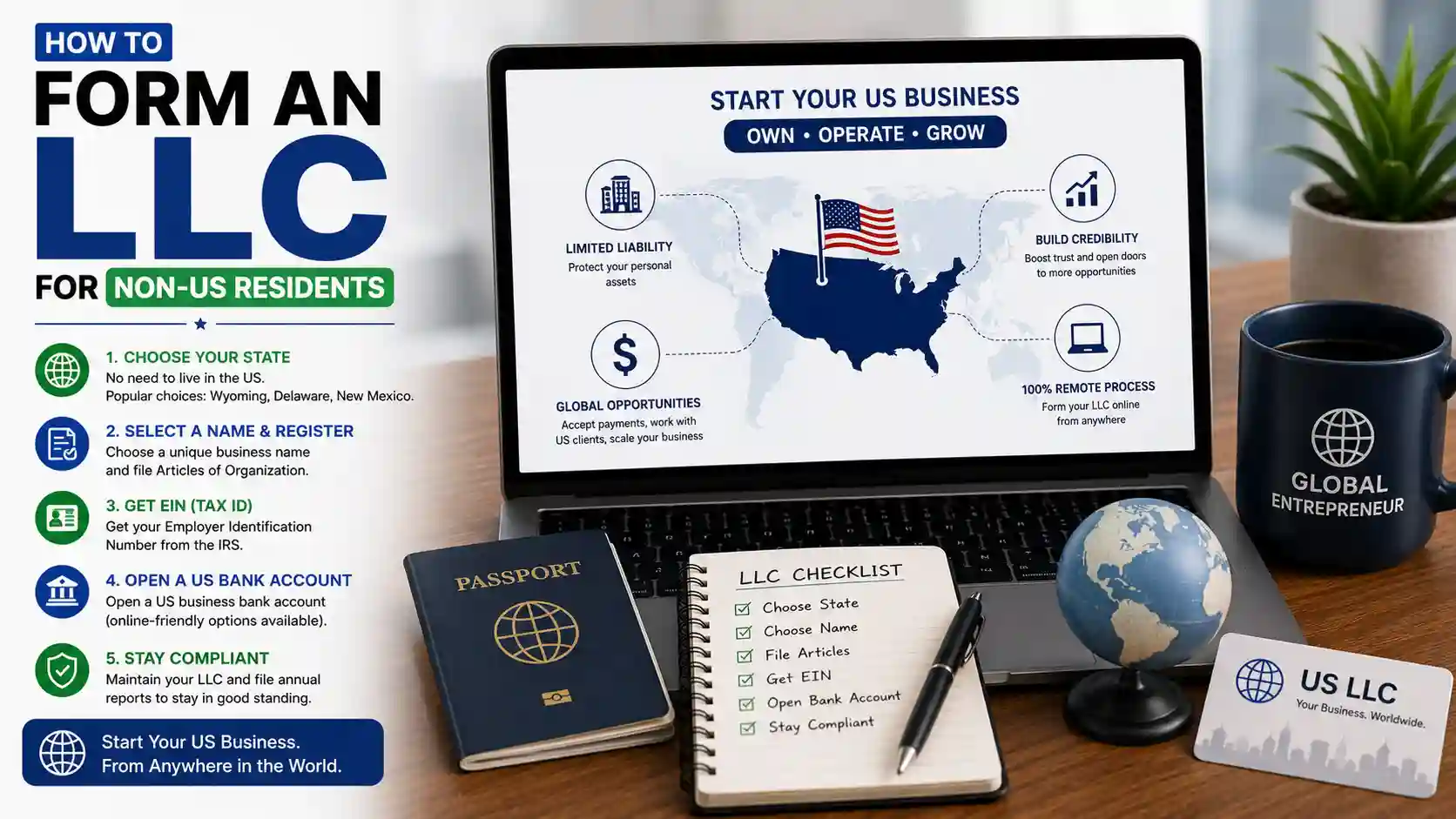
How to Create an LLC for YouTube Channel & Google AdSense
By JoshWP Team | Updated: | ~38 min read | US LLC YouTube Google AdSense
Yes — you can create a U.S. LLC for your YouTube channel and connect a company Google AdSense account, whether you live in the United States or abroad. The clean process is: form a real U.S. LLC (with a registered agent), get an EIN, open a business bank or receiving account, create a new AdSense account as an organization under the LLC, verify phone and identity, complete address and bank verification, then file the correct tax form (W-9 for U.S. persons, W-8BEN-E for foreign entities).
This guide is written for YouTubers, multi-channel network builders, and digital creators who want liability separation, cleaner bookkeeping, and a professional AdSense setup. It covers Northwest formation screenshots, Payoneer and Wise banking options, full AdSense steps with screenshots, U.S. SMS verification, tax forms, annual compliance, common mistakes, and FAQs.
Important: You generally cannot convert an existing personal AdSense account into an LLC organization account. If you already have personal AdSense, you create a new AdSense account under a different Google identity and link it through YouTube’s Partner Program “change AdSense account” flow. Do not invent fake addresses, fake ownership, or public shared SMS inboxes for sensitive Google verification.
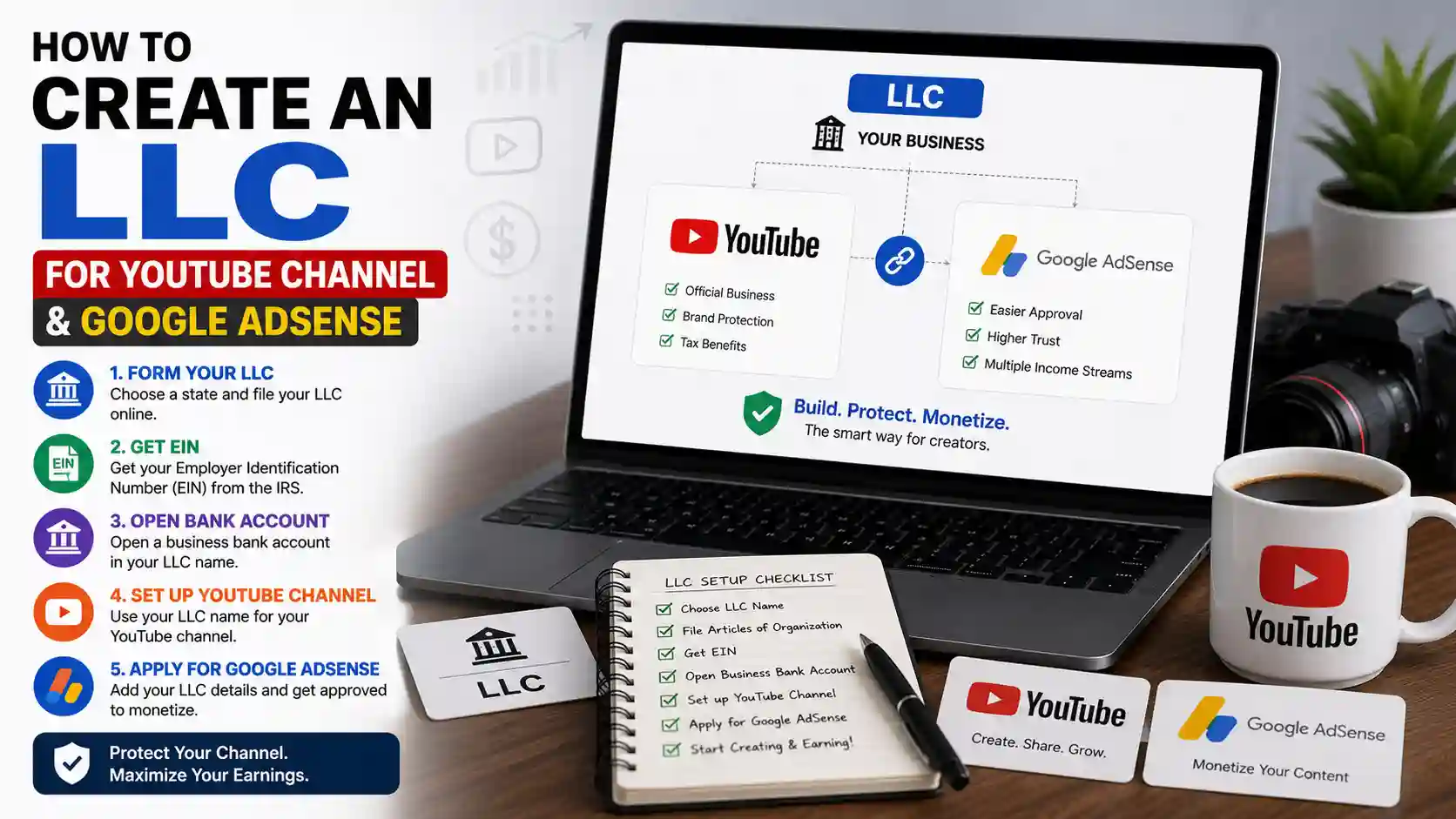
Table of Contents
- Why create an LLC for YouTube & AdSense?
- Who this guide is for
- Full setup roadmap
- U.S. residents vs non-U.S. creators
- What you need before you start
- Choosing a formation state
- Step 1: Create your U.S. LLC with Northwest
- Northwest formation screenshots
- Step 2: Get your EIN
- Step 3: Business bank setup
- Payoneer vs Wise comparison
- Step 4: U.S. phone & SMS verification
- Step 5: Change AdSense from YouTube
- Step 6: Full Google AdSense setup
- AdSense setup screenshots
- Identity & address verification
- Add payment method & bank confirmation
- Tax forms: W-9 vs W-8BEN-E
- Ongoing LLC & IRS compliance
- Business deductions for creators
- Charts & key statistics
- Common mistakes to avoid
- Master checklist
- FAQs
- Sources
Why Create an LLC for a YouTube Channel & Google AdSense?
YouTube income is real business income. Once ads, memberships, Super Thanks, brand deals, and affiliate links start stacking up, operating purely as an individual can mix personal and business risk. A limited liability company (LLC) is a legal entity that can help separate business activity from personal assets — and it creates a cleaner structure for banking, contracts, and tax documentation.
For AdSense specifically, many creators want an organization account tied to a company name and EIN rather than a personal name. That is especially useful if you:
- Run YouTube as a formal media business, not a side hobby.
- Plan to hire editors, thumbnail designers, or managers.
- Need business banking and clear bookkeeping.
- Want brand deals invoiced under a company name.
- Live outside the U.S. and want a U.S.-organized entity for certain payment and business workflows.
- Already have a personal AdSense account and need a second entity-based account for a separate channel business.
What an LLC is not: An LLC is not a magic tax-elimination tool, a guarantee of AdSense approval, or a substitute for honest information. Google still verifies identity, address, payments, and tax forms. Banks still perform KYC. States still require annual compliance.
| Factor | Personal AdSense | LLC / Organization AdSense |
|---|---|---|
| Account type | Individual | Organization / business entity |
| Legal name on account | Your personal legal name | Legal company name (including “LLC”) |
| Tax ID focus | Often SSN/ITIN path for U.S. persons | EIN for the entity; owner identity still verified |
| Banking | Personal bank often used | Business bank / receiving account preferred |
| Brand deals & invoices | Personal contracts | Company contracts and invoicing |
| Liability separation | Limited structural separation | Better business/personal separation when run correctly |
| Convert existing account? | — | Usually no — create a new AdSense under a new Google identity |
Who This Guide Is For
Great fit
- YouTube creators approaching or past monetization
- Non-U.S. residents who want a U.S. LLC + AdSense organization setup
- U.S. residents formalizing a channel as a business
- Multi-channel operators using separate business entities
- Creators who want cleaner taxes and expense tracking
Maybe wait
- Brand-new channels with no monetization path yet
- Creators unwilling to maintain annual LLC filings
- Anyone looking for fake-document shortcuts
- People who will not keep business and personal funds separate
If you are a non-U.S. founder evaluating entity formation more broadly, also read How to Form an LLC for Non-US Residents and our comparison of the best LLC formation services for non-US residents.
The Complete Setup Roadmap
Follow the order below. Starting with AdSense before the LLC, EIN, and bank account is the most common source of delays and mismatches.
Form a U.S. LLC
Choose state, appoint a registered agent, file formation documents, and create your company name.
Obtain an EIN
Get the IRS Employer Identification Number for banking, AdSense tax info, and business identity.
Open business banking
Use Payoneer, Wise, Mercury, Relay, or a traditional U.S. bank depending on residency and eligibility.
Secure a stable U.S. phone
AdSense often requires a U.S. number for verification. Prefer a private dedicated number over public shared inboxes.
Change AdSense from YouTube
Use YouTube Studio → Earn → Partner Program → change AdSense account with a new Google identity.
Complete organization AdSense
Select United States, organization type, LLC legal name, address, phone, identity, PIN, bank, and tax forms.
Build the Entity First — Then Monetize Cleanly
Form the LLC and gather documents before touching AdSense organization setup. That single habit prevents most “document mismatch” reviews.
U.S. Residents vs Non-U.S. Creators: What Changes?
Most of the process is the same for everyone: form an LLC, get an EIN, open business banking, create organization AdSense, verify everything, and stay compliant. The differences are mainly state choice, address strategy, banking options, and tax forms.
U.S. residents (home-state focus)
Usually form the LLC in the state where you live and operate. Forming only in Wyoming or Delaware while living in California (for example) can still force foreign LLC registration and home-state taxes.
- State: often your home state
- Address: home or real business address for PIN mailers
- Bank: Chase, Bank of America, Wells Fargo, credit unions, etc.
- Tax form in AdSense: typically W-9 path for U.S. persons
Non-U.S. creators (entity + agent focus)
Anyone can generally form a U.S. LLC from abroad. Popular online-business states include Wyoming and Delaware for familiarity, privacy features, and relatively manageable maintenance — but “popular” is not the same as “perfect for every situation.”
- State: often Wyoming or Delaware (case-by-case)
- Address: registered agent address for many filings; PIN strategy matters
- Bank: Payoneer, Wise, Mercury, Relay, and similar options
- Tax form in AdSense: usually W-8BEN-E for foreign entities
Disclaimer: This article is educational, not legal or tax advice. Entity choice, tax residency, treaty claims, Form 5472 / pro forma 1120 requirements, and state obligations vary. When revenue is material, consult a CPA familiar with creator businesses and cross-border structures.
What You Need Before You Start
Gather these items first so formation, banking, and AdSense do not stall halfway.
| Item | Why you need it | Tips |
|---|---|---|
| Government photo ID | Identity verification for banks and Google | Passport or driver’s license; clear scans |
| Company name ideas | Name must be available in the formation state | Include “LLC”; keep it brand-safe and consistent |
| Business email | Northwest, bank, IRS, and AdSense communications | Use an email you will keep for years |
| Payment method for formation | State fees + service fees | Budget for registered agent renewal each year |
| Registered agent plan | Legal service of process in the formation state | Northwest is a registered-agent-first provider |
| EIN path | Banking + AdSense tax information | Provider EIN service or IRS SS-4 process |
| Banking preference | Separate business funds; AdSense payouts | Payoneer / Wise for many non-residents; traditional banks for many U.S. residents |
| Stable phone number | AdSense verification & recovery | Private dedicated U.S. number preferred for U.S. AdSense |
| YouTube Partner Program access | Change AdSense account flow | Channel should already be in YPP or eligible to connect AdSense |
| New Google account option | New AdSense cannot reuse an existing AdSense-linked Google identity | Create a clean business Google account if needed |
Choosing a Formation State
State choice affects filing fees, annual reports, privacy of public records, registered agent requirements, and long-term maintenance. There is no single perfect state for every YouTuber.
| Situation | Common approach | Why |
|---|---|---|
| U.S. resident operating at home | Form in your home state | Avoids unnecessary foreign LLC registration and dual compliance |
| Non-U.S. online creator | Often Wyoming or Delaware | Familiar to online businesses; relatively straightforward remote formation |
| Strong privacy preference | States with better privacy norms + professional agent | Personal home address may not need to appear on every public record |
| Complex multi-state operations | CPA / attorney review | Nexus, sales tax, and foreign qualification can change the math |
Practical rule: U.S. residents should usually start with home-state formation. Non-U.S. creators often pick a state designed for remote online businesses, then keep the registered agent active every year.
Create Your U.S. LLC with Northwest Registered Agent
A registered agent is a person or company with a physical address in your formation state that can receive legal documents and official notices for your LLC. U.S. residents can sometimes act as their own agent, but a professional agent is usually cleaner — especially if you travel, value privacy, or live outside the United States.
Northwest Registered Agent is a practical choice for many creators because the flow is straightforward, the company is registered-agent focused, and pricing is relatively transparent compared with aggressive upsell-heavy formation funnels. For a deeper look, read our Northwest Registered Agent review.
What Northwest handles in this workflow
- Registered agent service in the formation state
- Articles of Organization / Certificate of Formation filing support
- Optional EIN assistance (recommended for many non-U.S. founders)
- Document delivery into your client account
- Ongoing agent renewal so the company stays in good standing
Core formation steps (overview)
- Open Northwest and choose formation / registered agent service for your state.
- Select entity type: LLC.
- Pick a unique company name ending in LLC (or your state’s required designator).
- Enter contact and management details accurately.
- Decide on optional services (EIN is often worth it; many extras are optional).
- Pay state fees + service fees.
- Wait for official formation documents (timing varies by state).
Start Your YouTube LLC Formation
Use Northwest to appoint a registered agent, file your LLC, and prepare the document pack you will need for banking and AdSense.
Watch: Video Guide
Recommended watch: This video provides a helpful walkthrough of How to Create an LLC for YouTube Channel and complements the information covered in this guide. It’s a useful resource if you prefer a visual explanation before or after reading the article.
Northwest Formation Screenshots: What Each Step Means
These screens show the practical Northwest path. Read the explanation under each image so you know why the field matters for YouTube banking and AdSense later — not just what to click.
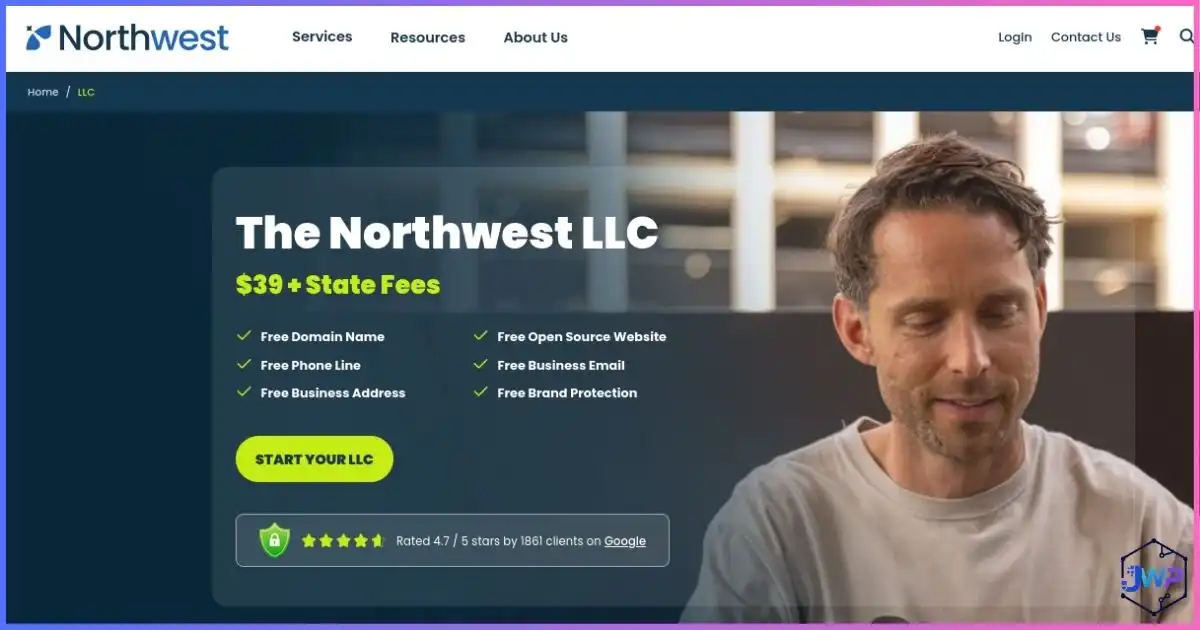
1) Northwest homepage
This is the entry point for registered agent and company formation services. Start here when you are ready to create the legal entity that will later appear on your AdSense organization profile and bank applications.
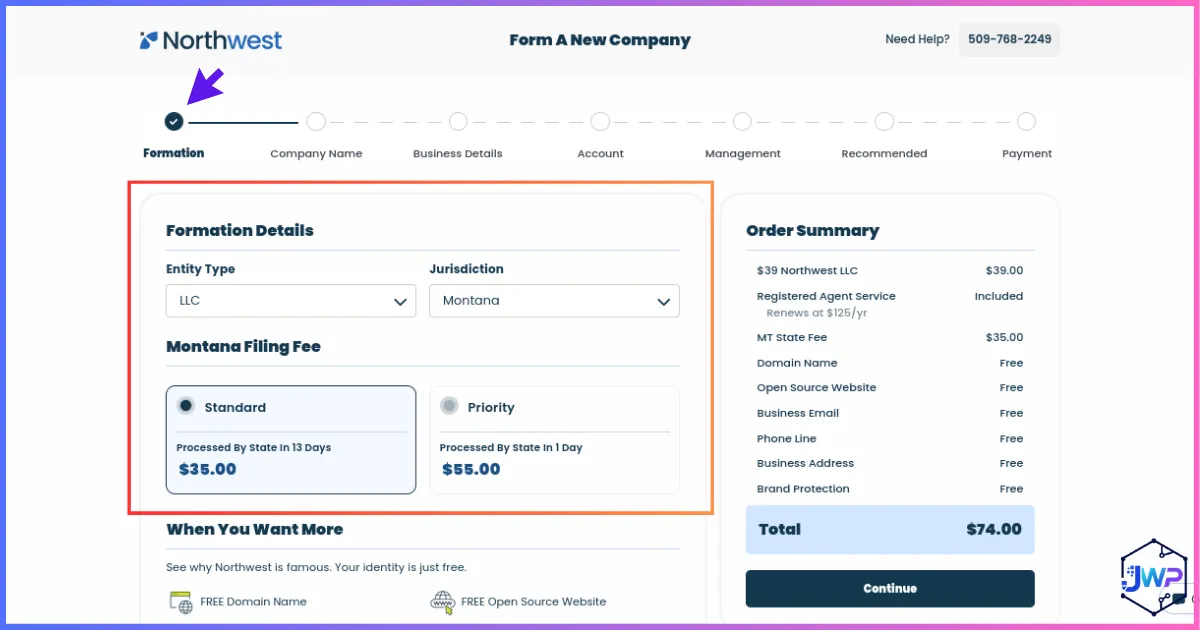
2) Formation details
Choose your entity type and formation state. Your state choice drives filing fees, annual obligations, and privacy norms. U.S. residents should usually prioritize their home state; non-U.S. creators often evaluate Wyoming or Delaware.
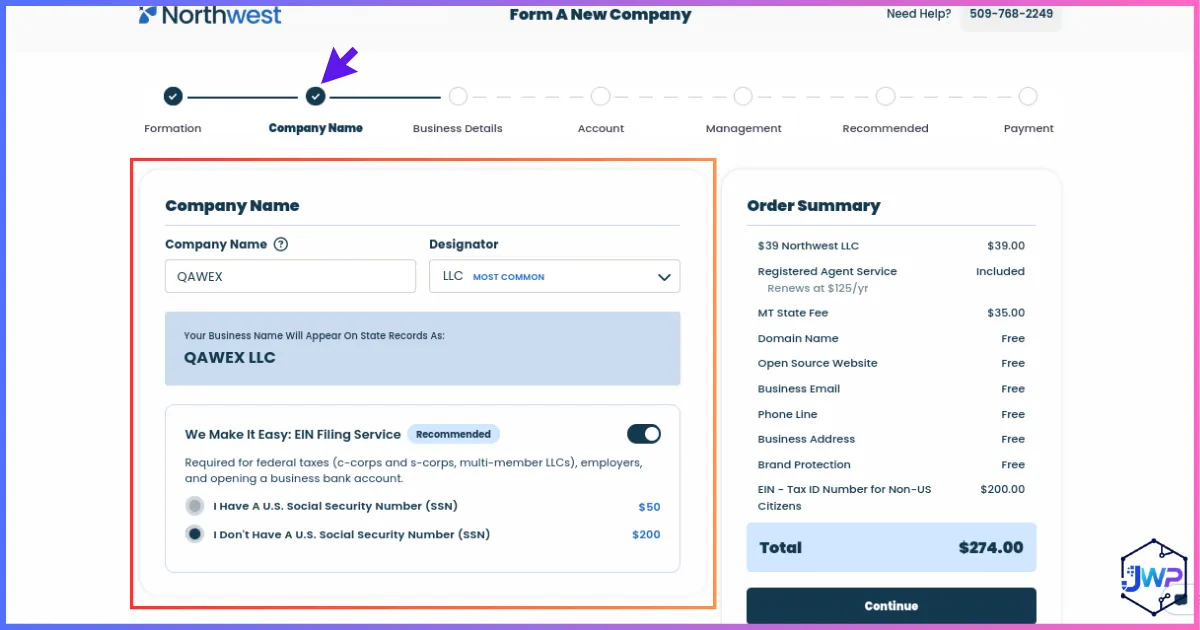
3) Company name + EIN option
Enter a unique company name. Keep it consistent with your future YouTube business branding and invoices. The EIN service is optional but recommended for many non-U.S. founders who cannot use the IRS online application easily.
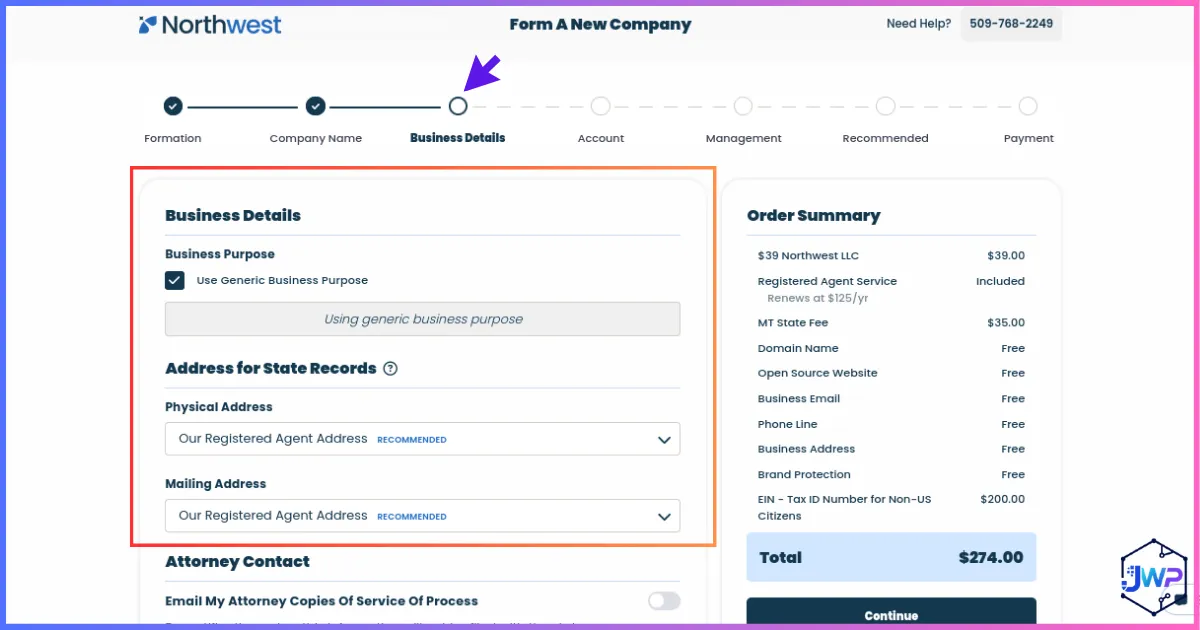
4) Business details
Describe the business accurately — for example, digital media, online content, advertising, or media production. This description should not contradict what you later tell banks or Google about your YouTube business.
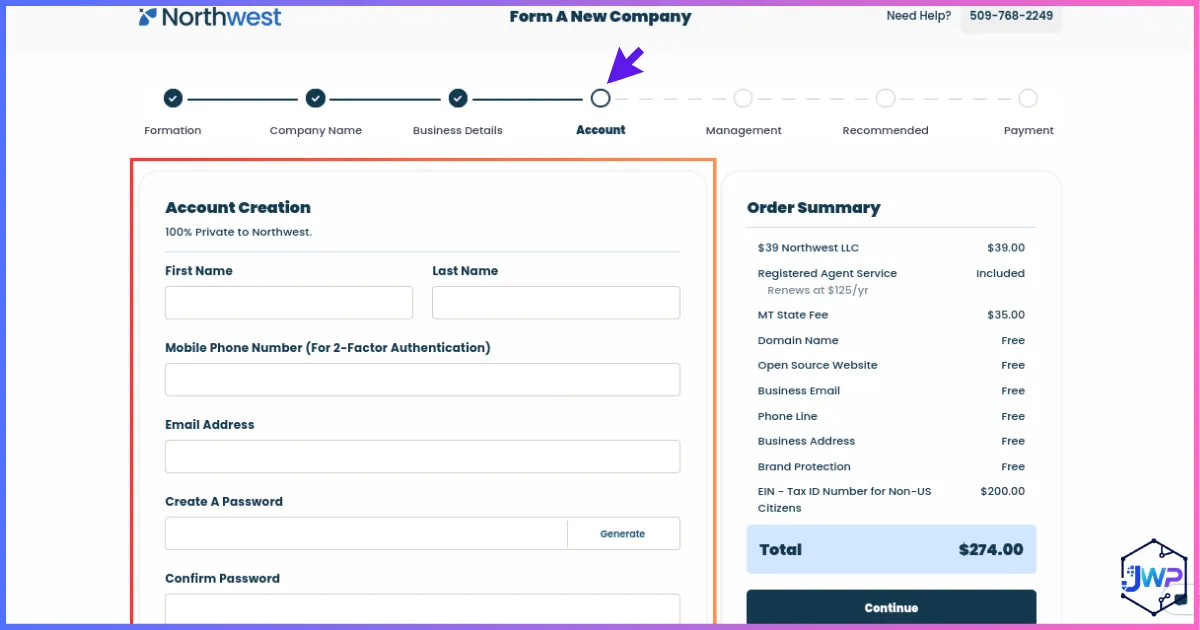
5) Account creation
Create your Northwest client login with a long-term business email. Formation documents, notices, and renewals will land here — treat this account like critical business infrastructure.
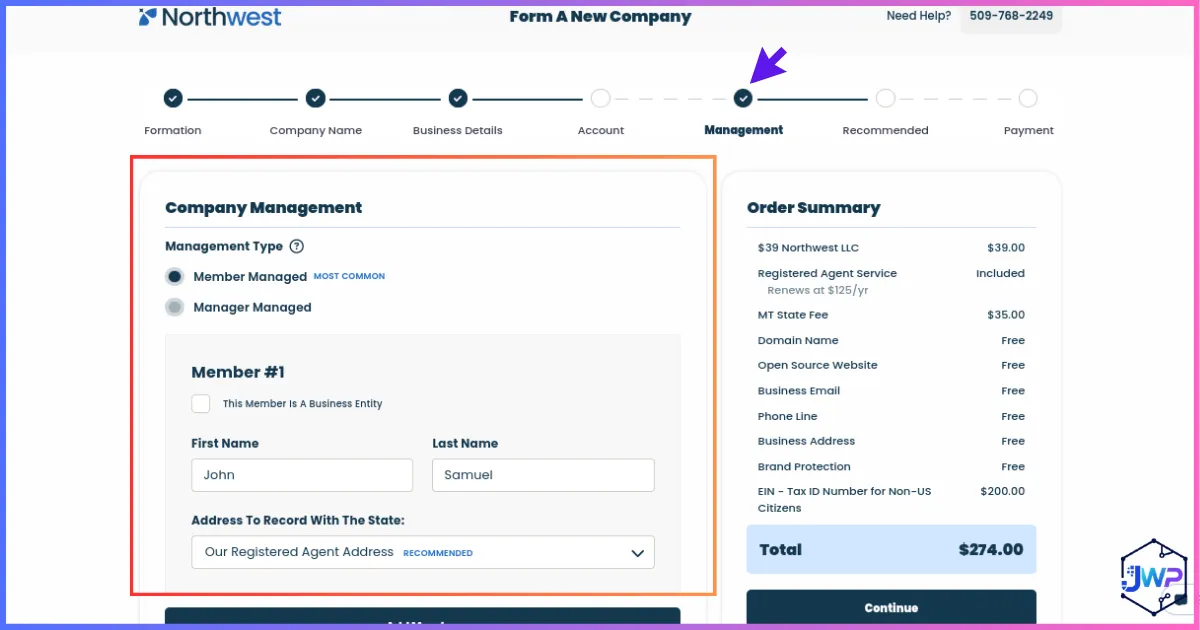
6) Company management details
Enter managers/members accurately. Ownership information should match beneficial-owner and tax information you later provide to banks and AdSense. Inconsistencies create review friction.
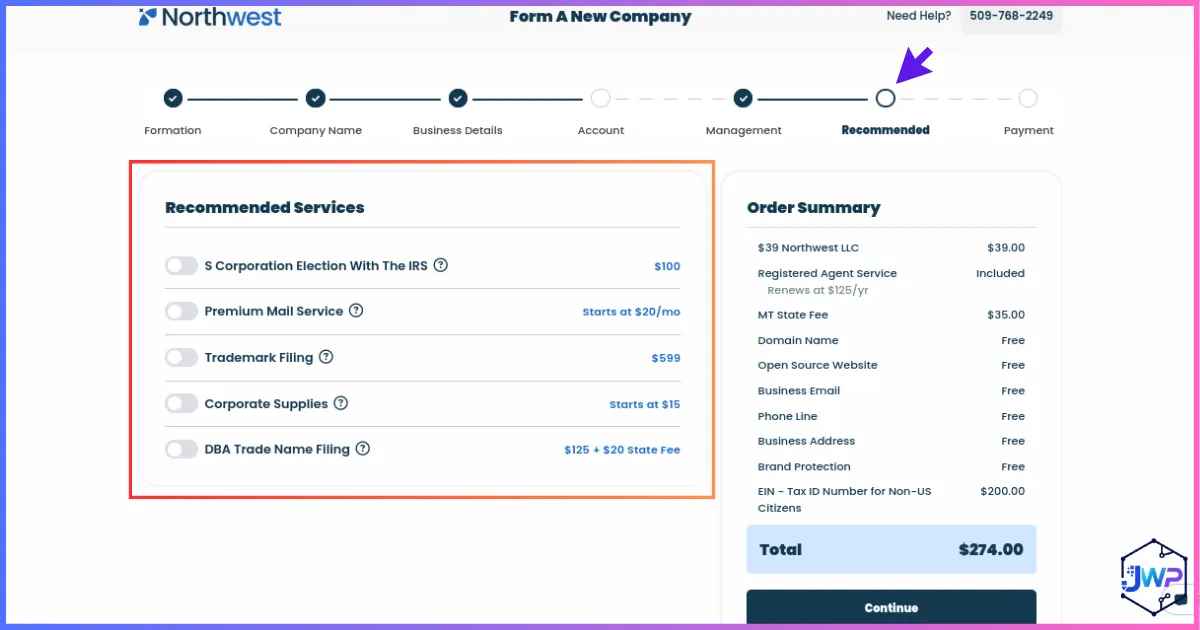
7) Optional recommended services
Review add-ons carefully. EIN help is often useful. Phone, domain, and mail extras may be helpful for some founders but are not required for every YouTube AdSense setup. Buy only what you will actually use.
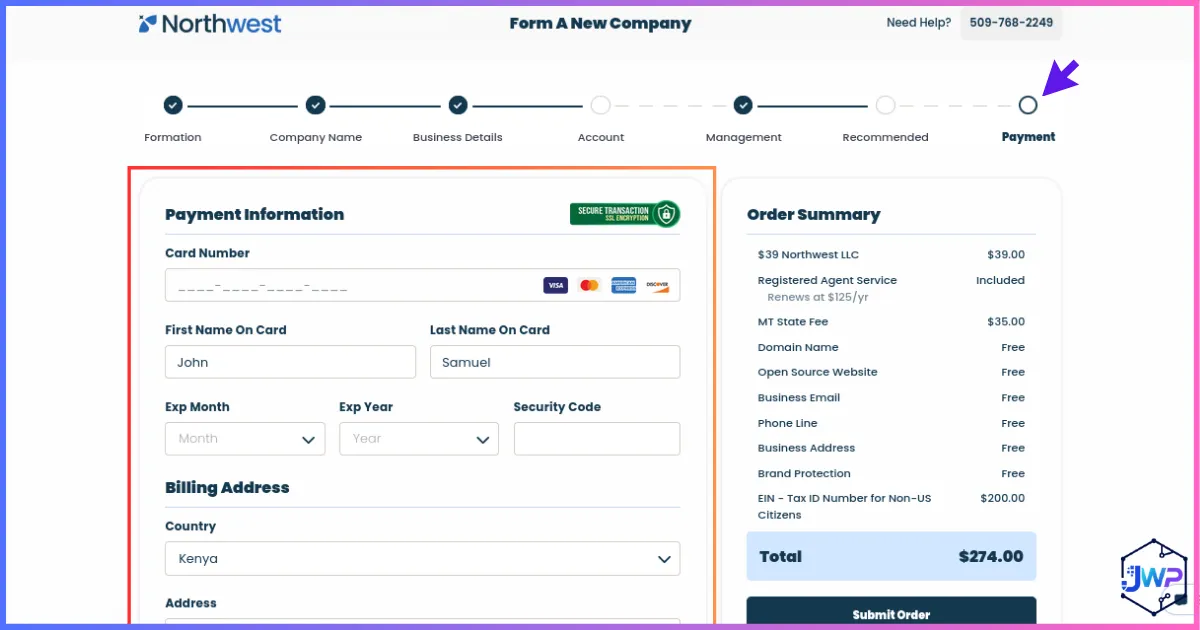
8) Payment information
Confirm state fees, registered agent term, and any EIN service fee before paying. Save the receipt. After payment, Northwest proceeds with filing and document delivery according to the selected state process.
Documents to download and store securely after formation: Articles/Certificate of Formation, operating agreement (if provided/created), registered agent details, state confirmation, EIN letter (when available), and payment receipts. These three foundations matter most for the next steps: company registration, business address, and EIN.
Get Your EIN (Employer Identification Number)
An EIN is the federal tax ID for your business — think of it as a Social Security number equivalent for the company. You need it for business banking, many payment processors, and Google AdSense tax information.
U.S. persons with an SSN/ITIN can often obtain an EIN quickly through IRS channels. Non-U.S. responsible parties without an SSN/ITIN generally cannot use the standard online EIN assistant the same way and may need phone, fax, or mail Form SS-4 processing — or a formation provider’s EIN service.
| Path | Best for | Notes |
|---|---|---|
| Northwest / provider EIN service | Beginners, non-U.S. founders | Extra fee; reduces paperwork confusion |
| IRS online (when eligible) | U.S. applicants meeting IRS criteria | Fast when available |
| IRS international phone / fax / mail SS-4 | Foreign responsible parties | Follow current IRS SS-4 instructions carefully |
Do not treat the EIN as a personal ID substitute. Banks and Google may still verify the living humans who own or control the LLC. Keep the EIN confirmation letter (CP 575 or equivalent) in your records.
Business Bank Setup for Your YouTube LLC
Once the LLC exists, do not run company AdSense payouts through a personal account if you are operating as an LLC. Separate business finances protect liability separation, simplify bookkeeping, and make tax time less painful.
For U.S. residents
Traditional national and regional banks are common: Chase, Bank of America, Wells Fargo, and many credit unions offer business checking. Compare monthly fees, minimum balances, wire costs, and online tools. Bring formation documents, EIN letter, and owner ID.
For non-U.S. residents
In-person U.S. branch banking is often impractical. Fintech and cross-border platforms are more realistic:
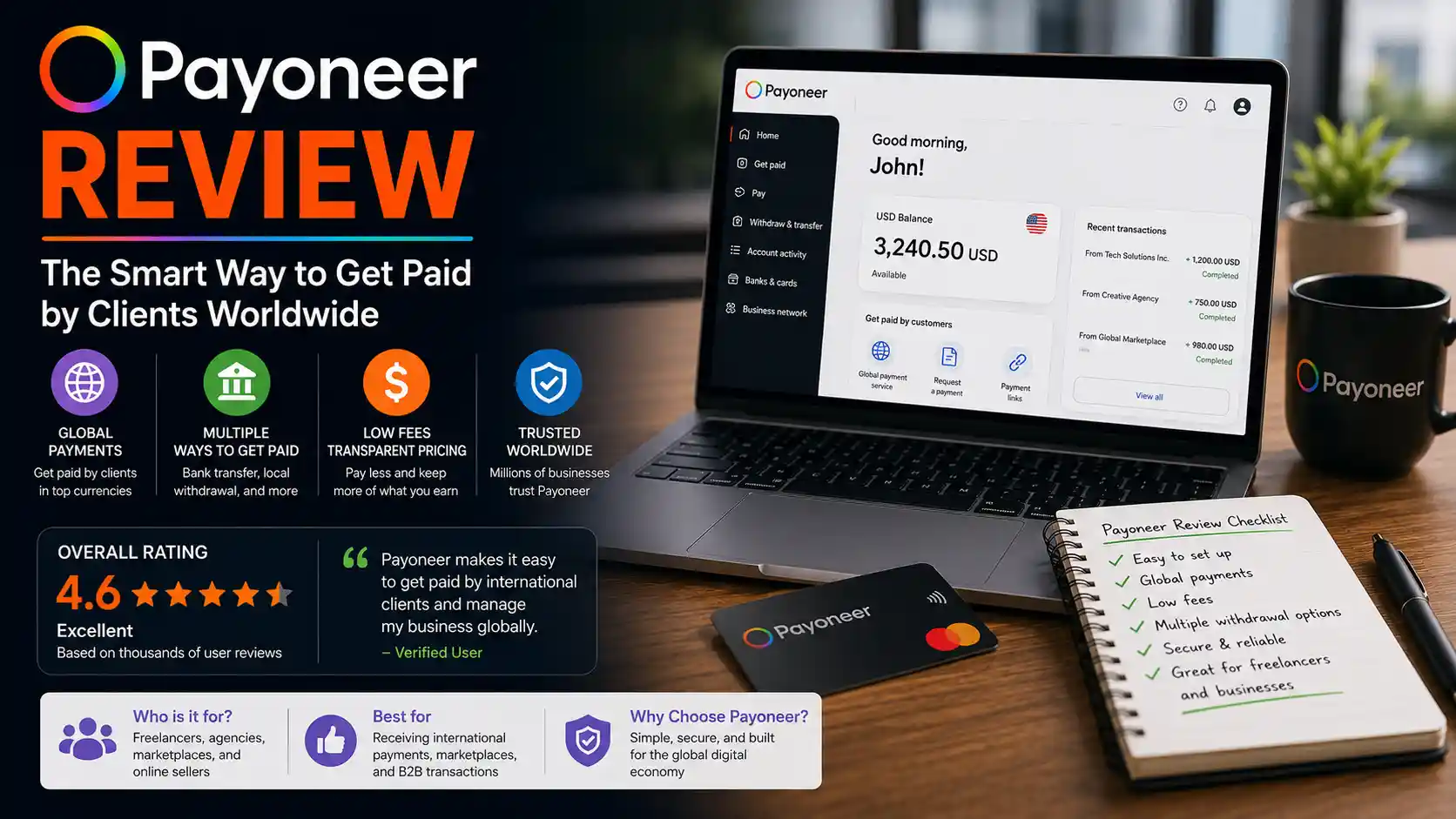
- Payoneer — widely used by freelancers and online businesses for receiving international payments; see the full How to Open a Payoneer Account guide.
- Wise — strong multi-currency business accounts and transparent FX; see How to Open a Wise Account.
- Mercury / Relay — online business banking options popular with remote companies (eligibility and approval are not guaranteed).
To open a business account you typically provide:
- LLC legal name and formation documents
- EIN
- Business address / registered agent details as required
- Owner identity documents
- Business activity description (YouTube / digital media / advertising)
Open Your Business Receiving Account
Most non-U.S. creators start by comparing Payoneer and Wise, then choose the platform that best matches payout rails, fees, and verification comfort.
If you also need U.S. PayPal workflows for brand deals, see How to Create a US PayPal Account as a Non-US Resident.
Payoneer vs Wise for YouTube LLC Banking
Both platforms are popular with international creators. The “best” choice depends on where you live, which currencies you need, how you withdraw, and which account details AdSense (or other processors) will accept for your situation.
| Factor | Payoneer | Wise Business |
|---|---|---|
| Primary strength | Receiving payments from marketplaces and clients worldwide | Multi-currency accounts and transparent FX transfers |
| Typical creator use | Ad networks, freelancing platforms, brand payments | Holding and converting multi-currency balances |
| Business docs | LLC docs + ID + business profile | LLC docs + ID + business profile |
| Setup difficulty | Beginner-friendly with guided verification | Beginner-friendly; strong UI clarity |
| Fees focus | Receiving, currency conversion, withdrawal fees vary by corridor | FX markup/transparency often a key selling point |
| Best next read | Payoneer full guide | Wise full guide |
Choose Payoneer if…
You want a receiving account stack commonly used by freelancers and online publishers, and you like marketplace-style payout ecosystems.
Get PayoneerChoose Wise if…
You move money across currencies often and want clear conversion pricing with a modern multi-currency business account.
Get WiseU.S. Phone Number & SMS Verification for AdSense
When you create a United States AdSense account, Google typically requires a U.S. phone number for verification and account recovery. If you already have a stable U.S. mobile number, use it. If you live outside the United States, you will likely need a private virtual U.S. number that can receive SMS.
Avoid public shared SMS inboxes for AdSense. Public numbers can be read by strangers, are unreliable for account recovery, and are a poor fit for a monetized business account. Use a private dedicated number you control.
For private U.S. numbers, you can use Receive-SMS.com. Rent a dedicated number, open the inbox, copy the number into AdSense, request the SMS code, then paste the code back into Google.
Discount code: Use code JOSHWP where applicable on Receive-SMS.com for a discount. Always confirm the current offer on the checkout page.
Change Your AdSense Account from YouTube Studio
Do not invent a random AdSense signup in isolation if your goal is to attach the new organization account to an existing channel. The cleaner path is to start from YouTube Studio so the channel linking flow is correct.
Important rule about existing personal AdSense
If you already have a personal AdSense account, do not try to “edit it into an LLC.” Google does not provide a simple convert-personal-to-organization-country path for this use case. You create a new AdSense account under a Google identity that is not already tied to an AdSense account, then associate it through the Partner Program change flow.
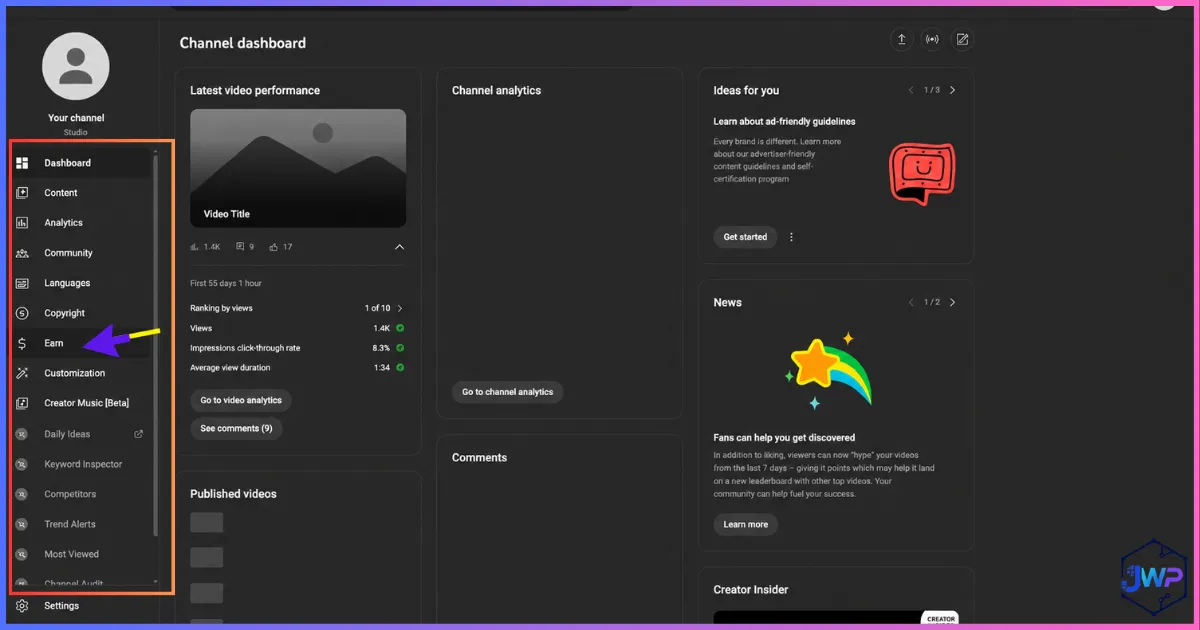
Open Earn in YouTube Studio
In YouTube Studio, go to the Earn section. This is where monetization status, memberships, and AdSense association are managed for the channel.
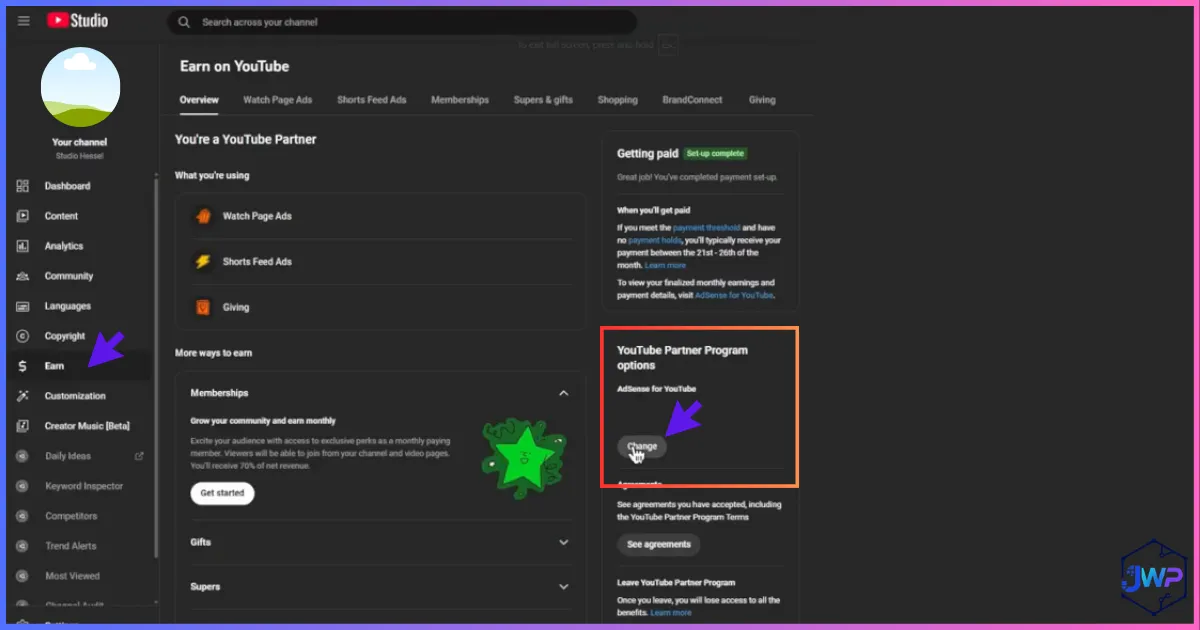
Partner Program → Change
Open the YouTube Partner Program area and click the option to change the AdSense account. This is how you deliberately move the channel onto a new AdSense entity instead of reusing the old personal one.
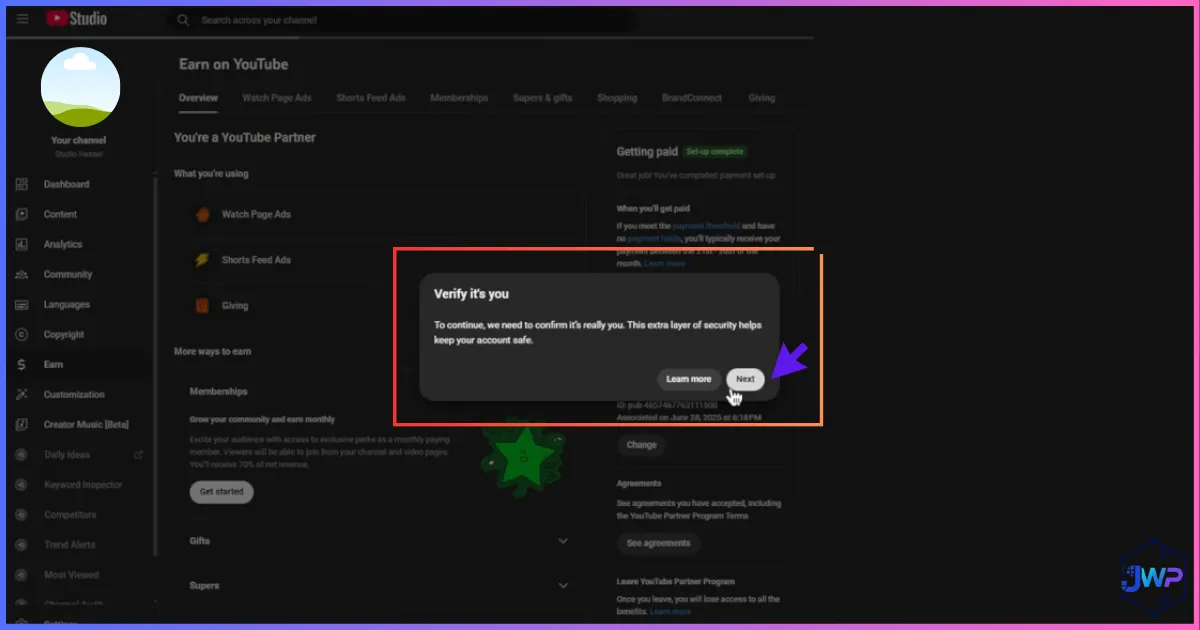
Verify it is you, then continue
Click Next / verify that it is you. You will then sign in with the Google account that should own the new AdSense organization account. Use a Google identity not already linked to another AdSense account.
Pro tip: Create the business Google account in advance, enable 2FA, and store recovery codes. AdSense is a financial account — treat login security like banking security.
Full Google AdSense Setup for Your LLC
After YouTube launches the setup flow, you will configure AdSense as a United States organization account for the LLC. Work slowly and match your formation documents character-for-character.
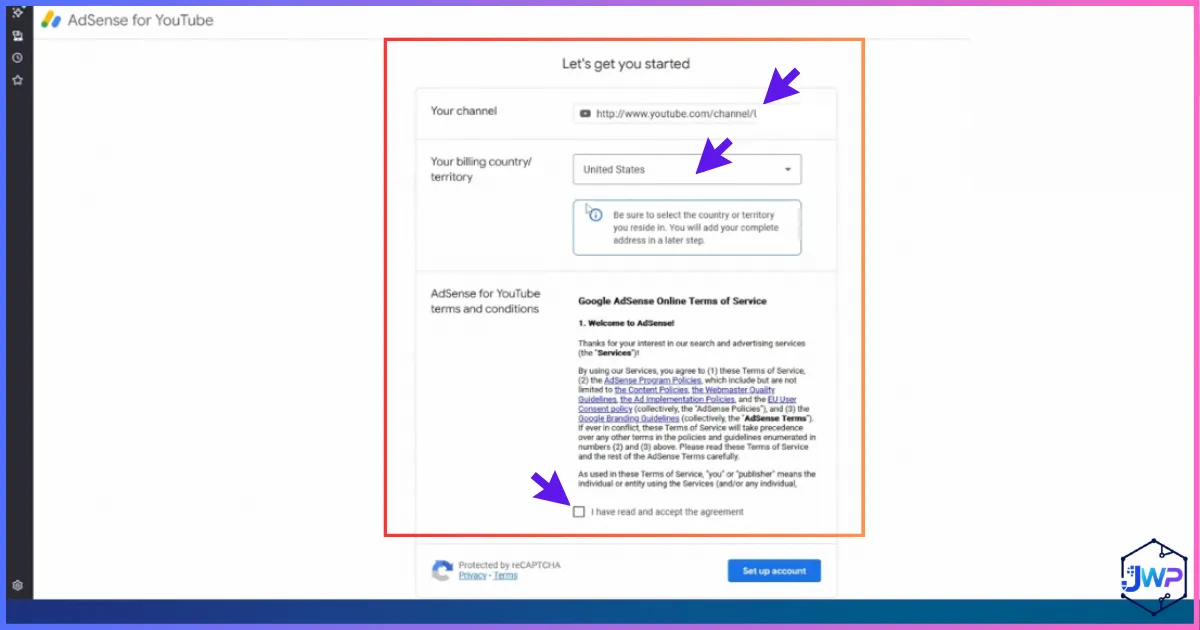
6.1 Choose billing country: United States
Select United States as the billing country/territory because the LLC is a U.S.-organized entity. Non-U.S. owners still select United States here when the AdSense account is for the U.S. LLC.
6.2 Accept terms and start setup
Review Google’s terms and click to set up the account. You should see the linked YouTube channel association in the flow.
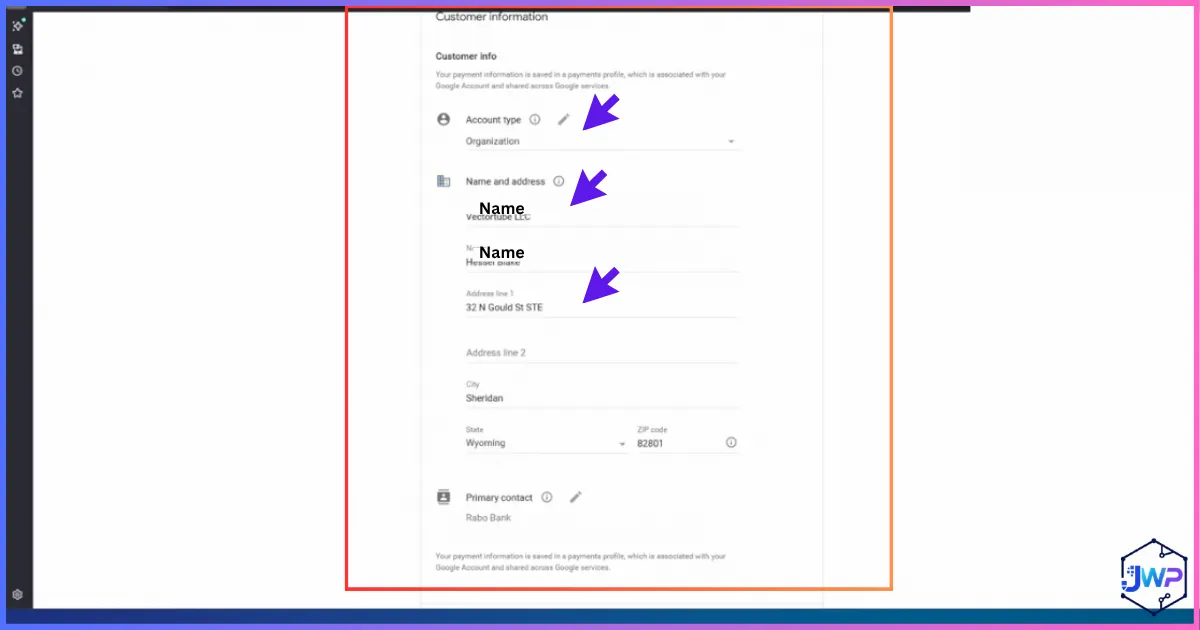
6.3 Account type: Organization
When asked for account type, choose Organization (not individual). Enter the legal business name exactly as formed, including “LLC”.
6.4 Contact person and address
- U.S. residents: Use a real address where you can receive Google’s PIN mailer (home or true business address).
- Non-U.S. creators: Often use the registered agent address for the organization address fields — but understand PIN mailer logistics. Some creators arrange a trusted U.S. mailing path they can document. Do not use random unverifiable addresses.
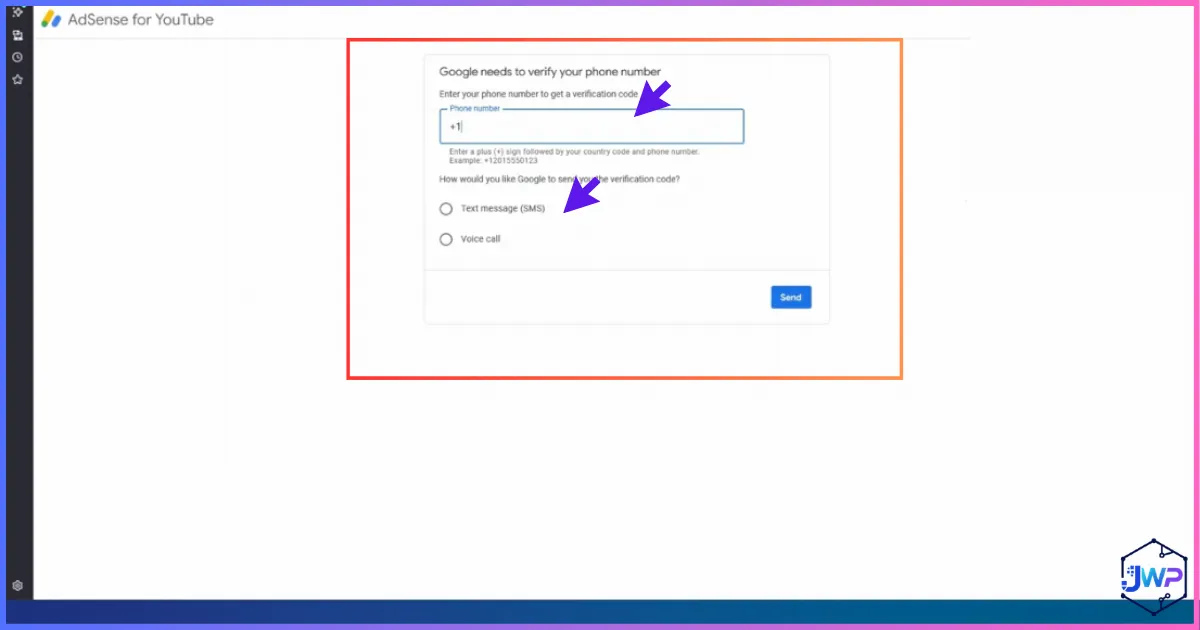
6.5 Phone verification
Enter a U.S. number you control, request the SMS, and submit the code. If you need a private number, use Receive-SMS.com with code JOSHWP where available.
6.6 Submit for review
After submission, Google typically reviews the account. Many creators see approval within roughly 24–48 hours, though times vary.
Need the Phone Number Before You Continue?
Get a private dedicated U.S. number first, then return to AdSense verification so you are not stuck on the SMS step.
Google AdSense Setup Screenshots (Organization Account)
Use this visual walkthrough as a companion while you click through AdSense. Each image includes a plain-English explanation of what Google is collecting and why it matters for an LLC-based YouTube channel.
Step 1 — Start AdSense for the channel
The first AdSense screen confirms you are connecting monetization for the YouTube channel. Check that the correct channel is listed before continuing.
Step 2 — Contact information
Enter organization contact details carefully. The legal name should match formation documents. Typos here create identity and tax mismatches later.
Step 3 — U.S. phone verification
Provide a U.S. phone number and complete SMS verification. This number is also important for recovery and security, so prefer a private number you will keep.
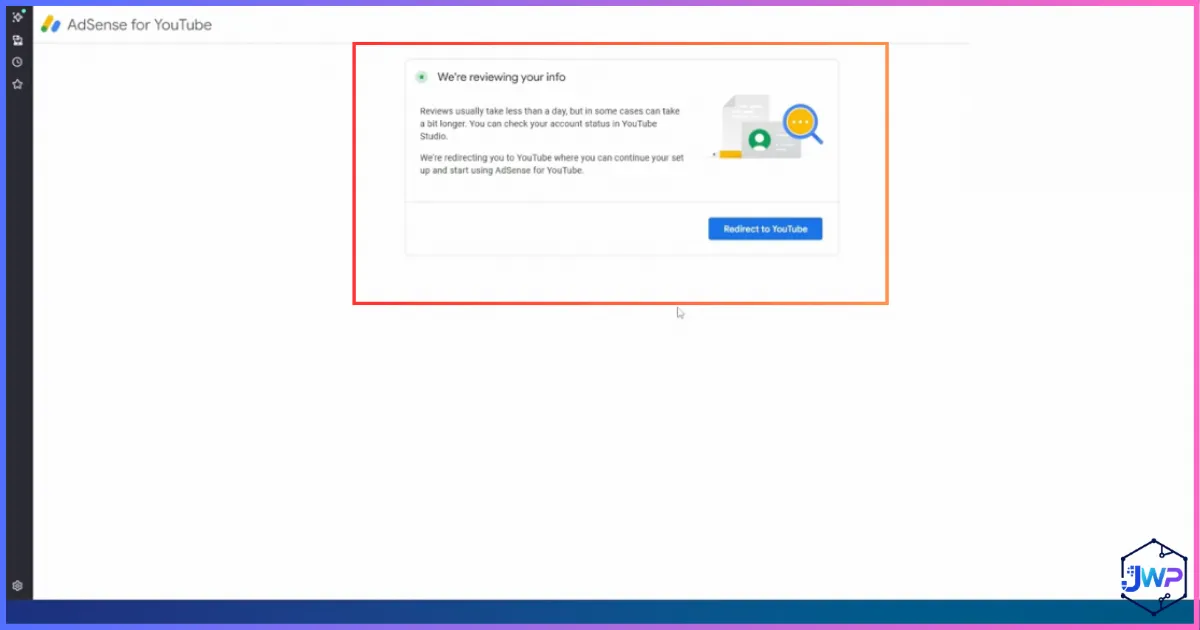
Step 4 — Submitted for review
After submission, AdSense shows a pending review state. Do not spam-create duplicate accounts while waiting. Keep your documents ready for follow-up checks.
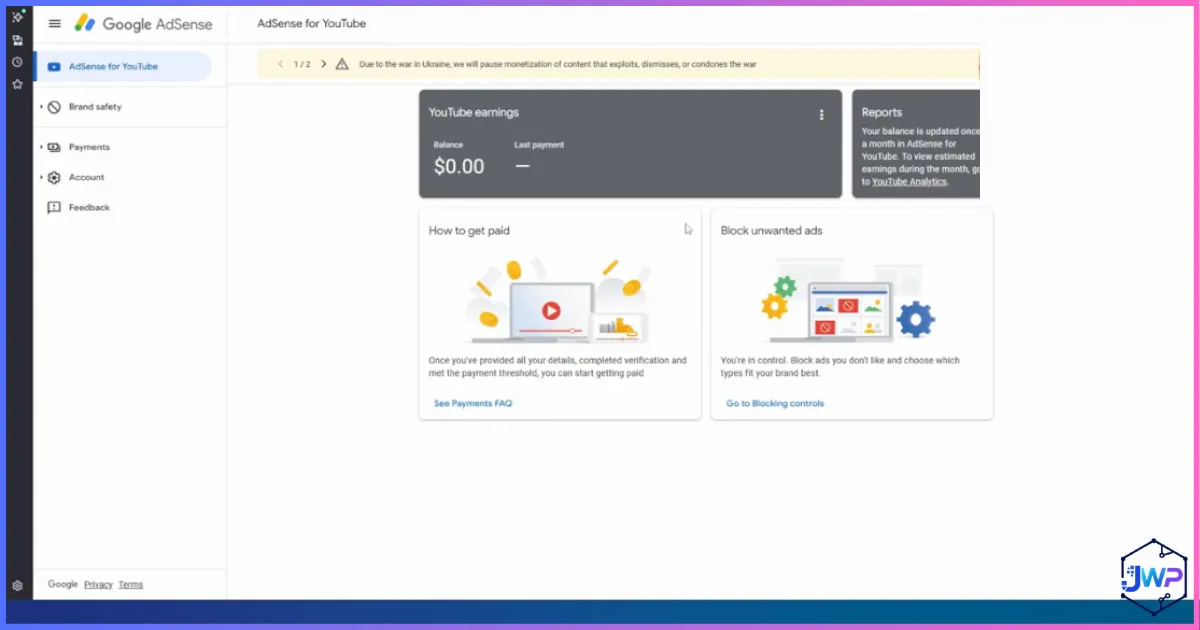
Step 5 — Approved dashboard
Once approved, you will see the AdSense dashboard. From here you manage payments, verification tasks, sites/channels association, and tax information.
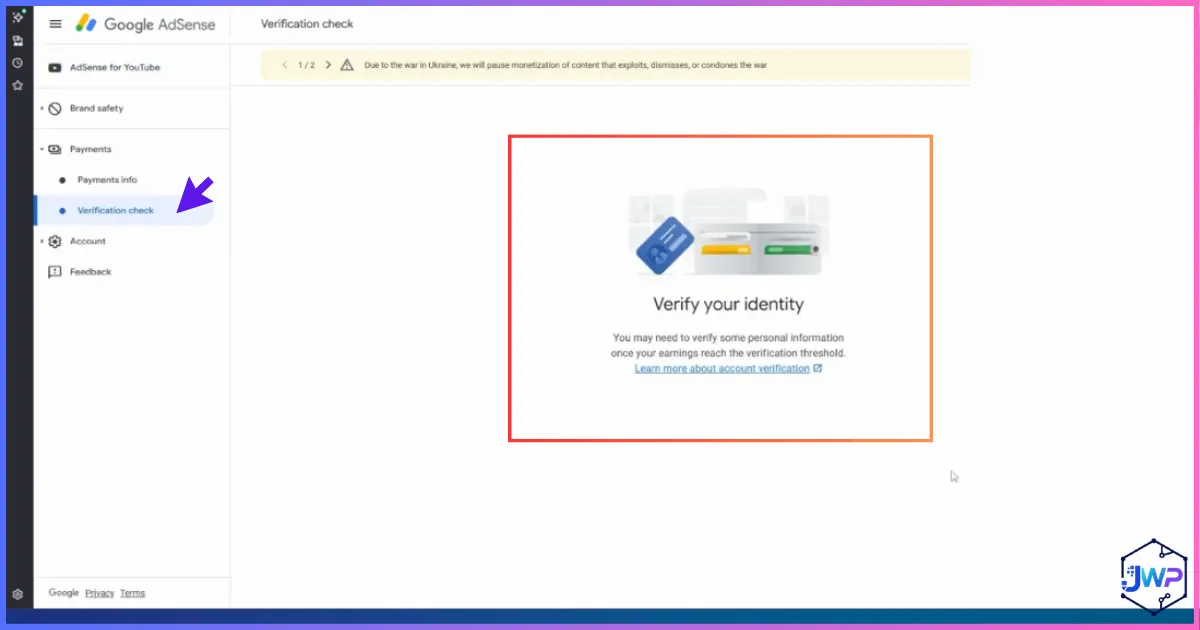
Step 6 — Verify your identity
Google may request government photo ID verification for the individual associated with the account. Passport or driver’s license scans are common. This can apply even when the account is an organization.
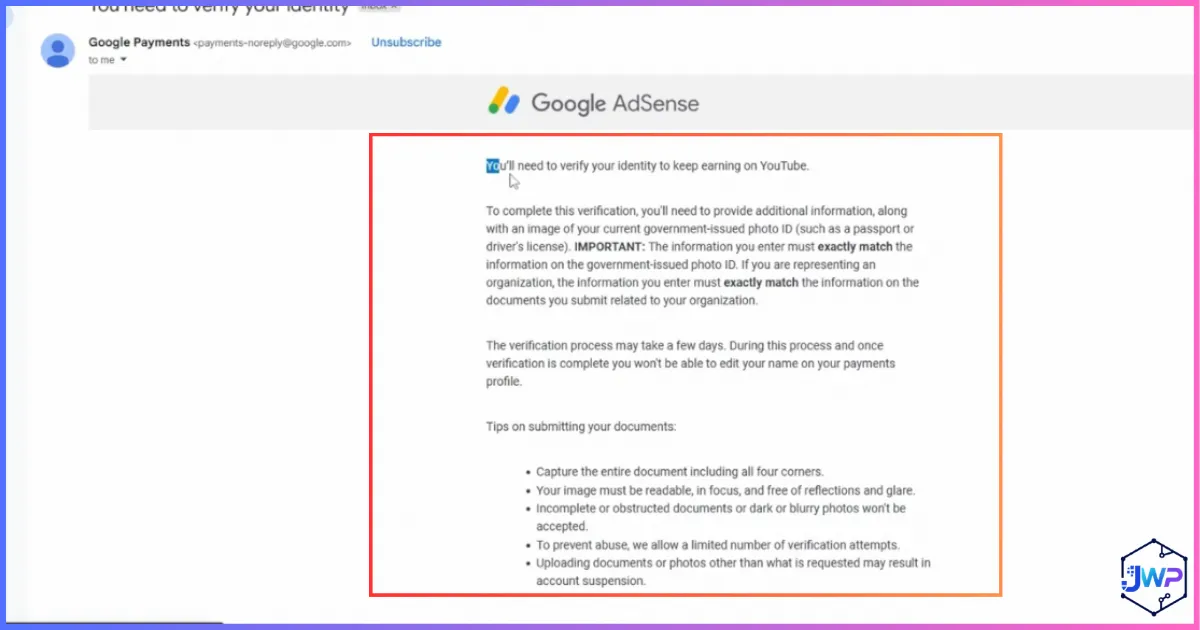
Step 7 — Identity verification email
Watch the business email for Google’s identity verification messages. Complete requests promptly; unfinished verification can block payments.
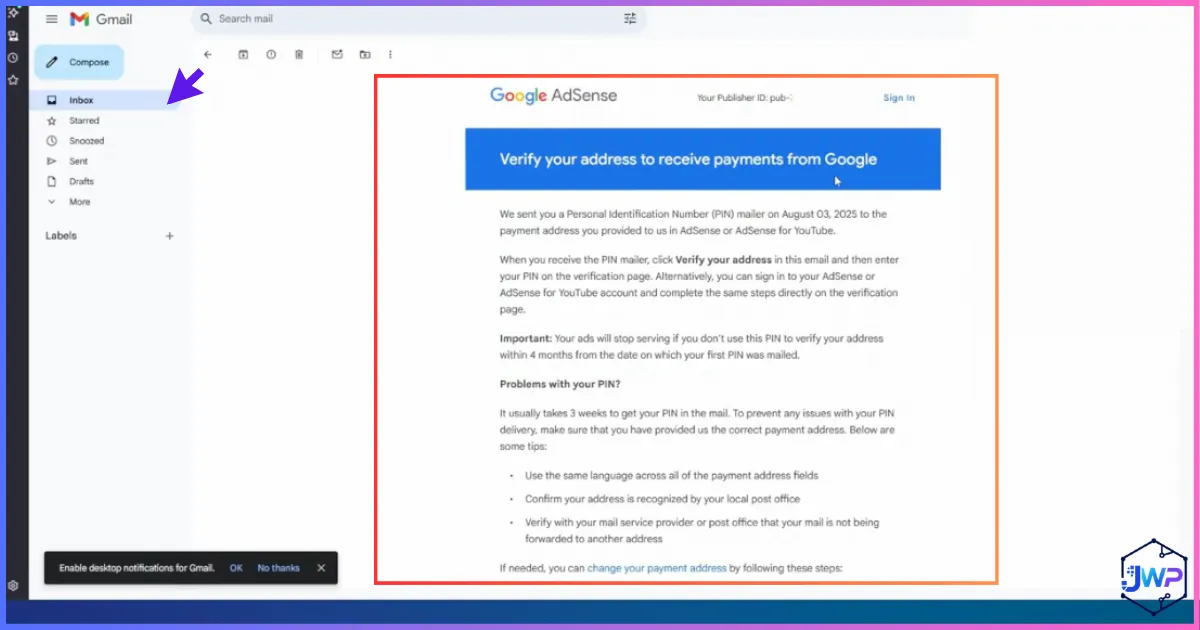
Step 8 — Address verification after threshold
When you approach or hit payment thresholds (commonly discussed around the $10 verification/payment readiness range), Google may mail a PIN to the payment address on file.
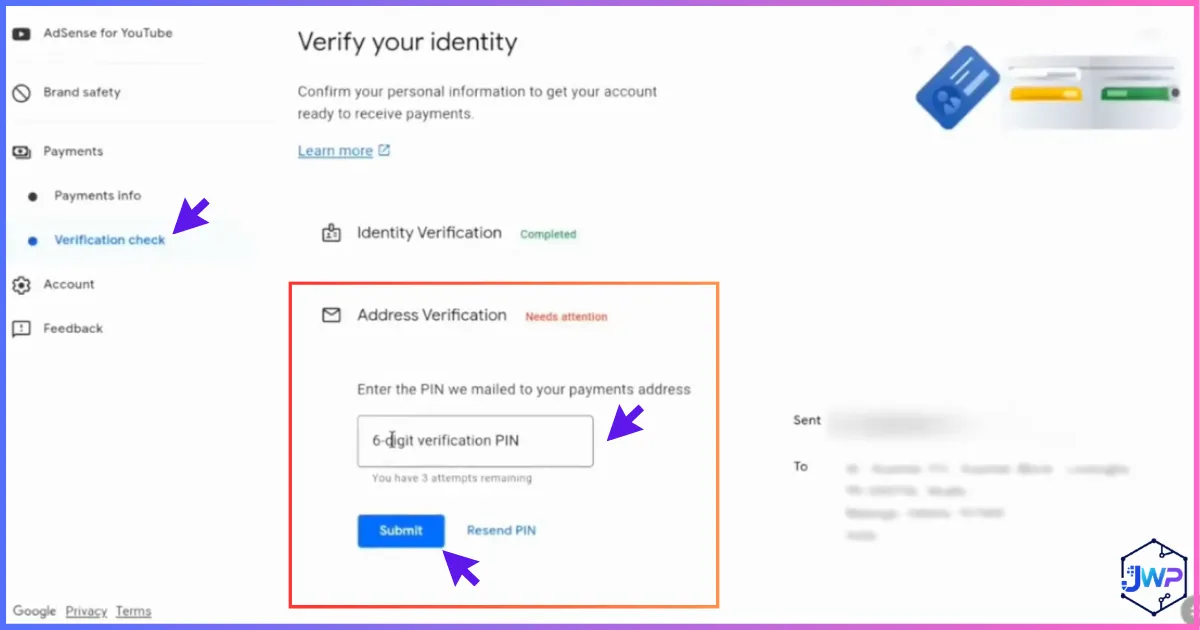
Step 9 — Enter the 6-digit PIN
When the PIN arrives, enter the 6-digit code in AdSense to complete address verification. If it never arrives, use Google’s change-payment-address path carefully rather than creating a second account.
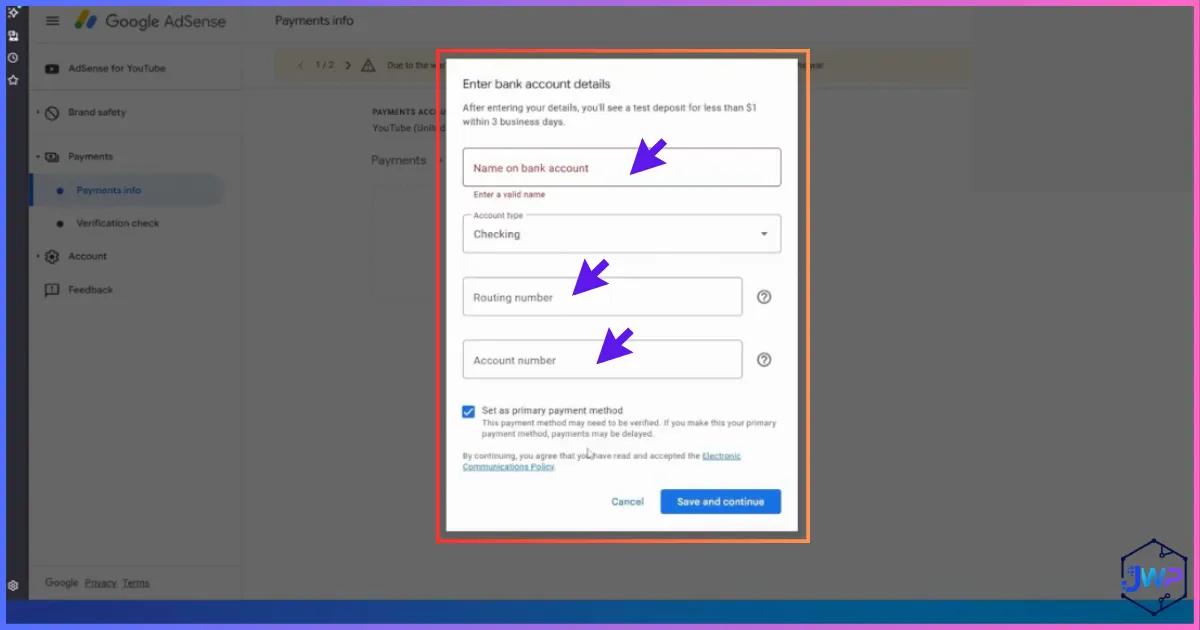
Step 10 — Add payment information
Add the business bank or receiving account details for AdSense withdrawals. Prefer the LLC business account — not a personal account — when operating as a company.
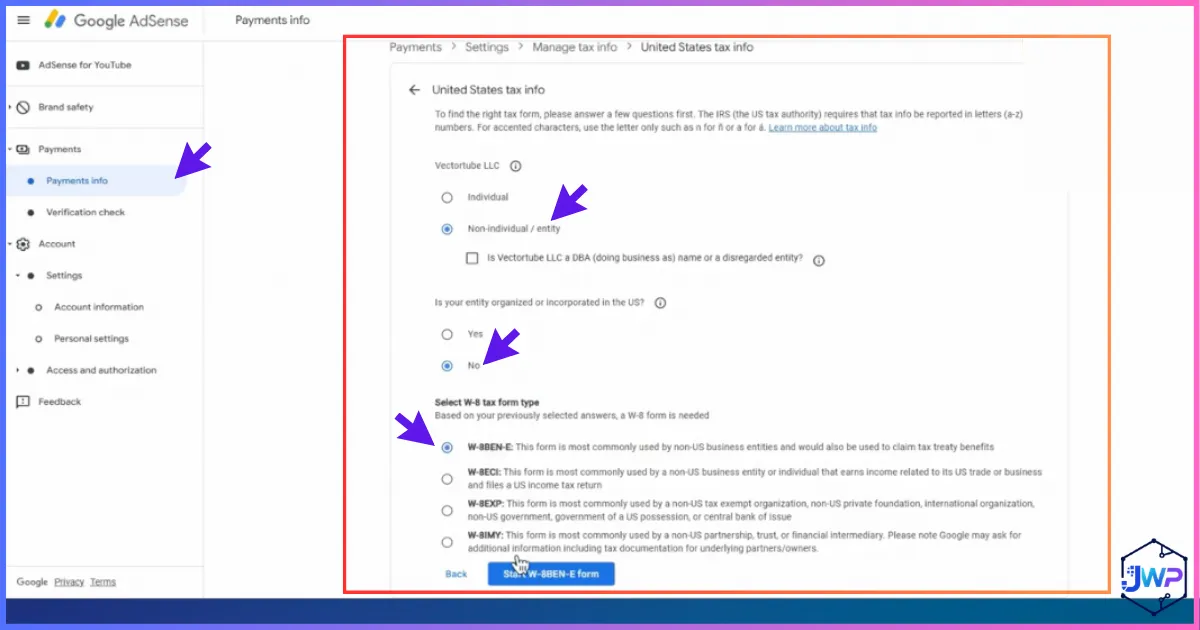
Step 11 — Add tax information
Complete U.S. tax information inside AdSense. Choose the entity path and the correct form (W-9 vs W-8BEN-E). Incorrect tax setup can cause backup withholding issues.
Identity Verification & Address PIN Mailer
Identity verification
Google may ask for a government-issued photo ID even when AdSense is under an LLC. That is normal. Upload a clear passport or driver’s license for the controlling individual. Approval can take hours to days.
Address PIN verification
Address verification is often triggered as you near payout readiness. Google mails a PIN to the payment address on the account.
| Residency | Common address used | PIN logistics |
|---|---|---|
| U.S. resident | Home or real operating address | PIN arrives by mail; enter in AdSense |
| Non-U.S. creator | Registered agent address or trusted U.S. mailing arrangement | Coordinate mail handling; wait time can be a week or more |
| PIN never arrives | Use Google’s change payment address flow | Update carefully; do not open duplicate AdSense accounts |
Mail handling matters. If your registered agent forwards mail, know the turnaround time. If you use a trusted contact in the U.S., document the arrangement and keep the address consistent across payment settings.
Add Payment Method & Confirm the Bank Account
After verification tasks clear and you reach payment readiness, add a payment method under AdSense payments settings.
- Open AdSense → Payments / Payments info.
- Choose Add payment method.
- Select bank account (commonly preferred for business setups).
- Enter the business account details from Mercury, Relay, Payoneer, Wise, or your U.S. bank — depending on what AdSense accepts for your account.
- Complete any micro-deposit verification. Google may send a small deposit (for example, a few cents). Enter the exact amount to confirm ownership.
Bookkeeping tip: Label the AdSense deposit in your bank records and keep screenshots of confirmation. This helps if support ever asks you to prove control of the account.
AdSense Tax Forms: W-9 vs W-8BEN-E
Inside AdSense payments settings, complete United States tax information. For an LLC organization account you generally start the form as a non-individual / entity.
| Your situation | Typical form path | Notes |
|---|---|---|
| U.S. person / U.S. tax resident entity path | W-9 | Used when the entity/person is a U.S. tax person under the form logic |
| Foreign entity / non-U.S. beneficial ownership path | W-8BEN-E | Common for foreign-owned U.S. LLCs; complete carefully |
| Wrong form selected | Restart with correct answers | Incorrect answers can route you to the wrong form |
How the AdSense interview usually works
- Go to Payments info → Manage settings → United States tax information.
- Click Add tax info / Start form.
- Select non-individual / entity.
- Answer whether the entity is organized/incorporated in the U.S.
- U.S. tax persons typically continue to W-9.
- Foreign entities typically continue to W-8BEN-E (not W-8BEN, which is for individuals).
- Submit and wait for Google’s tax info approval notice.
Withholding risk: Incomplete or incorrect tax information can lead to backup withholding (often discussed as up to 30% in U.S. withholding contexts for certain foreign payees). Completing the correct form is not optional if you care about net revenue.
Not tax advice: Treaty claims, chapter 3/4 statuses, and entity classification can be nuanced. If your channel revenue is significant, have a cross-border CPA review your W-8BEN-E answers and your annual U.S. filing obligations.
Ongoing LLC, State, and IRS Compliance
Forming the LLC is the beginning, not the end. Keep the company alive and the AdSense profile accurate.
For U.S. residents
- File state annual reports / franchise taxes when due.
- Keep registered agent active if you use one.
- Report business income on the correct federal/state returns.
- Maintain separate business banking and bookkeeping.
For non-U.S. owners of U.S. LLCs
- Many foreign-owned U.S. disregarded LLCs must file Form 5472 with a pro forma Form 1120 each year when required — even with little or no U.S. effectively connected income. Missing this can bring severe penalties.
- Keep W-8BEN-E information in AdSense current.
- Renew registered agent service so the company remains in good standing.
- Track owner transactions with the LLC for reporting accuracy.
Operational reality: Formation services help with filings and agent service, but you still own compliance. Put renewal dates on a calendar the day your LLC is approved.
Business Deductions Creators Often Track
When YouTube is operated as a real business, ordinary and necessary expenses may be deductible against business income under applicable tax rules. Common creator expense categories include:
Production
Cameras, mics, lights, tripods, sets, props, stock footage.
Software
Editing suites, thumbnails tools, captioning, project management.
People
Editors, designers, managers, contractors (with proper forms).
Overhead
Internet portion, studio rent, registered agent, formation renewals.
Growth
Ads, collabs, courses, research tools (when business-related).
Admin
Accounting software, CPA fees, business banking fees.
Records win audits. Keep invoices, contracts, and bank feeds. Personal expenses mixed into the business account undermine both tax clarity and LLC liability hygiene.
Charts & Key Statistics for Planning
The charts below are planning visuals based on commonly discussed creator-business benchmarks and process timelines from this workflow. They are educational illustrations — always verify current Google, IRS, bank, and state rules for your case.
Illustrative setup timeline (weeks)
Illustrative ranges: LLC filing (0.5–2 weeks depending on state), EIN (same day to several weeks), banking KYC (days to weeks), AdSense review (often 1–2 days after submit), PIN mailer (about 1–3 weeks depending on address path).
Where creators usually spend setup effort
Effort distribution is qualitative: document consistency and verification steps dominate real-world delays more than the initial click-through forms.
Resident path vs non-resident path complexity
Index is relative (1–10 illustrative scale), not an official score. Non-resident setups add cross-border banking, SMS, mail, and tax-form complexity.
Document pack completeness vs approval friction
Conceptual relationship: incomplete or inconsistent documents increase review loops with banks and Google.
| Topic | Reference point | Why it matters |
|---|---|---|
| YouTube monetization | YouTube Partner Program eligibility thresholds change over time | You need YPP access before AdSense association is useful |
| AdSense payments | Payment thresholds and verification tasks appear in AdSense payments center | PIN and identity tasks can gate withdrawals |
| Foreign-owned LLC reporting | IRS Form 5472 + pro forma 1120 regime for many foreign-owned U.S. disregarded entities | Annual compliance beyond AdSense forms |
| Registered agent | Every state requires a registered agent with an in-state address | Core ongoing cost of maintaining the LLC |
Common Mistakes That Delay or Break the Setup
Entity & docs mistakes
- Trying to convert personal AdSense into an LLC account
- Using a different legal name spelling across LLC, bank, and AdSense
- Skipping the EIN before banking
- Letting registered agent service lapse
Verification mistakes
- Public shared SMS numbers for AdSense
- Unverifiable random U.S. addresses
- Ignoring identity verification emails
- Creating multiple AdSense accounts in panic
Banking mistakes
- Mixing personal and LLC funds
- Adding a personal bank while claiming organization status
- Not completing micro-deposit confirmation
Tax mistakes
- Selecting W-9 when W-8BEN-E is required (or vice versa)
- Using W-8BEN (individual) for an entity account
- Ignoring annual foreign-owned LLC filing duties
Master Checklist: LLC → Bank → AdSense
| Stage | Done when… | Output to keep |
|---|---|---|
| LLC formed | State accepts formation; agent active | Articles/Certificate, receipts |
| EIN issued | IRS/provider confirms EIN | EIN letter |
| Bank ready | Business account approved | Account details, login 2FA |
| Phone ready | Private U.S. number receives SMS | Number ownership access |
| YouTube change flow | Partner Program change launched | Correct channel linked |
| AdSense org created | Organization account approved | Publisher ID, dashboard access |
| Identity verified | ID review complete | Approval notice |
| Address verified | PIN entered successfully | Verified payment address |
| Bank linked | Micro-deposit confirmed | Payment method active |
| Tax info approved | W-9 or W-8BEN-E accepted | Tax approval email |
| Compliance calendar | Annual report / 5472 reminders set | Calendar + CPA contact |
Ready to Start the Stack?
Form the LLC, open banking, then complete organization AdSense with consistent documents.
Frequently Asked Questions
Can a non-U.S. resident form a U.S. LLC for YouTube?
Yes. Non-U.S. residents can generally form a U.S. LLC. You will need a registered agent in the formation state, formation documents, an EIN process, and ongoing compliance. Approval for banks and AdSense is separate from LLC formation.
Can I convert my personal AdSense account into an LLC account?
Usually no. The practical approach is to create a new AdSense account under a Google identity not already linked to AdSense, set it up as an organization with LLC details, and associate it through YouTube’s change AdSense account flow.
Which state should I choose for my YouTube LLC?
U.S. residents often form in their home state. Non-U.S. creators often consider Wyoming or Delaware for remote online businesses. The best state depends on fees, privacy, annual maintenance, and your operating profile — not social-media hype alone.
Do I need an EIN for Google AdSense?
For an organization/LLC AdSense account, an EIN is a core business identifier used in tax information and often in banking. Get the EIN before you try to finish a professional setup.
Is Payoneer or Wise better for AdSense?
It depends on your country, currencies, fees, and which account details work for your payout path. Compare both using our Payoneer guide and Wise guide, then choose based on verification success and transfer costs.
Why does AdSense need a U.S. phone number?
For U.S. AdSense accounts, Google commonly uses SMS verification and account recovery. If you lack a U.S. mobile, use a private dedicated virtual number — not a public shared inbox.
What discount code can I use for Receive-SMS?
Use code JOSHWP where supported via Receive-SMS.com. Confirm the discount applies at checkout.
What tax form do foreign LLC owners file in AdSense?
Many foreign-owned entities complete W-8BEN-E in AdSense. U.S. persons typically use W-9. Answer the entity interview carefully so Google routes you to the correct form.
Can I have more than one AdSense account?
Google’s rules are strict, but separate AdSense accounts can exist in legitimate multi-entity situations (for example, a personal account and a distinct LLC business account). Abuse, duplicates for circumvention, or policy violations can cause enforcement. When in doubt, follow Google’s current multiple-accounts policies and keep entities truly separate.
How long does the full process take?
Some creators finish major steps in a couple of weeks; others need longer for state filing queues, EIN issuance, bank KYC, PIN mailers, and tax approval. Document readiness is the biggest controllable speed factor.
Does an LLC reduce YouTube taxes to zero?
No. An LLC is a legal structure, not a tax-elimination switch. Tax results depend on residency, elections, income types, treaties, and local law. Use a qualified tax professional for planning.
Should I use Northwest or another formation service?
Northwest is a strong registered-agent-first option used throughout this guide. Compare alternatives in our best LLC formation services for non-US residents roundup and the Northwest review.
Final Takeaway
Creating an LLC for a YouTube channel and Google AdSense is a systems project, not a single signup form. The winning order is simple:
- Form a real U.S. LLC and keep the documents.
- Get an EIN.
- Open a business bank or receiving account (Payoneer, Wise, or a U.S. business bank).
- Secure a private U.S. phone number if needed.
- Create a new organization AdSense account through YouTube’s change flow.
- Finish identity, address, payment, and tax verification.
- Stay compliant every year.
Build Your YouTube Business Stack Today
Start with formation, then banking, then AdSense. Consistent documents beat shortcuts every time.
Sources & further reading
- Internal: How to Form an LLC for Non-US Residents
- Internal: Best LLC Formation Services for Non-US Residents
- Internal: Northwest Registered Agent Review
- Internal: How to Open a Payoneer Account
- Internal: How to Open Multiple AdSense Accounts
- Internal: How to Open a Wise Account
- Internal: How to Create a US PayPal Account as a Non-US Resident
- Internal: Receive-SMS / virtual number resource
- Primary: IRS publications and instructions related to EINs (Form SS-4) and foreign-owned U.S. disregarded entity reporting (Form 5472)
- Primary: Google AdSense Help Center — payments, identity verification, PIN mailers, and tax information
- Primary: YouTube Help — YouTube Partner Program
This article is for educational purposes only and is not legal, tax, or financial advice. Policies from Google, banks, IRS, and states change. Verify current requirements before filing or submitting personal information.
Affiliate Disclosure
Some links in this article are affiliate links, including links to Northwest, Payoneer, Wise, and related offers. If you click and purchase or sign up, we may earn a commission at no additional cost to you. This compensation may influence which products appear and where they appear, but we aim to keep recommendations practical and transparent. Always evaluate fees, eligibility, and policy risks for your own business before buying. Receive-SMS discount code JOSHWP may provide savings where supported by the merchant.