Clonable Review + Clonable WordPress Setup: The Complete, Unbiased Guide
By JoshWP Team | Published: August 30, 2026 | ~28 min read | Tested on WordPress 7.x with a live Japanese clone
We cloned real websites into new languages, installed the Clonable WordPress plugin end-to-end, stress-tested the AI translations, and broke down every pricing tier — so you can decide whether this localization platform deserves a place in your international growth stack.
This Clonable Review in 30 Seconds (Quick Verdict)
Clonable is a cloud-based website localization platform that clones your existing site — layout, images, structure and all — into translated language versions that live in SEO-friendly subfolders, while keeping the heavy translation infrastructure outside your WordPress installation.
In our testing it delivered the fastest “idea → live foreign-language version” workflow we’ve used: a demo in minutes, a connected WordPress clone in under an hour, and automatic hreflang handling without touching your database schema. The trade-offs are a recurring subscription priced per translated page, AI (not human) translation by default, and a verification + deployment step that beginners will want to follow carefully.
Best for: WordPress site owners, WooCommerce stores, SaaS and content publishers who want multilingual SEO without WPML-style database bloat or manual translation workflows.
Clonable Review — Quick Answer
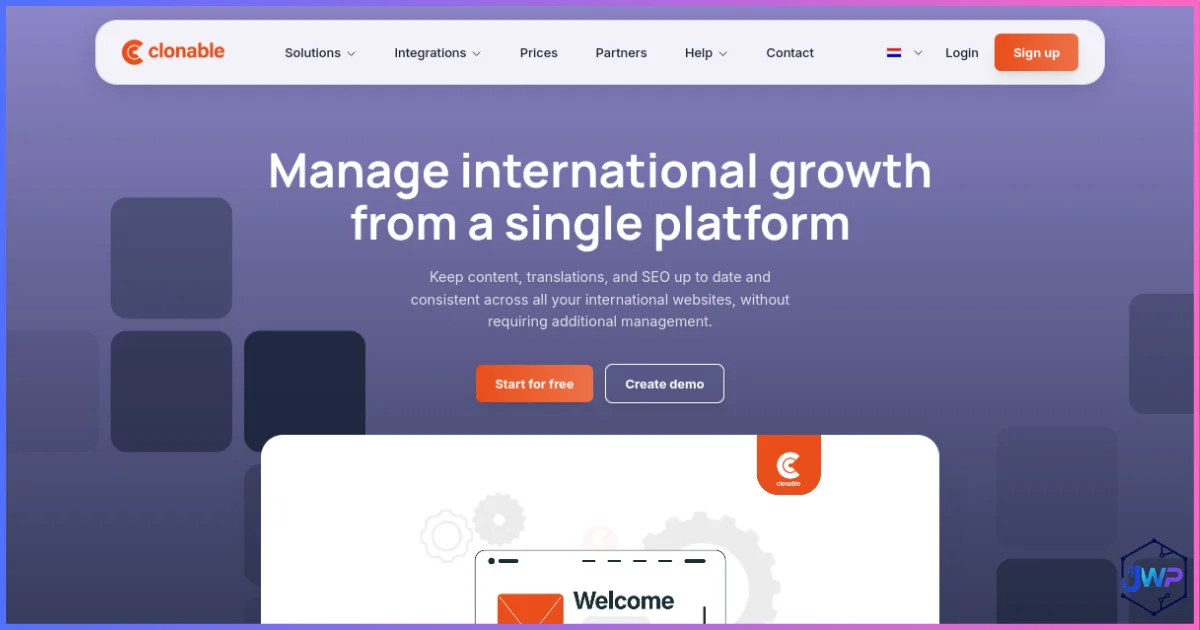
Clonable (clonable.net) is a website translation and cloning platform built for international growth. Its tagline — “Clone. Translate. Growth.” — describes the workflow accurately: it creates a synchronized, translated copy (“clone”) of your website or webshop, deploys it under a subfolder like /ja/ or a subdomain, and keeps it updated whenever your original site changes.
Unlike classic multilingual plugins that store every translation inside your WordPress database, Clonable runs its localization infrastructure in the cloud. Your WordPress site only needs a lightweight connector plugin. That single architectural difference explains most of the pros and cons in this Clonable review.
- What it replaces: manual translation agencies, heavy multilingual plugin stacks, and hand-maintained per-market websites.
- What it keeps: your existing CMS, design, hosting, and domain — nothing is rebuilt.
- What it adds: AI translations in 142+ languages, hreflang and international SEO automation, translated URLs, editing tools, and centralized multi-market management.
How Clonable Works: The Architecture in Plain English
Most WordPress multilingual tools are database-first: every translated string, post and field becomes extra rows inside your wp_posts / wp_postmeta tables. Clonable flips the model and is infrastructure-first:
- Crawl & clone: Clonable’s cloud crawls your public site and builds a translated clone of it.
- Translate with AI: multiple AI translation engines convert your content, URLs and metadata into the target language, guided by your context notes, glossary and rules.
- Deploy to a subfolder/subdomain: on WordPress, a lightweight plugin mounts the clone at e.g.
yourdomain.com/ja/— no DNS changes required for subfolder clones. - Verify & connect: you prove site ownership (business email, HTML tag or DNS), install the plugin, and paste an API key.
- Stay in sync: when your original site changes, the clone updates — no re-translating manually.
- Manage centrally: the dashboard lets you edit translations, exclude pages, replace media per market, and monitor every language version from one screen.
Clonable also works beyond WordPress — the company lists integrations for WooCommerce, Shopify, Magento and Shopware, plus options for other CMSs. E-commerce deployments additionally support translated XML product feeds so product catalogs stay localized too.
The “WPML Headaches” Problem — and How Clonable Approaches Each One
To be clear: WPML is a mature, capable plugin used on hundreds of thousands of sites. But this Clonable review would be incomplete without addressing the three complaints that push WordPress owners to search for a WPML alternative in the first place.
Headache 1 — Heavy database loads
Database-duplicating multilingual plugins create a translated row for nearly every post, page, string and meta field. On a 1,000-page site with 4 languages, that’s a several-thousand-row multiplication of wp_posts and wp_postmeta, plus language taxonomy terms. The symptoms are familiar: slower WP_Query results, bloated backups, pricier hosting requirements, and admin screens that crawl.
Clonable’s approach: translations are not stored as duplicated posts in your database. The clone is produced and maintained by Clonable’s cloud; the WordPress plugin is a thin connector. Your DB footprint stays essentially unchanged whether you run 1 language or 10.
Headache 2 — Broken layouts after updates
Multilingual plugins sit deep inside the rendering pipeline: they filter strings, rewrite URLs and hook into page builders. When WordPress core, your theme, WooCommerce or a builder plugin ships an update, something in that chain can snap — untranslated strings, broken language switchers, mangled RTL layouts, or 404s on translated URLs.
Clonable’s approach: the translated version is a clone rendered from Clonable’s infrastructure and mounted into a subfolder, so theme and core updates on the original site don’t rewrite your translation tables or language routing. Your clone mirrors the current state of your site through synchronization instead of fragile in-database hooks.
Headache 3 — Time-consuming manual translations
The traditional route means exporting content, briefing translators or translation services, waiting days to weeks, importing files, then repeating the cycle every time you publish. Per-page agency costs of €50–€150 make whole-site translation financially impossible for most small teams.
Clonable’s approach: AI translation of the entire site in minutes, with human-style controls on top — an in-dashboard editor, exclusion rules, glossaries, brand context and AI proofreading — so you only spend human time on the pages that truly need it.
| Classic WPML-style headache | Root cause | How Clonable handles it |
|---|---|---|
| Database bloat & slow queries | Translations stored as duplicated WP rows | Localization runs in Clonable’s cloud; thin WP connector plugin |
| Layouts break after updates | Deep hooks into rendering & string filters | Clone synced from outside; subfolder mount, no schema changes |
| Weeks of manual translation | Human-only workflow, export/import cycles | Full-site AI translation in minutes + targeted human editing |
| Expensive hosting upgrades | Bigger DB + more PHP processing | Workload shifted off your server |
| hreflang/SEO misconfiguration | Manual or plugin-dependent tag management | Automated hreflang, translated URLs, canonical handling |
| Re-translation after every edit | No automatic sync pipeline | Continuous synchronization with the original site |
Clonable vs WPML vs Weglot vs TranslatePress vs Polylang
No Clonable review is complete without the competitive landscape. Here’s how the main ways to translate a WordPress website compare at a structural level:
| Factor | Clonable | WPML | Weglot | TranslatePress | Polylang |
|---|---|---|---|---|---|
| Core approach | Cloud clone + thin WP plugin | WP plugin, DB-duplicated content | Cloud proxy + WP plugin | WP plugin, visual editor | WP plugin, DB-duplicated content |
| Where translations live | Clonable cloud | Your database | Weglot cloud | Your database | Your database |
| Extra DB load | Minimal | Heavy | Minimal | Medium | Heavy |
| Time to first live language | Minutes–hours | Days–weeks | Hours–days | Days–weeks | Days–weeks |
| Automatic AI translation | Yes, full site | Via add-ons/credits | Yes | Via add-on engines | Via add-ons |
| Human editing of translations | Dashboard editor | Full | Dashboard | Visual front-end | Full |
| hreflang automation | Yes | Yes | Yes | Yes | Yes |
| Layout risk after WP updates | Low | Higher | Low | Medium | Higher |
| Pricing model | Subscription per pages/clones (free tier) | Annual license (~$39–$199/yr) | Subscription by words/languages | Annual license (~€79+/yr) | Free core; Pro ~€99/yr |
| Works outside WordPress | Shopify, Magento, Shopware… | WP only | Any site | WP only | WP only |
| Best for | Fast multilingual SEO without DB bloat | Full manual control, complex stores | Quick cloud translation | Visual DIY translation | Budget DIY with dev comfort |
Competitor prices are approximate public figures; verify current pricing on each vendor’s site. The structural differences (where translations live, who does the work) matter more than small price deltas.
Typical time-to-live for a first translated language version (days)
Illustrative planning estimates based on typical small-business setups (demo → live), not a benchmark. Manual routes scale with site size.
Key Features: What You Actually Get
Part 1 — The Instant Demo: Your Site in a New Language in ~5 Minutes
The demo is Clonable’s best salesperson: no account, no card, no plugin. You paste a URL and receive a translated clone link. Here’s the exact flow we ran.
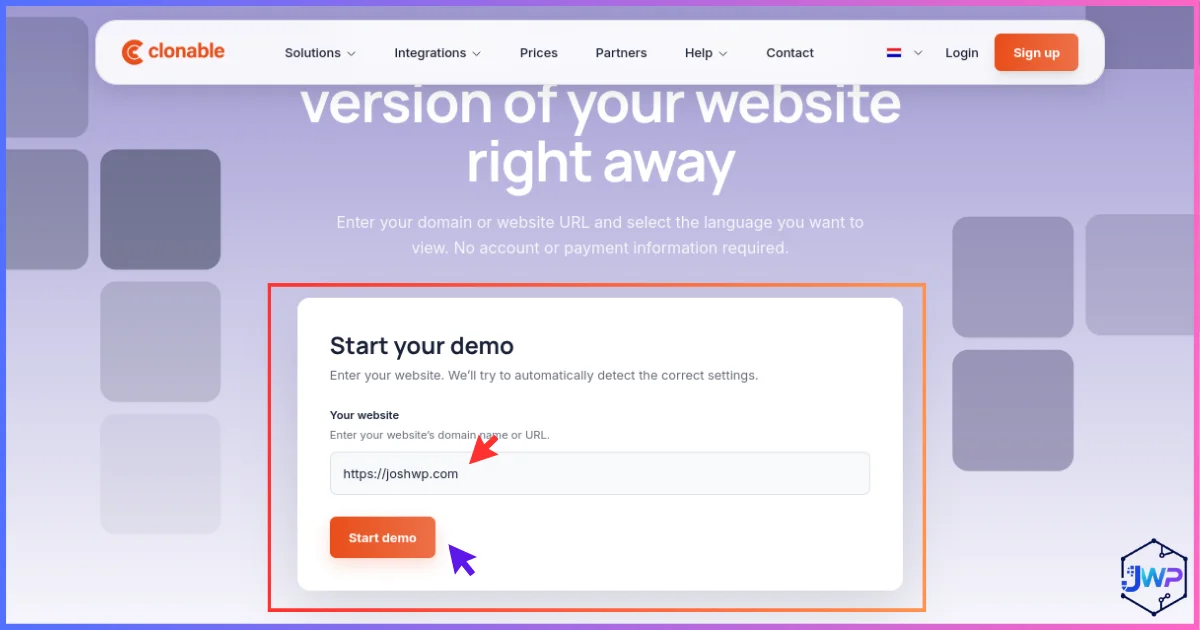
Enter your website URL
From the homepage, hit “Create demo” and paste the address of the site you want to translate. That’s the only input required to begin.
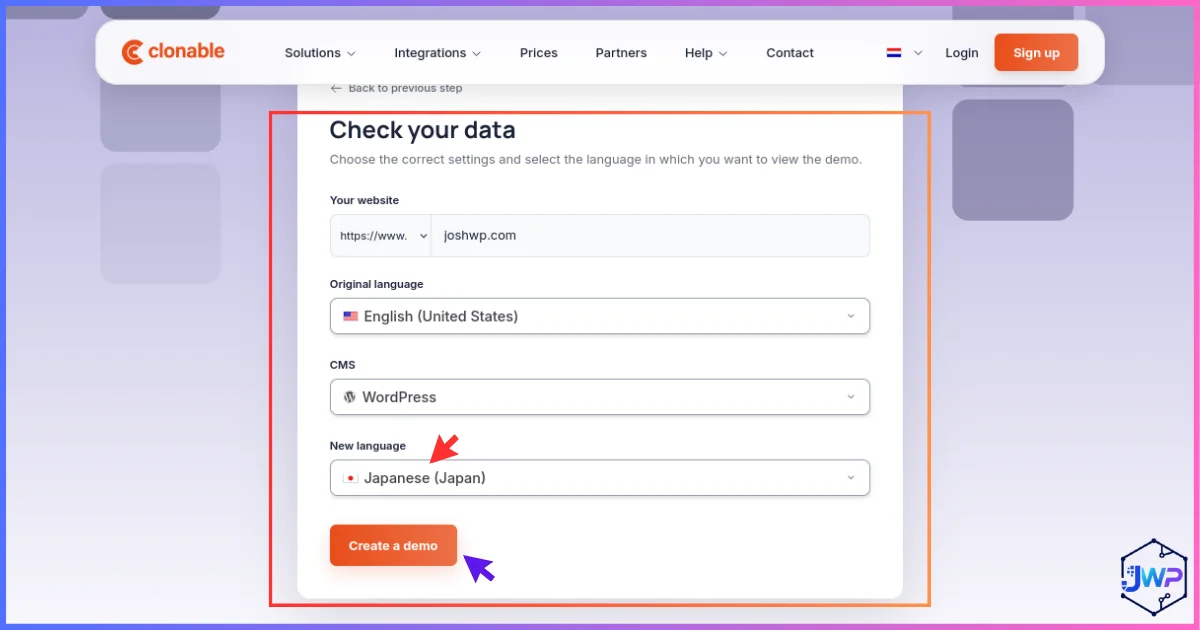
Check the auto-detected data and pick languages
Clonable inspects the site and pre-fills your current language and CMS. Confirm both are correct, then choose the language you want the demo in.
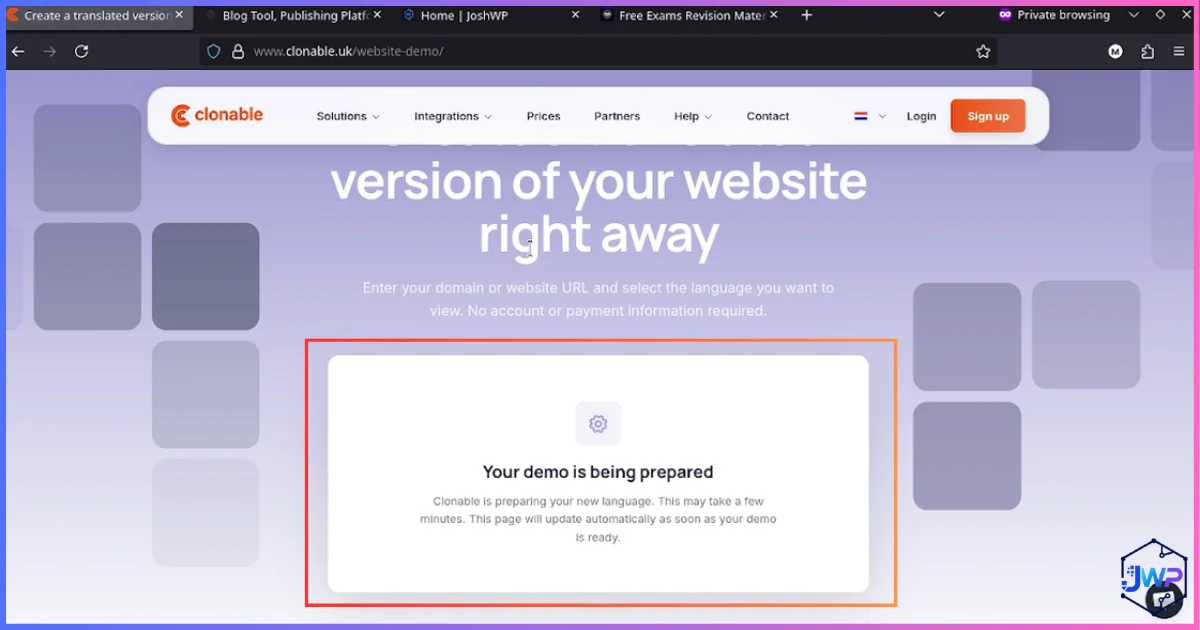
Wait while the demo is prepared
The cloud crawler clones and translates your pages. For average marketing sites this takes minutes, not hours.
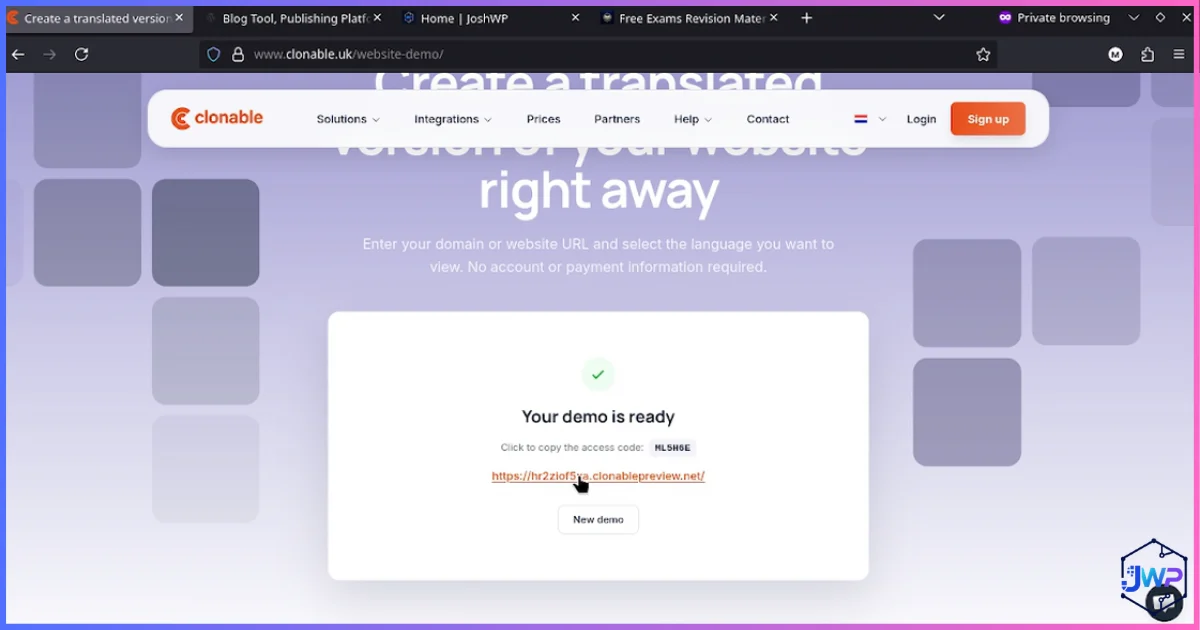
Open your generated demo link
When processing finishes, you get a clickable link to the translated clone. No installation has happened yet — this is a preview environment.
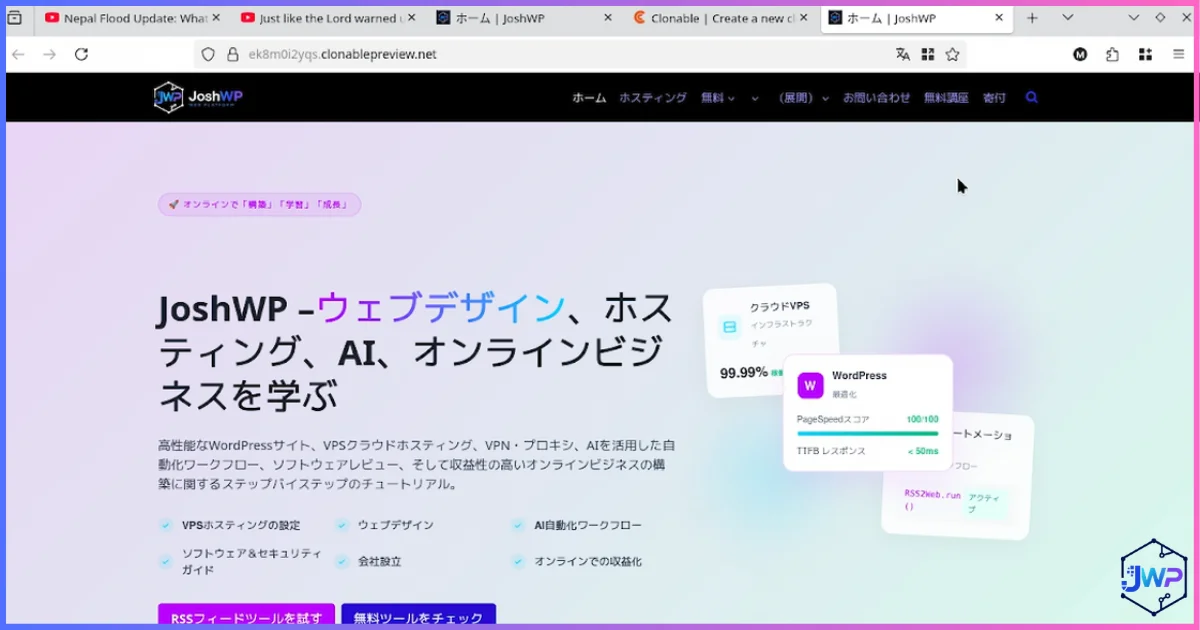
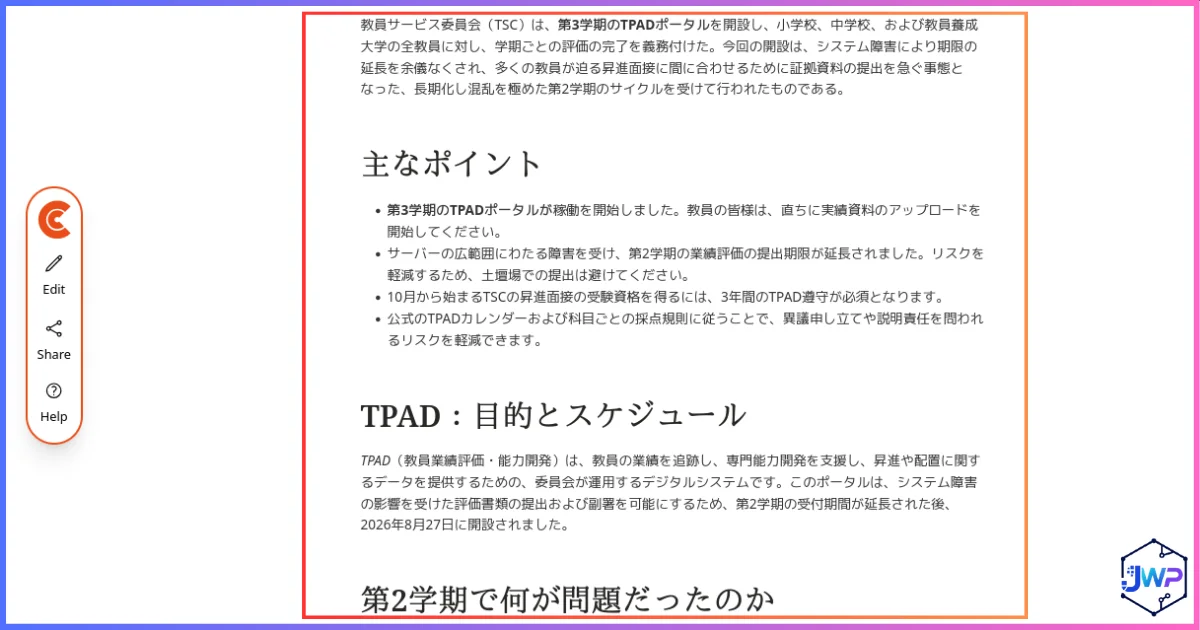
Inspect the translated clone on real pages
We tested on two very different sites. The first clone shows this site’s own homepage fully translated with layout, cards and images intact. The second, a content-heavy exams platform, proves the clone holds up on dense educational UI. The third screenshot checks the hardest case: a long-form blog post, where machine translation usually shows its seams.

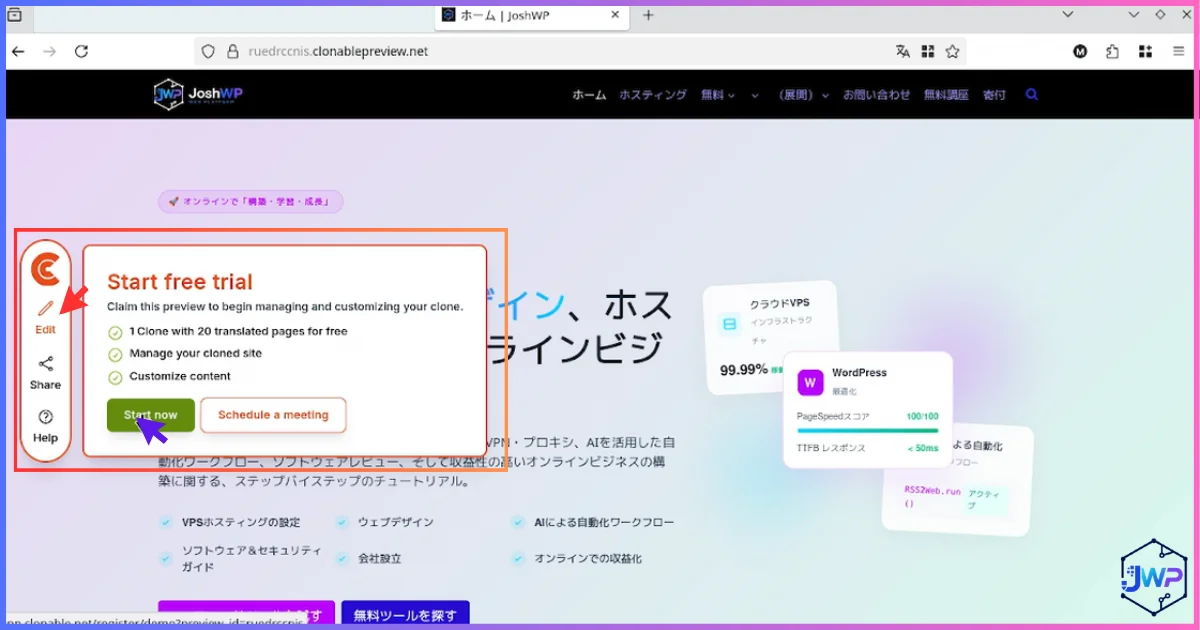
Click “Edit” to start tweaking
Inside the demo, an edit button unlocks the translation editor — your first taste of the post-sale workflow.
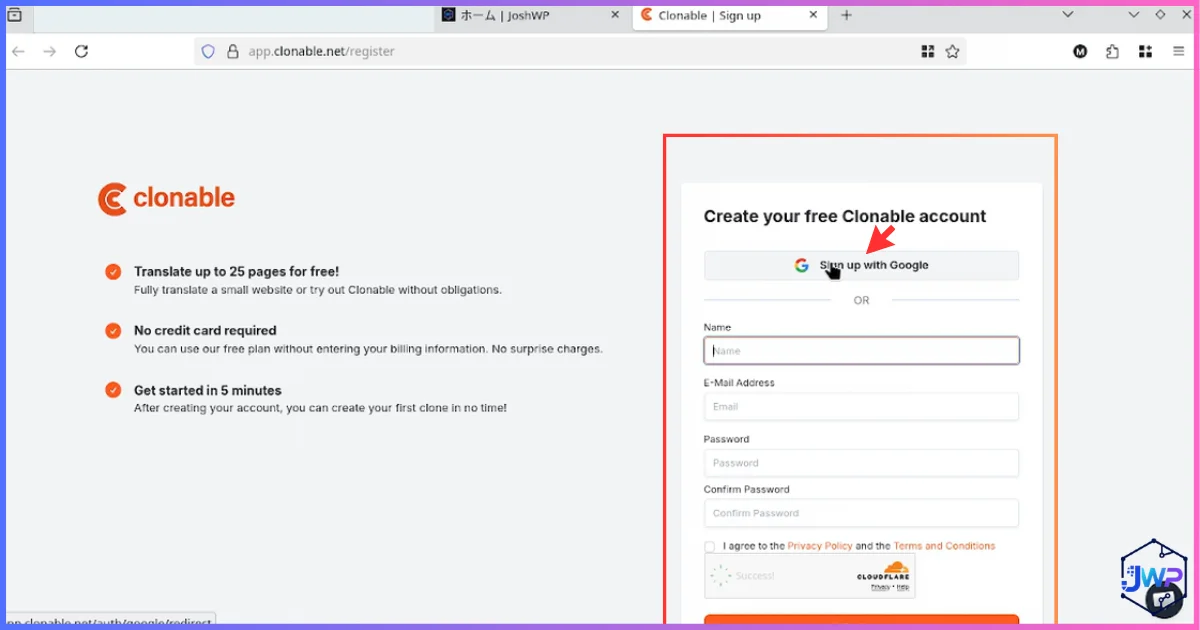
Create your account (email or Google)
One click signs you up with Google; otherwise use email. You’re now inside the real dashboard with your demo attached.
Part 2 — Full Clonable WordPress Setup, Step by Step
The demo lives on Clonable’s preview infrastructure. Going live on your domain (e.g. yourdomain.com/ja/) takes roughly 10 more steps. This is the exact sequence we followed.
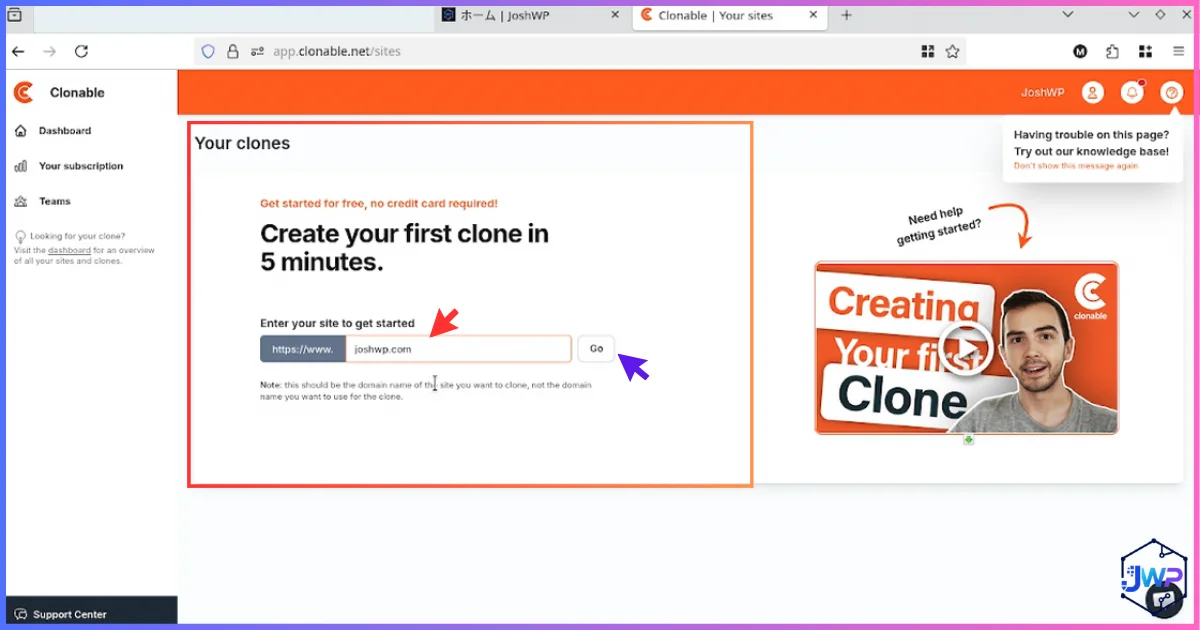
Start a new clone from the dashboard
Logged in, enter your site URL to generate a production clone (not just a demo).
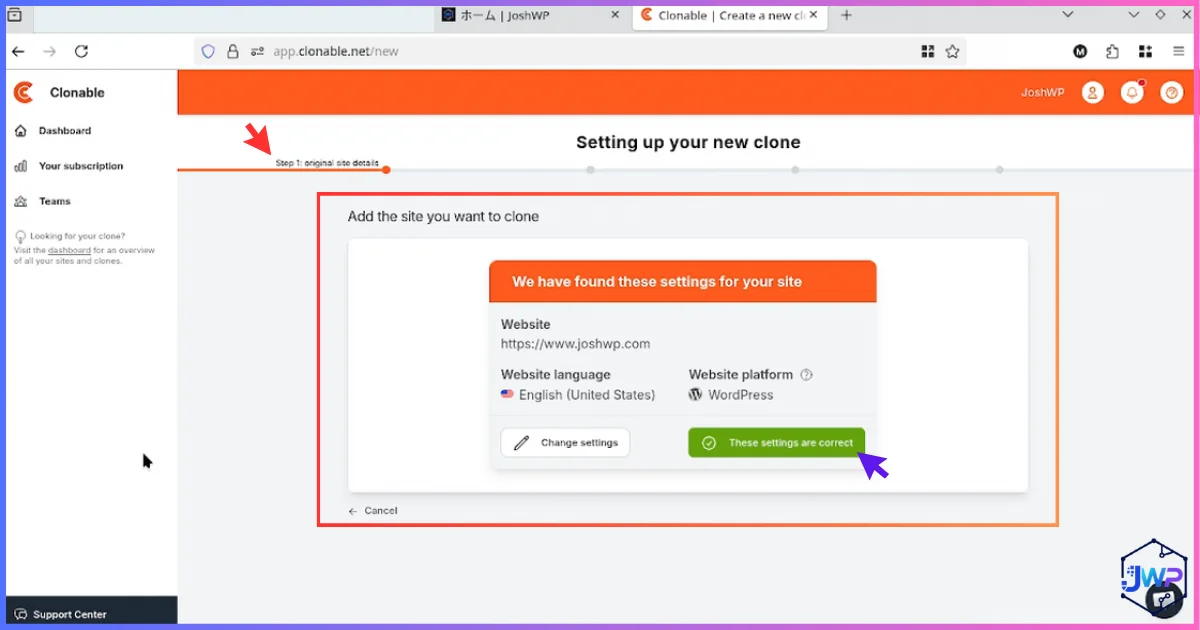
Confirm detected language and CMS
Double-check the auto-detected source language and CMS. Wrong source language = wrong translation direction, so don’t skip this.
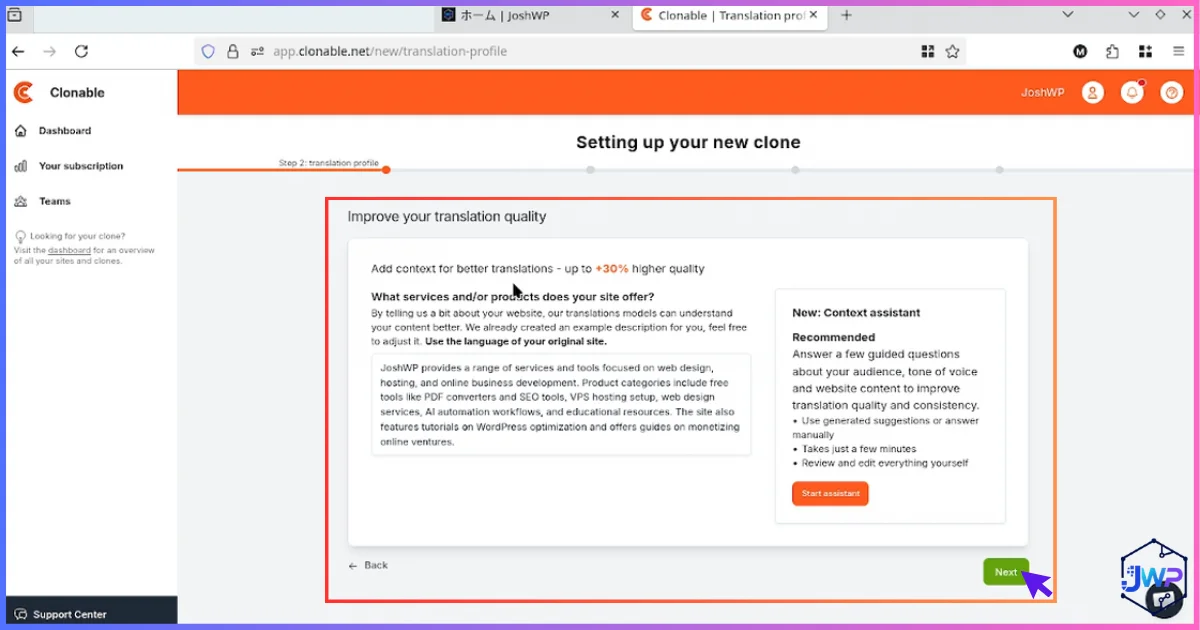
Add context (or keep the prefill)
Clonable prefills an automated content summary. Adding your own context — brand voice, industry terms, audience — measurably improves translation quality. Two minutes well spent.
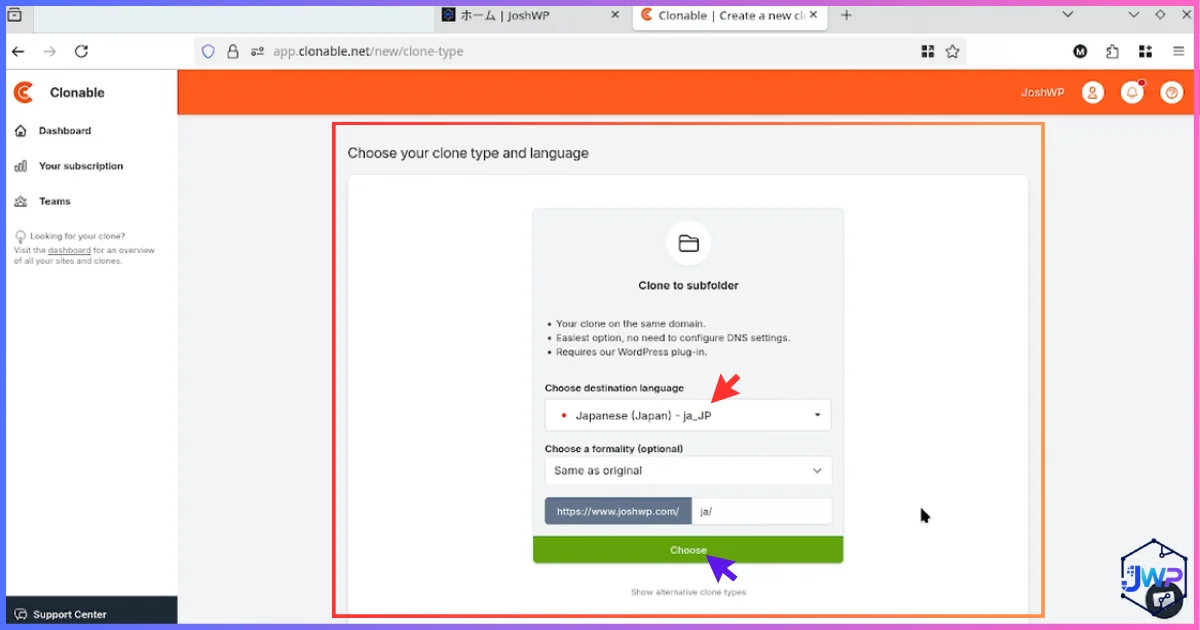
Choose clone type and target language
Pick the clone type and the language. For this setup we chose Japanese — a good stress test for script, politeness level and URL transliteration.
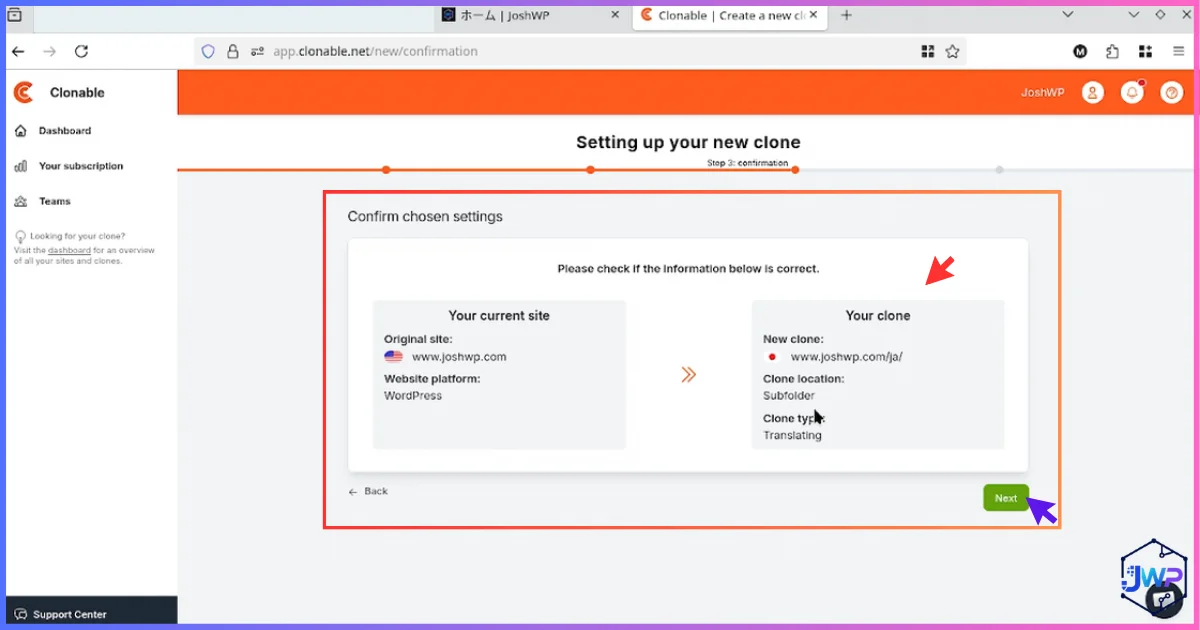
Confirm language and subfolder
Review the deployment target, e.g. the /ja/ subfolder. Subfolders (not subdomains) are generally the stronger choice for SEO because they inherit your root domain’s authority.
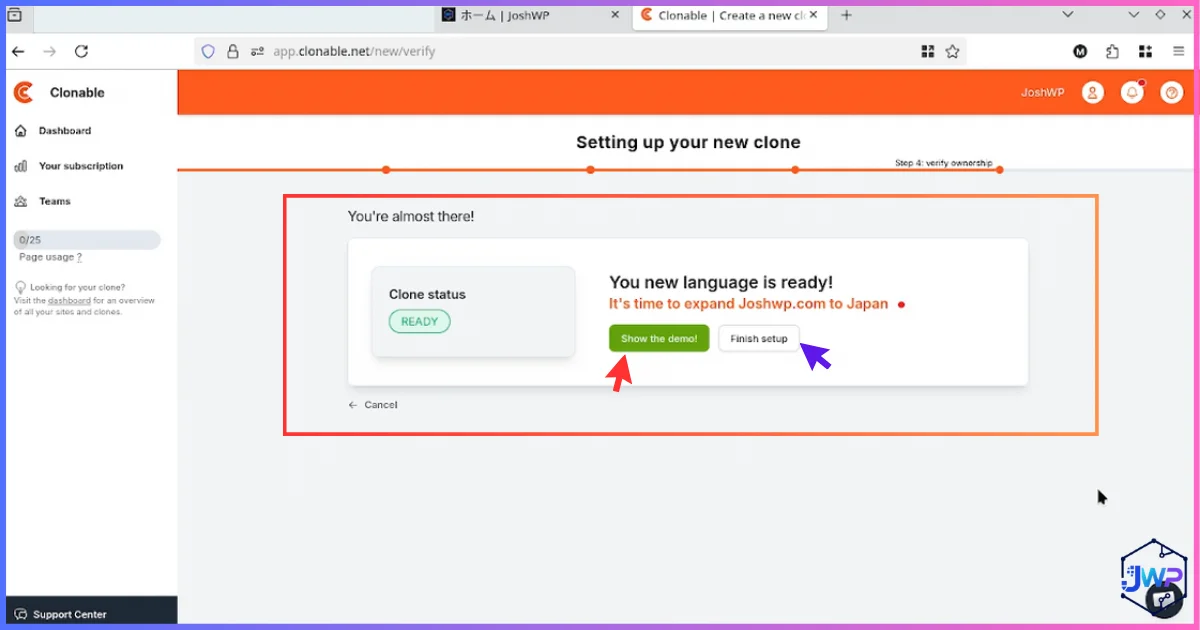
“Your language is ready” — finish or preview
Clonable prepares the clone and gives you the option to view the demo first or finish setup immediately.
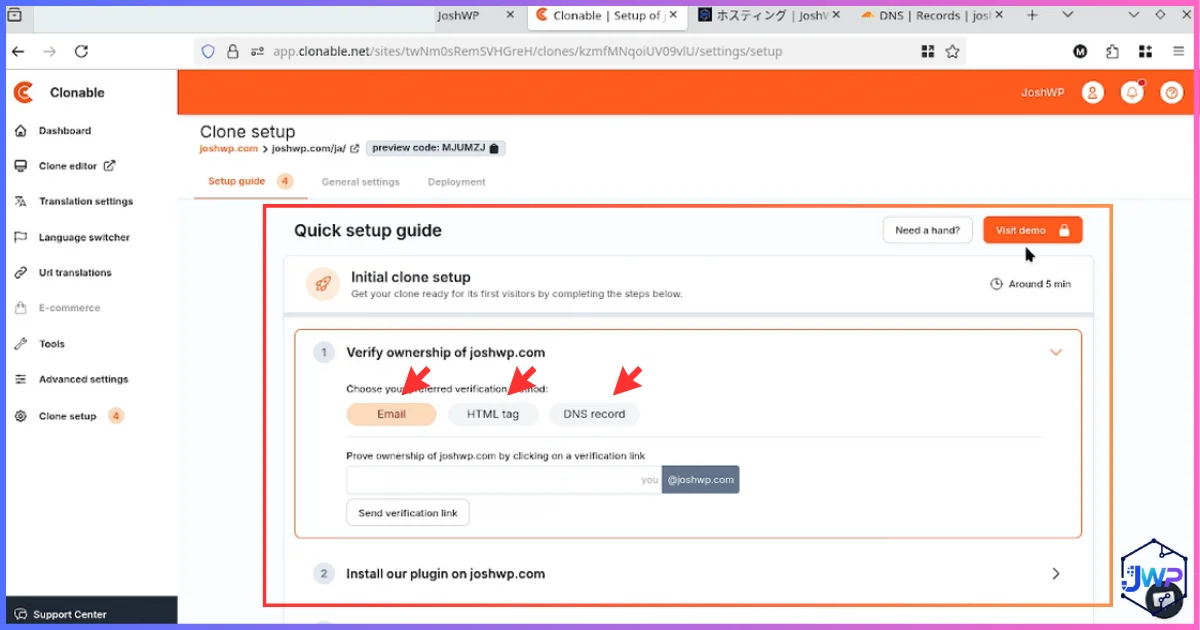
Verify site ownership
Before anything goes live on your domain, Clonable requires proof you own the site. Three methods are offered: business email, HTML tag, or DNS record.
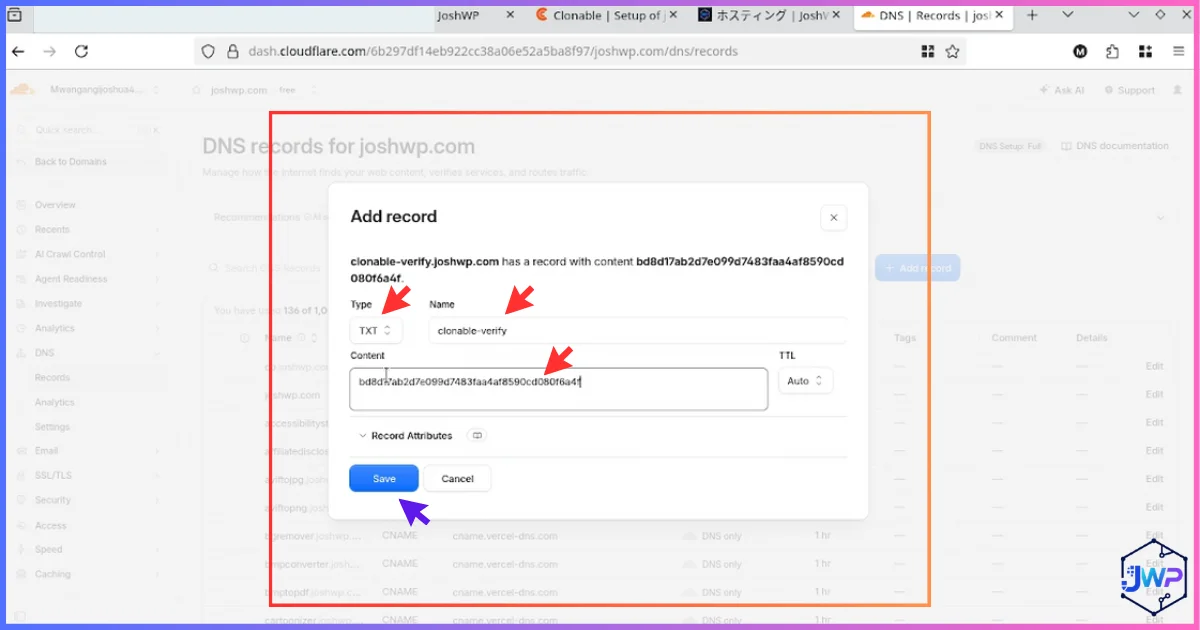
Option A: DNS verification (TXT record)
We tested DNS first, adding the provided TXT record in Cloudflare. Propagation can take minutes to hours depending on TTL.
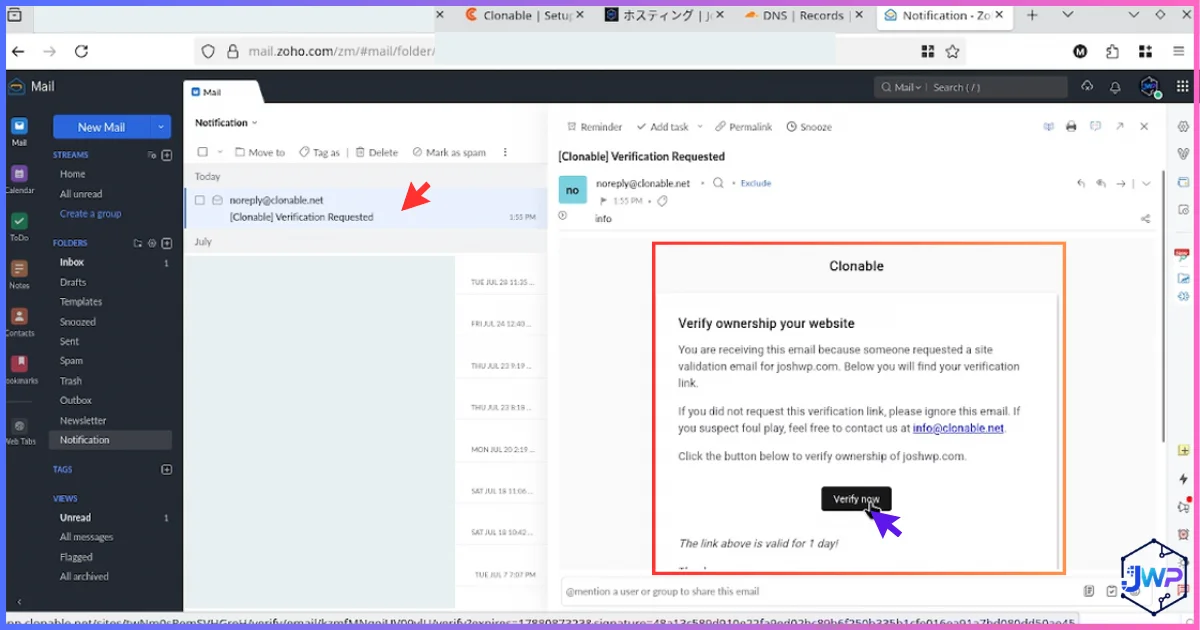
Option B: business email (faster)
If you control a domain-matched email (e.g. you@yourdomain.com), this is the quick path — no DNS waiting.
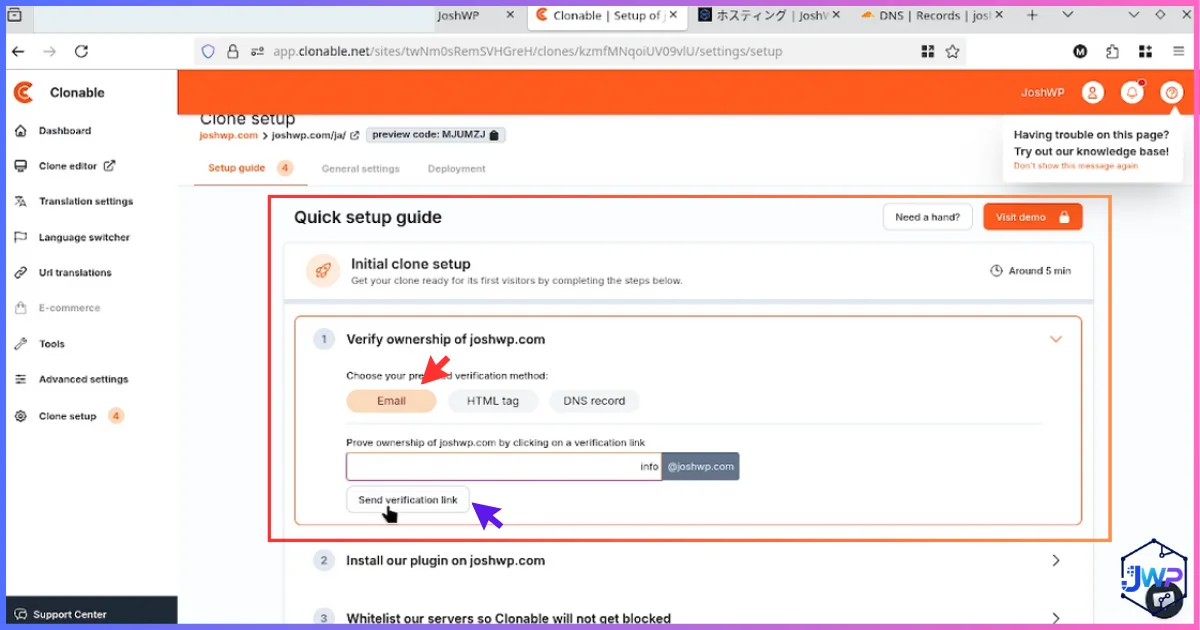
Click the verification link in your inbox
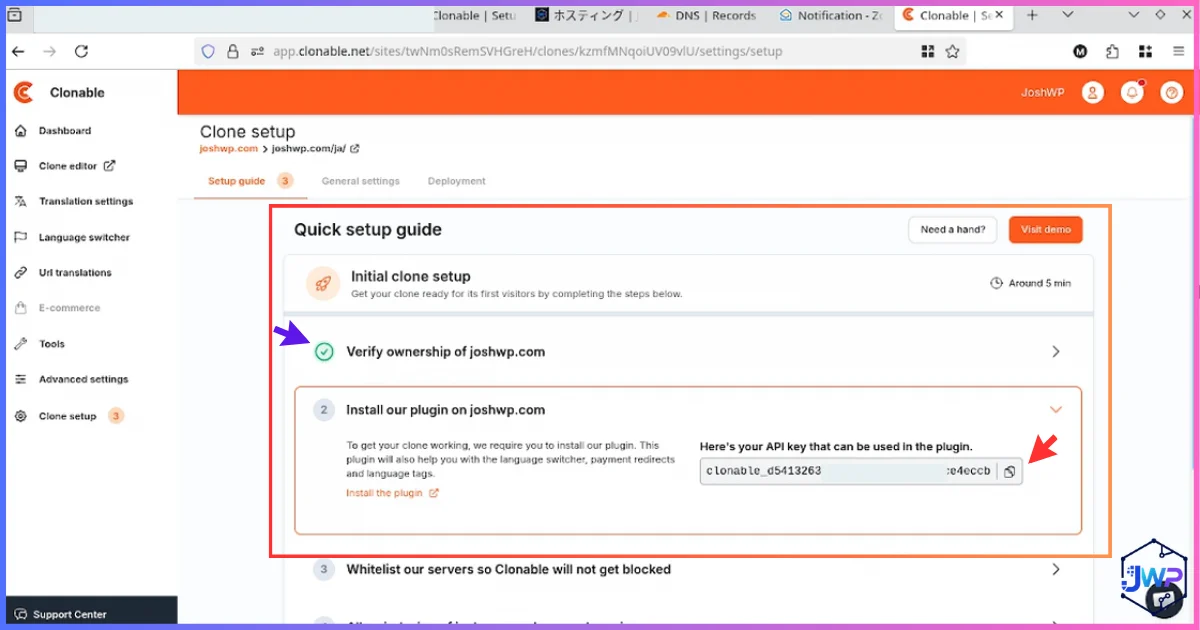
Ownership verified → get your API key
With ownership confirmed, Clonable issues an API key and points you to the WordPress plugin installation.
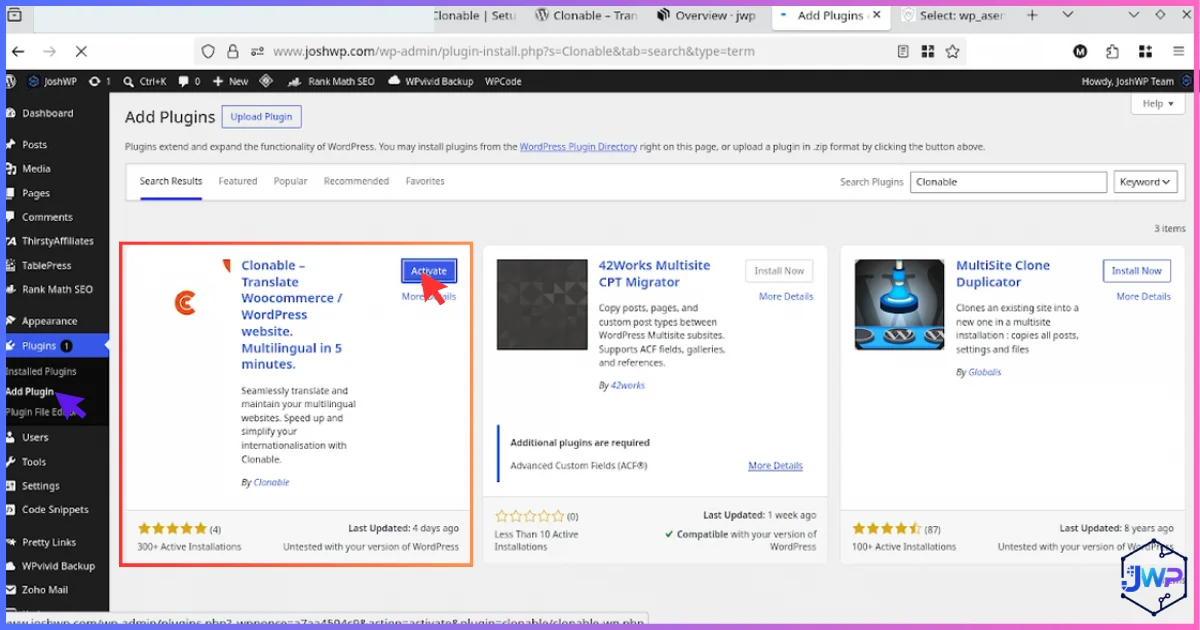
Install the Clonable plugin in WordPress
In WP Admin: Plugins → Add New → search “Clonable” → Install → Activate. It’s also listed on wordpress.org as “Clonable – Translate Woocommerce / WordPress website.”
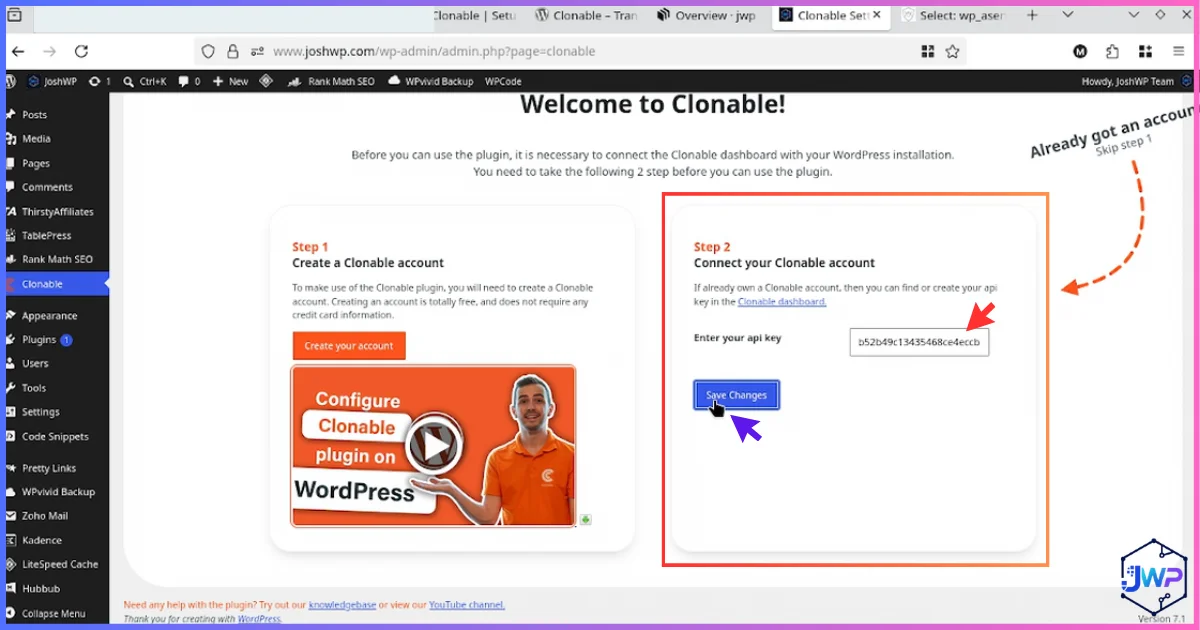
Paste the API key to connect
The plugin’s settings ask for one thing: the API key. This binds your WordPress install to your Clonable account and clone.
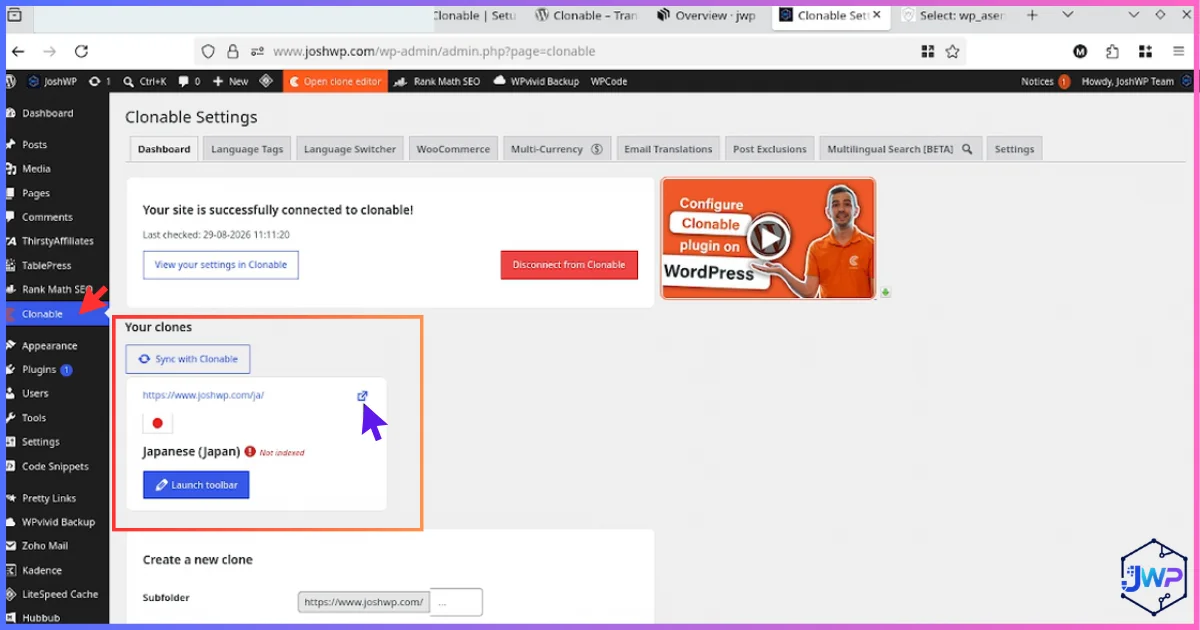
See your language subfolder link in WP Admin
The plugin now surfaces a direct link to your live language subfolder — a handy shortcut that confirms the mount is working.
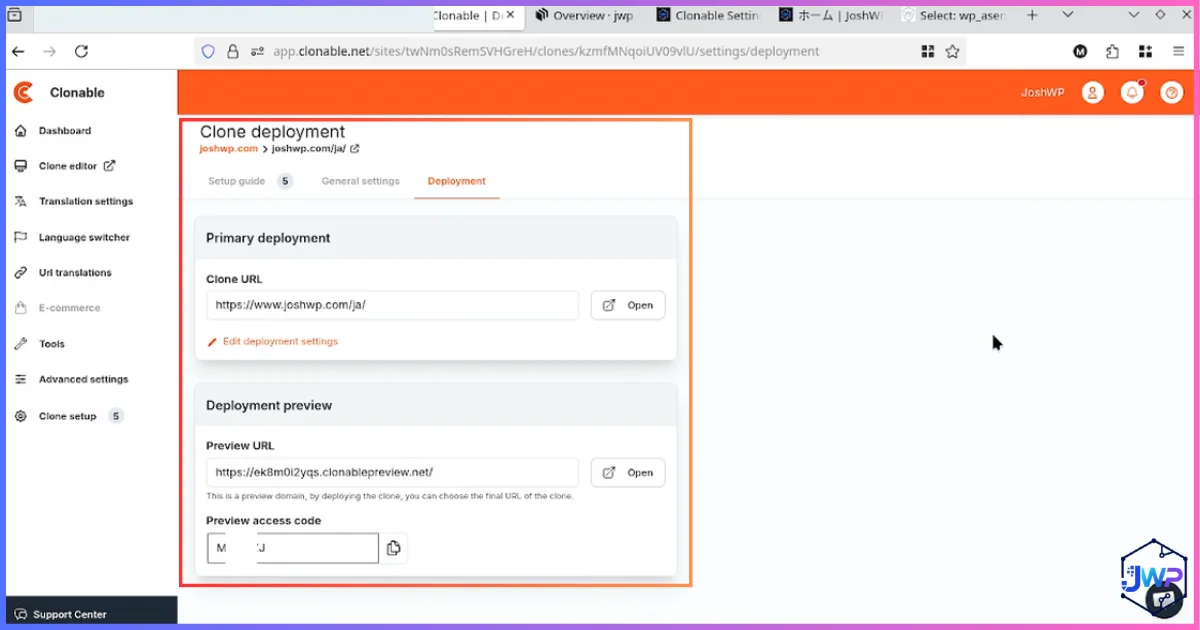
Complete deployment details in the dashboard
Back in Clonable’s Deployment tab, fill the primary deployment fields: clone URL, preview URL and preview access code. Save, and your translated version is live under your domain.
- View-source a translated page and confirm
hreflangannotations + correct canonicals. - Submit/refresh your sitemap in Google Search Console for the new subfolder.
- Add the language switcher link to your main navigation.
- Review 5–10 high-value pages in the translation editor; add glossary terms for your niche.
- Exclude low-value archives (old tags, author pages) to save page quota.
- Set up analytics segmentation per language to measure traction.
Translation Quality: How Good Is the AI, Really?
Clonable combines multiple AI translation engines rather than a single model, which in our Japanese test produced natural, consistent prose on marketing copy and blog content — clearly above old-school machine translation, slightly below a professional human localizer on nuance-heavy or regulated text.
Quality is also steerable, which is the point many Clonable reviews miss:
- Context prompts (step 10 above) tell the AI what your business is and how it should sound.
- Glossaries / translation rules lock brand names, product terms and forbidden translations.
- The editor lets you fix any sentence; fixes persist.
- AI proofreading runs extra review passes (quotas depend on plan, e.g. 1–2 texts on lower tiers, 50–100 on higher).
- Media replacement & exclusions let you localize more than words.
Clonable Pricing: Every Plan, Explained (August 2026)
Clonable prices by clones (language versions) and translated pages. Current website plans, billed monthly:
| Plan | Price/mo | Clones | Translated pages | Notes |
|---|---|---|---|---|
| Free | €0 | 1 | 20 (one-time boost to 50) | Perfect for testing on a live subfolder |
| Business | €49 | 3 | 400 | Optional install help €250 |
| Pro ⭐ | €79 | 5 | 1,200 | Sweet spot for content sites |
| Expert | €249 | 10 | 5,000 | Multi-market publishers |
| Premium | €999 | 20 | 50,000 | Install help €1,000 option |
E-commerce plans (WooCommerce/Magento/Shopware): Small €99 (1,000 pages), Medium €299 (5,000 pages), Large €499 (15,000 pages), with translated XML feeds at €30/€50/€75 per feed per month and optional installation assistance (€250–€950). Extra clones/pages run from ~€20–€50/month depending on tier.
Two pricing details are unusually customer-friendly and worth highlighting:
- Pages with a canonical tag don’t count toward your quota.
- You can exclude outdated sections (ancient blog archives) so quota spends on pages that earn.
Effective cost per translated page at each plan’s included cap (€, monthly billing)
Derived from published plan prices and page caps (August 2026). Compare: professional human translation typically costs €0.10–€0.25 per word — i.e. €100+ per 1,000 words per language.
Which plan fits whom?
- Free: validate the product on a live subfolder with your 20 most important pages.
- Business: small business sites testing 2–3 markets.
- Pro: blogs and business sites up to ~1,200 pages, or 5 smaller language versions.
- Expert/Premium: publishers and brands running many markets centrally.
- E-commerce tiers: any store where product/catalog pages dominate the count.
Clonable also publishes realistic installation timelines: under a week for non-e-commerce, 2–4 weeks for WooCommerce, and 4–8 weeks for Magento/Shopware builds with custom features. There are no hidden fees — extras are limited to add-on clones/pages, XML feeds and optional installation help.
SEO Deep Dive: hreflang, Subfolders, Canonicals & International Backlinks
Multilingual SEO lives or dies on correct signals. In our checks, translated clones shipped with hreflang annotations linking language versions, localized URLs (translated slugs, not /ja/?p=123 style), and canonical handling consistent with a subfolder strategy.
Subfolder vs subdomain — why it matters
Clonable’s WordPress plugin specializes in subfolder clones, which is the configuration most international SEO specialists prefer: yourdomain.com/ja/ inherits the root domain’s authority, consolidates link equity, and avoids the “new property” cold start that subdomains face. It also means no DNS changes are needed for the clone itself.
The international backlink flywheel
A translated version doesn’t only rank — it earns links from local-language sites that would never link to your English pages. That compounds with your existing link-building: pair Clonable’s market expansion with a systematic outreach process like our guide on how to get free backlinks from high-authority websites, and each language becomes its own acquisition channel.
Illustrative scenario: organic traffic after launching 2 translated subfolders (indexed)
Illustrative planning scenario (baseline vs +2 languages), not a guarantee. Real results depend on market size, content quality and indexation.
Security & hygiene note
Adding any third-party connection to WordPress should happen inside a clean security posture. If your site has ever been compromised — a shockingly common event, usually via unrelated vulnerable plugins or themes — clean it properly before wiring in new services using our WordPress SEO spam injection cleanup guide. A hacked site with hidden spam pages will sabotage your international SEO no matter which translation tool you choose.
Performance, Maintenance & the “Boring” Reliability Questions
- Database: no duplicated post rows for translations → backups, migrations and queries stay light. This is the single biggest operational win versus DB-first plugins.
- Updates: because language routing and translation storage sit outside core rendering hooks, routine WordPress/theme updates are far less likely to break language versions.
- Server load: translation processing happens in Clonable’s cloud, not your PHP workers.
- Sync: content changes on the original propagate to clones, killing the “outdated international pages” problem Clonable itself lists as a core pain point.
- Vendor dependence: the flip side — your language versions depend on Clonable’s infrastructure and your active subscription. Budget for that, and keep an export/edit workflow for critical pages.
- Third-party signal: Clonable shows a ~4-star Trustpilot profile with a small number of public reviews — normal for a B2B-focused European vendor, but it means you should rely on your own demo test (which is free) rather than crowd volume.
Pros and Cons — The Unvarnished List
What we liked
- Fastest route from “idea” to live translated subfolder we’ve tested
- Localization infrastructure outside WordPress → no DB bloat, lighter hosting
- Layout/design fidelity of clones is excellent
- Automatic hreflang, translated URLs and canonical handling
- 142+ languages; easy multi-market central management
- Continuous sync keeps translations current with the original site
- Free plan lets you validate on a live subfolder, not just a sandbox
- Steerable AI quality: context, glossary, rules, editor, AI proofreading
- E-commerce depth: WooCommerce/Magento/Shopware + XML feeds
- No DNS changes needed for subfolder clones on WordPress
What could be better
- Subscription priced per page — huge sites need careful quota planning
- AI-only by default; regulated content still needs human review
- Vendor/infrastructure dependence while subscribed
- Ownership verification + deployment steps add friction for total beginners
- E-commerce setups (Magento/Shopware) can take 4–8 weeks
- AI proofreading quotas are limited on lower tiers
- Small public review volume compared to legacy plugins
- Complex web-app areas (custom checkout logic, member areas) may need extra configuration
Who Should Use Clonable (and Who Shouldn’t)
| Great fit ✅ | Think twice ⚠️ |
|---|---|
| WordPress blogs & publishers wanting multilingual organic growth | Sites needing certified/legal-grade translation only |
| WooCommerce stores entering new markets with big catalogs | One-page sites with no international demand (check your analytics first) |
| SaaS & B2B sites localizing for enterprise buyers | Teams that want full manual control of every string in-database |
| Agencies managing several clients’ international versions centrally | Projects with zero ongoing budget (this is a subscription, not a license) |
| Owners burned by WPML database bloat or update breakage | Highly custom web apps where most “pages” are logged-in UI |
Real-World Use Cases & Growth Playbooks
1. Content publishers & education sites
Exam-prep, course and blog sites (like the freeexams clone in our demo) translate thousands of articles that would never justify human translation budgets. Each language becomes a new organic channel. If you’re building new publishing properties from scratch, modern AI builders make the base site cheap to create — see our guides on how to create a website with AI and how to build a website with Lovable AI, then clone the result into new markets.
2. SaaS & affiliate businesses
Localizing pricing and docs dramatically lifts conversion in non-English markets. It also opens monetization angles: multilingual review and comparison content pairs naturally with recurring-revenue partnerships — our roundup of the best SaaS affiliate programs is a good place to pick partners whose markets you then enter with Clonable.
3. Agencies & freelancers
Offer “international expansion in a week” as a productized service: demo in the sales call (5 minutes), paid setup during onboarding, monthly management retainer. If you also ship custom themes for clients, workflows like making a WordPress theme with Google Antigravity or creating a website using Google Antigravity compress the build phase, leaving translation as the differentiator.
4. Developers on modern stacks
Not on WordPress? Clonable supports multiple platforms, and for custom React/Next.js frontends you can combine localized landing pages with ad monetization — our walkthrough on implementing Adsterra ads in React.js/Next.js projects covers the revenue side of international traffic.
Clonable Review FAQs
Is Clonable free to use?
Does Clonable work with WordPress and WooCommerce?
Will Clonable slow down my WordPress site or bloat my database?
wp_posts table doesn’t multiply per language like it does with database-first multilingual plugins.Is it a good WPML alternative?
How many languages does Clonable support?
Do translated pages get hreflang tags and rank on Google?
Can I edit the AI translations?
How long does installation take?
What happens if I cancel my subscription?
How is the page count calculated?
Final Verdict: Our Clonable Review Conclusion
Clonable delivers exactly what it promises: the fastest, least invasive path to a live, SEO-correct multilingual website we have tested on WordPress. By moving localization infrastructure out of the WordPress database and into the cloud, it sidesteps the three classic multilingual-plugin headaches — database bloat, update fragility and manual translation drag — while the subfolder deployment model is the right call for international SEO.
It isn’t perfect: page-based subscription pricing demands quota discipline on large sites, AI output still needs human polish for high-stakes content, and you’re renting infrastructure rather than owning it. But the free plan removes the risk from the decision: clone your 20 most important pages, verify hreflang yourself, and judge the Japanese/German/Spanish version of your own homepage with your own eyes.
Rating: 4.4 / 5 — Recommended for WordPress publishers, WooCommerce stores and SaaS teams expanding internationally without an enterprise localization budget.