Browser Cookies Explained
What cookies actually do, how they track you, why consent banners exist, and what happens when you accept, reject, or delete them — explained with real data.
What Are Browser Cookies, in One Paragraph?
Browser cookies are small text files that websites store on your device to remember information about you. First-party cookies are set by the site you’re visiting and enable features like login sessions, shopping carts, and preferences. Third-party cookies come from external domains (ad networks, analytics, social media) and enable cross-site tracking. Session cookies expire when you close your browser; persistent cookies remain for days, months, or years. Research shows websites set around 20 cookies on average, with most loaded by third-party services.
cookies per website on average, with most loaded by third-party services (Cookiebot).
of U.S. adults turn off cookies or tracking to protect their privacy (ANA, 2023).
of visitors ignored cookie banners entirely in 2018, though this dropped to 33.6% by 2023 (Advance Metrics).
of EU websites show a cookie consent banner shortly after GDPR took effect (PrivacyTerms.io).
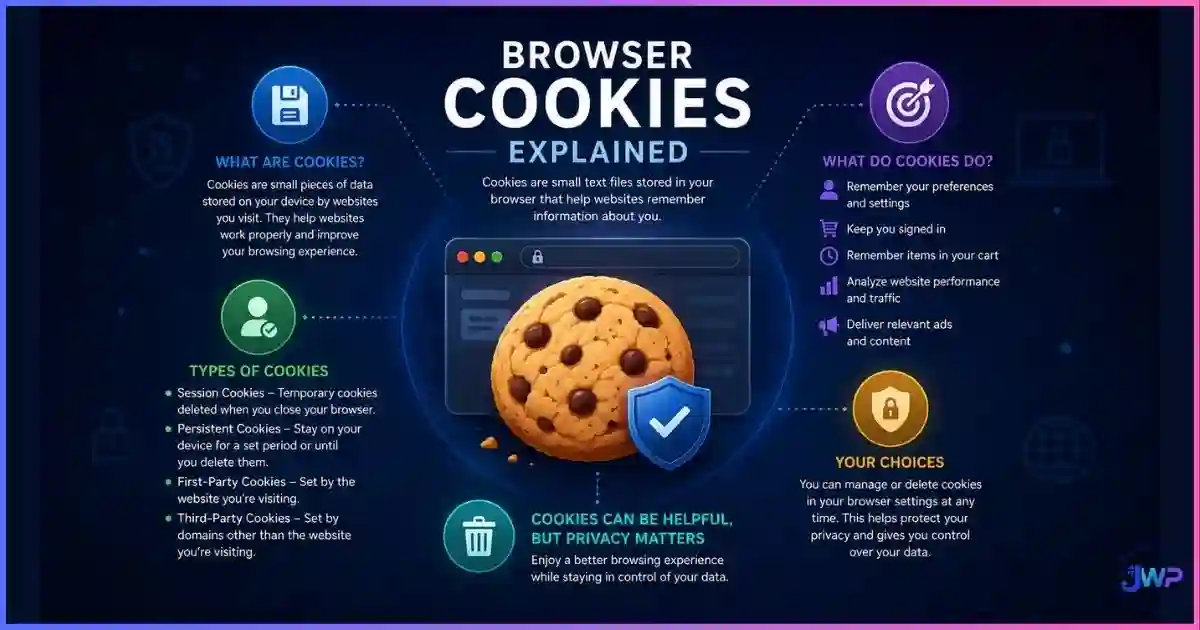
Table of Contents
What Are Browser Cookies?
Browser cookies are small pieces of data (typically 4KB or less) that websites store on your device through your web browser. They were invented in 1994 by Lou Montulli at Netscape to solve a practical problem: how to remember state in a stateless protocol (HTTP). Without cookies, every page request would be treated as a new visitor — shopping carts would empty, logins would expire instantly, and personalization would be impossible.
A cookie is essentially a name-value pair with optional attributes like expiration date, domain scope, path, and security flags. When you visit a website, the server can send a Set-Cookie header in the response. Your browser stores the cookie and sends it back with every subsequent request to that domain via the Cookie request header.
To understand the broader tracking ecosystem that cookies are part of, see our guide on how websites track you across the web.
Types of Cookies Explained
Cookies are classified along two main dimensions: who sets them (first-party vs. third-party) and how long they last (session vs. persistent). Understanding both axes is essential for privacy.
First-Party vs. Third-Party Cookies
| Attribute | First-Party Cookies | Third-Party Cookies |
|---|---|---|
| Set by | The domain you’re visiting (e.g., example.com) | An external domain embedded on the page (e.g., ads.example.net) |
| Primary use | Login sessions, shopping carts, preferences, analytics | Cross-site tracking, ad targeting, social media widgets |
| Scope | Only sent to the domain that created them | Sent to the third-party domain on any site that loads its resources |
| Privacy impact | Generally low — enables site functionality | High — enables cross-site user profiling |
| Browser support | Universally supported | Increasingly blocked by default (Safari, Firefox, Brave) |
First-party cookies are necessary for most modern websites to function. Third-party cookies are the primary target of privacy regulations and browser restrictions because they enable advertisers to build profiles of your browsing behavior across thousands of unrelated sites.
Session vs. Persistent Cookies
| Attribute | Session Cookies | Persistent Cookies |
|---|---|---|
| Lifespan | Deleted when you close the browser | Remain until expiration date (days, months, or years) |
| Storage | In memory (not written to disk) | Written to disk as a file |
| Typical uses | Shopping cart, login session, form data | “Remember me” login, tracking IDs, preferences |
| Security | More ephemeral — disappears on browser close | Persists across browser restarts and device reboots |
The distinction matters for privacy: session cookies are generally lower-risk because they don’t create long-term identifiers, while persistent cookies can track you for months or years if not cleared.
Managing multiple accounts? Cookie isolation is critical.
Tracking platforms link accounts through shared cookies. Incogniton gives every browser profile its own isolated cookie jar, so your accounts never cross-contaminate through session data or tracking identifiers.
Get Incogniton →Affiliate link — we may earn a commission at no extra cost to you.
Browser Cookie Statistics & Charts
Cookie usage and consent behavior have been extensively studied. The data below comes from privacy research organizations, browser vendors, and compliance studies.
Average cookies per website by source
Source: Web Privacy Census — average HTTP cookies per website. The 6:1 ratio of third-party to first-party cookies shows how much tracking infrastructure is embedded in typical sites.
Cookie banner interaction rates over time
Source: Advance Metrics (2024) — percentage of visitors who ignored cookie banners entirely. The drop from 76% to 33.6% suggests either improved banner design, increased privacy awareness, or stricter enforcement requiring interaction.
Cookie banner acceptance rates by region
Sources: Cookie Banner (global average 31%); Milkmoon Studio (EU strict opt-in 3-15% for well-designed banners); eMarketer 2024 (17% of US consumers always accept third-party cookies). Wide variation reflects different consent frameworks and cultural attitudes.
User privacy concerns and action
Sources: CookieYes (65% concerned about privacy due to excessive cookies); ANA 2023 (67% turn off cookies/tracking); Progress Chamber (76% find pop-ups irritating, 68% don’t want to deal with them). The gap between concern and action creates consent fatigue.
Other notable statistics: the average cookie banner acceptance rate is 31%, but can range from 4% to 85% depending on design and trust (Cookie Banner). Research shows Europeans spend an estimated 575 million hours annually clicking through cookie banners (LinkedIn analysis, 2024). The average user encounters more than 1,000 cookie banners per year (Cookie-Script).
How Cookies Technically Work
Understanding the HTTP mechanics helps explain why cookies are both useful and problematic. Here is the lifecycle:
- Server sets cookie: When you visit a page, the server responds with a
Set-Cookieheader containing name=value pairs and attributes (Expires, Domain, Path, Secure, HttpOnly, SameSite). - Browser stores cookie: Your browser saves the cookie according to the attributes. Session cookies go to memory; persistent cookies are written to disk.
- Browser sends cookie: On every subsequent request to the matching domain/path, the browser includes a
Cookierequest header with all applicable cookies. - Server reads cookie: The server (or third-party script) reads the cookie values to identify the user, maintain state, or track behavior.
Secure flag ensures cookies are only sent over HTTPS. The HttpOnly flag prevents JavaScript from reading the cookie (protecting against XSS attacks). The SameSite attribute controls whether cookies are sent with cross-site requests (protecting against CSRF attacks). These attributes are critical for security but don’t affect the tracking capability of cookies.How Cookies Enable Tracking
Cookies enable tracking through a simple mechanism: if the same third-party domain is embedded on multiple websites, it can set and read its own cookie on each site, building a profile of your cross-site behavior. Here is how it works in practice:
- Ad networks: An ad network like Google Ads or Facebook Pixel is embedded on millions of sites. When you visit any site with their pixel, they set a tracking cookie. Over time, they build a profile of which sites you visit, what you search for, and what you buy.
- Analytics platforms: Google Analytics, Mixpanel, and similar services use cookies to track user journeys across pages and sessions.
- Social media widgets: Facebook Like buttons, Twitter embeds, and LinkedIn share buttons load resources from their domains, enabling them to track which sites you visit even if you don’t click the buttons.
- Retargeting: E-commerce sites use cookies to track which products you viewed, then show you ads for those products on other sites.
For a comprehensive breakdown of tracking methods beyond cookies, see our guide on how advertising networks track browsers using pixels, CNAME cloaking, and other techniques.
Running multiple ad accounts? Shared cookies are a liability.
Ad platforms ban linked accounts by matching cookies and session data. Incogniton creates isolated cookie jars per profile, so your accounts stay separate and never cross-contaminate through tracking identifiers.
Try Incogniton Free →Affiliate link — we may earn a commission at no extra cost to you.
Privacy Concerns and Regulations
Cookie-based tracking has become a major privacy concern, leading to comprehensive regulation in many jurisdictions. The key frameworks:
European Union: GDPR and ePrivacy Directive
The General Data Protection Regulation (GDPR, effective May 2018) and the ePrivacy Directive (often called the “Cookie Law”) require websites to obtain explicit consent before setting non-essential cookies. This is why EU visitors see cookie banners on almost every site. Research shows 62.1% of EU websites displayed cookie consent banners shortly after GDPR took effect.
California: CCPA and CPRA
The California Consumer Privacy Act (CCPA) and California Privacy Rights Act (CPRA) give California residents the right to opt out of the sale of their personal information, which includes cookie-based tracking identifiers. Unlike GDPR’s opt-in model, CCPA uses an opt-out framework with a “Do Not Sell My Personal Information” link.
Browser-level restrictions
Major browsers have taken independent action:
- Safari (Apple): Blocks all third-party cookies by default since 2020.
- Firefox (Mozilla): Blocks known third-party tracking cookies by default since 2019.
- Brave: Blocks third-party cookies and fingerprinting by default.
- Chrome (Google): Initially planned to phase out third-party cookies by 2022, then delayed to 2025. In April 2025, Google announced it would not deprecate them entirely but would give users more control through prompts.
Understanding the broader privacy landscape requires distinguishing between privacy and security — they overlap but are not identical. Our guide on browser privacy vs. browser security explains the difference.
Managing Your Cookies
You have several options for managing cookies and reducing tracking:
Browser settings
- Block third-party cookies: Most browsers allow you to block third-party cookies while keeping first-party cookies enabled. This is the single most effective privacy setting for most users.
- Clear cookies regularly: You can clear all cookies or selectively delete cookies from specific sites. This resets tracking identifiers but also logs you out of sites.
- Use private/incognito mode: Private windows don’t persist cookies after the session ends, but they don’t prevent cookie-based tracking during the session. See our guide on what incognito mode actually does for details.
Browser extensions
- Privacy Badger (EFF): Learns which third-party domains track you and blocks them automatically.
- uBlock Origin: Blocks ads and tracking scripts, which often prevents cookies from being set.
- Cookie AutoDelete: Automatically deletes cookies from domains you’re no longer visiting.
Alternative browsers
- Tor Browser: Blocks all third-party cookies and clears all cookies on exit. Provides the strongest cookie privacy but has performance trade-offs.
- Brave: Blocks third-party cookies and fingerprinting by default while maintaining compatibility with most sites.
- Firefox with strict tracking protection: Blocks known tracking cookies while allowing most sites to function.
The challenge with cookie management is that blocking or deleting cookies can break website functionality (login sessions, shopping carts, preferences). The goal is to find a balance that protects privacy without making the web unusable.
Anti-Detect Browsers and Cookie Isolation
For users managing multiple accounts (advertising, e-commerce, social media, affiliate marketing), cookie isolation is critical. Tracking platforms link accounts by matching cookies, session data, and other identifiers. If you log into multiple accounts from the same browser profile, the platform can detect the connection and ban all linked accounts.
Anti-detect browsers like Incogniton solve this by creating isolated browser profiles, each with its own:
- Cookie jar (no cross-contamination between accounts)
- LocalStorage and IndexedDB
- Cache and browsing history
- Browser fingerprint (canvas, WebGL, fonts, WebRTC)
- Proxy connection (different IP per profile)
This approach is used by affiliate marketers managing dozens of ad accounts, e-commerce sellers running multiple storefronts, social media managers handling multiple brand accounts, and QA teams testing across different user profiles.
Our detailed Incogniton review covers setup, performance, and real-world use cases. We also compare it against alternatives in our roundup of the best anti-detect browsers and the cheapest anti-detect browsers.
Separate cookies. Separate accounts. No surprise bans.
Incogniton lets you spin up dozens of isolated browser profiles, each with its own cookie jar and consistent digital identity — free to start.
Try Incogniton Free →Affiliate link — we may earn a commission at no extra cost to you.
Frequently Asked Questions
Are cookies bad for privacy?
Do I need to accept cookies?
What happens if I reject all cookies?
How many cookies does an average website set?
Can cookies track me across different websites?
Are cookies being phased out?
Do anti-detect browsers use cookies?
Sources and Research Notes
Cookie statistics vary by study methodology, website sample, and measurement date. Figures above are presented as published and should be read as directional. Open sources used:
- Cookiebot — “Why do websites use so many cookies?” — average 20 cookies per website. monosolutions.com
- Web Privacy Census — average HTTP cookies per website: 8.32 first-party, 54.61 third-party. berkeley.edu
- ANA (2023) — “Privacy, Data, and Consent: Consumer Attitudes” — 67% of U.S. adults turn off cookies or tracking. ana.net
- Advance Metrics (2024) — cookie banner interaction rates: 76% ignored in 2018, 33.6% in 2023. phew.org.uk
- PrivacyTerms.io (2026) — 62.1% of EU websites show cookie consent banners. privacyterms.io
- CookieYes — “Internet Cookie Statistics: Key Trends and Insights” — 65% concerned about privacy due to excessive cookies. cookieyes.com
- Cookie Banner — average acceptance rate 31%, range 4-85%. cookiebanner.com
- Milkmoon Studio — EU strict opt-in acceptance 3-15%. milkmoonstudio.com
- eMarketer (2024) — 17% of US consumers always accept third-party cookies. emarketer.com
- Progress Chamber — 76% find pop-ups irritating, 68% don’t want to deal with them. progresschamber.org
- LinkedIn analysis (2024) — Europeans spend 575 million hours annually on cookie banners. linkedin.com
- Cookie-Script — average user encounters 1,000+ cookie banners per year. cookie-script.com
- Google Privacy Sandbox (2025) — Chrome will not deprecate third-party cookies but will give users more control. google.com
- Usercentrics (2025) — Google’s changing approach to third-party cookies, April 2025 update. usercentrics.com